Online directories can rebuild profiles from your site
See how online directories rebuild profiles from contact pages and footer details, and why a business site can expose a home-based owner.
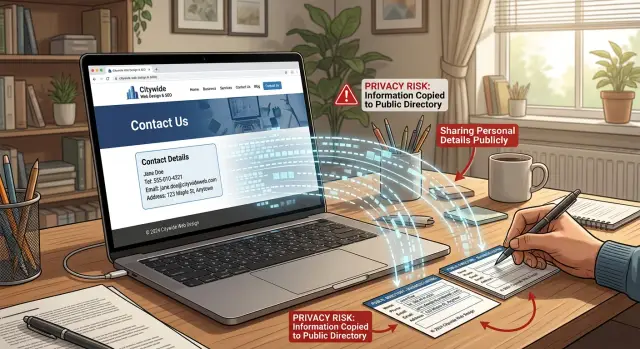
Why a business site can expose your home address
A business website can reveal more than most owners expect. If you run a business from home, the site may show your address directly, or leave enough clues for someone else to work it out.
The problem is repetition. One contact detail often gets reused across the whole site. You add an address to the contact page to look trustworthy, repeat it in the footer, mention the same town on the about page, and use the same phone number in a booking form. Soon the same details appear everywhere.
The footer is often the biggest leak. It feels small, but it shows up on every page. That means a home address is not tucked away in one place. It is repeated again and again, which makes it easier to copy, cache, and match with other records.
Even partial details can be enough. A street name without a house number, a local phone number, a business email, and a distinctive business name can point to one person when matched with public filings, maps, social profiles, or older directory entries. A scraper does not need one neat box with your full address. It can piece things together from scattered clues.
This is why business website privacy deserves more attention. The risk usually is not one obvious mistake. It is a trail of small details that keep repeating until your home address becomes easy to connect.
What directories pull from your site
Most owners worry about the contact page first, and that makes sense. But directories and data brokers do not stop there. They also scan footers, policy pages, booking pages, forms, PDFs, and any other place where contact details appear.
They usually look for obvious contact information such as your address, city, postcode, phone number, email, map embed, business hours, and legal text. They also pick up less visible details, including structured data in the page code, contact details inside downloadable files, and text baked into images.
That is why one cleanup is often not enough. You might remove your address from the contact page but leave it in the footer. You might delete a map but forget a PDF price list with the old address in small print. The site looks clean at first glance, but the old data is still there.
Phone numbers are especially sticky. If the same number appears on your website, an old listing page, and a social profile, it becomes a strong match point. The same is true for contact emails. Even a thin profile becomes easier to trust when those details line up.
Small bits of wording can also say more than people expect. A line like "pickup by appointment only" or "open Mon-Fri, 9-5" tells a crawler that this is a real operating location, not just a service area. Legal text can do the same. A quiet sentence in a footer may include a registered address, company name, or tax detail that keeps feeding old data long after you think you removed it.
A simple rule works here: if a person can copy it, a scraper probably can too.
How a profile gets rebuilt
A rebuilt profile often starts with a basic crawl. A bot visits your site, scans the contact page, reads the footer, and stores anything it can parse clearly. That may include your business name, phone number, email, street address, hours, and map data.
On its own, that may not seem like much. The trouble starts when those details match information that already exists elsewhere.
A directory or data broker does not need a perfect record to create a profile. It only needs enough overlap to decide that two records belong to the same person or business. One phone number can do it. So can a rare business name, a support email tied to your personal name, or an old registration record with your home address.
The pattern is usually simple:
- A crawler collects details from your site.
- Those details are compared with older listings, public filings, and broker records.
- Missing fields are filled in from other sources, such as social profiles or archived pages.
- A fresh profile is published, even if you never created it yourself.
This matching can be sloppy, but it does not have to be smart. If a few fields line up, many sites treat that as good enough. That is why an address removed from one place can show up again months later somewhere else.
Context matters too. A footer copyright name may match a domain registration history. A staff bio may match a social username. A city and postcode can narrow the search enough for older records to fill the rest.
That is why hiding one field rarely solves the whole problem. If your site keeps giving away stable details, directories can use them as anchors and rebuild the rest from data that never fully disappeared.
A simple example
Picture a freelance bookkeeper named Nina. She works from a spare room at home and has a simple site with a contact page, a short list of services, and a footer on every page.
Nothing on the site feels risky to her. She uses her business name, her mobile number, and a mailing address so clients can send paperwork if needed. In the footer, she repeats the business name, plus her town and postcode so local clients know where she is based.
That may be enough for a directory to rebuild a profile.
A crawler finds the contact page and collects the business name, phone number, and address. Then it sees the same business name in the footer across the rest of the site. The repeated town and postcode make the data look consistent. From there, the directory can match those details with older sources such as a past business listing, a company record, a people-search page tied to the same phone number, or a cached page with the same postcode.
Now the directory has enough to publish a public profile. It may list Nina's business name, mobile number, service type, town, and a full or partial address. Even if the website never says, "this is my home," the pattern is easy to spot.
This is where privacy breaks down for home-based owners. No single detail looks serious on its own. The trouble comes from how the details stack up.
Why footers cause so many problems
The contact page gets most of the attention, but the footer often does more damage. It sits on every page, which means it gives repeated signals to anyone scanning the site.
A footer can confirm the same business name, town, postcode, phone number, and legal text over and over. That repetition makes the data look stable. For a directory or broker, stable data is easier to trust and easier to match.
Footers also get overlooked during updates. Someone removes an address from the contact page and assumes the job is done. Meanwhile, the old address still appears at the bottom of every page on desktop, mobile, or both. Some templates even keep separate footer settings, so one version gets changed and the other does not.
The same thing happens with site builders and plugins. Contact details may live in a settings panel, not in the visible page content. So you delete the text you can see, but the theme, schema markup, or plugin still outputs the old location.
That is why footer details deserve a full check, not a quick glance.
How to reduce what your site gives away
The safest business website usually says less. If you run a home-based business, every extra detail gives directories one more piece they can copy and reuse.
Start with a full sweep of your site. Do not stop at the contact page. Check the footer, about page, booking pages, return or policy pages, PDFs, images, forms, and auto-reply messages. Search your own site for your full address, old phone numbers, and any past email you no longer want public.
Keep only what a customer needs. If people can call, email, or submit a form without seeing your home address, leave the address off the public page.
It also helps to separate business contact details from personal ones. A work phone, a work email, and a mailing address that is not your home make matching much harder. Depending on your setup, that could mean a PO box, mail handling service, office mailbox, or registered business address. If you need a legal address for paperwork, it does not have to sit in the footer of every page.
For most home-based businesses, the public details can stay simple:
- a business email for customer contact
- a work phone number instead of a personal mobile
- a mailing address that is separate from home, if one is needed
- a city or service area instead of a full street address
- a contact form for first enquiries
That is usually enough for customers. It is also a lot safer.
Check the places people forget
Websites often leak information in quiet ways. A PDF may keep an old letterhead. A contact form may send an auto-reply with an outdated address. An embedded map may still point to your house after the written address is gone. An image of a van, invoice, sign, or business card may show more than you noticed.
Hidden data matters too. Structured data in the page code can still include address fields, hours, and business type. File names and document properties sometimes keep old contact details long after the visible text has changed.
Before publishing updates, do one careful pass through these areas:
- footer and header templates
- contact pages and map embeds
- forms and auto-reply messages
- PDFs, brochures, menus, or price sheets
- site settings that fill business info automatically
- images that contain readable contact details
After you make changes, search for your business name, old phone number, and past address. Then check again a few days later. Search results and directory pages do not always refresh quickly.
Mistakes that keep old details alive
The most common mistake is thinking one edit fixes everything. You remove the address from the contact page and assume the old data is gone. But the site may still repeat it in the footer, a mobile template, a copied page, or a file you forgot existed.
Another common mistake is leaving one stable match point in place. The home address might be gone, but the same personal mobile number still appears everywhere. That number can tie together your site, an old business listing, a social profile, and public records.
Files cause trouble too. An invoice, intake form, brochure, or welcome packet with your home address may stay online for months if nobody replaces it. Search engines and scrapers do not care which version you meant to keep. If they can still reach it, they can still copy it.
People also expect deleted text to vanish right away. It often does not. Search engines may keep older snippets for a while, and other sites may have copied the page before you updated it. That delay makes cleanups feel broken when the real problem is that older copies are still circulating.
If you want a quick review before calling the job done, check these first:
- desktop and mobile footers
- map embeds and schema markup
- downloadable files
- phone numbers shared between personal and business use
- old pages still live on the site
Quick privacy checks before you publish
Before a page goes live, do a short search against yourself. Assume a stranger will try to work out who you are and where you live using only your website and a search engine.
Start with your phone number. Search it in quotes exactly as it will appear on the site. Then try it again without spaces, with brackets, and with your country code. If that number already appears on older listing pages, your website may confirm the match and help those pages spread again.
Next, search your business name with your town and your surname. This is a fast way to see how easy it is to connect a trading name to a real person. For a florist, tutor, accountant, or consultant working from home, one footer line with a full name and mobile number can be enough.
Then review the site itself like an outsider would. Check the footer settings in your theme or site builder. Check the contact page, especially maps and call buttons. Open your PDFs. Zoom in on images. Look at page titles and snippets generated by plugins or templates.
One test works especially well: ask someone else to find your address in five minutes using only your website and a search engine. Do not guide them. If they can find it that quickly, a directory scraper can too.
This check is not glamorous, but it saves a lot of trouble later.
What to do next
Start with your own site. If the footer, contact page, privacy policy, forms, or older blog posts still show a home address, personal email, or old phone number, fix those first. If the source stays public, directories and data brokers can pull it again even after you remove a few copies elsewhere.
After that, make a list of every place still showing the old data. A basic spreadsheet is enough. Track the site name, what detail is exposed, the removal status, and the date you checked it. That makes follow-up much easier, especially when the same information moves from one listing to another.
Then keep checking for a while. Review the main listings after 7 days, then 14 days, then monthly for a period. That catches the common pattern where a profile disappears and then returns after another site republishes it.
If manual cleanup starts eating your time, this is where a service can help. Remove.dev removes personal data from over 500 data brokers, usually completes removals within 7 to 14 days, and keeps monitoring for re-listings so the same records do not quietly come back. For home-based business owners, that can save a lot of repetitive follow-up.
The basic approach is still the same: clean your own site first, document what is already out there, and keep watch until the old details stop resurfacing.