Ad tracking vs data brokers: what actually differs online
Confused by ad tracking vs data brokers? Learn how browser tracking works, what public profiles contain, and which cleanup steps fit each problem.
Why this gets confusing
Most people notice both problems the same way: something private seems to follow them around online. You look at a product once and ads keep popping up. Then you find your phone number or home address on a people-search site. It feels like one big privacy mess.
That reaction makes sense. In both cases, your data gets used without much real control, and you usually can't see who collected it first. So the line gets blurry fast.
Part of the confusion comes from the language. Companies, apps, and privacy tools throw around broad terms like "tracking," "data," and "personalization." To most people, that all sounds like the same thing. It isn't.
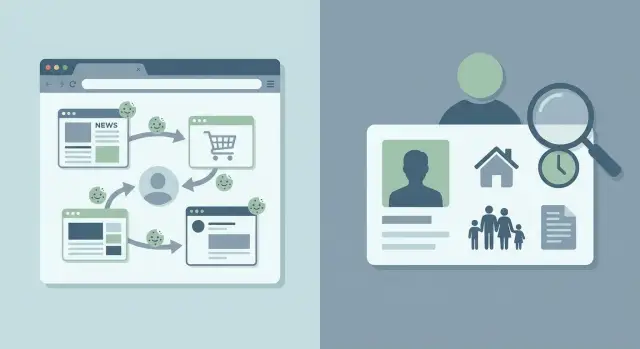
A simple way to split them is this: browser tracking watches what you do, while data brokers list what they know about you. One is about behavior. The other is about identity.
When a tracker follows you, it is usually trying to guess your interests. It may note that you visited a travel site, searched for running shoes, or clicked on a loan ad. That changes the ads, prompts, and offers you see later.
A data broker usually works differently. It may collect your name, age range, old addresses, phone numbers, email addresses, relatives, and other records tied to you. That information can end up on people-search sites or inside large marketing databases.
Because the two systems overlap, people often assume one fix handles both. It doesn't. Clearing cookies, using a private browser, or blocking trackers can reduce browser tracking, but it won't erase a broker profile that already exists. The reverse is true too. A broker removal service such as Remove.dev can help remove exposed personal details from broker sites, but it won't stop every ad tracker in your browser.
That's why a real cleanup plan has two parts. First, cut down how much new behavior gets tracked. Then remove the profile data that is already out there. If you only do one, half the problem stays behind.
What ad tracking means in plain language
Ad tracking is the system that watches what you do online so ads can be matched to your habits. It usually cares less about your full identity and more about your behavior: what you searched for, which product page you opened, how long you stayed, and what you clicked next.
That tracking happens through a few common tools. Cookies are small files a site saves in your browser so it can recognize you later. Pixels are tiny bits of code or invisible images that report when you visited a page or opened an email. Device IDs do a similar job on phones and tablets, and app trackers watch what you do inside apps.
Put simply, these tools help ad companies build a picture of your interests. If you look at running shoes once, they may guess you're shopping for sneakers. If you compare flights, hotel sites and travel apps may start showing you trip ads for days.
Most people notice this in ordinary ways. You search for one item and then see it everywhere. A store reminds you about a cart you never finished. Two apps seem to "know" what you were browsing earlier. That is why "follow-you-around ads" feels like the right phrase.
This kind of tracking is mostly about observing actions and using them to place ads. It is not the same as cleaning up public profile pages.
The good news is that tracker blocking can help a lot. Browser privacy settings, cookie limits, ad blockers, and app permission checks can cut down how much data gets collected. That won't erase your personal details from broker sites, but it can reduce the ads that seem to chase you after a single search.
If your goal is less ad targeting, start with your browser and your apps. That's usually the fastest win.
What data brokers are doing
Data brokers build files on real people, then sell access to those files. Their buyers can include advertisers, lead generators, recruiters, insurers, investigators, or other brokers. The basic idea is simple: collect personal details, sort them into profiles, and make those profiles easy to search or resell.
These records often go far beyond what most people expect. A broker may pull data from public records, old marketing lists, app signups, court records, loyalty programs, and other brokers. Over time, those scraps get merged into one record that looks surprisingly complete.
A broker profile may include your full name, past names, current and previous addresses, phone numbers, email addresses, age or birth year, and even relatives, roommates, or other known associates.
That's why people-search sites feel so invasive. You type in a name and suddenly see where someone lived, who they may be related to, and how to contact them. Sometimes the record is wrong or outdated. Sometimes it is close enough to cause real problems anyway.
This is also why blocking ad cookies doesn't solve the whole issue. Browser tracking follows activity across sites and apps. Data brokers often work from a different pool of information. They can still have a record on you even if you use a private browser, reject tracking popups, or clear cookies every week.
Think of it this way: ad tracking watches behavior, while brokers build identity files. One watches what your browser does. The other tries to answer who you are, where you live, and how to reach you.
That difference matters because the fix is different too. If your name, address history, and relatives are sitting on broker sites, you usually need opt-out forms, removal requests, and follow-up checks. Browser privacy tools help with tracking, but they do not erase a broker profile that is already online.
Why the cleanup plan is different
The reason these problems need different fixes is simple: they cause different kinds of harm.
Browser tracking usually changes what you see. It follows your visits, app use, clicks, and searches so ad networks can guess what you might buy next. That can feel creepy, but the most common result is targeted ads, retargeting, and the sense that your browser is watching you.
Data broker listings are a different mess. They can expose your name, age, past addresses, phone number, email, relatives, and other details in one place. That can lead to spam calls, scam texts, surprise contact from strangers, and, in some cases, real safety risks. If someone can look up where you live or who your family members are, the harm is much more direct than seeing another shoe ad.
That is why the tools are not the same.
A browser extension can block trackers, cut down cookie sharing, and make it harder for ad companies to follow you from site to site. Privacy browsers and stricter settings help too. But those tools work in your browser. They do not reach into a data broker's database and erase a profile that was already built.
Once your information is sitting on broker sites, cleanup usually means removal requests. Sometimes that is a site opt-out form. Sometimes it is an email or a legal request under privacy laws such as CCPA or GDPR. One request is often not enough, because listings can come back after a broker updates its records.
That follow-up is where many people get stuck. Manual removal takes time, and you have to keep checking for re-listings. If you don't want to manage that yourself, Remove.dev is built for broker removals specifically. It finds and removes personal information from over 500 data brokers and keeps monitoring for listings that return.
So if you only install ad blockers, you reduce tracking but leave broker profiles alone. If you only remove broker listings, you can still get followed around the web by trackers. Most people need both.
A simple everyday example
Picture Maya shopping for a standing desk. She reads a few reviews, visits two online stores, then leaves without buying.
Later that day, she opens a news site and sees ads for the same desks. Then she checks social media and sees them again. That feels creepy, but it usually comes from browser tracking. Cookies, ad pixels, and similar tools noticed what she viewed and helped advertisers follow that interest across sites.
This part is often easy to reduce. Maya can block third-party cookies, clear site data, limit ad personalization, and use a privacy-focused browser extension. That won't erase every ad, but it can cut down the repeat targeting.
Now picture a second problem. Maya searches her own name and finds an old address and mobile number on a people-search site. That is not the same thing as retargeted ads. It is a broker listing.
Changing browser settings won't remove that page. She has to send a removal request, wait for the site to process it, and check again later in case the listing comes back. Same uneasy feeling, different system, different fix.
How to deal with both
The easiest way to handle this is to split the job into two tracks.
First, reduce new tracking. Strengthen the privacy settings in your browser, block third-party cookies, review ad personalization in the accounts you use most, and check app permissions on your phone. Pay special attention to location sharing, contacts, and background activity. These steps won't erase broker listings, but they can cut down how much fresh behavior gets collected.
Next, look for the profiles that already exist. Search your full name, old addresses, phone numbers, and email addresses. Keep a simple list of the sites that show your details. A note on your phone or a basic spreadsheet is enough. If a site has an opt-out form, submit it. If it asks for ID, read the request carefully before sending anything.
Then comes the slow part: follow-up. Save confirmation emails or screenshots so you know what you sent and when. Check again later, because broker listings can return after a new scrape, a fresh public record, or a partner database update.
Manual removal works, but it takes time. Every broker has its own form, proof steps, and wait time. If your information shows up across a lot of sites, using a service that automates removals and keeps monitoring can save a lot of admin work.
Mistakes that slow people down
The biggest mix-up is treating tracking and broker profiles like the same problem. They are not. If you install an ad blocker and clear cookies, you may cut down browser tracking, but your people-search pages can still stay live for months.
That mistake is common because ad blockers give fast feedback. You see fewer creepy ads, so it feels like the job is done. But a broker profile is usually a separate record with your name, age range, addresses, relatives, phone numbers, or email history. An ad blocker does not remove that.
Another slow-down is sending one opt-out request and assuming it will stick forever. Many brokers refresh their databases. Your info can show up again after a new scrape, a public record update, or a fresh list purchase. Real cleanup needs follow-up, not one afternoon of form filling.
Old accounts also trip people up. A forgotten shopping account, an old forum profile, or a public voter or property record can keep feeding broker pages. If you only remove the profile you found in search and ignore the source behind it, you are treating the symptom, not the leak.
Poor record-keeping makes the whole process worse. People send requests under one email, follow up with another, then use a nickname on a third form. A month later they can't tell what was approved, rejected, or never answered.
Keep your details consistent. Use one email for requests, one version of your name, and one place to track status. It doesn't need to be fancy. It just needs to be clear.
A quick check before you start
Before you change settings or send removal requests, spend a few minutes figuring out which problem you actually have.
If ads start following you right after you search for shoes, a hotel, or a blender, that usually points to browser tracking. Cookies, device IDs, and ad networks are learning what you browse and using it to target ads.
If you can type your name into a broker site and see your age, past addresses, phone number, or relatives, you need broker removal. Browser privacy tools won't erase those public profiles. They may cut future tracking, but they won't clean up records that are already posted and sold.
A simple self-check helps. Search for one product and notice whether ads for it appear within a few hours on apps or websites you use. Then search your own name, city, phone number, and address on a few people-search sites and note what appears. Check every device you use, not just your laptop. A private browser on your desktop does little if your phone and tablet still allow broad ad tracking.
If you look at hiking boots and then see boot ads on social media that night, that is a tracking problem. If a stranger can find your old address and mobile number on a people-search page, that is a broker problem. A lot of people have both at once.
What to do next
Do one small thing in each bucket today. Change one browser or account setting that reduces tracking, such as blocking third-party cookies or turning off ad personalization. Then search for your name, phone number, email, or old address on a few people-search sites and note what appears.
Keep notes as you go. A plain note on your phone is enough. Write down the site name, what personal details it showed, the date you submitted an opt-out, and whether the listing disappeared. It sounds boring, but it saves time fast.
Without notes, people forget which broker they already contacted, miss follow-ups, or end up repeating the same search a week later. With notes, you can actually see progress.
If you want to do everything by hand, that's fine. Just expect it to take time, and expect some listings to come back. If you'd rather not manage dozens of separate opt-outs, Remove.dev focuses on that part of the job: broker removals, ongoing monitoring, and repeat requests when data gets re-listed.
The practical plan is simple. Reduce future tracking in your browser and apps. Clean up the personal details that are already exposed. Treat those as two separate jobs, and online privacy starts to feel a lot more manageable.
FAQ
What is the difference between ad tracking and data brokers?
Ad tracking watches what you do online, like what you search for, click, and view. Data brokers build profiles about who you are, such as your name, phone number, address history, and relatives.
One changes the ads you see. The other can expose personal details on people-search sites or inside marketing databases.
Why do ads keep following me after one search?
That usually happens because trackers saw your visit and shared that signal across ad networks. Cookies, pixels, and device IDs can help advertisers keep showing you the same product for days.
It feels personal, but it is often based on recent behavior, not a full public profile about you.
Will clearing cookies remove my info from people-search sites?
No. Clearing cookies can reduce browser tracking, but it will not erase a broker page that already has your name, phone number, or address.
If your details are on a people-search site, you usually need a removal request for that site.
Can an ad blocker stop data brokers?
Not really. An ad blocker can cut down how much websites and apps track your behavior, which helps with retargeted ads.
Data broker records are a separate problem. If a broker already has a profile on you, blocking ads will not remove it.
What kind of personal details do data brokers usually have?
Many broker profiles include your full name, age or birth year, current and past addresses, phone numbers, email addresses, and possible relatives or roommates.
Some records are old or wrong, but even outdated details can still cause spam, scams, or unwanted contact.
How can I tell which privacy problem I have?
Try a quick two-part check. Search for a product and see if ads for it show up soon after on other sites or apps. Then search your own name, phone number, email, and old address on people-search sites.
If the first happens, you have a tracking issue. If the second happens, you have a broker issue. A lot of people have both.
What should I do first to reduce ad tracking?
Start in your browser and phone settings. Block third-party cookies, turn off ad personalization where you can, and review app permissions like location, contacts, and background activity.
That will not fix broker listings, but it can slow down how much fresh behavior gets collected.
How do I remove my information from data broker sites?
Look up your name, phone number, email, and old addresses on broker and people-search sites. When you find a listing, use the site's opt-out form or send a removal request if that is the method they provide.
Keep notes on what you submitted and when. That makes follow-up much easier if a site is slow or asks for more details.
Can my data come back after I opt out?
Yes, they can. Brokers often refresh their records from public sources, old lists, or partner databases, so a page that disappeared can show up again later.
That is why one round of opt-outs is rarely enough. Checking again after a few weeks or months is part of the job.
When does it make sense to use Remove.dev instead of doing it by hand?
If you do not want to handle dozens of separate opt-outs, a service like Remove.dev can save time. It removes personal data from over 500 brokers, tracks requests in real time, and keeps checking for re-listings.
Most removals are done within 7 to 14 days, and plans start at $6.67 per month with a 30-day money-back guarantee.