AI answer boxes show old contact details: why it happens
AI answer boxes show old contact details when broker pages, cached copies, and scraped bios keep sending outdated facts back into search-like tools.
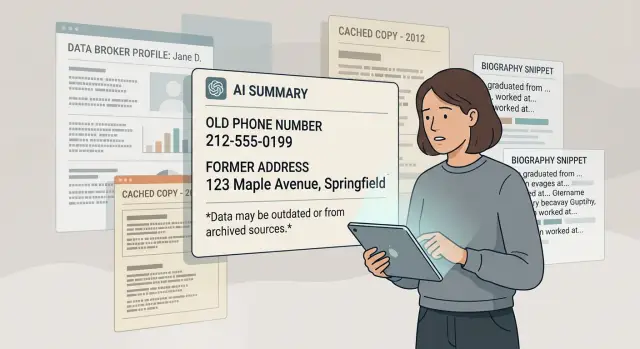
Why old contact details keep showing up
AI answer boxes often build one response from several places at once. They do not always read your current profile and stop there.
A search-like tool might pull a phone number from one page, a city from another, and an email from a third. If those pages do not match, the system can still merge them into one clean answer. That is how old records turn into current-looking mistakes.
You can update your LinkedIn page, author bio, or business profile today, but a data broker page from two years ago may still be live. An old directory listing, cached web copy, or scraped conference bio can stay online far longer than most people expect.
The bigger issue is copying. Once your details appear in one place, they often spread to other sites that reuse public records, staff pages, forum profiles, and people-search listings. Even if the original page changes or disappears, the copies can keep circulating on smaller sites that nobody checks.
Machines tend to trust repeated facts. Not because those facts are fresh, but because they show up again and again. If the same old number appears on five stale pages, that can look more reliable to a system than one newer page with the right details.
Cached copies make this worse. Search systems and AI tools sometimes rely on stored versions of pages instead of the latest live version. So even after you fix the source, the wrong detail can stay in circulation for a while.
The usual starting points are predictable: people-search and data broker sites, old company team pages, speaker or event bios copied across sites, and local directories or archived listings. One stale page is annoying. Ten copies are what make the problem stick.
Where stale details come from
A wrong phone number or old address rarely comes from one bad source. It usually comes from a chain of old pages that never fully disappeared.
People-search sites and data brokers are often the first problem. They collect records from public filings, old account data, mailing lists, and other databases, then keep those pages live much longer than most people realize. A record can stay up long after you moved, changed jobs, or stopped using an email address.
Search engines add another layer. When a page changes, the old version may still exist in cached copies, snippets, or archived traces for a while. So even if the live page looks fixed, the older version may still be easy to find and easy to reuse.
Old bios are another common source. A forgotten team page, author profile, event speaker page, or PDF brochure can sit untouched for years. Then other sites scrape it, copy it, and repost it without asking. One outdated line turns into ten versions of the same mistake.
A simple chain looks like this: a small directory copies a broker page, another site copies that directory, and a search-like AI tool sees the same old phone number on several pages. It treats the repetition like proof, even if all of those pages came from one original error.
Picture a common example. You left a job two years ago, but your old staff bio still lists a work number. A conference page copied that bio, then a small directory copied the conference page. Now the same stale detail appears in multiple places, which makes it look current.
That is why removing one page often is not enough. To remove old personal info for good, you usually have to deal with the source page, the copies, and the sites that keep reposting it.
How search-like AI tools reuse old facts
Search-like AI tools do not verify contact details the way a person would. They usually pull from pages, indexes, summaries, and copied text that already exist online.
Most of these tools are built to summarize what looks repeated and stable. If an old phone number appears on a broker page, a people-search site, and an old bio page, the model may treat that pattern as trustworthy. It is not deciding whether the fact is current. It is deciding whether the fact appears often enough.
That creates a simple problem: old data often spreads better than new data. A fresh profile update on one site may lose against five older copies elsewhere. The AI can end up mixing a recent source with stale broker pages or cached copies, then produce one neat answer that looks confident and wrong.
Old details tend to stick when the same phone number or address appears on several sites, when an old staff bio gets copied onto other pages, when a page is removed after search indexes or scrapers already saved the text, or when people-search sites keep reposting the same record with minor changes.
That last point catches a lot of people off guard. A page can disappear, yet its wording still lives in cached results, scraped databases, old snippets, and reposted bios. Even when the original source is gone, the sentence naming your city, email, or mobile number can keep floating around online.
This is why one cleanup rarely fixes the whole issue. You are not dealing with one bad page. You are dealing with a trail of copies that make each other look real.
A simple example
Say Priya changed jobs last year. She stopped using her old work email, and she moved from Denver to Seattle. Her current company page is correct, but an old data broker profile still shows the old email and her old city.
That would be annoying on its own. The bigger problem is that one old page rarely stays alone.
Two years earlier, Priya spoke at a small conference. The event page still has her speaker bio, and that bio includes the same old contact line because it was copied from her former employer page. Then another site scraped that conference page and reposted the bio. Now the same outdated details appear in several places, even though Priya has not used them for months.
What the tool sees
When a search-like AI tool scans the web, it often gives extra weight to details that match across multiple sources. It may pick up a stale data broker page with the old email, a cached copy of the conference bio, a scraped bio on a third site, and the same old city listed beside her name.
To the tool, that looks consistent. It sees the same email, the same city, and the same name repeating. It may miss the fact that the newer information appears on fewer pages, or on pages it did not use for the answer.
So the answer box repeats the outdated version: Priya works at her old company, lives in Denver, and can be reached at the old work address. None of that is current, but the repeated copies make it look believable.
The system is not making the data up from nowhere. It is reusing old facts that still sit on broker pages, copied bios, and cached versions of pages that should have disappeared.
Until those older sources are removed or corrected, the bad record can keep coming back. One stale profile turns into three copies, and three copies can look like confirmation.
What to do first when you spot it
Move fast, but keep it simple. If an AI answer box shows an old phone number, email, or home address, save proof before the page changes.
Take a screenshot of the wrong answer and note the date. If the tool shows a source panel, save that too. One clear record now can save a lot of guesswork later.
Then check how far the old detail has spread. Search your phone number, email, and address in quotes, one at a time. That helps you find pages using the exact wording, not just similar results. If an old cell number appears on three broker sites and a forgotten profile page, you have a better idea of what the AI may be reusing.
A short checklist is enough:
- Save the wrong answer with a screenshot and date.
- Search each detail in quotes, such as "555-123-4567" or "[email protected]".
- Write down every page that still shows the old info.
- Fix or remove the oldest source first, if you can find it.
- Check again in 7 to 14 days and compare screenshots.
That fourth step matters more than most people think. If the same outdated bio, directory entry, or broker profile stays online, copied versions often keep coming back. Start with the page that looks like the original source, or the oldest page with the full set of details.
If you control that page, update it or delete it. If you do not, send a removal request or use the site's opt-out process. Data broker pages are often the main problem, but old business listings, author bios, and people-search pages can do the same thing.
Do not expect the answer box to change overnight. Cached copies and scraped records can lag behind. A one- or two-week recheck is usually enough to show whether the bad source is gone, still live, or copied somewhere else.
What usually changes after you ask for removal
The first change is often the source page itself. A broker profile may be deleted, hidden, or stripped down to a name only. That is progress, but it does not mean every trace is gone.
Cached copies can linger after the live page changes. Search systems, archives, and search-like AI tools may still rely on an older snapshot for a while, so your old phone number or address can keep showing up even after the broker page is fixed.
Copied material is the next problem. A short bio, staff page, old directory listing, or people-search profile may have been scraped and reposted elsewhere months ago. When the original page is cleaned up, those copies do not update on their own.
A common pattern looks like this:
- You remove your details from one broker site.
- The broker page disappears within days.
- A cached copy still shows the old version.
- A smaller directory still has the same details from an earlier scrape.
- An AI answer box repeats the old details because one of those copies is still online.
Relisting is another issue. Some broker sites rebuild profiles from public records, partner feeds, or older databases. So even after a successful removal, the same record can come back under a new page, a slightly different spelling, or a fresh update date.
That is why one removal request rarely fixes the whole problem. You may see a clean result in one place and stale data in three others. It feels inconsistent, but it is normal.
Search-like tools also need time to catch up. They do not always fetch the newest version right away, and they may trust older stored text until they crawl the page again.
The practical shift after removal is not instant disappearance. It is a slow drop in how often the old details appear, followed by fewer relistings over time. If you check only the first source page, you can miss the copies and cached versions that are still feeding the wrong answer.
Mistakes that keep the old record alive
The problem is usually not one bad page. It is a chain of old pages, copies, and mismatched profiles that still point to the same outdated phone number, email, or address.
One common mistake is updating only your own website. That helps, but it does not touch the broker pages, people-search sites, cached copies, and profile pages that already copied your details. If those pages stay live, search-like tools can still pick them up and repeat them.
Another mistake is removing one listing and assuming the rest will fade out on their own. They often do not. A broker page may have been copied by another broker, saved in a cache, or quoted on a small directory page. You remove one source, but the copies keep circulating.
Old bios are a quiet problem too. Event pages, webinar archives, partner websites, alumni directories, and podcast guest pages often keep speaker bios online for years. If one of those pages still shows an old work email or phone number, that detail can look current to an AI system pulling facts from several places at once.
People also stop checking too early. A page may disappear, then reappear after a refresh or a new broker import. Some services update every few weeks, not every day. If you do not check again, you may miss the moment your old record comes back.
Mixed contact details make this worse. If your personal site shows one email, a broker page shows another, and two old bios show a third, the web starts to look inconsistent. That gives automated tools more chances to keep the wrong version alive.
A simple cleanup rule works better than one-off edits: update the sources you control, remove broker listings, edit or delete old bios on third-party pages, check again after a few weeks, and keep the same contact details everywhere you still want to be listed.
If you do not want to keep checking hundreds of broker pages by hand, this is the point where a service can save a lot of time.
A quick check before you stop looking
One cleanup request is rarely the end of it. Old contact details can stay visible in places you would not think to check, and AI answer boxes keep repeating them when those pages still look real enough to reuse.
Start with the two searches that catch the most leftovers: your full name plus your old phone number, and your full name plus your old address. Those combinations often pull up broker pages, forum posts, people-search profiles, and old directory entries that a normal name search misses.
Then look at the result preview, not just the page itself. A cached snippet can still show the wrong number or address even after the site owner changed the page. That matters because some search-like AI tools may read the snippet or a stored copy and treat it as current.
Some pages are easy to miss: old staff pages from past jobs, author bios on blogs or news sites, speaker pages for events, and alumni pages or club directories. These can sit untouched for years. A short bio you forgot about in 2019 can still be scraped today and repeated somewhere else.
Keep notes as you go. A plain note on your phone or a small spreadsheet is enough. Mark each site as changed, unchanged, or removed. If the page is fixed but the preview is not, note that too. That helps you tell the difference between a live page, a cached copy, and a stale search result.
Here is a simple example. Say an old people-search page finally drops your cell number, but an author page still shows it. An AI box may keep repeating the number, which makes it look like the first removal failed. In reality, the tool may be pulling from the bio page or from an old cached snippet.
What to do next if you want less manual work
The hardest part is usually not the first removal. It is the repeat work afterward. Old records get copied, cached, and posted again, so one cleanup pass often is not enough.
You can handle each broker, copied page, and old bio by hand. That works if you only found a few pages. But if your phone number, address, or email appears across many broker sites, manual cleanup turns into an ongoing chore.
Doing it yourself usually means finding every record, saving proof, sending each opt-out or removal request, checking again later, and repeating the process when a broker relists your details. That last part is what wears people down. A page may disappear, then show up again weeks later because another broker scraped the same data.
If you want less manual work, Remove.dev is directly built for this kind of cleanup. It removes personal data from over 500 data brokers worldwide, and it keeps monitoring for relistings after your information comes down. The service uses direct API integrations, browser automation, and legally compliant removal demands under privacy laws such as CCPA and GDPR.
According to Remove.dev, it reaches a 99% removal success rate, most removals are completed within 7-14 days, and subscribers can track each request in real time through a dashboard. If you have already found stale records on several sites, that ongoing monitoring is probably more useful than the first round of takedowns.
The main point is simple: if old contact details keep showing up in AI answer boxes, the issue is almost never just one page. It is the pile of stale broker listings, cached copies, and scraped bios behind it. Fix the source, clean up the copies, and keep checking long enough to catch relistings.
FAQ
Why is an AI answer box showing my old phone number or email?
AI tools often reuse whatever facts repeat across several pages. If your old phone number or email still appears on broker sites, copied bios, or cached pages, the system may treat that repetition as current even when your newer profile is correct.
Where do these stale contact details usually come from?
People-search sites, data brokers, old company team pages, event speaker bios, author pages, local directories, and cached search results are the usual sources. One stale page is bad, but copied versions on smaller sites are what make the error stick.
Is updating my LinkedIn or website enough?
No. Updating your own pages helps, but it does not remove older copies elsewhere. If broker listings or old bios still show the wrong detail, AI tools can keep pulling from those pages instead.
What should I do first when I spot wrong contact info?
Start by saving proof. Take a screenshot of the wrong answer, note the date, and save any source panel you can see. Then search your old phone number, email, and address in quotes so you can find the pages still using the exact detail.
Can a page still affect results after it has been changed or removed?
Yes. A deleted or updated page can still live on in cached copies, snippets, scraped databases, or reposted bios. That is why the wrong detail may keep showing up for a while after the original page is fixed.
Should I try to remove the original source first?
Usually the oldest page with the full set of wrong details is the best place to begin. If that source stays live, other sites may keep copying it or treating it as the version to trust.
How can I find every page that still has my old details?
Search each old detail in quotes and pair it with your full name. Check result previews as well as the page itself, because the snippet may still show the stale number or address even after the live page changed.
How long does it take for the wrong info to disappear?
Not always. Search systems and AI tools can lag behind the live web, and copied pages do not update on their own. A recheck after 7 to 14 days usually tells you whether the source is gone, still cached, or reposted elsewhere.
Why does my old record come back after I removed it?
Relisting is common. Some broker sites rebuild profiles from public records, partner feeds, or older databases, so a record can return under a new page or slightly different wording. That is why one removal request often is not the end of it.
When should I use a service like Remove.dev instead of doing it by hand?
It makes sense when your details appear on many broker sites or keep coming back after removal. Remove.dev removes personal data from over 500 data brokers, monitors for relistings, and shows each request in a real-time dashboard. Most removals are done within 7 to 14 days, and the service says it reaches a 99% removal success rate.