Professional award announcements and impersonation risk
Professional award announcements can give scammers your name, role, employer, city, and photo. See what to trim before bios get copied.
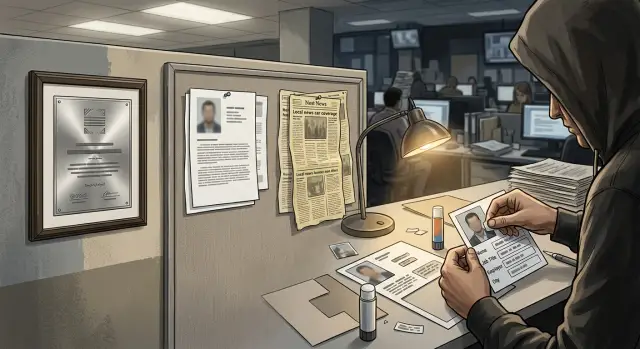
What the problem looks like
A single award post can reveal far more than most people expect. It often includes a full name, job title, employer, city, headshot, and a short career bio. Each detail looks harmless on its own. Put together, it becomes a tidy identity packet.
That packet rarely stays in one place. A company newsroom posts it first. Then an industry group repeats it. A conference page copies the same blurb. Local news sites may lift the text almost word for word. Within days, the same profile can appear on several sites, even if nobody planned for that to happen.
This is where professional award announcements start to create real risk. Scammers do not need secret records to sound convincing. They need ordinary facts: where you work, what your role is, what city you are tied to, and a recent reason someone might contact you.
A fake message gets much easier to write when the public post already provides the script. An email about "your recent award," a note from a "reporter" asking to confirm a quote, or a message that looks like it came from a coworker can feel normal at first glance. The scam works because the details match.
The risk grows when each copied version adds one more piece. One page shows the photo. Another includes the city. A third repeats the employer and a longer bio. None of those pages looks risky by itself. Together, they form a clean profile without anyone really noticing.
Award bio privacy matters because these posts are written to celebrate someone. To a scammer, they are a short summary of who you are, who you know, and how to make the first message sound real.
Where the same bio gets copied
A short award bio rarely stays on the original page. Once it appears in a company newsroom or press release, the same text often gets pasted into other places. That is normal publishing behavior, but it creates a much wider public trail than most people expect.
The first copy is usually the employer's own announcement. After that, local business news sites and community outlets may republish the release with little or no editing. If the award is tied to an industry group, the bio can also show up on association pages, member directories, conference programs, and event websites.
That spread happens fast because publishers want clean, ready-to-use copy. A prewritten bio saves time, so they keep the exact wording, the same headshot, and often the same contact details. One polished paragraph can turn into five or six separate pages in a few days.
Older versions tend to stick
These pages do not all update together. You might shorten your company profile later, remove a direct phone number, or cut older job history from the original post. An event site, local paper archive, or association page may keep the older version online for years.
Search results make this worse. Even after the original page is edited, copied pages can still rank well and stay visible. Someone searching your name might see an older conference bio first, then a local news copy, then the company announcement that used the same wording.
Picture a common case: a regional award winner gets a company post, a chamber newsletter mention, and an association profile for the ceremony. None of those pages feels risky by itself. Together, they create a neat public record with the same employer, title, city, photo, and career summary repeated across search results.
That is the real issue. The original post is only the start. The copies are what make the bio hard to pull back later.
Why copied bios help scammers
When professional award announcements are copied from a company page to local news sites, alumni pages, event programs, and old press archives, they stop looking like marketing. They start to look like public record, and people trust them faster.
A scammer does not need every detail to be true. They just need enough true detail to sound convincing for one email, one call, or one fake profile. A copied bio gives them that in a neat package.
The tone matters too. Award notices usually sound formal and specific, so readers assume the facts were checked. If a message mentions the same award name, employer, and short career summary they have already seen online, it feels real before anyone slows down to question it.
Manager quotes can make this worse. A short quote may reveal a direct supervisor's name, the team someone works on, and where they sit in the org chart. That is useful material for impersonation. A scam email signed with a manager's name is more believable when the sender also knows the employee's role and recent recognition.
Timing helps as well. Dates, conference names, and award events tell a scammer when attention is high and people are busy. A message sent the week of an award dinner or right after a public announcement can say, "Congrats again on the award - can you review this invoice before the event?" It is simple, but the timing makes it feel normal.
Photos add another layer. A polished headshot from an award page gives a fake LinkedIn account, speaker profile, or email avatar more credibility. People trust a familiar face quickly, even when the account behind it is fake.
One copied bio may seem harmless. Ten copies across different sites are something else. Together they can confirm a person's job history, reporting line, public image, and recent milestone. That is enough to build a strong impersonation script.
Which details raise the risk most
The riskiest details are usually the ones that make a person easy to identify and easy to imitate. One fact on its own may seem harmless. Combine a few, and a scammer gets a profile they can use in an email, phone call, or fake introduction.
A full name is the starting point. Add a nickname, middle initial, or the version a person uses at work, and the match gets tighter. "Jennifer L. Perez" plus "Jen" tells an attacker how formal or casual to sound. It also helps them connect the award post to other public pages that use slightly different name formats.
Exact job details matter more than people think. If a bio lists the precise title, department, and employer spelling, a fake message can sound internal right away. "Senior Director, Revenue Operations" feels much more believable than a vague title like "manager." The same goes for office city, branch, or regional territory. A note that mentions the Dallas office or the Midwest territory sounds like it came from someone who knows the person.
Contact details make the risk jump. A direct phone number gives a caller a straight path in. A visible email pattern, such as first.last@company, lets someone guess other addresses with little effort. Even an assistant's name can help. A scammer can write, "I worked with Maria on your schedule," and that one familiar detail lowers suspicion.
School history and past employers are often treated as harmless background. They are not. Those details make cold outreach feel warm. A fake sender can mention the same university, a former company, or an old industry event and sound like a real connection.
The most exposed version is a bio that combines all of this in one place: full name, exact role, location, direct contact path, and personal history. That is enough for a scammer to build a message that feels specific, polite, and routine. People tend to trust routine.
A simple scam scenario
A local business outlet runs a short award story about Dana Reed, a sales director in Columbus. The post includes her headshot, employer name, city, and a short bio that says she was honored at a recent industry breakfast.
That same week, Dana's employer publishes a staff spotlight with almost the same wording. An industry group copies the blurb for its member page. Now the same bio sits on three public pages, with the same facts, the same photo, and nearly the same sentences.
For a scammer, that is enough.
They make a lookalike email address that is close to Dana's real work address. Then they copy phrases from the public bio so the message sounds like her. They mention the award by name, refer to the breakfast from last Thursday, and use the exact title shown on the company page.
The email goes to someone in finance, payroll, or vendor management. It says Dana is traveling after the event and needs an urgent payment update before noon. The note may ask for a bank change, a copy of a tax form, or a rushed invoice approval.
Nothing in the message feels random. The sender knows her city. The timing matches the award announcement. The signature uses the same title shown on the employer site. Sometimes the scammer even drops in the headshot from the local news post or repeats a line from the industry group page.
This kind of scam does not require a hack. It requires a tidy dossier, and copied bios often provide one. A finance assistant who glances at the message sees several facts that match public pages and stops asking hard questions. When three sites repeat the same bio, the request can feel confirmed before anyone checks the actual sender address.
How to publish it more safely
A good award announcement should explain why someone earned recognition without giving strangers a ready-made script. Most readers only need the award, the person's broad role, and a short reason they were chosen.
Start with the public part of the story. "Maria Chen received the regional service award for leading client education at a midsize accounting firm" tells people enough. It does not need a direct phone number, personal email, exact office address, or a line about living near a specific office.
A safer bio usually sticks to four things: the award name, a broad job title or department, the work that led to the award, and one shared company contact for follow-up. That shared contact matters more than people think. A team inbox or main office number gives reporters and clients a way to reach the company without handing scammers a direct line to the person being featured.
Location deserves a second look. In most cases, the city or region is enough. Skip the full office address, branch location, and neighborhood unless the story truly needs them.
Keep the bio tight. If a detail does not explain the award, cut it. Graduation year, past employers, volunteer groups, board roles, and long lists of certifications can help a scammer sound convincing on a call. They rarely help a normal reader.
Before you approve the text, ask one plain question: where will this be reused? A short bio may start on an association page, then get copied into a press release, a local paper, a PDF program, and a staff profile. One small overshare can spread fast.
If possible, review the final version everywhere it will appear. And if the person already has a lot of personal data floating around on broker sites, reducing that exposure with a service like Remove.dev can make it harder for someone to piece together a fuller profile from a simple award bio.
Mistakes that make impersonation easier
The risky part of professional award announcements is rarely the award itself. Trouble starts when the post turns into a compact packet of personal and work details that someone else can reuse.
A common mistake is pasting in a full speaker bio. That often includes job history, past employers, volunteer roles, certifications, city, and a polished summary written in the first or third person. Put next to an award photo, it gives someone enough material to sound real in an email, direct message, or phone call.
Another mistake is adding a quote that says too much. If the quote mentions a current client project, an upcoming launch, a team name, or who reports to whom, it helps an impersonator mimic the person's day-to-day world. A fake message sounds more believable when it refers to a real project and uses company language.
Bundling contact details in one place also makes things easier. An office address, main phone line, work email pattern, and social handles may look helpful for readers, but together they create a ready-made contact card. That saves a scammer time.
Large headshots are another weak spot. A high-resolution image can be lifted from the page, cropped, and dropped into fake profiles, event pages, or messages. People trust a face fast, especially when it matches the bio they just found copied elsewhere.
Small sites copy everything
Many teams forget that local news sites, chambers, alumni pages, and industry blogs may republish a release word for word. Once that happens, the same bio can appear on dozens of pages you do not control. One overly detailed post turns into a small network of matching records.
If you want to lower impersonation risk, trim the extras before publishing. Use a short bio, skip project-specific quotes, avoid grouping every contact detail together, and upload a smaller image that still looks good on the page. A short award note is usually enough. A mini dossier is what causes trouble later.
A quick check before publishing
Before a name goes live, pause for five minutes. That small review can cut a lot of risk without making the award feel less real.
Ask a simple question: if a stranger read this post once, what could they do with it? Many professional award announcements reveal more than people should, especially when the same bio is later copied to local news sites, association pages, and staff profiles.
A practical review is straightforward. Check whether a new reader could tell who the person works with, who they report to, or which clients or partners they deal with. Look for direct phone lines, work emails, or easy address patterns like [email protected]. Check whether the location is too exact. A city may be fine. A specific office, floor, or branch often adds risk without adding much value.
Then look at repetition. Are the same facts already sitting on several public pages? Repetition makes a scammer's job easier because it confirms the story. And if you cut half the personal detail, would the award still make sense? Most of the time, yes.
One easy rule helps: keep the honor specific, keep the person identifiable, but keep the personal trail thin. Name, role, company, and the reason for the award are usually enough.
For example, "Senior account manager at a Boston office serving regional healthcare clients" says more than most readers need. "Senior account manager recognized for client service" still tells readers why the award matters. It just gives scammers less material to work with.
Also check where the text will appear next. A company post may be copied into a press release, a chamber newsletter, and a local business journal brief. Each copy adds another search result and another place for someone to lift details.
If two or more parts of the post make you uneasy, trim it before it goes out. A shorter bio is often better writing anyway.
What to do after it is already public
Once an award announcement is live, the first job is not panic. It is inventory. You need to see where the same bio was copied, what details keep showing up, and which version is easiest for a scammer to use.
Start with a few searches using your name, employer, award name, and city. Then note the details that repeat most. In many cases, the risky part is not the award itself. It is the bundle around it: direct email, office phone, team title, city, headshot, and a short career summary that sounds convincing when pasted into a fake message.
Keep a simple record. List every page that reused the bio or press copy. Mark any direct contact details, office address, or exact location. Note old event pages, member directories, and association profiles. Save screenshots before you ask for edits or removal.
Next, contact the publishers that control those pages. Ask for a trim, not a rewrite. Many will remove a direct email, phone number, exact office location, or an outdated headshot if you ask clearly and keep the request short.
Old pages are easy to miss. Event sites, local business journals, conference speaker pages, alumni spotlights, and association directories often stay up for years. If the award page cannot come down, ask for a shorter version of the bio. Even small cuts help.
Then look beyond the announcement itself. People-search sites and data brokers can reuse the same public details and add age ranges, relatives, old addresses, and other matching information. If that cleanup starts to spread, Remove.dev can automatically find and remove personal data from over 500 data brokers and continue monitoring for re-listings, which can save a lot of manual work.
After that, keep one file with what was changed, what is still live, and which pages refused edits. If a scam shows up later, you will know exactly which details were exposed and where they likely came from.
FAQ
Why can an award announcement create impersonation risk?
Because they often bundle a full name, exact role, employer, city, photo, and a recent public milestone in one place. That gives a scammer enough true detail to write a message or make a call that feels normal.
What details are safest to leave out of an award bio?
Skip direct phone numbers, personal emails, exact office locations, long job history, graduation years, and extra background that does not explain the award. A broad role and a short reason for the recognition are usually enough.
Is it okay to include the person's city?
Usually yes. A city or region gives readers context without exposing as much as a full office address, branch, or floor. If the location is not needed for the story, less is better.
Do headshots make impersonation easier?
They can be. A polished photo is easy to copy into a fake profile, speaker page, or email avatar, which makes an impersonation attempt look more believable.
Why are copied bios worse than the original company post?
One post may seem minor, but copied versions turn the same bio into a public trail across search results. That repetition helps scammers confirm names, titles, timing, and employer details faster.
How short should an award bio be?
Keep it tight enough that a stranger learns why the person was recognized, not how to reach or mimic them. In most cases, the award name, a broad job title, the company, and a short reason for the award do the job.
Can we still explain why someone won without oversharing?
Yes. You can say what the person did well without adding a mini resume. A simple line about the work that earned the award is clearer and safer than a long career summary.
What should I do if the announcement is already public?
Start by searching the person's name with the employer, award name, and city to see where the bio spread. Then save screenshots and ask publishers to trim direct contact details, exact locations, old photos, or extra background.
Should I request full removal or just a shorter bio?
Ask for an edit first. Many sites will remove a direct email, phone number, or outdated bio even if they will not take the whole page down, and small cuts still reduce the risk.
How can Remove.dev help after my bio has been copied online?
If the public bio is only part of a bigger exposure problem, Remove.dev can help by finding and removing personal data from over 500 data brokers and keeping watch for re-listings. Most removals finish in 7 to 14 days, and you can track requests in the dashboard instead of doing the cleanup by hand.