Birth announcement privacy risks and how details spread
Birth announcement privacy risks start when names, dates, relatives, and hometowns are copied from hospital pages and family posts into lasting profiles.
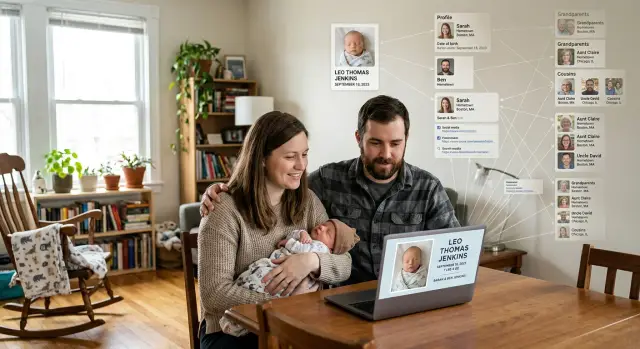
Why a simple birth post can turn into a family profile
A birth announcement feels personal and temporary. Online, it often becomes a long-lived bundle of identity details.
A name, birth date, parents' names, hometown, and a photo can sit on a hospital page or announcement site for years. Public pages also get copied, indexed, archived, and reposted. One page might list the baby's full name and birth date. Another might add the parents' city. A relative might mention grandparents or siblings in a comment. None of those pieces looks risky by itself. Together, they can describe an entire household.
Relatives often fill in the missing details without meaning to. A proud aunt might post, "Welcome Emma, daughter of Jake and Lauren Miller from Cedar Falls." A grandparent adds the exact birthday. Someone uploads a hospital photo with a bracelet or room number still visible. The family sees a warm update. Search engines and broker sites see matching clues.
That is the part many parents miss. They usually notice only the first post they made or approved. They do not see the copies on local announcement pages, archived search results, family tree sites, and people-search databases that connect relatives by name and place.
A simple post becomes a family profile because the internet is very good at joining fragments. One page says who the baby is. Another hints at where the family lives. A comment adds a maiden name or an older sibling. Later, data broker pages can pull those threads together. Cleaning that up is possible, but it is much easier to limit what gets published in the first place.
What details travel the fastest
The details that spread fastest are the ones that seem harmless. A baby's name, an exact birth date, and a hometown can be enough to connect one post to another. Once that happens, the post stops acting like a family update and starts acting like an identifier.
Exact dates matter more than many parents expect. If a hospital page, a family post, and a public people-search listing all show the same date, matching gets easy. Parents' full names also move quickly, especially in captions like "Proud parents Anna and Michael Reed" or in congratulatory comments from relatives.
Location details are another shortcut. A hospital name, city, neighborhood, or small hometown can narrow the match fast. Add a line like "big brother Noah is excited," and several people can suddenly be tied to the same household.
Photos carry more information than they seem to. The image might show a hospital bracelet, room number, birth board, or last name on a bassinet. The caption often adds even more. A short line with a time of birth, weight, and hospital name gives several details that can be reused elsewhere.
The biggest troublemakers are usually the same few details: the exact birth date and time, parents' full names, hospital or hometown, sibling and relative names, and anything visible in the background of a photo. They do not need to appear in one place to be useful. Hospital baby pages, announcement sites, social posts, and reposted family photos can fill in each other's gaps.
A simple rule helps: if you would not use a detail to verify an account or identify a household, do not include it in the announcement.
How the information spreads beyond the first post
A birth announcement rarely stays where it started. If the page is public, search engines can pick it up within days. That means a notice on a hospital baby page, local announcement site, or family blog can appear when someone searches the parents' names, the baby's full name, or the hometown.
Announcement pages are especially easy to copy because they usually follow a fixed template. They often include names, date of birth, city, parents, grandparents, and a photo. That structure makes them simple for scraping tools to read and repost in bulk. One site publishes the notice, another copies it, and soon the same facts live on several pages the family never approved.
The larger problem is connection, not just copying. A baby's last name links to the parents. The birth date hints at timing and age. The hometown narrows the household. Grandparent names open another branch of the family tree. People-search sites and data brokers use small pieces like these to build profiles that look much more complete than any single source.
That is why the risk can last for years. The original page may get deleted, but search results can keep old titles and snippets for a while. Copy sites may leave the notice up. Archived pages can hang around. A relative might repost the same details on social media months later, giving the information a second life.
Those details can feed several types of records at once: people-search listings that show household members, marketing databases tied to an address, identity-verification prompts built from family facts, and ad profiles based on a recent birth.
Once that web forms, cleanup is no longer about one post. It becomes a mix of search indexes, copy sites, broker records, and cached pages.
A realistic example of how this happens
Picture a couple who shares a birth announcement through a hospital page. The page shows the baby's full name, birth date, and a smiling photo. It feels harmless because it looks like a one-time update for friends and family.
Then the wider family joins in. A grandparent reposts the photo on social media and adds the parents' first names, both surnames, and the hometown. Another relative copies the same details into a community group and congratulates the family by name.
Now the pieces start to connect. The hospital page has the baby's name and birth date. Family posts add the town, relatives, and spelling of surnames. A people-search site may already list the parents at a current or past address, along with ages, phone numbers, and relatives. A broker does not need every detail to match perfectly. A few shared points are often enough.
It can happen in a very ordinary chain. A hospital page lists Ava Bennett, born on March 4. Her grandparents repost the news and mention the Bennett and Flores families in Cedar Hill. A people-search site already shows Maya Flores and Daniel Bennett at an address in that town. Search results start grouping those details together.
Years pass, but the posts do not always disappear. The hospital page may still be live. Old reposts may still be public. Cached search results, copied directories, and broker entries can keep the same details easy to find long after the announcement feels forgotten.
How to check what is still public
You do not need special tools to see what strangers can see. A private browser window helps because it gives you cleaner search results.
Start with the exact name used in the post. Search the baby's full name in quotes, then try the parents' names with the hometown, city, or hospital name. If that does not show much, change the order. Try a parent name with the baby's first name, or a last name with the birth month and town. Small changes matter because some pages show only part of the notice in search results.
Do not stop at normal web results. Check image search too. A baby photo, hospital card, or birth graphic can stay visible there even after the original page changes. Look closely at snippets and cached previews when they appear. Sometimes the page is gone, but the search result still shows names, dates, or relatives.
After that, search people-search sites using the parents' names, home city, and past addresses if you know them. These sites may not list the baby right away, but they can connect parents, grandparents, and one shared address into a clear family record.
Before you ask for any removal, keep a simple record of what you found. Note the site name, page title, names shown, dates or city listed, whether a photo appears in search, and the date you captured a screenshot. It feels a little tedious, but it saves time later. Copied pages often disappear in one place and stay live somewhere else.
How to reduce the exposure step by step
Start with the original source. If the information appears on a hospital baby page or announcement site, ask for removal there first. That page often feeds copies, screenshots, and search results, so taking it down early can reduce later spread.
Keep the request short. Include the page title, the baby's name if shown, and the name of the parent or relative listed on the page. Then note when you sent the request. That small record matters because follow-ups are easy to forget during the first busy weeks with a newborn.
Next, clean up social posts. You do not have to delete every photo. In many cases, editing captions and comments does most of the work. Remove the full name, exact birth date, hospital name, hometown, and anything else that makes matching easy.
Relatives need a direct message too. Ask them to remove reposts that include full names or exact details. Be specific. "Please delete the version with the full name and birth date" works better than a vague request to be more careful online.
If family still wants updates, move them into a private album, group chat, or closed group. For baby news, less detail usually beats complicated privacy settings on a public post.
It also helps to keep a short tracking note with where the information appeared, when you asked for removal or edits, whether the page changed, and when to follow up again. Once the details have spread to broker pages, the job gets slower. If that has already happened, Remove.dev can handle removals across hundreds of data brokers and keep watching for re-listings, which is useful when the same profile keeps coming back.
Mistakes that make the problem bigger
The most common mistake is posting the same announcement in several public places. Parents share it once, grandparents copy it, and a hospital page adds its own version. To a stranger, those separate posts look like one neat record with names, dates, relatives, and a location.
Another common mistake is trusting deletion too much. Removing the original post does not mean it vanished. Public pages can be copied, screenshotted, reposted, scraped, or saved by sites that collect family data. If the post was public even briefly, the details may keep moving after the source is gone.
Many families also clean up the photo but forget the text around it. Captions, comments, and tags often reveal more than the image itself. A simple caption like "Welcome Noah James" may seem fine, but a relative's comment can add the birth date, weight, hospital name, and sibling names.
Tagged photos make this worse because they connect people who did not post anything themselves. One baby photo can quietly tie together parents, cousins, hometown friends, and older family posts. That gives search tools and people-search sites more ways to build a family profile.
Waiting too long is its own problem. Once other people repost the announcement, every extra day gives it more time to spread. Ask family members to remove duplicates right away, then check search results and broker listings before the trail gets wider.
A short checklist before you share
Most problems start with ordinary details that feel harmless. A safer post is usually a smaller post.
- Use a first name only, or initials if you want a tighter circle.
- Skip the exact birth date. A month or "arrived this week" usually says enough.
- Leave out the hospital name, hometown, and names of extended relatives.
- Keep the audience small. A group chat or limited post is very different from a public page.
It also helps to think one step ahead. If you post the baby's first name today, then share a tagged hospital photo tomorrow, then a family visit picture next week, each post fills in another blank. That is how newborn privacy breaks down in real life.
Before the next update, check older posts too. Relatives often mean well, but they may have added the birth date, city, or hospital name in the comments. Ask them to trim those details or remove the post if needed.
A good rule is simple: if a stranger could use the post to identify your child, your home area, and your close family, it says too much.
What to do next
Start with the pages you can control. If the birth notice is still live on a hospital page or announcement site, ask for removal there first. Then review your own social posts and family posts for full names, birth date, hospital name, hometown, and photos that show too much.
After that, look for copies. Search the baby's full name, the parents' names, phone numbers, address, and hometown in different combinations. Save screenshots and confirmation emails so you can track what changed.
Do not treat this as a one-time cleanup. Copies can stay cached, get reposted, or show up weeks later on another broker site. Set a reminder to check again in a few weeks, then once more after a couple of months.
If broker pages are already showing family connections, Remove.dev can take over the repetitive part. It removes personal data from more than 500 data brokers, monitors for re-listings, and lets you track requests in real time. That is helpful when a family profile keeps rebuilding itself quietly in the background.
The first move is still simple: remove what you can today, then make a short list of the copied pages that need follow-up. A little cleanup now can cut down what strangers, scammers, and broker sites can piece together later.