Board minutes privacy: when public PDFs expose your address
Board minutes privacy matters when attendance sheets, conflict forms, and meeting PDFs reveal home addresses, signatures, and other personal details.
Why your address ends up in public minutes
Most boards publish meeting records so the public can see what happened. That part is normal. The problem starts when "public record" turns into "post the full file exactly as it was submitted."
Board staff are often working fast. They collect agenda packets, sign-in sheets, disclosure forms, and supporting documents from different people, then combine everything into one PDF for the website. If your home address appears on any of those pages, it can go online without anyone stopping to remove it.
That is why privacy problems in board minutes are so common. The address is often not in the minutes themselves. It may be buried in a form attached to the minutes, a speaker card, a conflict disclosure, or a contact page that was meant for internal use but got published with the public packet.
Sometimes it comes down to habit. Many offices post documents exactly as they receive them because that is the easiest workflow. If a board member, volunteer, or resident uses a home address on a form, that same address can end up in the final PDF with no bad intent behind it.
One address can also appear several times in the same meeting record. You might enter it on an application, repeat it in a disclosure, and include it again in a supporting attachment. Later, removing one page does not fix the whole problem.
People usually expect a meeting handout to be seen by those in the room. They do not expect a searchable PDF that stays online for years. Once the file is posted, search engines can index it, other sites can copy it, and downloads can keep circulating long after the board forgets it ever went up.
A small mistake is often enough. A form uses your full home address, staff post the packet without redacting anything, and the PDF sits in an archive year after year. No hack. No leak. Just routine paperwork turned into a lasting online record.
Where personal details usually appear
Most privacy leaks in public records do not start with the final minutes. They start with the everyday paperwork around the meeting.
That is what makes these cases tricky. A board may mean to publish only the public record, but the uploaded PDF often includes much more than the vote log or agenda. The usual trouble spots are sign-in sheets, conflict disclosure forms, speaker cards, reimbursement pages, and scanned attachments that were never meant for wide circulation.
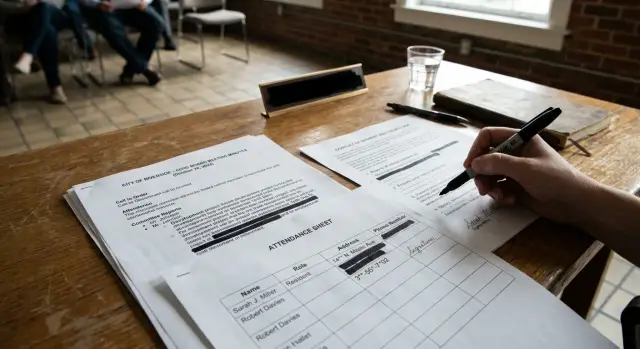
Attendance sheets are a common source of exposure. A resident signs in to speak, writes an email address so staff can follow up, and adds a signature without much thought. Later, that sheet gets scanned into the packet and posted online with everything else.
Conflict of interest paperwork can reveal even more. Some forms ask where the person lives, where they work, or what property is involved. If staff upload the full form instead of a short summary, that personal data becomes public in one click.
Meeting packets are another weak spot. They often include backup documents sent by board members, staff, or attendees. Those pages can show a mailing address, direct phone number, or personal email that did not need to be public.
The minutes themselves can spread details too. If someone is introduced by full name and street address, or a recusal is explained with more detail than necessary, the written minutes can preserve that wording long after the meeting.
Scanned PDFs create an extra problem. A quick glance may miss a handwritten phone number or note in the margin, but once the file is online, that information is easy to copy and share.
How one PDF spreads beyond the meeting room
A meeting packet feels local. It may be posted for one board meeting, read by a handful of people, then forgotten. But once that PDF goes on a public website, it can travel much farther than the board expected.
Many offices keep old agendas, packets, and minutes online for years. That means a file posted for one Tuesday night meeting may still be sitting in the same folder months or years later. If the PDF includes a home address, phone number, signature, or financial disclosure, that detail can stay public long after the meeting ends.
Search engines make this worse. If the PDF contains searchable text, search engines can read it and index it. Someone who searches your name may land on the file directly without ever visiting the board's website. That is why these problems often feel sudden. The document was public the whole time, but search made it easy to find.
The file can also spread beyond the original site. Archives, transparency portals, and simple web crawlers may copy the same PDF and store their own version. A resident can download it and email it around. A people-search site may pick up the details and turn them into another listing.
Why edits do not fully fix it
Even if the board replaces the file later, older copies may still exist. Search results can keep a cached version for a while. Archive sites may keep the same text. Anyone who already downloaded the file still has it.
That is what makes a public meeting PDF different from a paper handout. A paper copy reaches the people in the room. A PDF can keep moving, keep getting copied, and keep showing up in searches long after the meeting is over.
A simple example of how this happens
This sounds abstract until you picture one ordinary volunteer.
Maria joins a neighborhood advisory board in her city. She is not a public figure. She just wants to help with park updates, traffic complaints, and small grant requests.
Before her first meeting, she receives a standard packet from the board office. One form asks for her full legal name, phone number, email, and home address. Another asks whether she owns property or has business ties that could create a conflict of interest. She fills it out quickly because it looks like routine paperwork.
The problem starts when the clerk builds the public meeting packet. Instead of pulling only the pages that need to be public, the office uploads the whole PDF. That file includes the agenda, attendance sheet, board roster, and Maria's disclosure form with her address still visible.
Nobody notices at first. The meeting happens. The PDF stays on the website. A few weeks later, it is copied into another archive that stores local meeting records. Search engines crawl the file, read the text inside it, and connect Maria's name to her street address.
Months later, Maria searches her own name and sees the document in the results. She also finds the same address in copied files on other sites. In some cases, the PDF has been downloaded, reposted, or scraped by companies that collect personal details from public records.
What makes this easy to miss is that nobody set out to expose her. The clerk was trying to post the packet on time. The board followed its normal process. Maria answered the form honestly. Still, her address moved from one office file into a public document, then into search results, then into places she never agreed to.
That is why these issues grow fast. One upload can turn a routine disclosure form into a long-term privacy problem that takes far more time to clean up than it took to create.
How to check whether your details are already public
Start with the obvious search, even if it feels too simple. Type your full name with your street name or city and see what appears. That often finds the PDF before the board office realizes there is a problem.
Try a few versions of your name if you use a middle initial, a maiden name, or a shortened first name. Public records often mix these up, and one missed variation can hide the file you need to find.
Do not stop at the latest meeting page. Open the main page for agendas, packets, minutes, and attachments, then work backward through older meetings. The newest files may be clean while a packet from two years ago still shows your address in a sign-in sheet or disclosure form.
When you open a PDF, search inside it instead of reading only the first page. Look for your last name, street name, phone number, and email handle. Many people miss personal details because they scan the meeting summary and never open the attendance sheet, ethics form, or appendix.
A simple review usually looks like this:
- Search your name with your street name or city.
- Open agendas, minutes, packets, and attached PDFs.
- Check older files, not just the newest ones.
- Save proof before you ask for edits or removal.
Before you contact the board office, save screenshots that show the page, the file name, and the detail you want removed. Write down the meeting date too. That cuts down on the usual back-and-forth of "which file are you talking about?"
If the file has already spread beyond the original site, you may need to remove it from more than one place. If the same details also show up on data broker sites, a service like Remove.dev can help with the wider cleanup. Remove.dev removes personal data from over 500 brokers, tracks requests in a dashboard, and keeps checking for re-listings.
What to ask the board office to do
A short, specific request usually works better than a long complaint. Start with the person who handles records day to day. That is often the clerk, records officer, board secretary, or board administrator.
Do not ask them to "fix everything." Ask them to confirm which document contains the personal detail. It may be in the minutes, an attendance sheet, a meeting packet, or an attached conflict disclosure form.
Your request should cover four things: the meeting date, the document title, the exact page or section, and the detail that is exposed. Then ask for a clear action, such as redaction, replacement with a cleaned copy, or removal of the attachment.
That level of detail saves time. It also makes it harder for your message to get passed around without action.
If the office says the minutes themselves cannot be changed because they are part of the public record, ask a narrower question. Can they replace the attachment with a redacted version? Can they remove a sign-in sheet that was posted by mistake? In many cases, the record can stay public while the unnecessary personal detail is covered.
Ask one more thing before the exchange ends: whether copied versions on partner sites can be updated too. Meeting files often appear on a city portal, a document archive, or a board management system run by another vendor. If the office edits only one copy, the older PDF may stay live somewhere else.
Keep your message calm and brief. Five or six clear sentences are often enough. Screenshots help. Page numbers help even more.
You can use wording like this: "My home address appears on page 3 of the attendance attachment for the June 12 meeting. Please redact the address and replace the posted PDF. If the file appears on any partner or archive site, please update those copies as well."
If no one replies, send one follow-up and ask who handles public records updates. That usually gets you to the right desk faster than arguing about policy.
Mistakes that keep the information online
One common mistake is asking for a single page to be edited while the full PDF stays online in the same folder. If the file name does not change, people may still download the older copy, and search engines may keep showing it for a while.
Another problem is focusing only on the minutes. Your address might also appear in the meeting packet, an appendix, a sign-in sheet, or an archived folder from the same date. When staff fix one document but miss the rest, the personal details are still public.
Vague requests slow everything down. "My information is online" is easy to ignore or misunderstand, especially in a busy office. A short note with the meeting date, document title, page number, and exact detail usually works much better.
People also stop too early. The source file may be changed, but search results can still show the old title, snippet, or cached PDF for days or weeks. In some cases, a local document portal, records archive, or third-party site copied the file before it was fixed. If you do not check those copies, the address can keep circulating after the board updates its own page.
There is also the problem of accidental reposting. Someone gets a record cleaned up, then later submits a new conflict form, attendance sheet, or speaker card with the same home address. The board removed it once, but the next upload puts it right back online.
That is why a one-time cleanup is rarely enough. The same pattern shows up in broader personal data removal work: one source changes, then the same detail appears again somewhere else. Public meeting records need the same mindset.
A simple rule helps. Ask for the exact file, check older folders, review search results after the edit, and stop using forms that include more personal detail than the board really needs.
Quick checks before your next meeting
Many of these problems start before the meeting begins. They start on forms, sign-in sheets, and email threads that get copied into a public packet without much thought.
A good rule is simple: give the board only the contact details it truly needs. If the rules allow it, use a work email or a board-only email instead of your personal one. If you have a business or office address, ask whether that can appear in public records instead of your home address.
Before you send anything in, slow down and read every field. Some forms ask for more than they need, and open text boxes are where people often give away too much.
A few checks can prevent a lot of trouble:
- Confirm whether your home address is actually required.
- Leave out phone numbers unless the board clearly needs one.
- Use the shortest contact details that still work.
- Ask what will be posted publicly.
That last question matters. Staff may be able to redact a line, swap in a business address, or keep a sign-in sheet out of the online packet if the issue is raised before publication.
If you attend often, keep a simple template with your approved board contact details. It saves time and cuts down on mistakes when deadlines are tight.
These checks take a few minutes. Cleaning up a public PDF can take much longer.
What to do next
Start with the exact file that exposed your information. Save a copy, note the file name, and write down where it was posted. If the address, phone number, or signature later disappears, you still need a record of what was public and where it came from.
The first source matters most. If the board office removes or replaces that file, many copied versions stop spreading. If the original stays up, the same detail can keep getting picked up by search engines, archives, and anyone who downloads meeting packets.
Keep one list of every copy, mirror, or cached result you find. A simple note or spreadsheet is enough. Include the site name, page title, the date you reported it, and whether it was removed. That makes follow-up much easier.
Then keep checking search results for a while instead of looking once and moving on. Search your full name, your full address, and both together. Try common variations too, such as a middle initial or an old street abbreviation. A result that disappears today can come back after a cache refresh.
If the same address is showing up on data broker sites as well, the problem is bigger than one meeting PDF. That is where a service like Remove.dev may fit. It automatically finds and removes private information from over 500 data brokers, sends new removal requests if your data is listed again, and gives you a real-time dashboard to track the process.
The goal is simple: remove the source, track the copies, and keep watching until your address stops resurfacing.
FAQ
How does my home address end up in a public meeting PDF?
Because the exposed detail is often not in the minutes alone. It may be sitting in a sign-in sheet, disclosure form, speaker card, or other attachment that got bundled into the public PDF.
What is the fastest way to check if my details are already public?
Start by searching your full name with your street name or city. Then open the actual PDF and search inside it for your last name, street name, phone number, and email handle.
Are the minutes the only place I should check?
No. Many leaks come from attendance sheets, conflict forms, reimbursement pages, rosters, and scanned backup documents that were posted with the meeting packet.
What proof should I save before I contact the board office?
Save screenshots that show the web page, file name, meeting date, and the exact detail that is exposed. It also helps to download a copy of the PDF so you have proof of what was posted.
Who should I contact to get my address removed?
Usually the clerk, records officer, board secretary, or board administrator is the best first contact. If you are not sure, ask who handles public records updates and document corrections.
What should I say in my removal request?
Keep it short and specific. Include the meeting date, document title, page number, what personal detail is visible, and the action you want, such as redaction or replacement with a cleaned copy.
Can the board fix the file without rewriting the minutes?
Often, yes. If the minutes must stay public, the office may still be able to replace an attachment with a redacted version or remove a page that was posted by mistake.
Why does my address still appear in search results after the PDF was changed?
Older copies may still be cached by search engines, stored in archives, or saved by people who downloaded the file earlier. The original page can be fixed while copied versions keep showing up for a while.
How can I avoid this at future meetings?
Use only the contact details the board truly needs. If allowed, give a work email, board-only email, or business address instead of your home address, and ask what will be posted publicly before you submit anything.
What if my address from the meeting PDF also appears on people-search sites?
That means the issue has spread beyond one meeting record. You may need to remove the source PDF first and then clean up broker listings separately; Remove.dev can help by finding and removing your data from over 500 brokers and checking for re-listings.