Map a broker profile to its sources with simple checks
Learn how to map a broker profile to its sources by comparing fields, dates, relatives, and old addresses across broker listings.
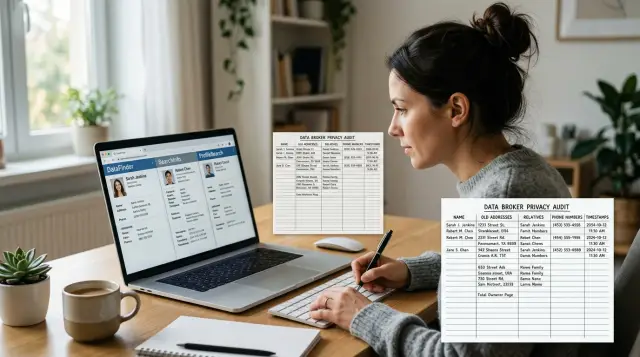
Why one broker profile can come from many places
A broker page can look like one clean record. Most of the time, it is not. It is often a mix of older records that were pulled from different places and merged into one profile.
That is why a single page can show your current city, a phone number from ten years ago, a misspelled middle initial, and relatives tied to different parts of your life. One detail may come from a property record. Another may come from a people-search site. A third may come from an older broker page that was copied again.
Bad data spreads fast. If one source lists the wrong age or ties you to an address you never lived at, that mistake can move across many broker sites because they buy, scrape, swap, and repackage records from each other. After a while, the same false detail starts to look confirmed simply because it appears in five places.
This is also why removing one page does not always fix the problem. If the upstream record is still active, the profile can return on the same site or appear on a new one a few weeks later. That is why services like Remove.dev keep watching for re-listings. The page you see is often just one output from a much larger data chain.
The useful shift is simple: do not treat a broker listing like an isolated page. Treat it like a mixed record. Ask where each field probably came from, which details look older, and which ones seem to have been copied forward. Once you see the page that way, the next steps get much clearer.
Start with the fields that change the least
Do not begin with flashy details like a profile photo or job title. Start with the parts that usually survive when a record is copied, sold, and repackaged.
A full name is the first anchor, but it is rarely enough by itself. Look for the middle initial, suffix, and an age range that makes sense across records. "Daniel P. Reed, 42-44" gives you far more to work with than "Dan Reed."
Current and former addresses are often the strongest clues. People move, but old addresses follow them for years because brokers keep reusing them. If two records share the same street and one older address, that often tells you more than an exact birthday.
Phone numbers and email patterns can help when the rest is messy. A full number is best, but even the last four digits can matter if they line up with the same city or household. With email addresses, focus on the pattern instead of treating it as proof. "j.miller73" and "johnm73" do not confirm a match on their own, but they can support one when the address and age already fit.
Relatives, household members, and associates are easy to ignore. That is a mistake. These names often show where a profile got its data. If one broker lists a person with "Karen Mills" and another source shows Karen at the same old address, you may be looking at the same feed passed around in different forms.
Small odd details matter more than they seem to. Unit numbers, misspelled street names, old ZIP codes, and awkward abbreviations can act like fingerprints. If two profiles both say "Westridge Apt 2B" instead of "West Ridge #2B," that weird phrasing may point back to the same original source.
A good rule is to match the stable details first and use the messy ones as support. When three or four fields line up, you usually have a real connection instead of a lucky guess.
Make a small side-by-side worksheet
A plain worksheet will save you a lot of time. Memory is unreliable, and broker pages change without warning. A simple table helps you compare details instead of relying on hunches.
Use a spreadsheet, notes app, or paper. The format does not matter much. What matters is keeping each detail in one place. A useful worksheet only needs a few columns: site name, field, value, date seen, and notes.
Keep the wording exact. If one site says "Michael J Lewis" and another says "Mike Lewis," write both versions exactly as shown. Do the same for addresses, phone numbers, ages, employers, and relatives. If you paraphrase, you lose the tiny differences that tell you whether two listings came from the same source.
Give each item its own row. Do not drop a whole profile into one cell. If a page shows three old addresses, enter three rows. If it lists two relatives and one phone number, that becomes three more rows. It takes a few extra minutes, but it makes patterns much easier to spot.
Once the rows are in place, mark repeats. A color, a check mark, or a note like "also on Site B" is enough. When the same old address, the same phone ending, and the same relative appear across several sites, that pattern is often more useful than a full profile match.
Dates matter too. Add the day you saw the record. If the page shows "updated" or "last seen" text, copy that into your notes. Even rough timing clues can help you figure out which site may be feeding another.
Save screenshots as you go, especially for pages that refresh often or hide details after a few views. Screenshots give you proof of the exact wording and layout you used.
The worksheet does not need to be fancy. It just needs to be consistent. Once everything is side by side, weak matches start to fall apart on their own.
Trace the source step by step
Treat one profile like a puzzle, not a finished record. Start with a detail that is unusual enough to travel across records without changing much.
An old apartment number, a middle initial, or an outdated phone number is a better starting point than a city, age range, or current ZIP code. Broad details create false matches fast.
A practical approach is to pick one uncommon detail from the profile, search other records for that exact detail before searching the name alone, and add every possible match to your worksheet. Then look for the oldest version of that detail. The oldest record often sits closer to the source. After that, confirm the connection with a second clue, such as a relative, another address, or a phone number.
That second clue matters more than most people expect. An old address can spread to many sites. An old address plus the same sister's name is much harder to dismiss as chance.
Say one broker profile lists "18 Maple Ave Apt 3B," a landline ending in 4421, and a relative named Denise Carter. You search the apartment number first and find two older records. One has the full old address and the landline from 2019. The other has Denise Carter and the same street, but no apartment number. Put both into your worksheet. The 2019 record may be the earlier feeder, while the second record may be another branch copied from it or from the same public source.
Dates help you sort the order. If one listing says "updated last month" but still carries a 2019 phone number, that does not make the phone number current. It only means the page changed recently. Look for the oldest appearance of the detail itself, not the newest page stamp.
When two clues line up, you can call it a likely match with much more confidence. When only one clue fits, keep it in the worksheet and move on. That small pause prevents a lot of bad assumptions later.
Read dates and updates for timing clues
Dates often tell you more than the headline on the page. A name and city can match by accident. A pattern of years usually does not.
Write down every date you can find. That includes the page's "updated" date, the years tied to past addresses, move-in or move-out dates, and the year a phone number first appears. Keep them together so you can compare them instead of trusting your memory.
Older dates are clues, not proof. A broker may pull a 2018 address from one source, a 2021 phone record from another, and then stamp the whole page as "updated 2024." That does not mean every fact was refreshed in 2024. It only means something on the page changed.
Some timing patterns are especially useful. A newer page may still show an older address range. A recent update date may appear even though the relatives list has not changed in years. A phone number may appear right after a move. A surname change may show up soon after a marriage record. When you see that mix, you are probably looking at a profile built from several feeds gathered at different times.
Timing matters most around life changes. Moves are the easiest example. If someone moved in June and one broker starts showing the new address in July while another still shows the old one through October, the two sites may be pulling from different source lists or updating on different cycles.
The same logic applies to marriage, divorce, and new phone numbers. If a new last name appears but the old household members stay attached, the broker may have merged a fresh public record with older household data. That is a strong sign that the page is not a single clean record.
When dates disagree, do not force a match. Mark the conflict and keep going. Good source matching is less about finding one perfect date and more about seeing which facts changed first, which stayed stale, and which records moved together.
Use relatives and old addresses to connect records
Relatives and old addresses often tell you more than the headline name. A full name can match dozens of people. A sibling's name plus a past street address can narrow things down fast.
Start by looking for the same second person across records. If one listing names "Lisa Moreno" as a spouse and another names the same Lisa at the same past address, that is a strong clue the records point to the same trail. The same goes for a sibling, adult child, or long-term roommate.
Old addresses help when the main name is common. Two "David Lees" may live in the same state today, but only one used to live on Oak Terrace with "Nina Lee." That shared address can separate a real match from a bad one.
Still, be careful. A common relative name can fool you. "Michael," "Maria," or "James" on their own do not prove much. Treat them as support, not proof.
A quick reality check helps. See whether the relative name appears with the same city or ZIP. Check whether the address dates make sense for both people. Compare age gaps that fit the relationship. Notice whether the person is listed as a relative on one site and an associate on another.
That last point matters. Data brokers do not label relationships the same way. One site may call someone a spouse. Another may call the same person an associate because they shared a household, phone line, or public record. The label can shift even when the connection is real.
Age gaps are useful here. If a profile says a person is 29 and lists a "son" who is 24, slow down. That is possible, but it is much more likely that the broker mixed two households. A 29-year-old with a 31-year-old brother or a 58-year-old with a 57-year-old spouse sounds far more believable.
When you review records in a tool like Remove.dev, this is often where the pattern starts to make sense. You do not need to prove every relationship with certainty. You need enough believable overlap that the match holds up.
Example: one profile built from five sources
Take a sample profile for "Maria Lopez." One broker page shows her current address on Pine Street in Phoenix. The same page also lists two older addresses: an apartment on West Elm Street and a house on North 3rd Avenue. At first glance, it looks like one clean record. It usually is not.
A closer read shows pieces from different places. The Pine Street address is marked "updated May 2024." The West Elm address appears on another broker with a "last seen" date from 2022. North 3rd Avenue shows up on a third page with no update date, but it includes a landline that does not appear on the newer Pine Street profile.
The brother's name makes the pattern easier to spot. Maria's profile on one broker lists "Carlos Lopez" as a relative. A second broker page for the West Elm address also lists Carlos with the same age range. A third page for North 3rd Avenue lists Carlos again, but this time next to an older household group. That repeat strongly suggests that these pages were copied from a shared source and then repackaged.
The phone number tells you even more. The Pine Street profile shows a mobile number ending in 4421. That number did not start there. It appears earlier on a West Elm record dated 2022, then shows up later on two newer broker pages tied to Pine Street. That suggests the newer profile reused an older source instead of collecting fresh data on its own.
At that point, you can rank the likely inputs. There may be an older people-search record for West Elm Street with the 4421 number, a household record for North 3rd Avenue that includes Maria and Carlos, a move-linked source connecting North 3rd Avenue to West Elm Street, a newer public record tied to Pine Street, and the broker's own recycled database that merges the older phone, Carlos's name, and all three addresses into one page.
No single clue proves the chain. Together, they do. The current address, the two older ones, the reused phone, and the repeated relative name all point to one profile built from several source trails.
Mistakes that create false matches
The fastest way to get source matching wrong is to trust the first record that looks close enough. The first listing you find is not always the original source. It may be a later copy built from older details pulled from somewhere else.
Small spelling changes matter more than people think. "Katherine" and "Kathryn," a missing middle initial, or "St" changed to "Street" can point to copying. If you ignore those tiny shifts, two records can look identical when they are not.
Another common mistake is mixing two people who share a city, an age range, and a common last name. That sounds close, but it is weak evidence by itself. Before calling it a match, compare a few stable details together, such as the full name pattern, one past address, and one relative tied to that same address.
Relatives can mislead you too. Broker records often keep old household links for years after people move, split up, or lose touch. A brother listed on one site may be current, or he may just be old data copied forward. Treat relatives as clues, not proof.
It also helps to look for the oldest-looking record instead of the first one you found. Compare odd text details, including abbreviations and misspellings. Make sure the relative, address, and age range fit the same period.
One more trap is stopping after a single removal request and assuming the job is done. A profile can disappear from one broker and then come back after another source refreshes its feed. That does not always mean your first match was wrong. Often, it means the source chain is still active.
That is why rechecking matters. Remove.dev, for example, keeps monitoring for re-listings after removals, which helps when the same profile is rebuilt from another broker or public source.
False matches waste time and send requests in the wrong direction. Slow down. The odd details usually tell the truth faster than the obvious ones.
Quick checks before you call it a match
Before you decide two listings belong together, pause for a minute. A bad match can send you after a copy while the real source stays live somewhere else.
One shared detail is not enough. A common name, the same city, or a broad age range can describe a lot of people. Look for at least two uncommon details that line up.
The best checks are simple. Match two details that are hard to copy by chance, such as an exact old street number, a middle initial, a rare relative name, or a past ZIP code. Check the timeline too. The older record should lead into the newer one, not the other way around. Make sure relatives fit the same address period. Watch for parent-child mixups by comparing ages, suffixes like Jr. or Sr., and move dates. Then mark which record looks upstream and which one looks like a copy.
Dates matter here more than many people expect. If one broker shows an address first seen in 2012 and another adds that same address plus a 2021 phone number, the older record may be feeding the newer one. If the order is reversed, the match is weak.
Relatives are useful only when the timing works. Say a profile shows Michael Reed at an old Dallas address with "Laura Reed" as a relative. Another listing shows the same Dallas address from the same years and the same Laura Reed. That is a solid clue. If Laura appears only years later at a different address, be careful.
A simple marking system makes this easier. Put one symbol next to records that look like sources and another next to likely copies. If you later send removal requests through a service like Remove.dev, those notes help you avoid spending time on duplicates first.
What to do after you map the sources
Once you have mapped the likely sources, the next move is practical: decide what to remove first. Start with the pages that look like source records, not the obvious copies. If one people-search page feeds three smaller sites, removing the source can save you a lot of repeat work.
Copied pages still matter, but they usually come second. A copied page may disappear for a while and then return if the source record stays live.
Good notes make the next round much easier. Save the exact name, address, age range, and relatives shown on each page. Record the date you checked it. Take a screenshot or paste the text into your notes. Broker listings often come back with small changes, such as a middle initial, an old apartment number, or one relative added back in. If you captured the fields that matched the source the first time, you can spot a re-listing in minutes instead of redoing the whole job.
Set a reminder to check again after a few weeks. That is normal, not paranoid. A record can be removed from one site and then reappear after a fresh data pull from another broker.
When you recheck, look for the same patterns you used to make the match in the first place: the unusual relative, the older address, the same month and year on an update stamp, or the same misspelling. Those clues matter more than a polished profile page.
If you are doing all of this by hand and it is taking too much time, using a service can make sense. Remove.dev removes personal data from more than 500 data brokers and keeps monitoring for re-listings after removals, so you do not have to keep restarting from scratch every time the same profile comes back.
The real goal is not one clean-looking page. It is finding the records that keep putting your information back online and dealing with those first.
FAQ
Why does one broker page show information from different years?
Because a broker page is often a merged record, not one clean file. One field may come from a property record, another from an older people-search page, and another from a copied broker entry. That is how you end up with a current city, an old phone number, and relatives from different time periods on the same page.
What should I compare first on a broker profile?
Start with details that tend to stick around when records get copied. Full name pattern, middle initial, suffix, old addresses, phone digits, and repeated relative names usually tell you more than a profile photo or job title.
Are old addresses more useful than a current city?
Yes. A past street address usually gives you a stronger match than a current city or broad age range. Old addresses get reused for years, so if two profiles share the same older address and another matching clue, they are often connected.
How can I tell if two listings came from the same source?
Look for odd details that repeat exactly. A misspelled street, apartment number, old ZIP code, or the same phone ending can act like a fingerprint. If two records share one uncommon detail and a second clue like a relative or age range, the match is much more believable.
Do update dates mean the data is current?
Not by itself. An update stamp usually means the page changed, not that every fact on it is fresh. A page can say it was updated this month and still carry a phone number or address from years ago.
Can I trust relatives and associates on broker sites?
They help, but treat them as support. If the same relative appears with the same old address or time period on more than one site, that is useful. If the relative name is common or only shows up years later, slow down and check for another match.
What is the easiest way to track possible matches?
A small worksheet is enough. Write the site name, exact field, value, date seen, and any notes. Keep the wording exactly as shown, and give each address, phone number, or relative its own row so repeats stand out fast.
How many matching details do I need before I call it a real match?
Try not to call it a match from one shared detail. A safer rule is at least two uncommon details that fit the same timeline, such as an old street number plus a relative, or a middle initial plus an older phone number. If the dates clash, leave it marked as uncertain.
Why does a broker profile come back after I remove it?
Usually the upstream source is still live somewhere else. Removing one page may only remove one copy, while another broker or public record keeps feeding the same data back into the system. That is why rechecks matter after any removal.
What should I remove first after I map the sources?
Go after the records that look like sources before you spend time on obvious copies. If you want help with that process, Remove.dev removes data from over 500 brokers, watches for re-listings, and lets you track requests in one dashboard. That can save a lot of repeat work when the same profile keeps returning.