Data broker web form removal when email is not accepted
Data broker web form removal needs better records than email requests. Save screenshots, note timestamps, and follow up on a clear schedule.
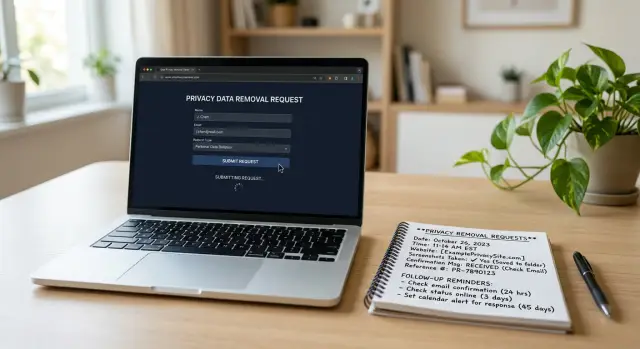
Why form-only requests are harder to track
Some data brokers accept only a web form because it gives them more control. They can decide which fields you must fill in, force a certain format, and route requests into their own system. For them, that's easier than reading email.
For you, it's harder to document. Email gives you a sent message, a timestamp, the full text of your request, and any reply in one thread. A form often gives you much less. You might see a simple "thank you" page, a case number with no copy of what you sent, or no confirmation at all.
That's the real problem. If the broker ignores the request, drags it out, or says it never arrived, you may have almost nothing to point to unless you saved your own records. Even a small typo in your name or address is harder to catch later if the form clears and the text is gone.
Most form-only requests are harder to manage for the same few reasons: there may be no confirmation email, the exact text you submitted can disappear, the broker may give no deadline or status page, and you may later need to prove you submitted the request at all.
So go in with the right expectations. A form-only process is not always a bad sign, but it is easier to lose track of. Assume you'll need to create your own proof of submission and your own follow-up schedule.
That proof matters most when nothing happens. If a listing stays live past the normal review window, your records help you resend the request, compare dates, and show that you already tried. If the broker won't give you a clean record, make one before you close the tab.
What to collect before you open the form
Before you type anything, make a short record for that broker. Two minutes of prep can save a lot of guesswork later.
Start with the broker name and the exact page you're using. Some brokers have different forms for suppression, deletion, and state privacy requests. "Their opt-out page" is too vague when you come back later. "AcmeData - consumer deletion form" is much better.
Next, copy the exact details you plan to submit into a note before you paste them into the form. Use the same spelling, address format, phone number, and email every time. If the broker asks you to confirm your request later, your own record should match what you sent word for word.
It also helps to create one folder for that broker before you start. Save screenshots, PDFs, and short notes in the same place. A simple folder named with the broker and date is enough.
Then scan the form once from top to bottom. Some pages ask for old addresses, middle initials, date of birth, a profile URL, or an ID upload. Others tie the request to a privacy law checkbox. It's better to see that before you begin than halfway through a timed form or a CAPTCHA.
Your prep note only needs a few things: the broker name, the exact page, the contact details you plan to use, any required documents, and where you'll save your screenshots.
This becomes even more important when you're handling several requests at once. Once a form reloads, memory is a weak backup.
How to create proof of submission
When a broker uses only a web form, your proof has to come from your own records. If the broker later says it never got the request, your notes and screenshots are what you have.
Start before you click "Submit." Take a full-page screenshot of the completed form if possible. You want something that shows what you entered, where you sent it, and that the form was ready to go. A cropped image of the button alone is weak proof.
It also helps to save the exact text you typed. Copy it into a note before you send the form. If you need to resubmit later, you won't have to guess which version you used.
Right after submission, save whatever the site gives you. If there's a confirmation page, save it as a PDF or take another full-page screenshot. If you see a ticket number, case ID, or reference number, write it down immediately. Even a short message like "Your request has been received" is worth keeping.
Be precise with time. Write down the date, time, and time zone, not just "sent in the afternoon." If you follow up later, that detail matters.
A basic record should include:
- A screenshot of the completed form before submission.
- A screenshot or PDF of the confirmation page.
- The date, time, and time zone.
- The exact wording you used and any reference number.
If you're doing this by hand, a folder and a running log are enough. The rule is simple: if you can't prove what you sent and when you sent it, assume you may need to do it again.
A simple workflow
When a broker accepts only a web form, a slow and plain approach is usually the safest one. Rushing leads to the wrong email address, the wrong apartment number, or extra personal details you didn't need to share.
First, read the whole form once before you fill anything in. Some brokers ask for optional details that aren't really needed. Others hide extra fields until you choose "opt out" or "delete my record."
Then use this routine:
- Review every field. Check what's required, whether there's a CAPTCHA, and whether the page says how long review may take.
- Fill in only what's needed to match your record. If the form asks for a phone number, employer, or other extra detail, leave it blank unless it's required.
- Pause and check your name, email, and address for mistakes.
- Submit the form once and wait for the confirmation screen. Don't refresh or submit again unless the site clearly says it failed.
- Save your notes right away, including the date, time, email used, and what the confirmation page said.
That last step matters more than most people expect. With a form-only request, your own notes become part of the record.
When to follow up and when to wait
Patience matters, but blind waiting is how requests get lost. If the broker gives a timeline, use it. If the page says "allow 10 business days," don't send a second request on day three.
If the form shows no timeline, set a reminder for 7-14 days. That's long enough for many requests to move through review, but still close enough that you'll remember what you sent.
A simple rule works well. Wait until the stated review period ends. If no period is listed, check back after 7-14 days. If the form required identity documents, check sooner to make sure the files were received. And after a confirmed removal, recheck later in case the profile comes back.
Identity documents change the timing. If you uploaded an ID, utility bill, or selfie, don't let the request sit for two weeks with no check at all. Look for a status page, confirmation screen, or any support route within a few days.
Even after a broker confirms removal, don't treat the case as finished forever. Data brokers refresh records from new sources all the time. A practical habit is to recheck after 30-60 days, then on a lighter schedule after that.
Keep every reminder tied to one saved record. That record should include the broker name, date submitted, what you sent, and your proof of submission. Without that, follow-up turns into guessing.
A realistic example
Say you find your profile on a broker site and the only removal option is a small web form with three fields: name, city, and email. There is no support address, no portal login, and no place to upload documents. That's common.
You open the form and fill it in carefully. You use the same version of your name that appears on the listing, add the city shown on the page, and enter an email address you can still access later.
After you click submit, the site does not send a confirmation email. It only shows a short message on screen such as "Thank you, your request has been received." That sounds fine, but by itself it isn't much proof.
So you stop for a minute and document it. You save a screenshot of the listing before removal, a screenshot of the completed form before submission if you can, and a screenshot of the thank-you message. In your notes, you add the date, time, the exact name used, and the fact that there was no case number.
Then you wait. If the profile is still live after 10 days, that's a reasonable time to check again without chasing too early.
On day 10, the listing is still there. Since you have no ticket and no reply thread, you submit the same request again and log it as a second attempt, not a replacement for the first. That matters. Now you have proof tied to two dates instead of a vague memory that you "already did this."
A few days later, the profile is gone. You save one last screenshot showing the removal result or the missing page, then mark the request closed. If the broker republishes the listing later, your notes show exactly when you first submitted, when you followed up, and what the site showed each time.
Common mistakes
Most problems with form-only opt-outs come from small, boring mistakes. That's exactly why they're easy to miss.
A common one is closing the page too fast after you click submit. Some brokers show the only confirmation you'll ever get on that screen. If you don't save it, you may have no proof later.
Another is using an email address and not writing it down. That sounds minor until a broker sends a verification message to an old inbox, a work address, or an alias you rarely check. Then the request looks ignored when it's really waiting on you.
Double submissions also create confusion. If you send the same form again a day later, note why you did it. Maybe the page froze. Maybe you never saw a confirmation. Without that note, a delayed reply can look like a second case.
Spam folders cause more trouble than people expect. Check spam, promotions, trash, and any filtered folders for a week or two after submission. A simple verification email can decide whether the request moves forward or quietly dies.
People also tend to overshare. If the form needs only your name, city, and listing URL, don't add extra phone numbers, old addresses, or ID images unless the broker clearly requires them.
A few habits prevent most confusion: save the confirmation page, note the email address used, record the date and time, mark any second submission and the reason for it, and watch all folders for follow-up messages.
A quick checklist before you move on
Before you close the tab, take one minute and make sure the request will still make sense a week from now.
Check these four things:
- You saved a screenshot or PDF of the completed form, the confirmation page, or both.
- You wrote down the broker name, the date and time, and the email address used.
- You kept the exact text you entered, plus any case number shown on screen.
- You picked your next check-in date before leaving the page.
Ask yourself one plain question: if support replies next week, can you show what you sent and when you sent it?
If the answer is no, fix it while the page is still open. Copy the text into a note. Rename the screenshot so you can find it later. Add one line to a spreadsheet if that's how you track requests.
The best proof of submission is usually a small set of records, not one perfect document. A screenshot, the text you entered, and a timestamp are often enough.
If you have many brokers to handle
Once you've done a few of these, the hard part usually isn't filling out one form. It's keeping dozens of small records straight.
Turn your notes into a simple template you can reuse for every broker. Keep the same fields in the same order each time so you don't waste energy deciding what to write down.
A good template covers the broker name, the exact form used, the date and time submitted, the personal details entered, your proof of submission, and the current status: waiting, removed, rejected, or needs another try.
Keep everything in one place. That can be a spreadsheet and one folder on your computer, or any setup you'll actually keep updated. Screenshots, dates, case numbers, and outcomes should live together, not across random tabs, inboxes, and phone photos.
This matters more as the list grows. Ten brokers by hand is annoying but manageable. Fifty or a hundred is a different kind of job. Follow-up timing slips, ID requests get missed, and it's easy to forget which broker removed you and which one ignored you.
Set one review day each week. Open your tracker and sort brokers into three groups: still within the normal wait window, ready for follow-up, and done. That small routine saves a lot of repeated checking.
At some point, it's fair to ask whether you want to keep doing all of this by hand. Manual work can be fine for a short list. For a long list, it turns into admin.
If you want less of that, Remove.dev keeps requests in one dashboard, sends removal requests to over 500 data brokers, and monitors for re-listings so you don't have to keep checking the same sites over and over. For people dealing with a large number of brokers, that kind of tracking can save a lot of time.
A tidy process is what makes form-only removals manageable. Without one, filling out the form is only half the job.
FAQ
Why are web-form removal requests harder to track than email?
Email usually leaves a clear trail: a sent message, a timestamp, the full text, and any reply in one thread. A web form may give you only a thank-you page or nothing at all, so you need to make your own record before you close the tab.
What should I collect before I open the form?
Save the broker name, the exact form page, and the exact details you plan to submit. It also helps to create a folder first so your screenshots, PDFs, and notes stay together.
What counts as good proof of submission?
The safest proof is a full-page screenshot of the completed form before submission, plus a screenshot or PDF of the confirmation page after submission. Write down the date, time, time zone, the wording you used, and any case number shown on screen.
How long should I wait before following up?
Start with the timeline on the form if one is shown. If there is no timeline, checking back after 7 to 14 days is a practical default, and you should look sooner if you uploaded ID files and want to confirm they were received.
Should I send the form again if I never get a confirmation email?
Not always. If the page gives a clear success message, save it and wait for the review window to pass. If the form freezes, gives no confirmation at all, or the listing is still live after the normal wait period, sending a second request makes sense as long as you log it as a new attempt.
Do I need to fill in every field?
No. Fill only the fields needed to match your record and complete the request. If a phone number, employer, or old address is optional, leave it blank unless the broker clearly requires it.
What if the broker asks me to upload an ID?
Be more careful with those requests. Save proof that the upload step was completed, then check within a few days for a status page, confirmation screen, or follow-up email so the files do not sit unseen while the case stalls.
How do I keep multiple broker requests organized?
Use the same template every time and keep each broker in one record with the name, exact form used, submission date, email used, proof files, and current status. A spreadsheet and one folder are often enough if you keep them updated right after each request.
What mistakes cause form-only opt-outs to go wrong?
Most failures come from small misses: closing the page before saving the confirmation, using an email address you do not check, sending duplicate requests without noting why, or missing a verification email in spam or promotions. A one-minute review after submission prevents most of this.
When does it make sense to use a service instead of doing this by hand?
If you only have a few brokers, doing it by hand can work. If you are dealing with dozens of sites, repeated follow-ups, and re-listings, a service like Remove.dev can save time by sending requests to over 500 brokers, tracking them in one dashboard, and monitoring for profiles that come back.