Browser autofill mistakes and how they spread your data
Browser autofill mistakes can send the wrong email, address, or phone across many forms, then into broker records that stay online for years.
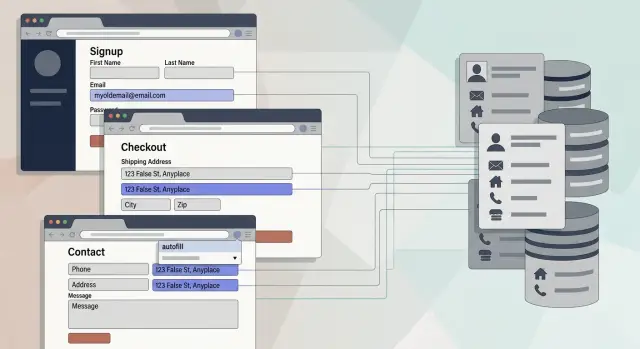
How one wrong field keeps showing up
A small typo can leave a long trail.
You enter an old email once, miss one digit in your street number, or save the wrong apartment line during checkout. Your browser remembers it and keeps offering it everywhere. Because the rest of the form looks right, your eyes slide past the one field that is wrong.
That is why browser autofill mistakes stick around. They sit beside your real name, phone number, and city, so the bad detail feels believable. People trust autofill more than they realize. It feels fast, familiar, and almost official. If the browser fills a form in half a second, it is easy to assume it is pulling from one clean record instead of a pile of old entries.
The pattern is simple. You mistype something once. The browser saves it after a purchase or signup. It appears again on new forms for weeks or months. You accept it without reading every field. Then more sites store the same bad detail.
This usually happens during boring moments: ordering socks on your phone, signing up for a coupon, filling out a delivery form while distracted. No alarm goes off. The mistake just repeats.
After a while, the copied error starts to look like history. If the same bad email shows up on a shopping account, a shipping form, and a newsletter signup, it no longer looks random. It looks tied to you.
Old details make this worse. A previous home address, a work email you no longer use, or a nickname from years ago can still feel close enough to accept. You see it, think "that looks familiar," and move on.
Once the same wrong detail appears across several records, cleaning it up gets harder. It blends in with your real information. What started as one rushed form fill can begin to look like part of your identity.
Where autofill gets the data
Autofill does not make up your details. It pulls them from places you already typed, saved, or synced across devices. That usually means your browser profile, old form entries, account settings, and sometimes a shared computer that still remembers someone else.
The most common source is the saved profile inside your browser. That profile may hold your full name, email, phone number, street address, ZIP code, and payment details. Once those fields are saved, the browser starts offering them anywhere it sees a similar form.
That sounds helpful until an old value gets stuck. A typo in an apartment number, an email you stopped using, or a work phone from two jobs ago can keep coming back. This is how browser autofill mistakes spread with almost no effort from you.
Sites can reinforce the problem. If you entered the wrong address on a shopping site once, that site may save it in your account. Later, your browser sees a similar form somewhere else and suggests the same old version again. One bad entry can bounce between a browser and a website for years.
Shared devices make things messier. A family laptop may still have data from a partner, parent, or former roommate. A work computer can hang onto office details or one-off shipping addresses. Even an old computer from a previous resident can keep filling forms with someone else's information if the browser profile was never cleared.
Browsers also do not always choose the newest value. Sometimes they prefer an older one because it was saved first, used more often, or tied to the main synced profile on the device. Some forms are labeled badly too, so the browser matches the wrong saved item.
If autofill offers something you would never type today, it came from somewhere real: a saved browser profile, an old online account, another user on the device, or a synced browser on another phone or computer.
That is why stale data keeps showing up. It is remembered, reused, and repeated long after you forgot it existed.
How bad form data reaches broker databases
A wrong address or old email usually does not stay in one form. Once you hit submit, that detail can move through several systems behind the scenes.
It often starts with something ordinary: a store checkout, a newsletter signup, a loan pre-check, or an insurance quote. If a browser autofill mistake drops the wrong field into that form, the company will often save it exactly as received. Even if you catch the error later, the first version may already be logged in a customer record.
The chain is longer than it looks
Many companies do more than keep that record for themselves. They pass form data to outside firms that handle ad targeting, mailing tools, fraud screening, identity checks, or customer tracking. Sometimes the full record is shared. Sometimes it is just a few fields, such as your email, phone number, ZIP code, and street address.
That matters because each outside firm may add the new detail to an older profile. If your email matches a record they already have, the wrong address can get attached to your name. If your phone number and birth year line up, the same thing can happen. A small autofill error starts to look confirmed because it sits beside details that are correct.
Say you moved two years ago, but your browser still fills your old apartment number. You use that browser to sign up for a pharmacy coupon, request a moving quote, and buy something from a home goods store. Three separate companies now have the same outdated address. Their vendors see the same match points, merge the records, and treat that old address as current.
Once merged, it spreads again
Data brokers buy, license, or exchange these combined records. They do not need a perfect file to profit from it. A profile with your real name, current phone number, and one wrong address is still useful to marketers, lead sellers, and people-search sites.
After that, the bad detail can show up far beyond the form where it started. Another company buys a list. A people-search site republishes it. An ad platform uses it to match households. A risk-scoring tool pulls it into a background profile. Each copy makes the error harder to trace.
This is why one bad field can hang around for years. The problem is not just the original form. It is the quiet copying, matching, and resale that happen after submission. Once that record reaches data broker databases, fixing your browser settings alone will not pull it back.
A simple example that feels normal
Maya moves to a new apartment and orders a few things online that week. On one checkout form, her browser fills in her new street address but keeps the wrong apartment number from an older entry. She is tired, in a hurry, and clicks submit.
Nothing dramatic happens. The package still arrives because the building staff recognizes her name, so she never fixes the saved form data.
A few days later, she buys something from another store. This time the browser also fills in an old school email she has not used in years. For the phone field, it suggests a number from a family plan that now belongs to her brother. She accepts all three because they look close enough.
That is how these errors stick. One small mismatch feels harmless when the order still goes through.
The first store saves the order details. So do the payment processor, shipping tool, fraud check service, marketing system, and any company that handles returns or warranty records. Maya thinks she gave her details to one shop, but the same form data gets copied into several places.
Later, another site sees her name, the same street, and that old email. Its form prefills the same bad apartment number again. Now the mistake looks more real because it appears in more than one account.
Over time, broker databases can stitch those pieces into one profile. They do not need every detail to match perfectly. A name plus a near match on address, email, or phone is often enough to keep a bad record alive.
The family phone number makes it worse. If her brother uses that number for his own accounts, records can cross over. One household turns into a messy cluster: Maya at the wrong apartment, her old school email, and her brother's phone number sitting in the same profile.
That is why bad data can show up years later on people-search sites or in marketing lists. The original mistake was tiny. The spread was quiet.
How to stop the spread step by step
You do not need a full privacy project to slow this down. Ten focused minutes can stop a lot of bad data from spreading.
Most autofill problems start with details you forgot were still saved: a past address, a work email you no longer use, or two nearly identical profiles. A simple cleanup routine works better than trying to fix every account at once.
- Open your browser's autofill settings and read every saved address, email, phone number, and profile line by line. If something looks old or slightly off, treat it like a real problem.
- Delete past addresses, misspelled street names, old emails, and duplicate profiles. If your browser syncs across devices, make sure the cleanup reached your laptop, phone, and tablet.
- Review the accounts that collect your details most often, like online stores, delivery apps, patient portals, and insurance or pharmacy accounts. Many save their own contact details, so cleaning the browser alone is not enough.
- Pick one current set of contact details and use it only on forms that truly need it. If a form asks for extra information that is not required, leave it blank.
- Before you hit submit, scan every autofilled field. This matters most when a form fills six or seven boxes at once, because one bad entry often hides in the middle.
One habit makes a bigger difference than most people expect: slow down at the end. Autofill saves time, but it also makes you less likely to notice a wrong apartment number or an old phone number. A five-second review can save months of cleanup later.
It also helps to separate your important contact details from low-stakes signups. Use your current home address and main email for bills, deliveries, and legal forms. Be more selective with coupons, giveaways, and other forms that ask for more than they need. These are common autofill privacy risks, and every extra field gives bad data another place to spread.
If you moved recently, changed jobs, or switched emails, do one extra pass through your most-used accounts this week. Those transitions create some of the biggest problems because old details keep getting reused long after they should have disappeared.
Common mistakes that make it worse
Most of these errors do not spread because of one dramatic slip. They spread because of small habits that feel harmless.
A common one is leaving old work or school emails saved in your browser long after you stop using them. You type the first letter, the browser fills the rest, and now a store, booking site, or coupon form has an email tied to an old job or campus account. That stale detail can get copied into marketing systems, sold to data vendors, and mixed with your current profile.
Guest checkout causes a similar mess. People buy one thing from a site they may never visit again, let the browser save the details, and forget about it. Months later, that saved entry pops up on another form. One click, and the wrong address in forms starts traveling again.
Shared devices can create trouble fast. On a family laptop, one person saves their details for convenience, then someone else uses the same browser profile and picks the wrong suggestion without noticing. Now two people's data starts mixing across orders, signups, and support forms.
Small mismatches are easy to ignore. A missing middle initial. An old ZIP code. A street name with the right number but the wrong apartment. These sound minor, but they often act like glue between records. A broker may use that near-match to connect an old file to a newer one.
Another bad assumption is thinking one correction fixes everything. It usually does not. Updating your address on one shopping site does not update the same address on ten other sites, your browser profile, your phone, and every company that already bought the old record. Once bad data leaves the original form, it can keep moving on its own.
Quick checks you can do today
You do not need a full privacy audit to spot trouble. A short check can catch the small errors that keep spreading long after you forgot about them.
Start with what your browser already knows. Open your saved addresses, payment profiles, and contact info. Look for anything outdated, half-complete, or oddly merged. A common example is a profile that mixes your current name with an old address.
Then do a quick test on a harmless signup form. Click into the address and email fields and watch what autofill suggests. Do not submit the form. Just check whether the browser keeps pushing an old apartment number, a nickname you never use, or a secondary email that should not be there.
After that, compare your main email and phone number across a few accounts you use often. Check for duplicate name entries with small spelling changes. Look for an old roommate, spouse, or family member in saved profiles. Review shipping and billing addresses in major shopping accounts. If you do not recognize a profile, delete it instead of leaving it for later.
These small mismatches matter more than they seem. If one store has "Jon Smith" at your old address and another has "John Smith" with your current phone number, that can be enough for records to get stitched together in messy ways.
Retail sites, food delivery apps, travel bookings, and quote forms are common sources because they collect the same basics again and again. If you see an old phone number or extra household member in two or three of those places, assume it has spread further.
What to do if the data is already out there
Fixing your browser autofill helps with future forms. It does not erase the old records already copied into broker files.
That is the frustrating part. One broker may still hold last year's version of your profile, and another may buy the same bad address or email from a different seller next month. Even after you correct the source, old entries can keep circulating.
Start by making a short list of places where the wrong data was submitted. Keep it simple: online checkouts, food delivery or ride apps, quote forms, loyalty signups, and store accounts are good places to start. If the same wrong apartment number or email showed up in three or four places, there is a good chance it spread through vendor sharing, list sales, or broker matching.
Then update the accounts you still use, especially shopping, delivery, travel, and finance accounts. If a service keeps syncing old profile data, it can feed the same error back into the system.
After that, think about removal. Manual opt-outs work, but they take time, and some records come back after a fresh data upload. If you do not want to handle that by hand, a service like Remove.dev can help. It searches across more than 500 data brokers, sends removal requests, and keeps monitoring for relistings, which matters when one old autofill mistake has spread far beyond the original form.
The order matters: fix saved autofill data, update your active accounts, keep a short list of bad submissions, and then go after broker listings.
One wrong field can travel surprisingly far. The best time to clean up autofill is before your next rushed checkout. The second-best time is now.
FAQ
Why does browser autofill keep suggesting an old address?
Because your browser often keeps old saved profiles, form history, or synced data from another device. If one bad entry was saved early or used a lot, it can keep showing up even after you moved or changed emails.
Can one typo really end up on data broker sites?
Yes. Once you submit a form, that detail can be saved by the site and passed to outside vendors like shipping, marketing, fraud, or identity tools. If those records get merged with your real name, phone, or email, the mistake can spread far beyond the original form.
Where is autofill getting my contact details from?
Usually it comes from your browser profile, saved form entries, synced accounts, or website accounts that stored your details before. On shared devices, it may even pull from someone else's old profile.
What is the fastest way to clean up bad autofill data?
Start with your browser's saved addresses, emails, phone numbers, and payment profiles. Delete anything old, misspelled, duplicated, or unfamiliar, then check that the same cleanup reached your phone, tablet, and laptop if sync is on.
Do I need to fix both my browser and my online accounts?
Yes, both matter. Fixing the browser stops future mistakes, but many stores, delivery apps, and quote sites keep their own saved profile data, so an old address can keep coming back unless you update those accounts too.
Can a shared computer cause mixed-up autofill results?
Very often, yes. A family or work computer can hold saved details from another person, and one wrong click can mix names, phone numbers, and addresses across new forms.
Why do old emails or phone numbers keep coming back?
Browsers and websites do not always prefer the newest detail. They may keep suggesting an older value because it was saved first, used more often, or tied to the main synced profile on the device.
How can I catch bad autofill before I submit a form?
Pause for a few seconds before you hit submit and read every autofilled field, not just the first and last one. The bad entry is often in the middle, like an apartment number, old email, or stale phone number that looks close enough at a glance.
What should I do if the bad data is already out there?
First fix the source by cleaning your browser and updating the accounts you still use. Then keep a short note of where the wrong detail was submitted, because those are the places most likely to have fed the error into vendor systems and broker files.
Can Remove.dev help with old autofill mistakes?
If you do not want to chase broker opt-outs by hand, Remove.dev can take over that part. It finds and removes personal data from over 500 data brokers, keeps watching for relistings, and most removals are completed within 7 to 14 days.