Check old roommates linked to your profile: simple steps
Check old roommates linked to your profile on people-search sites, find old household ties, and see what to do if names still appear together.
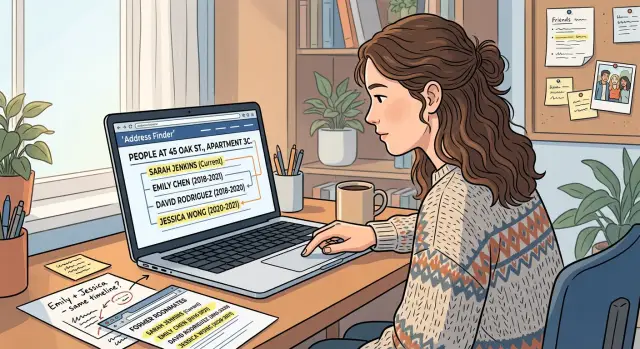
Why old roommate links happen
Many people-search sites start with an address, then attach names, ages, phone numbers, and move dates. That works until the data gets old. If two or three people once shared an apartment, the site may keep all of them in one "household" long after they moved out.
The mistake usually starts with ordinary records. A lease lists multiple names. A utility bill stays on file. A change-of-address entry never gets refreshed. One person updates their records, another does not. The broker keeps both names tied to the same place because the older record still looks plausible.
Once that happens, the error spreads. One broker copies another. A mirror site republishes it. Later, a third site imports the copied version. A short living arrangement from years ago can turn into a long-running profile link.
These mix-ups usually come from a few sources:
- leases or utility accounts with more than one name
- stale change-of-address or voter records
- public records that show an address but not a clear move-out date
- merged profiles for people with similar names or ages
"Possible associates" and "household members" sections make the problem worse. Those labels sound harmless, but they make it easy for someone to search your old roommate, open the profile, and click through to you.
Where these links usually show up
These links rarely sit in one place. They tend to appear across several kinds of pages, often with slightly different labels.
Regular profile pages are the obvious place to look. Search your name and the site may show a former roommate beside one of your old addresses. Reverse address pages are just as common. Those pages start with the street address and list everyone the site thinks lived there, so old tenants, subletters, partners, and roommates can end up grouped together.
Pay close attention to small profile sections such as "household members," "associated people," "possible relatives," and "current and past residents." Those sections are often based on shared mail or shared records, not a real relationship.
Start with four places:
- name-based profile pages
- reverse address pages for current and past homes
- household or associate sections inside a profile
- copy sites that repeat the same listing with minor changes
If the same old address tie shows up more than once, write that down. That usually means the record has already been copied and may keep resurfacing even after one site removes it.
How to check your own profile
The fastest way to miss a bad link is to search randomly. Use the same routine on each site and save proof as you go.
Use a fixed search order
- Search your full name with your city and state. Open every result that looks close, even if the age or middle initial is slightly off.
- Search the old address by itself. Many sites have resident pages for one address, and that is where shared household links often show up.
- Search each former roommate's full name with that address.
- Open the full profile page and scan sections such as "household members," "associates," "possible relatives," and "current and past residents."
- Save a screenshot of anything wrong. Note the site, the date, and the exact page title.
Do not rely on the preview card. Search results often hide the actual problem. A result may show only your name, while the full profile lists two old roommates and a shared address underneath.
A simple example helps. If you lived with Alex and Jordan in Chicago three years ago, search your name first. Then search the old apartment address. If all three names appear on the address page, search Alex with that address too. If Alex's profile also lists you in a household section, the site is still connecting both of you.
Your notes do not need to be fancy. A screenshot folder and a short note on your phone is enough. Record the site, whose profile you opened, the address shown, and where the wrong link appears.
What to look for on each listing
A bad household link is usually hidden in small details, not the main headline. Read the profile the way a stranger would. Could this page connect your name to someone else's address history in a few clicks?
Start with the address history. If your old apartment appears there, check who else is tied to it and which years are listed. An incorrect move-out year is common. If you left in 2020 but the site says 2022, that extra time can make two separate residents look like one household.
Apartment numbers matter more than most people expect. "Apt 3B," "Unit 12," and no unit at all can behave like different records. A missing unit number can merge several households in the same building.
Then check the extra identifiers. Old phone numbers, email addresses, and name variants often keep the bad match alive. A shared landline, a utility contact number, a school email, a maiden name, or a shortened first name can all reinforce the same address tie. "Jon" and "John" are close enough for some brokers to treat as the same person.
Also look at the labels the site uses. "Possible relative" can mean nothing more than shared mail at one address. "Associate" often means the site saw two names at the same location and guessed the rest.
Write down every mismatch, even the small ones. A wrong move-out year, a stale email, and a missing unit number may be enough to explain why the profile keeps pairing you with a former roommate.
A simple example
Say you rented an apartment with Jake two years ago. You moved out and updated your address. Jake stayed a few months longer, then moved too. In everyday life, that living arrangement is over. On people-search sites, it may still look current.
Jake searches his own name and finds a profile with the old apartment. Under "possible household members" or "associated people," your name appears too. A stranger can search Jake, land on that page, see the shared address, and click into your profile from there. The record is old, but the path to your information is still live.
Now imagine the same match appears on three more sites. One says "associate." Another says "past resident." A third puts both names on a reverse address page. The wording changes, but the result is the same: your name stays tied to Jake through one old address.
That is why one clean search result does not mean the issue is gone. What matters is whether the shared address link still appears under your name, under your old roommate's name, or on the address page itself.
Mistakes that slow people down
Most people stop after the first clean result. That is the biggest mistake.
People-search sites do not all use the same source data or update on the same schedule. One site may remove a household link quickly while another keeps it for months. If you only search your own name on one site, you can miss the same connection sitting under your roommate's profile or on a reverse address page.
Another common mistake is searching only one version of your name. If one record lists "Sam Lee," another lists "Samuel Lee," and a third uses a middle initial or an old last name, the household tie may only appear under one version.
Old addresses create problems too. If you search the street without the apartment number, you may miss the exact page that grouped your household together. On the other hand, if the broker dropped the unit number, searching only the full unit address may also miss it. Try both.
Finally, save proof right away. Listings change. A page can disappear, move, or come back later. If you do not keep screenshots or notes, it becomes much harder to file a removal request or tell whether the same record returned in a new form.
A final pass before you stop
Before you move on, do one more sweep.
Check on desktop and phone. Some sites show different snippets, cards, or cached results depending on the device. Test the address in more than one format, with the unit number and without it. Then search your own name, each old roommate's name, and the address by itself.
After that, wait a couple of weeks and check again. Some brokers rebuild profiles from fresh source data or leave stale pages in cache longer than expected. A listing that looks gone today can reappear later.
You do not need to find every page on the internet. You need enough proof that the old address no longer shows up in the places people usually find it: your profile, your former roommate's profile, and the main reverse address pages.
What to do next
Once you find the bad links, start removing the clearest matches first. If a site still lists your name with a former roommate or shows an old address where you no longer live, send the removal request there instead of waiting for a perfect master list. Taking down the obvious records early reduces what other sites can keep copying.
Keep a simple log with the site name, the address shown, the names connected to it, the date you checked, and whether you sent a request. That is enough to track progress and catch relistings later.
If a listing comes down, search again after a week or two. Then check again later. Reposts are common because brokers buy fresh records, merge older files, and republish household links that should have died years ago.
If you are doing this manually, work in short rounds. Check a site, send the request, log it, and move on. That is easier than trying to clear everything in one sitting.
If the repeat work starts taking too much time, Remove.dev can handle the ongoing cleanup. It removes personal data from more than 500 data brokers, keeps monitoring for relistings, and lets you track each request in real time through a dashboard. The goal is simple: stop an old shared address from connecting your name to someone else's profile again and again.
FAQ
Why is my old roommate still showing on my profile?
Usually because a data broker kept an old shared address on file and never updated who moved out. Once one site keeps that household link, other sites often copy it and the match spreads.
Where should I look for these links first?
Start with your own name, your former roommate's name, and the old address. Then open the full profile and any reverse address page, because the bad link often shows there instead of in the search preview.
Should I search my name or the old address first?
Begin with your full name plus city and state, then search the old address by itself. After that, search each old roommate's name with that address so you can catch links that only appear on their profile.
What parts of a profile usually hide the bad connection?
Check the small sections, not just the top of the page. Labels like "household members," "associates," "possible relatives," and "current and past residents" are where these old ties often show up.
Do apartment numbers really matter?
Yes, they can make a big difference. If a site drops the unit number or mixes formats like "Apt 3B" and "Unit 3B," it may group separate households into one record.
What if the link only shows under my roommate's name?
That still means your information is exposed through the old address. If someone can search your former roommate, open their page, and click through to you, the link is still live and worth removing.
Should I save screenshots before I request removal?
Yes. Save screenshots and note the site, date, page title, and address shown before you send any request. Listings move or disappear, and having proof makes it easier to track what changed later.
If one site removes the link, am I done?
No. One clean result does not mean the problem is gone. Different brokers use different records and update at different times, so the same address tie may still be sitting on another site or come back later.
What's the fastest way to clean this up?
Go after the clearest matches first. If a site still shows your name with a former roommate or lists the old address as current, send that removal request now and keep a short log so you can recheck in a week or two.
Can Remove.dev help if these links keep coming back?
If you do not want to keep checking and filing requests by hand, Remove.dev can do the repeat work for you. It removes personal data from more than 500 brokers, watches for relistings, and shows each request in a live dashboard.