Church livestream privacy: how family details get found
Church livestream privacy matters when captions, prayer requests, names, cities, and health updates can turn into searchable public records.
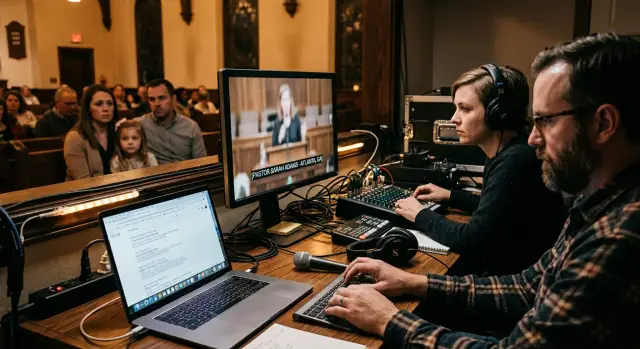
Why this feels private but isn't
A church livestream or prayer page can feel like a local notice board. It feels familiar, limited, and short-lived. Online, it works more like a public record.
The problem usually is not the video by itself. It is the text created around it. Automatic captions can turn a spoken prayer into searchable words, including full names, a city, a school, or a health update. Once that text is indexed, the audience is no longer just the people in the room or the members who watched live.
A prayer that sounds harmless during service can become much more revealing once it appears as plain text: "Please pray for Linda Harris in Columbus after her cancer surgery." Search engines can read that. So can tools that copy, summarize, and archive pages.
Prayer request pages create the same risk. They are usually posted with good intentions, then left online for months or years. A short note like "Pray for Jason, Emily, and their kids as they move back to Tulsa after Mark's stroke" can identify a family much faster than most people expect. It names people, places them in a city, ties them to a family event, and adds a medical detail.
Family roles make this even easier. Words like "wife," "daughter," "pastor's son," or "the Smith family" help strangers connect one detail to another. Even without a last name, a first name plus a church name, city, and health event can narrow things down a lot.
Archived videos widen the audience too. A live service might have a few hundred viewers. The replay can be watched later, clipped, shared in group chats, reposted elsewhere, or pulled into search results. What felt like a brief moment can stay public long after the reason for sharing it has passed.
There is another layer many churches miss. Once names and family health details are public and machine-readable, they can spread beyond the church website. Data brokers and people-search sites often collect public information from many places and combine it into one profile. That does not happen every time, but it happens often enough to treat public prayer details with real care.
Which details expose a family
The risk is rarely one detail by itself. It is the pileup.
A first name may seem harmless. A city may seem harmless too. Put them next to a church name, a school, and a health update, and a stranger can often connect the dots in minutes.
That is why the issue goes beyond the video feed. Captions, archived sermon pages, prayer request forms, bulletins, and comment sections can all turn private family information into searchable text.
Full names create the biggest risk. Maiden names add even more because they connect someone to older records, relatives, and past addresses. Nicknames matter too. If a request says "Please pray for Katie 'KJ' Johnson," that can match social profiles, school rosters, and old public posts that would not appear under a formal name alone.
Location details make those names much easier to pin down. A city, neighborhood, school, workplace, sports team, or ministry group can narrow the search fast. In a small town, even something like "the choir director's daughter at Westview High" may be enough.
Health details are often the most sensitive. A short prayer update can reveal far more than people meant to share, especially when captions make every spoken word searchable. The details that deserve the most care include:
- surgery dates or cancer treatment
- rehab or mental health care
- pregnancy, miscarriage, or fertility issues
- funerals, memorials, or causes of death
- a child's hospital stay or diagnosis
Contact details raise the risk even more. Phone numbers, email addresses, and home addresses should almost never appear on public pages. Once posted, they can spread into people-search sites, spam lists, scam calls, and unwanted outreach.
A simple example shows how quickly this happens. A church post says, "Pray for Melissa Carter of Springfield. She is recovering from surgery, and meals can be dropped at 214 Oak Street. Contact her sister Jenny at the number below." That one message gives a full name, city, health event, home address, family connection, and phone number. Outside the intended audience, it reads like a ready-made profile.
A good rule is simple: if a detail helps identify, locate, or contact a person, treat it carefully. Two matching details may be enough. Four or five can expose the whole household.
How search builds a profile
Search engines do not read a prayer request the way church members do. They read plain text. If a page includes a full name, a city, a medical update, and a family role, those words can become searchable and easy to match with other records.
This is how privacy breaks down in ordinary ways. A caption might say, "Please pray for Michael Turner from Columbus after his surgery." A PDF bulletin might repeat the same name. A ministry page might mention his wife and children. Each piece looks minor on its own. Together, they can point to one real family with very little guesswork.
A name plus a city is often enough to narrow results. Add a church name, school, illness, or relative's first name, and search results get very specific very quickly. Even a common name becomes easier to identify when one page mentions a recent hospital stay and another mentions the same person singing in the choir.
Old copies also stick around longer than most people expect. If a page is edited after a service, the earlier wording may still show up in search snippets or cached results for a while. PDFs are another problem. Churches often upload bulletins, prayer sheets, or event handouts as files, then forget about them. Those files can stay visible long after the main page changes.
Then the profile can spread beyond the church site. Data brokers and people-search sites often collect public details from many places and combine them into a single listing. A public prayer request can add context to records they already have, such as age range, relatives, or city history.
The pattern is usually simple. A livestream caption names a person and their city. A bulletin PDF repeats the name and mentions a health event. Search results connect both pages. A broker then copies those public details into a people-search profile.
Once that happens, cleanup gets harder because you are no longer dealing with one church post. You are dealing with copies, search results, and broker listings that can linger long after the original page is changed.
A simple example of how this spreads
Most problems start with a kind moment, not a reckless decision. A pastor reads a prayer request during a live service: "Please pray for Susan Miller of Dayton. She starts chemo on Monday, and her daughter Ava is staying home to help."
Everyone in the room hears it once. Online, it can last much longer.
If the church streams to a platform with automatic captions, Susan's full name, city, and health event may end up in searchable text. The recording stays online with the caption file and the date. Dates matter because they help strangers connect one mention to other public posts.
A week later, the church uploads a bulletin as a PDF. It says the Millers "thank the church family for meals and prayer during Susan's treatment" and lists the same town. Maybe it also mentions her husband, Mark, who will speak at next month's men's breakfast. Now the same family appears in two places with names that match.
A stranger does not need special tools to piece this together. One search for a full name plus a town, or an illness plus a last name, can pull up both pages.
At that point, a simple search may reveal:
- a full name
- a city or neighborhood
- a health issue and rough timeline
- relatives' names
- the church they attend
That is enough to build a rough family profile. It can also lead to more results, such as social posts, old fundraising pages, reunion lists, and existing broker entries that already contain addresses, age ranges, and relatives.
The intended audience was a church community. The real audience becomes anyone who knows what to search.
How to review your pages
Start with a short audit, not a full rebuild. Pick one recent month and check every place a member's name might appear. Most churches find the same details repeated in more places than they expected.
Look at a few common trouble spots:
- livestream replays and auto-captions
- prayer request pages and archived updates
- PDF bulletins and newsletter posts
- event forms that show submissions or comments
- social posts about meals, care needs, or prayer updates
A name on its own may seem harmless. Add the church name, city, and a health detail, and it becomes easy to find.
After that, test a few real searches. Search for a recent first and last name, then add the church name or city. Try another search with a condition, surgery, or funeral mention if that was said on air. You are checking what a stranger could learn in two minutes, not what regular members already know.
Auto-captions deserve close attention. They often turn a spoken prayer into clean, searchable text even when the speaker was talking fast. If the caption still identifies the person, changing the video title alone will not fix much.
Then clean up what you can. Old posts with full names, city names, school names, and medical details should be shortened, edited, or removed. A safer version usually keeps the purpose without exposing the family. "Please pray for the Johnson family during a medical crisis" often says enough.
Set one rule before the next service
People need a rule they can remember under pressure. Keep it short and repeat it to staff, volunteers, and anyone who leads prayer from the stage.
A practical rule looks like this:
- on air, use a first name only, initials, or no name
- do not mention a diagnosis, hospital, school, or street
- get written consent before sharing family details
- move sensitive requests to private channels
That one habit prevents a lot of cleanup later.
Common mistakes that leave details exposed
Most privacy problems come from normal church habits, not bad intent. A prayer request feels temporary when it is read aloud to familiar faces. A livestream, caption file, or archived page can turn that same moment into a searchable record.
One common mistake is reading prayer cards word for word during the stream. If the card says, "Please pray for Sarah Miller in Dayton after her biopsy," a stranger can connect a full name, city, and health event in one line.
Another mistake is leaving old livestreams public long after the service ends. Many churches assume the risk ends when the live event is over. Often the replay creates more exposure because search engines have time to index the title, page text, captions, and comments.
Posting full prayer lists as downloadable PDFs is another easy way to expose people. PDFs are indexed like regular pages, and they are easy to copy, save, and share outside the church.
Small churches also tend to assume nobody will notice them online. Search does not work that way. A tiny site can still appear in results when a page includes a full name, a city, and a specific event like surgery, rehab, or a funeral.
Relatives' names create another layer of exposure. A request for "Tom's wife, Lisa, and their son Evan" may sound harmless if the last name is missing. But if the same church site also lists volunteer teams, donation pages, or an address for family meals, those pieces can still point to the same household.
Most trouble comes from the same patterns: reading detailed requests aloud, keeping replays public for months, uploading prayer lists as PDFs, assuming a small audience means low visibility, and forgetting that relatives' names can identify the same home.
Usually, the problem is accumulation. One page may seem harmless. Five pages, a caption file, and an old video archive can paint a very clear picture of a family.
A quick check before you post or go live
A 30-second pause can save a family a lot of stress later. The safest habit is simple: cut details before they leave the room.
Treat a prayer list, bulletin note, and spoken update the same way. If a stream has captions, names and health details can turn into searchable text even when the original audience was only your church.
Before you post, ask a few direct questions:
- Does this still make sense with a first name, initials, or no name at all?
- Can you remove the city, street, school, workplace, or hospital name?
- Are you sharing a health issue told in confidence, or more detail than people need?
- If this appears in search results later, would the family feel exposed?
- Has the family approved the exact wording?
Small edits usually keep the meaning while dropping most of the risk. Instead of "Please pray for Michael and Erin Thompson of Cedar Falls as Erin starts treatment for breast cancer on Monday," use "Please pray for Erin T. and her family during a serious health issue this week."
The second version still tells people how to pray. It leaves out the parts strangers can search, copy, and connect to other records.
The same rule applies during live prayer time. If a speaker tends to add extra context, give them a short written version ahead of time and ask them to stick to it. That matters even more when the service is recorded and posted afterward.
One last check helps: if you would feel uneasy seeing the sentence on a public sign outside the building, do not post it online or say it into a microphone.
Kindness mixed with too much detail causes most of these problems. A shorter request is usually the better request.
What to do if details are already out there
Start with the source. If a prayer request page, livestream replay, bulletin archive, or auto-generated caption still shows names, city details, or medical information, edit it first or take it down. If the same text appears in an archive or transcript file, remove or replace that too. There is little point chasing search results while the original page is still public.
Next, ask search platforms to refresh outdated results. A page can stay visible in search for a while even after you fix it. Cached snippets may still show the old private sentence. If the page changed, request a new crawl. If the page is gone, request removal of the outdated result.
If a real family was named, tell them clearly what happened. Say what was posted, where it appeared, what has been removed, and what may still remain visible for a few days or weeks. Plain facts help more than vague reassurance.
A simple order works well:
- edit or remove the original page, replay, caption, or archive
- request refreshed or removed search results
- tell the family exactly what was exposed
- check people-search sites for the same names, city, and relatives
- watch for reposts or relistings
The hardest part often starts after the church page is fixed. Once a full name, town, and health event are public, that information can be copied by people-search sites and data brokers. A caption like "Please pray for Mark Jensen from Tulsa after his stroke" can give enough context to connect a person to an address, age range, relatives, and past addresses.
If that has already happened, broker removal becomes part of the cleanup. Doing it by hand takes time because listings often reappear. Services such as Remove.dev handle that process at scale by finding listings across hundreds of data brokers, sending removal requests, and monitoring for relistings so the same details are less likely to return.
Then do a follow-up check. Search the name, city, and health detail together and separately a week later, then again after a month. If nothing new appears, good. If it does, you have a clear trail of what to remove next.
The main lesson is simple: when prayer details go online, even for good reasons, they stop being private in the way many churches assume. A few careful edits before you post can prevent a long cleanup later.