Community theater cast page privacy: how families get exposed
Community theater cast page privacy matters because bios, photos, schools, and hometowns can let brokers and scammers map an entire family.
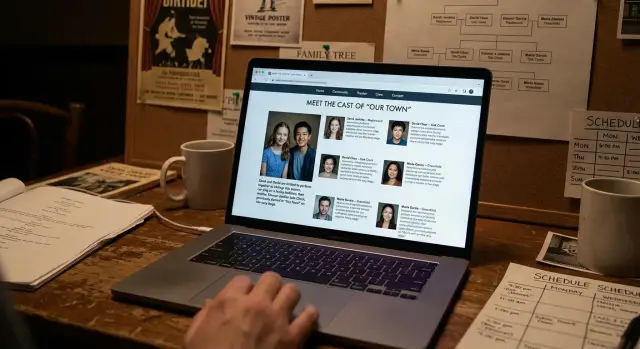
Why a cast page reveals more than it seems
A community theater cast page is meant to feel warm and local. It celebrates the show, thanks volunteers, and helps the audience connect with the people on stage.
The problem is how much one page can reveal once all the details sit together. A cast list might include full names, headshots, age ranges, school names, favorite activities, past roles, and the town someone lives in. On their own, those details feel harmless. Side by side, they start to look like a profile.
That is where the privacy risk starts. A first name and photo seem normal. A short bio like "Emma, 12, loves choir and lives in Oak Ridge" sounds sweet. Add a parent thank-you note, a credit from last year's show, and a rehearsal photo tagged with the theater's location, and the page points to a real family in a very specific place.
Family details rarely stay on just one page. A child's bio might mention parents by name. A sponsor page may list the family business. A thank-you section could mention grandparents, siblings, or a local school. No home address appears, but the pattern is still easy to read.
That is what makes these pages risky. They usually do not expose anyone with one big secret. They expose people by stacking ordinary facts until the picture is obvious.
Archives make the problem worse. Many theaters keep old production pages online because they want a record of past shows. That means a bio written for one weekend run can still show up in search results years later, long after a child has changed schools, grown up, or moved.
Photos add another layer. Faces, costumes, role names, and captions can connect a person to an age group and a local group in seconds. For a stranger, that is often enough to keep digging.
Most families think they are sharing one nice moment from a show. What they may be creating is a long, searchable record of who is in the family, where they spend time, and where to look next.
What people can learn from bios and photos
The risk usually comes from small details that feel friendly on their own but become revealing once they appear together on a public page.
A typical profile may show a full name, role, headshot, and hometown. That already gives a stranger enough to start searching. If the page also names the season or exact performance dates, it places that person in a specific place at a specific time.
Bios often go further. Many mention where someone goes to school, where they work, what town they grew up in, and who came to support them. A line like "Emma is a junior at Westfield High and thanks her mom, dad, and little brother Liam" sounds harmless. It also gives away a school, an age range, a family link, and a name tied to the same household.
From one page, someone can often pull a full name and nickname, a hometown or neighborhood, a school or employer, relatives named in the bio, and a current photo tied to a date.
Photos make the page even easier to use. A clear headshot can be matched with other public photos through reverse image searches or face matching tools. If that same image appears on a school page, sports roster, or social profile, it helps connect separate pieces into one record. Group photos can expose siblings, friends, or children who were never named on the page at all.
Dates matter more than most people think. A bio from the spring musical, a summer workshop photo, and a fall cast list can build a clean timeline of where someone spent time and with whom. Over a few seasons, public cast bios can reveal schools, jobs, family ties, and community groups without ever saying much in one place.
That is why family exposure often starts with ordinary details. One page may not say much. Three seasons of bios and photos can say a lot.
How brokers and scammers reuse the trail
A cast page often feels safe because each detail seems minor. A first name, a school, a headshot, a parent listed as a costume volunteer, maybe a line about a sibling in the same show. That is exactly the kind of trail data brokers collect every day.
Brokers scrape public pages and fold those details into much larger profiles. They may match a cast bio with address records, age ranges, past addresses, phone numbers, and relatives pulled from other public sources. One theater page does not create the whole profile. It fills in missing pieces.
That is why these pages are easy to overlook. They are public, searchable, and tied to real local places. For a broker, that is useful. For a scammer, it can be even better.
A scam call sounds a lot more believable when the caller already knows a few local facts. If a page says a child is in a summer production, a caller can pretend to be from the theater, the booster group, the costume team, or another parent. If they know the family name and a volunteer role, the message feels familiar instead of random.
The most reusable details are usually simple ones: parent and child names shown together, school or town references, volunteer jobs like ticketing or fundraising, and rehearsal photos with uniforms, car stickers, or street signs in view.
Impersonation is a real risk. When a page names the cast member, the parent volunteer, and maybe a sibling in the ensemble, someone can copy that identity in email or direct messages. They do not need much. A believable name, a local connection, and a reason to ask for money or information are often enough.
Public records make the picture sharper. A scammer can match a cast bio with people-search sites, property data, voter rolls, or old social posts. Suddenly a short bio about "Maya, who loves theater and lives with her parents and younger brother" turns into a profile with surnames, address history, likely ages, and contact details.
The cast page is not risky because of one sentence. It becomes risky because scattered facts, once matched together, do not look scattered anymore.
A realistic example from one local show
Picture a local production of "Bye Bye Birdie." The cast page lists 15-year-old Ava Miller in the ensemble, and her short bio says she is a sophomore at Westfield High and lives in Brookhaven. That looks harmless. It is also where the trouble usually starts.
A few lines lower, the theater posts a thank-you note for volunteers. It thanks "Jen Miller for costume repairs and late-night pickups." Now a stranger has a teen's full name, a parent's name, a school, and a town from one page.
The photo gallery adds more. In one image, Ava is standing with a younger boy who has the same last name written on a cast-party cupcake. In another, she is tagged by first name with two friends outside a pizza place near the theater. A third photo shows the group in front of Westfield High after rehearsal. None of this feels private when it goes up. Together, it becomes a family map.
A stranger does not need special tools. They can search Ava Miller with Brookhaven and Westfield High, then search Jen Miller in the same town. A broker site may fill in the home address, age range, and other relatives. A school newsletter could confirm the younger brother's name. A volunteer list or booster page may add another adult in the household.
At that point, the profile gets much fuller. The stranger can guess where Ava is after school, which parent usually picks her up, where the family spends time on show weekends, and which places they visit with friends. If someone wants to sound believable in a message, they now have enough detail to try. "Your mom Jen asked me to grab you after rehearsal" is a lot more convincing when it matches real names and routines.
That is the problem with public cast bios. One small page can turn into a stitched record of a family, especially when bios, thank-yous, and photo albums all stay searchable in the same place.
How to review your current cast page
Start the review the way a stranger would. Search the performer's full name with the show title, theater name, and town. Then search the name on its own. If the page appears quickly, it is easy for anyone else to find too.
The goal is to see the full trail, not just the page your theater posted. Cast bios often get copied into season pages, ticket listings, digital playbills, PDFs, and social posts. One short bio can travel much further than people expect.
As you review, write down every detail you find, even the ones that seem harmless at first. Check the page text for full names, schools, workplaces, ages, hometowns, and family references. Review photos, captions, alt text, and image file names that may include a child's name or the show date. Look for downloadable files such as playbills, calendars, press notes, or audition packets. Then check older season pages and social reposts from the theater, cast members, or local groups.
Small details add up fast. A first name and role may feel fine. Add a school, a parent mention, a town, and a smiling photo, and you have enough for a broker profile or a scam message that sounds personal.
Pay close attention to repeated details. If the same line appears on three season pages and two social posts, it becomes much easier to confirm identity. Even file names matter. A photo saved as "sophie-johnson-age-11-wizard-of-oz.jpg" gives away far more than most captions would.
Then sort everything into two groups: what the audience needs, and what it does not. Most cast pages work well with a name, a role, and one short sentence about theater experience. Exact schools, employers, ages, neighborhood clues, and family relationships usually do not help anyone buy a ticket or enjoy the show.
Make that cut before the page sits online for months, and you remove a lot of risk without making the page feel empty.
Safer ways to share cast information
A cast page does not need much to feel personal. Shorter is usually better, especially when the page may stay searchable long after closing night.
For children, first names are often enough. A role, a headshot, and one short line about what they enjoy on stage can still feel warm and welcoming. Full names make it much easier to connect a child to school records, sports rosters, and family social posts.
Keep bios brief and focused on the show, not on the person's whole life. "Emma loves singing and is excited to play a forest sprite" works fine. It says enough without giving away a school, neighborhood, parent name, or the places the family visits every week.
Photos need the same care. Choose images that show the cast member clearly but do not reveal extra details in the background. A plain, close theater photo is usually best.
Skip photos that show school uniforms, team logos, house numbers, street signs, car plates, pickup spots, rehearsal routes, name tags, or event badges.
Old pages deserve a second look too. Once the show ends, ask whether the public page still needs to exist. If not, take it down. If the theater wants an archive, keep a simple record of the production without cast bios and personal notes.
It also helps to set one written rule that everyone follows. Staff, parents, and volunteers should not all make up their own version of "careful." That is how extra details slip out.
A simple policy goes a long way: no full names for minors unless a parent agrees in writing, no school names or family details, no exact rehearsal schedules or contact information, and no reposting cast bios and photos on public personal pages without approval.
That may feel strict at first. It is still easier than cleaning up family exposure after the details spread across search results and broker sites.
Common mistakes that keep pages searchable
The problem is usually not one dramatic mistake. It is a pile of small choices that make a cast page easy to find, easy to copy, and hard to remove later.
One common mistake is leaving last season's page online and forgetting it exists. The show is over, but the page still has headshots, hometowns, school names, and sometimes a full cast list that links children and parents. Search engines keep finding it, and other sites can copy it long after the theater has moved on.
Another issue is publishing the same bio twice. The webpage may look fairly light, while a downloadable program includes more detail such as age, training, past roles, school, and family thank-yous. Now there are two public versions of the same information, and the file version often stays searchable for years.
Photo handling causes problems too. If image files use names like "emma-smith-july-2024-cast.jpg," that text can show up in search results even when the page itself is sparse. Production dates make the profile even easier to match with social posts, ticket pages, and old event calendars.
The same thing happens when cast spotlights are copied from social media onto the website. A post written for a quick audience on one app may include favorite local places, school clubs, siblings, or weekend jobs. Put that on a permanent site, and it becomes a neat profile for brokers or scammers.
Parent contact details are still one of the worst habits. It may seem practical to list a parent email or phone number for young performers, but public pages get scraped quickly. Once that contact detail sits next to a child's name and show date, it is much easier to reuse.
A safer page is usually a smaller page. Keep bios short, avoid duplicate program files, rename images before upload, remove old pages on a schedule, and keep parent contact details off public cast listings.
Quick checks before a page goes live
Before you publish a cast page, read it like a stranger would, not like a parent, director, or proud friend. If someone knows nothing about your family, could they still figure out who a child is, where they go to school, and who they live with?
That is the real test. Most privacy problems do not come from one detail. They come from several small details sitting together on one easy-to-find page.
A quick review usually catches the biggest risks. Check whether a child's full name appears anywhere on the page, in image file names, captions, or downloadable programs. Look for school names, hometowns, family ties, and ages packed into the same short bio. Review every photo for uniforms, house numbers, street signs, school logos, car plates, or name tags. Search for older cast pages, PDFs, and galleries that may still be public after the show ends. Then ask one blunt question: does this detail help someone decide to buy a ticket, or is it just extra?
The photo review matters more than many people expect. A short bio may say very little, but one backstage photo can show a school hoodie, a rehearsal location, and a sibling beside the cast member. That gives away more than the written text.
Old files are another weak spot. A current page may look careful while last year's PDF still lists full names, local schools, and family relationships. Searchable archives can keep that information online for years if nobody goes back and cleans them up.
It also helps to trim details that feel harmless but add up fast. Saying someone loves singing and joined their first show at age eight is usually fine. Naming their middle school, younger brother in the same cast, and the town they live in is too much.
A simple rule works well: if a ticket buyer does not need it, leave it out. First names, roles, and one short fun line are often enough. If your group wants fuller bios for the printed program, keep a lighter version for the public page.
What to do next if your family is already listed
Start with the page itself. If a cast bio includes a child's school, a parent's workplace, a neighborhood, or a full family photo, ask the theater to trim it. Most groups will edit a page if you point to the exact detail and explain the risk. A shorter bio is usually enough.
Do not stop once the live page is fixed. Cast pages often get copied into season archives, old event calendars, ticket pages, social posts, and image search results. Broker sites can pull names, relatives, city clues, and photos from that trail, then mix them with public records. Scammers use the same trail, just faster.
Make one simple takedown list so you do not lose track. Include the names shown on each page, the photos you want removed, the pages or screenshots where they appear, and the date you asked for edits or deletion. It saves time if the same details show up again later or if you need to follow up with more than one site.
If broker sites have already picked up the information, manual cleanup can drag on. A service like Remove.dev can help on that side by finding and removing personal data from broker listings and monitoring for re-listings after the same details go back online. That is useful when one cast page gives enough local detail to connect parents, kids, and a home area in a single profile.
Then fix the pattern, not just the page. For future shows, set a simple bio rule: first name, role, and one short line is plenty. Skip school names, employer names, neighborhood details, and family photos unless everyone clearly agrees.
Community theater should feel welcoming. Your cast page does not need to double as a family directory.
FAQ
Are community theater cast pages really a privacy risk?
Yes. A cast page can pull together full names, photos, school names, towns, family mentions, and show dates in one place. Each detail may look harmless alone, but together they can point to a real child and family.
What details on a cast page are most risky?
The biggest problems are full names for minors, school names, hometowns, ages, family relationships, and clear photos. Exact dates, volunteer names, and downloadable programs can also make the page much easier to use.
Why are photos such a big part of the problem?
Photos can reveal more than the bio does. A face, a school hoodie, a street sign, a car plate, or a sibling in the frame can give away identity and routine very quickly.
How do data brokers use theater cast pages?
Data brokers scrape public pages and match small facts with address records, phone numbers, age ranges, and relatives from other sources. A cast page may not create the whole profile, but it can fill in missing pieces.
What should a safer cast bio include?
Usually, first names, roles, and one short line about the show are enough. For minors, skip full names, school names, family details, and anything that points to where they live or spend time each week.
How can I check what my family already has online?
Search the performer's name with the show title, theater name, and town. Then check old season pages, PDFs, ticket listings, image file names, captions, and social reposts to see what is still public.
What should I do if my child is already listed online?
Ask the theater to remove or trim the page first, and be specific about what needs to go. After that, check archives, old programs, social posts, and image results, because the same bio or photo often lives in more than one place.
Can scammers really use this information to impersonate someone?
Yes, if someone names the cast member, the parent volunteer, and local details from the page. A message sounds much more believable when it uses real names, the show title, and a routine the family actually has.
Should theaters remove old cast pages after the show ends?
For most groups, yes. Once the show is over, taking down old bios, photos, and detailed program files cuts a lot of long-term risk. If the theater wants an archive, a simple production record is usually enough.
Can a data removal service help after this information spreads?
It can help when the details have already spread to people-search and broker sites. Remove.dev focuses on finding and removing personal data from broker listings and keeps watching for re-listings, which saves a lot of manual follow-up.