Data broker wrong address: how to spot a merged record
A data broker wrong address can mean your profile was mixed with a neighbor's. Learn what to check in split apartments and unit mix-ups.
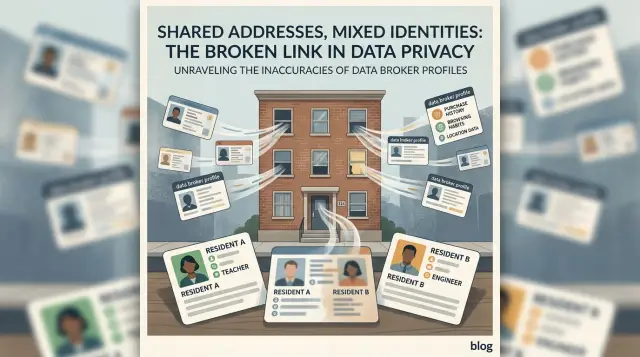
What this problem looks like
A wrong address on a data broker site usually does not look completely random. It often looks almost right. Your name is there, the street is familiar, and maybe even the building number is correct. The problem is that part of someone else's record got folded into yours.
This is common in duplexes, split houses, older homes turned into apartments, and buildings where unit numbers are missing or written in different ways. A broker may treat "12 Main St Apt 2," "12 Main St Unit B," and plain "12 Main St" as the same place.
When that happens, one profile can start showing details from two different people at one address. You might see your full name with a neighbor's phone number. Or the address may be right, but the listed age is off by 20 years. Sometimes the record shows relatives you do not know because they belong to the person in the next unit.
A few patterns show up again and again:
- Your unit number is missing, replaced, or switched.
- A phone number or email appears that you never used.
- The profile connects you to people who share the street number, not your household.
- The same bad details appear on more than one broker site.
These errors can look small at first. One site drops your apartment number. Another copies that version and adds a stranger's landline. A third treats both records as one person. That is how a simple apartment mix-up turns into merged broker records.
Say you live at 45 Oak Street, Unit 1, and your upstairs neighbor is Unit 2. A broker may build one profile for "45 Oak Street" and attach both of your details. You end up with a shared street number problem even though you never shared a household.
Once one bad record spreads, fixing it takes longer. It helps to catch the pattern early, before more sites copy the same mistake.
Why shared buildings confuse brokers
A lot of address mistakes start with one simple problem: brokers often treat a whole building like one home. That happens in duplexes, basement apartments, converted houses, and small buildings where two or three units share the same street number.
If one source says "214 Pine St" and another says "214 Pine St Apt B," some systems flatten both into the same record. The unit line gets dropped, shortened, or never imported at all. Once that happens, your name can end up next to another person's age, phone number, or move-in history.
Brokers rarely build a file from one clean source. They buy, scrape, and merge data from many places. Some lists are detailed. Others only store the street address and ZIP code.
Formatting differences make the problem worse. "214 Pine Street Apt 2," "214 Pine St Unit 2," "214 Pine St #2," and plain "214 Pine St" look related to a person. To a messy database, they can collapse into one household.
Old tenant records can linger too. If someone lived upstairs three years ago, their name may still be tied to the building in an older list. When a broker refreshes its file, it may keep the old resident and add the new one instead of replacing the record. That is how strangers who never met can appear connected.
Split apartments are especially messy when the building used to be a single house. County records, utility files, and mailing lists may not even agree on whether the place has separate units. One database shows Unit A and Unit B. Another shows only one main address.
This is why the same wrong match often shows up on several broker sites at once. The mistake is usually built into the source data, not caused by one random typo.
Signs your record was merged
A merged record often looks half right. The street address may be yours, but the apartment number is gone, swapped, or attached to a neighbor's unit.
The next clue is stranger: the household section names people you have never lived with. Brokers often assume everyone at one street number belongs to one home. If your profile suddenly shows a retired couple, a student upstairs, or someone who moved in after you left, the record was probably stitched together from the whole building.
Past address history can give it away too. You may see a move that makes no sense, like jumping from Unit 1 to Unit 3 without ever changing buildings, or an address tied to a floor you never lived on. When brokers pull from old property, credit, or marketing files, unit details are often the first thing to disappear.
Contact details are another fast check. A wrong mobile number, landline, or email is usually more than a typo if it belongs to someone at the same address. That often means the broker matched records by street number and last name, or by one shared utility account.
Look closely if you see any of these:
- an age range that is clearly off
- relatives or associates you do not know
- a missing unit where other records in the building use one
- a phone number ending you have never used
- past addresses that match neighbors, not your own moves
One odd field can be a simple mistake. Two or three at once usually means the file was merged. If the address is partly right but the people, contact details, or age range do not fit, you are probably looking at one profile built from several people in the same building.
How to check it step by step
Start with the most specific search you can. Enter your full name and full address exactly as you use it on mail or bills, including the unit number. If the result looks clean, you should mostly see your own details.
If that first search shows a neighbor's phone number, a stranger's age, or relatives you do not know, treat it as a possible merged record. These profiles often look almost right at first glance, which is why people miss them.
Next, run the same search again with the unit removed. This is where problems often show up in split houses, duplexes, and small buildings with one shared street number. A broker may keep one record for the whole address and mix the people inside it.
Then test the unit in the formats brokers tend to use: "Apartment 2," "Apt 2," "Unit 2," "#2," and no unit at all. Small changes matter more than they should.
Compare the results side by side. Start with the names. Then check phone numbers, age ranges, past addresses, and listed relatives. If one version shows your name but another person's phone and family members, the record was likely stitched together from two households.
A simple example helps. Say you live at 18 Oak Street, Apt B, and the upstairs tenant lives at 18 Oak Street, Apt A. If the search without a unit shows both of your names, one shared phone number, and relatives from both homes, that is not a small typo. It is a merged file.
Save proof as you go. Take a screenshot of every wrong entry, including the search result page and the full profile if the site has one. Capture the exact version you searched, such as "Apt 2" versus "#2," because that detail can explain why the mix-up happened.
Keep the screenshots in one folder and give them clear names. If you later send a removal request yourself, or use a service like Remove.dev, that record of the error makes the fix much easier to track.
What to save before asking for a fix
Before you ask a broker to correct a record, make a small proof pack. It saves time, especially when a site mixed your apartment with another unit in the same building.
You do not need a giant folder. You need a few clear items that show where you live and what the broker got wrong:
- one recent document with your name and full address, including the unit number
- screenshots of each broker page with the bad details visible
- a short note listing every wrong detail in plain language
- a simple list of the broker sites involved
Keep your note plain and specific. Write things like: "Shows Unit 4, I live in Unit 5" or "This profile links my name to another tenant's phone number."
Do not send more than you need. A cropped bill or lease page is often enough if it clearly shows your name, street address, and full unit. Cover account numbers, payment details, and anything else the broker does not need.
This prep work matters when the mix-up is messy. Split apartments, duplexes, basement units, and buildings with one shared front number get merged all the time. If you have your proof ready, the request is simpler and harder to brush aside.
A simple example from a split apartment
Picture a small duplex at 214 Oak Street. Maya lives in Unit A and Chris lives in Unit B. They share the street number, but they do not share a household, a phone plan, or relatives.
On paper, this should be easy. In broker databases, it often is not. A shared street number can turn into one blended record when a broker drops the unit line and keeps only "214 Oak Street."
Maya searches her name and finds a profile that looks half right. Her name is there, and the street is correct, so at first glance it seems like her record.
Then the odd parts show up. The phone number belongs to Chris. The profile lists relatives Maya has never met. It may even show an age range that fits Chris better than her. That mix of right and wrong details is a strong sign of a merged record.
This kind of apartment mix-up spreads fast. One broker publishes the bad version, then other brokers copy it, buy it, or match it against their own files. Soon the same error appears on several sites, which makes the mistake look more believable than it is.
A clean correction request usually works better than a long complaint. Maya does not need to explain her whole life story. She only needs to separate the records in plain language:
- She lives at 214 Oak Street, Unit A.
- The listed phone number belongs to another resident.
- The listed relatives are not connected to her.
- Her record should be separated from Unit B.
That gives the broker one clear job: split the address into two people, not one blended file. When an address is correct but the people around it are wrong, do not assume the whole profile is yours. In split buildings, the missing unit is often the real problem.
Mistakes that slow down removal
A merged record can stay online longer for very ordinary reasons. The broker cannot tell exactly what is wrong, or it fixes one version while the same bad details keep showing up somewhere else.
The first mistake is sending one broad request and hoping the broker will sort it out. "This address is wrong" is too vague. A better request names the exact bad fields, such as the missing unit number, the other resident's name, the wrong age range, or a phone number that belongs to someone across the hall.
Another common problem is leaving out the unit when you explain the mix-up. In a split apartment or a house divided into upstairs and downstairs units, the street address alone is not enough. If your place is "Unit B," "Rear," or "Apt 2," say that every time, even if the broker's page left it out.
People also fix one broker and stop there. That sounds reasonable, but bad records spread. One merged profile often gets copied to other sites, so you need to search for the same address in a few versions, including with and without the unit.
A few mistakes waste the most time:
- asking for removal without listing the exact wrong lines on the page
- describing the address without the unit, floor, rear entry, or upstairs-downstairs label
- fixing one broker but not checking where the same record was copied
- sending a full ID when a site only asks for masked ID or proof of address
- assuming the problem is gone after one record disappears
That fourth point matters more than it seems. If a broker only needs enough proof to confirm you, sending extra ID gives away more personal details than necessary. Cover your photo, ID number, or birth date unless the broker clearly requires them.
The last mistake is treating the first removal as the finish line. Merged records can come back after a database refresh or a new copy from another broker. Save screenshots, note the date of your request, and check again after a week or two.
Quick checks before you move on
Before you close the tab, do a few fast checks. A bad address record often sits next to other mistakes, and those extra errors help prove the profile was merged.
Start with the unit number. If the page shows only the building address and skips your apartment, suite, floor, or letter, that is a red flag. In split homes, duplexes, and converted houses, this is one of the most common ways two people get mashed into one record.
Then check every phone number and email on the page. Even one number you do not know can mean the profile includes another resident, a past tenant, or someone from a nearby unit.
Read the relatives section with a cold eye. Do those names match your household or your actual family history? If the page lists a stranger as a relative, the broker may have tied you to someone else in the building.
Review all past addresses, not just the current one. Watch for apartments you never lived in, a neighbor's unit, or another address on the same street with the same house number.
Finally, check the record again after 7 to 14 days. Some sites update slowly, and a profile can change after a removal request, a data refresh, or a source update. A partial fix today can turn into a full fix next week.
If you find two or more of these problems in one profile, treat it like a merged record, not a one-off typo. That gives you a stronger case when you ask for a correction or removal.
What to do next
Once you know the record is wrong, move quickly and stay organized. One fix does not fix the rest.
Send a correction or removal request to every broker where you found the mix-up. Ask them to delete the listing or correct the unit details, and include the same proof each time so your requests stay consistent.
A simple tracker helps. Keep the broker name, the date you sent the request, and the current status. Save screenshots of the bad listing before and after each request. Keep one folder with your proof of address and any masked ID the site asked for.
Do not assume one address search is enough when you recheck. After 7 to 14 days, search the same address in a few formats. Try the street number with and without the unit, and test common versions like "Apt 2," "Unit 2," or "#2." If the building was split later, also search older versions of the address that a broker may still be using.
If one broker fixes the record but another does not, keep going. These sites copy from each other, but they do not update at the same speed. One stale listing can put the mistake back into circulation.
If the record keeps coming back
Keep your proof file even after the record disappears. The same confusion can return when a broker refreshes its database, buys new records, or picks up a bad match from another source.
If you do not want to chase each site yourself, Remove.dev can help with the repeat work. It handles removals across more than 500 data brokers and keeps monitoring for re-listings, which is useful in apartment mix-up cases where the same error returns under slightly different address formats.
The goal is simple: get the wrong record down, keep notes on who complied, and recheck until the address stops showing up again.
FAQ
What are the clearest signs my record was merged with someone else?
A strong clue is when the street is yours but the unit is missing, swapped, or wrong. Another giveaway is a phone number, age range, relatives, or past addresses that belong to someone else in the building.
Why do duplexes and split houses cause so many address errors?
Many brokers flatten "12 Main St Apt 2" and plain "12 Main St" into one household. When they merge old tenant lists, mailing files, and scraped records, the unit line often gets dropped first.
How should I search to check whether my record is wrong?
Start with your full name and full address exactly as you use it, including the unit. After that, search the same address with common variations like "Apt 2," "Unit 2," "#2," and no unit at all to see where the mix-up begins.
Which details should I compare on each profile?
Begin with names, then compare phone numbers, emails, age range, relatives, and past addresses. When two or three fields are off at once, the profile is usually built from more than one person.
What should I save before I ask for a fix?
Save screenshots of the search result and the full profile, plus one recent document that shows your name and full address with the unit. A short note like "shows Unit 4, I live in Unit 5" makes your request much clearer.
Should I ask for a correction or a full removal?
If the site lets you remove the listing, that is often the cleaner option because the whole profile comes down. When removal is not offered, ask for a correction and point out each wrong field so the broker can split your record from the other resident's.
Why do the same bad details show up on several broker sites?
These sites often buy, scrape, or copy from the same sources. Once one bad version of your address gets into those files, other brokers tend to repeat the same missing unit or wrong household details.
How long does a fix usually take?
Many removals are finished within 7 to 14 days, though some sites take longer. Check again after that window because a profile may change in stages before it fully disappears or gets cleaned up.
What mistakes slow down removal the most?
Vague requests slow things down fast. Leaving out the unit, not naming the exact wrong lines, or sending more ID than the site needs makes the fix harder and exposes extra personal details.
What if the bad record comes back after it was removed?
Keep your screenshots and request dates, then recheck the address in several formats after a week or two. If you do not want to chase every site by hand, Remove.dev handles removals across more than 500 brokers, monitors for re-listings, and lets you track requests in one dashboard.