How data brokers get old records from offline vendors
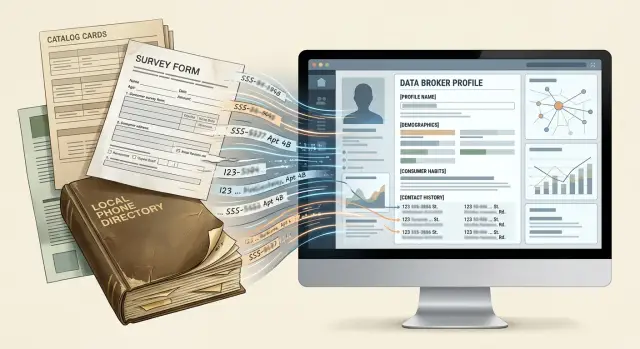
How data brokers get old records often starts with catalog lists, survey files, and local directories that keep outdated details in circulation.
Why old records keep showing up
Old records last because personal data does not move in a clean, one-way path. It gets copied, exported, sold, and merged with other files. That is a big reason an address from years ago can still follow you long after you moved.
A record can start in a harmless place: a catalog order, a warranty card, a mailed survey, a neighborhood directory, or a customer list from a local business. It was accurate once. Then it kept circulating after the facts changed.
The problem grows because brokers copy one another. One company imports a stale file, another buys that profile or scrapes it, and the same mistake spreads again. No one has to check the original source for the record to keep living on.
Offline data makes this worse because it often starts outside normal update cycles. A paper sign-up sheet at an event, a printed church directory, or a batch export from a mail-order company can sit in storage for years. Later, someone scans it, cleans it up just enough to use, and sells it again.
Picture a simple case. You lived on Pine Street in 2018 and filled out a warranty card. You moved in 2020, but that old file stayed in an archive. In 2024, a broker buys a bundle of old customer records, matches your name to other public and commercial data, and Pine Street shows up again as if it were current.
That is why one removal rarely fixes the whole problem. Deleting a profile from one broker does not erase the same record from every database that already copied it. Another broker can import the old address next month from a different seller, and the cycle starts over.
The frustrating part is simple: the record is outdated, but it is still cheap to buy and easy to reuse.
Where stale offline data comes from
A lot of old records do not begin online. They come from paper forms, mailed offers, phone books, warranty cards, in-store surveys, and local directories that were built years ago and never cleaned up well. That is why stale information can keep circulating even after you change your address, phone number, or name.
Catalog companies are one common source. If you ordered from a paper catalog, signed up for coupons, or mailed in a product card, that file may still hold your name, address, and rough shopping habits. Even if the original business stops contacting you, the data can live on in a separate marketing file.
Survey cards create another layer. A short form asking about your income range, pets, hobbies, or whether you own your home can look harmless. Years later, those answers can still be bundled into bulk files. The details may be old, but brokers often treat them as usable until someone objects.
Local directories are just as sticky. A regional phone book, club roster, chamber listing, or neighborhood guide can keep old addresses and dead phone numbers alive for a long time. Once that information is scanned into a spreadsheet, it stops being forgotten paper and becomes something that can be imported again and again.
Bundling makes the mess harder to untangle. Offline vendor data is often packaged with other lists and sold in bulk. The buyer may have no idea where each line came from. They just see a file full of names and fields that look complete enough to load.
That is how one stale record turns into a believable profile. A catalog file adds an old address. A survey file adds household details. A directory file adds an outdated phone number. Put those together, and the profile can look more convincing than it really is.
Why brokers keep importing stale files
The short answer is cost. Old bulk data is cheap. A broker can buy a large file from a catalog seller, survey company, or local directory source and load it all at once. That is faster and cheaper than checking every record by hand.
Old records also still look usable. An outdated address, an old landline, or a misspelled name may still match a real person well enough to get pulled into a profile. If the file has your full name, age range, or a past city, the system may treat it as close enough. For many brokers, close enough is enough to publish.
Merging makes the damage worse. Many brokers do not keep sources separate for long. They combine old and new data into one profile and let software guess which details belong together. When the guess is wrong, the result is a mixed record: a current cell number attached to a former address, or a current household linked to an old last name.
That also explains why removals do not always stay removed. A broker may delete your profile, then import another stale file a few weeks later and put the same old detail back on the site. You did nothing wrong. The broker simply treated an old source like fresh input.
This is where repeat monitoring matters more than most people expect. If a stale file keeps getting imported, one request is just one round.
How one bad record spreads
One old address can travel farther than most people think. A catalog company, survey seller, or local directory exporter sends out a file that still shows where you lived three years ago. The file may be stale, but it still has enough detail to look real: your name, age range, phone number, and sometimes another person from your household.
A broker then tries to match that file to a real person. The match can be loose. If your name, city history, and one contact detail line up, the broker may attach the old address to your current profile.
Once that happens, the bad record stops being one vendor's problem. It becomes part of a new profile that can be sold again. Another broker may buy it in bulk, copy it during a partner update, or feed it into a people-search site. Now the same wrong address appears in several places, even though the source was a single stale export.
This spreads quickly because brokers do not move data in a neat chain. They resell, merge, and refresh files on different schedules. One site may delete the bad address today, while another imports it next week from a different seller.
A small example makes it clear. Megan moved from Oak Street to Pine Avenue in 2021. In 2024, a survey seller still has Oak Street in its database and sends that file to a broker. The broker matches Megan by name and birth year, then resells the profile. A people-search site publishes Oak Street, and another site copies it in its next update.
That is why a wrong detail can feel strangely stubborn. It is not sitting in one bad database. It is moving through a network of old files, resellers, and automated matches.
A simple example of an old address
You move in March. Within days, you update your bank, utilities, phone plan, and voter record. In ordinary life, the old address is gone.
But one small place still has it. Maybe it is a club roster, a school fundraiser list, a church directory, or a printed community guide that later gets turned into a spreadsheet. No one thinks much about it because it feels like boring admin work.
A few months later, that file gets sold, shared, or bundled into a marketing list. The broker buying it may not know when each entry was last checked. They just see a name, a street address, maybe a landline, and a few household notes.
Then the old address gets merged with newer details from elsewhere, like a current mobile number or the names of relatives. Now the profile looks partly fresh and partly wrong, which makes it more believable at a glance.
Imagine Maria Lopez moved from Oak Street to Pine Avenue. Her bank and tax records show Pine Avenue. A volunteer directory from her old tennis club still lists Oak Street. That directory gets copied into a direct-mail list. Then another broker merges that list with a newer phone record and a family-member match. Soon Maria's profile shows her current cell number, her sister's name, and the house she left a year ago.
That is usually how these errors survive. The mistake is not coming from one website. It starts with one forgotten offline record that keeps getting copied into newer-looking files.
How to trace the source step by step
Treat every bad profile like evidence. Before you submit an opt-out request, save screenshots of the page, the date, and the exact details shown. If the listing changes later, you will still have a record of what was there.
Patterns matter more than single errors. The same stale detail usually travels in clusters. An old apartment number, a misspelled middle name, or a strange hobby from a survey can point back to one shared source.
A practical way to trace it is to compare several broker profiles side by side and look for details that repeat exactly. Pay extra attention to odd details, not just obvious mistakes. A very specific old phone number or a catalog-style version of your name can tell you more than a past city.
Then think about where that detail might have been collected. Common sources include magazine forms, product warranty cards, alumni lists, club memberships, church directories, and local business listings. If you still have old paperwork, check it. Sometimes a move-in form or neighborhood directory entry matches the stale record word for word.
After you file removals, watch what comes back. The returning detail often tells you which source is still feeding brokers.
Survey details can be especially revealing. If two broker pages both say you are interested in boating and home gardening, even though you never shared that online, the pair may have come from a mailed customer survey or product registration card that was sold later as offline vendor data.
If you are doing this manually, keep a simple log of requests and relistings. If you use a service such as Remove.dev, the dashboard can help you see which requests were sent and whether a listing comes back. Either way, the goal is the same: find the source that keeps putting the record back into circulation.
Mistakes that keep old data alive
A common mistake is removing one profile and treating that as the finish line. That can work for a short time, then the same details show up somewhere else because the wider data supply chain never changed.
Ignoring smaller brokers is another problem. Some of them look harmless, but they still feed larger search sites. Pulling down the page you can see does not help much if the smaller source keeps sending the same stale record back out.
People also hurt their own privacy by correcting records too freely. If you write, "My current address is 18 Pine Street, not 42 Oak Lane," you may have just handed over fresh information the broker did not have before. A broker that started with stale data now has your newer address straight from you.
A safer approach is simple. Ask for deletion when possible. Share only the minimum needed to verify your identity. Keep a record of every broker you contacted. If you can, check whether smaller brokers are feeding larger ones.
Another easy mistake is failing to check again a few weeks later. Old records often return through batch imports, not manual edits. A broker may remove your file today, then reload the same stale list next month when it buys another data package.
A realistic cycle looks like this: you remove an old address from one people-search site in March. In April, another broker imports a local directory file that still includes that address. By May, the first site buys that refreshed file and republishes it.
That is why follow-up matters. Manual removals can work, but only if you keep watching for relistings.
A quick checklist before you file removals
Before you send any opt-out request, spend a little time getting your details in order. Fifteen minutes of prep can save a lot of back-and-forth later.
Start one plain document or spreadsheet and keep it simple. List every old address you can find, including apartment numbers, ZIP codes, and short-term rentals if they appear in broker profiles. Add old phone numbers and name variations too, such as maiden names, middle initials, misspellings, and shortened first names. Then note your move dates and any earlier opt-out requests you already sent.
It also helps to use a separate email address for privacy requests. That keeps this work out of your main inbox and makes follow-ups easier to track.
Set reminders to check the same brokers again later. A practical rhythm is once after two weeks, then again 30-60 days later. That is often enough time to catch relistings from new imports.
This prep may feel dull, but it matters. When stale files keep bouncing back into circulation, good notes make it easier to prove that the record is old and already disputed.
What to do when records return
When a record comes back, do not restart everything at once. Begin with the profiles that expose the most: your home address, your phone number, and pages that list relatives or household members. Those tend to cause more trouble than an old age range or a stale shopping category.
A simple rule helps: deal with the highest-risk listings first, then watch which site brings them back. That gives you a clearer picture of which source is feeding the loop.
Build a return log
You do not need fancy software. A note, spreadsheet, or task app is enough if you update it every time something changes.
Keep track of four things:
- the site name
- what data showed up again
- when you sent the removal request
- when the record disappeared or returned
After a few rounds, patterns usually appear. Maybe the same old address reappears first on one local directory site, then spreads to two people-search sites a week later. That first return is the one worth watching closely.
If manual removals keep looping, doing it by hand gets tiring fast. Remove.dev can automate removals across more than 500 data brokers and keep checking for relistings, which is useful when catalog lists, survey files, or local directory records keep pushing old details back into circulation.
A returning record is a clue. If you log it well and focus on the first site that republishes your data, you have a much better chance of slowing the cycle and keeping stale records from taking over your profile again.
FAQ
Why does my old address keep showing up online?
Because brokers keep buying and merging old files. One stale address from a catalog, survey, club roster, or local directory can be copied into several databases, then pulled back into your profile even after one site removes it.
Where do old broker records usually come from?
A lot of stale data starts offline. Common sources are warranty cards, mailed surveys, paper catalogs, church or club directories, school fundraiser lists, and old local business records that later get scanned and sold in bulk.
Does one opt-out request solve the whole problem?
Usually not. Removing one listing only clears that site. If another broker already has the same old file, the record can come back during the next batch import.
How does an offline form end up on people-search sites?
It often happens through bulk files. An old paper record gets turned into a spreadsheet, sold to a broker, matched to your name, and then copied again by other brokers or people-search sites.
What details can help me trace the source of a bad record?
Look for odd details that repeat exactly across sites. A very specific old phone number, an apartment number, a misspelled name, or unusual survey details can point to one shared source.
Should I correct the wrong information when I file an opt-out?
No. If deletion is available, ask for deletion and share only what is needed to verify your identity. Telling a broker your current address can give them fresher data than they had before.
How often should I check if my record comes back?
Check once after about two weeks, then again in 30 to 60 days. That timing often catches relistings caused by new imports rather than manual edits.
Which listings should I remove first?
Start with listings that expose your home address, phone number, relatives, or household members. Those pages tend to create more risk than a stale age range or an old shopping category.
What should I save before sending removal requests?
Save screenshots, the date, the site name, and the exact details shown before you submit anything. That gives you proof if the page changes later and helps you spot repeat patterns.
Can I automate repeat data broker removals?
Yes. If you do not want to track hundreds of brokers by hand, a service like Remove.dev can send removals, watch for relistings, and keep requests moving when old files keep resurfacing.