Data removal for creators selling digital products
Data removal for creators matters when storefronts, payment tools, and domain records expose a home identity. Learn what to check and fix first.
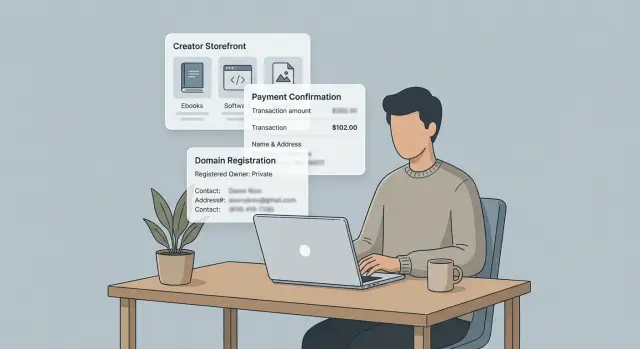
Why selling digital products can expose your home identity
Selling a digital product feels low risk. You are not meeting buyers in person, and you may never ship anything from your house. Even so, a side business can expose more about you than a product page ever shows.
The reason is simple: selling creates records. A storefront, payment receipt, support email, domain registration, and tax form can each carry a small piece of personal information. On its own, each piece may look harmless. Put together, they can point to your legal name, home address, email, and phone number.
A brand name helps, but it does not fully hide you. You might sell under "Moonlit Studio" while your payout account uses your real name, your receipts use a personal email, or your business contact number is your own cell. Buyers may only see one part. Data brokers, scrapers, or a determined customer can often see more.
Most people are not exposed by one huge leak. They are exposed by a trail of small clues.
Common clues include:
- a legal name on an invoice
- a home address in a business or tax field
- a personal email reused across accounts
- a phone number tied to old profiles or broker listings
Once those details are public, they can be matched with public records and old accounts. A personal Gmail address can lead to a username. That username can match a social profile. A phone number can connect to broker pages. A home address can confirm the rest.
That is why "I never posted my address" is weak protection. You may have hidden it from your audience, but it can still appear in the systems around your business.
For most creators, the risk is not fame or stalking. It is more ordinary than that, and more annoying: strangers finding your home, spam calls, doxxing during a refund dispute, or family details showing up in search results. Even a small business can create that problem.
What storefront pages often reveal
A storefront can look clean and professional while giving away more than you meant to share. The leak is often in the small print: a footer, contact line, policy page, or automatic email sent after checkout.
One common problem is the store owner name. Some storefront tools place it in the footer, checkout page, or order confirmation screen by default. If you signed up with your real first and last name, that name may appear even if your brand uses a studio name, pen name, or alias.
Your contact email can also say too much. An address like jane.smith.writer@... gives away your full name at a glance. If that same name appears on your social profiles or in a domain record, it becomes much easier to connect your shop to your home identity.
Policy pages are another quiet problem. Refund, returns, and terms pages sometimes pull in a legal business address automatically. For a solo creator, that can be a home address. Many people do not notice this until a customer points it out, or until the page is indexed and copied elsewhere.
Customer receipts can reveal even more. Depending on your setup, receipts may include your legal business name, billing contact, or physical address. That may be fine for a registered company with a separate business address. It is a bad trade if you work from your apartment.
Check these places first:
- page footer
- checkout page
- contact page
- refund and policy pages
- test receipt emails
A quick test helps. Open your storefront in a private browser, add a low-cost item to the cart, and go through checkout without buying. Then send yourself a test receipt if your system allows it. Read every line like a stranger would. Small details often give away the full picture.
How payment tools can give away personal details
Selling a download or subscription can feel separate from your personal life. The problem is that payment tools are built for billing first and privacy second. If you leave the default settings alone, a buyer may see far more than your store name.
One common leak is the name that appears on bank or card statements. Many payment systems use the legal business name by default. If you sell as a solo creator and never set up a separate business identity, that line can show your full personal name.
Receipts can leak just as much. A customer buys a template pack, then gets a confirmation from your personal email instead of a support address. Even an email like janesmith1989 can reveal a surname, birth year, or an old username you still use elsewhere. One detail may seem harmless. A few details together can identify you fast.
Invoice and tax settings are another weak spot. Some payment services pull the seller address into VAT invoices, refund notices, or tax documents without much warning. If you entered your home address when you opened the account, that address may go out with every sale. Many creators never catch this because they only check the checkout page, not the emails and files sent after payment.
Support conversations can make things worse. A buyer asks for a corrected invoice or help with a failed payment. You reply from a personal inbox, sign with your full name, and confirm part of your billing address so they can match the order. Now they have your name, email pattern, and maybe your city too.
A quick audit should include three things:
- make a test purchase and read every email, receipt, invoice, and refund message
- check the statement descriptor, sender email, business name, and address fields
- replace personal contact details with business-only ones wherever the service allows it
If your payment setup still exposes private details, fix that before driving more sales. More orders should mean more income, not more ways for strangers to trace your home identity.
How domain records can point back to you
Your domain can expose more than your brand name. When you register a domain, the registrar creates an ownership record. Many people know this as a WHOIS record.
If privacy settings are off, that record may show your real name, home address, phone number, and email. For a creator selling templates, courses, presets, or ebooks from a personal site, that can connect the shop to your private life very quickly.
A common mistake is using personal details during setup because it feels like a one-time form. Maybe you bought the domain years ago with your home address and personal email, then later turned the site into a store. Anyone who checks the record can match that email or phone number to social profiles, people-search sites, or broker listings.
WHOIS privacy matters because it replaces those personal details with proxy contact information from the registrar. It does not hide everything, but it blocks one of the easiest ways to trace a storefront back to you.
Check these fields in your domain account:
- registrant name
- email on file
- phone number
- street address
- whether privacy protection is turned on
Do this for every domain you own, not just your current store. Old project domains, redirect domains, and parked domains can still point back to you.
There is another problem: old domain records do not always disappear. Earlier versions can remain in public archives, search tools, or broker databases. So even after you turn privacy on, someone may still find details that were visible before.
Picture a creator who sells a digital planner from a clean-looking storefront. The site itself shows only a brand name. But an old domain record still lists her full name and apartment address. A scraper picks that up, and soon the same details show up on people-search sites.
That is why the fix has two parts. First, update the live domain record and turn privacy on. Then look for copies of the old data elsewhere. If your information has already spread to broker sites, Remove.dev can help by finding and removing listings across more than 500 data brokers while you close the original source of the leak.
A simple example of how someone gets identified
Picture a freelance designer named Maya who sells Notion templates. Her storefront uses the brand name "Maya Studio," which feels separate enough from her private life. She also buys a custom domain so the shop looks more polished.
On the surface, nothing looks risky. The storefront shows product pages, a contact form, and a short bio. Maya assumes buyers only see her brand.
Then a customer makes a purchase. The receipt from the payment processor shows "Maya R. Collins" because the account was set up under her legal name. In some cases, the receipt or invoice can also show a business address, and many solo creators use their home address when they first set things up.
Now a curious buyer has two pieces of information: the brand name from the shop and the real name from the receipt. That alone is often enough to start searching.
The next step is simple. The buyer checks the domain record for Maya's website. If WHOIS privacy is off, expired, or was never enabled, the registration can show the same full name and a physical address. Even if the full address is hidden, a city, state, email, or phone number can still help match the record to the person.
At that point, the dots line up fast:
- the storefront says "Maya Studio"
- the receipt says "Maya R. Collins"
- the domain record shows the same name or home details
- a public profile uses that name and the same product photos
None of this takes special skill. A normal buyer could do it in a few minutes. A scraper can do it much faster by collecting store pages, invoice screenshots, public domain records, and social profiles, then matching names and contact details.
The problem is not one big leak. It is a few small clues that fit together. A creator may think, "My address is not on my homepage, so I'm fine." But if the store name, payment tool, and domain record all point to the same person, a home identity is easy to find.
How to reduce exposure step by step
Start with a plain inventory. Search your creator name, legal name, store name, email addresses, and phone number. Then open every place a buyer or stranger can see: your storefront, checkout page, receipts, payment profile, domain record, and contact page. The goal is simple. Find every spot where your real identity leaks out.
Once you know where the problem is, swap public details for business-only ones wherever the service allows it. Use a support email that is separate from your personal inbox. If possible, use a business phone line, voicemail number, or mailbox service instead of your home contact details.
A simple order works well:
- Review your storefront, product pages, checkout, and email receipts.
- Check payment settings for seller info, support fields, and billing details.
- Turn on WHOIS privacy for your domain and review registrar contact data.
- Remove old people-search and broker listings that already copied your details.
- Recheck everything in a private browser after each change.
Domain settings deserve extra care. Many creators buy a custom domain once, then forget about it for years. If privacy is off, your name, phone number, or address may still be visible. Even when it is on, look at renewal notices, billing profiles, and auto-filled contact details. One old setting can undo the rest.
Past exposure matters too. Changing your current pages does not erase copies that data brokers already scraped. If your address or phone number has spread to people-search sites, remove those listings as well. You can do that by hand, but it takes time and repeat follow-ups. If you want less ongoing work, Remove.dev automates removals, tracks requests in real time, and keeps checking for relistings after your data comes down.
Finish by testing your setup like a stranger would. Open your public pages in a private window. Buy your own cheapest product if needed, and read the receipt that arrives. If anything still points back to your home, fix that one thing and test again. Small checks catch what big privacy plans miss.
Mistakes that keep your information visible
A lot of creators do the hard part, then miss the boring part. They hide an address on one page but leave the same detail exposed somewhere else.
One common mistake is using a personal email for sales, support, and account logins. If that address includes your full name, old usernames, or a domain tied to your home, it becomes an easy thread to pull. Someone can match it across storefronts, social profiles, mailing lists, and old forum posts in a few minutes.
Payment tools cause trouble too, mostly because people trust the default settings. A receipt may show your legal name, billing details, or a support contact you forgot to change. Most buyers will ignore this. The one person trying to identify you will not.
Domain privacy can also create a false sense of safety. Turning on WHOIS privacy is smart, but it does not clean up older records that were already public. Past snapshots, cached listings, and broker databases can still carry your name, phone number, or home address long after the current record looks private.
App stores and creator profile pages get missed all the time. Maybe your main storefront is clean, but your mobile app seller profile still shows a personal support email. Or your bio on a marketplace uses the same full name as your payment account. One loose page can undo the rest.
The pattern is simple: people update one service and assume the job is done. It rarely is. Your details get copied into receipts, archived pages, broker sites, search results, and public records.
A quick review should cover:
- sales and support email addresses
- receipt sender name and contact details
- marketplace bios and creator profiles
- domain registration history, not just the current view
- old copies of your info on broker and people-search sites
First fix the source pages. Then look for the copies. If copies are already out there, removal works best after you stop the same data from leaking again.
A quick privacy check before and after changes
A privacy fix is easy to overestimate. You hide an address, change a storefront setting, turn on WHOIS privacy, and assume the problem is gone. Then an old receipt, cached page, or broker listing still points back to your home.
Run the same check twice: once before you change anything, and again after the changes have had time to spread. A private browser window helps because you will see what a buyer or stranger sees, not the owner view.
What to check
- Search your brand name together with your full name. See whether search results, snippets, or profile pages connect the two.
- Open a live product page as a buyer would. Check the footer, seller profile, refund policy, and checkout screens for a personal name, address, or email.
- Open a recent receipt or invoice. Many creators miss this part, even though payment services often add a legal name, home address, or direct phone number.
- Look up your domain record and any archived snapshots you can find. Current privacy helps, but older records can still expose past details.
- Check whether data broker sites list your address or phone number.
Before you change anything, take screenshots and note exactly what is visible. Afterward, compare the same pages and documents, not different ones. That makes it much easier to tell whether you fixed the leak or just moved it.
A small example makes this clear. Maya sells digital planners under a brand name, and her storefront looks fine at first glance. But her receipt shows her full legal name, an old domain snapshot shows a home address, and a broker listing adds her mobile number. Each clue seems small on its own. Together, they are enough to identify her.
This before-and-after check catches problems faster than guesswork. If something still shows up, the cause is usually plain: an old page, a payment setting you missed, or a broker record that needs its own removal request.
What to do next
Treat privacy cleanup like basic site upkeep. A one-time pass helps, but it does not last forever. Storefront settings change, domain records renew, and data broker sites often repost old details.
The easiest next step is a monthly reminder on your calendar. Give yourself 15 minutes to repeat the same check: search your name, business name, email, and domain, then look at the pages a buyer or stranger would see first. That small habit catches problems before they spread.
It also helps to keep one simple list of every service that can show your details in public. For most creators, that includes storefront platforms, payment services and receipts, domain registrar records, newsletter signup pages, and support forms or contact pages.
Keep the list in one note so you can review it quickly when you change tools, launch a new product, or open a new domain. If a service shows customer-facing details, add it.
After you remove exposed information, keep watching for relistings. This is the part many people stop too early. A broker may take down your record, then add it back after pulling from another source a few weeks later. Follow-up matters just as much as the first removal request.
Manual checks work if you have time and only a short list of accounts. If your details are spread widely, Remove.dev can save a lot of repetition by sending legally compliant removal requests, watching for relistings, and keeping the process in one dashboard.
A good finish line is simple: your storefront looks professional, your payment pages show only what customers need, your domain privacy is turned on where possible, and your home details are much harder to trace. Then check again next month.
FAQ
Why can a digital product store expose my home identity?
Because selling creates records outside your product page. A receipt, invoice, support reply, domain record, or tax setting can expose your legal name, home address, phone number, or personal email.
Most people are not exposed by one big leak. It is usually a few small clues that match up and point back to the same person.
What should I check on my storefront first?
Start with the places buyers actually see. Check your footer, checkout page, contact page, refund policy, and any automatic emails sent after a sale.
Then view the store in a private browser and read it like a stranger would. Small details are often where the leak happens.
Can payment receipts show my real name or address?
Yes. Many payment tools use default seller details unless you change them. That can put your legal name on receipts, your home address on invoices, or your personal email in confirmation messages.
Also check your statement descriptor and refund emails. Those are easy to miss and often reveal more than the checkout page.
Does WHOIS privacy fully hide me?
No. WHOIS privacy helps by hiding the live ownership record behind proxy details, but it does not erase older copies.
If your domain used personal details in the past, those records can still live in archives, search tools, or broker databases.
I use a brand name. Isn’t that enough?
Not by itself. A brand name only covers the front of the store. If your payout account, receipts, support inbox, or domain still use personal details, the brand does not give you much cover.
Think of the brand as one layer, not the whole fix.
What’s the fastest way to test my setup?
A quick test works well. Open your site in a private window, go through checkout, and send yourself every email or receipt your setup allows.
After that, search your brand name together with your full name, email, and phone number. If those pieces connect in public, you still have work to do.
What details should I replace with business-only ones?
Usually, the best swaps are your support email, seller name, phone number, and any public address field. Keep those separate from your personal inbox, mobile number, and home address whenever the platform allows it.
If you work alone, a business-only contact setup still helps. It gives customers what they need without exposing more than necessary.
What if my information is already on people-search sites?
First stop the source of the leak. Update the storefront, payment settings, and domain record so the same details are not exposed again.
Then remove the copies. Broker and people-search sites often repost old data, so one cleanup pass is rarely the end of it.
Can Remove.dev help with old broker listings?
Yes. Remove.dev finds and removes personal data from over 500 data brokers and sends removal requests under privacy laws like CCPA and GDPR.
It also keeps checking for relistings, tracks requests in a dashboard, and most removals are finished within 7 to 14 days. Plans start at $6.67 per month and include a 30-day money-back guarantee.
How often should I review my privacy setup?
A monthly check is a good default. Give yourself about 15 minutes to search your name, brand, email, phone number, and domain, then review the pages and emails a buyer would see.
Recheck any time you change payment tools, launch a new product, or buy a new domain. Small setup changes can expose details again.