Data removal for therapists: how home addresses get found
Data removal for therapists matters when license boards, therapist directories, and telehealth tools point back to a home address. Learn what to check first.
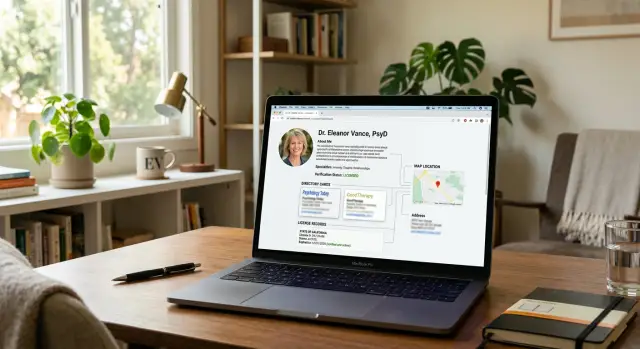
Why this happens in the first place
A therapist's home address usually does not appear online in one obvious place. It shows up because small public details get combined.
One record has a city. Another has a suite number. Another has a business name. A people-search site pulls the rest from old filings or broker data. On their own, those details can look harmless. Together, they create a clear match.
That is why the risk is easy to miss. Someone compares a license profile, a practice directory, a map listing, and a business registration, and the pattern appears fast.
Private practice owners have more exposure than therapists who work inside a large clinic. If you run your own practice, you often create the public trail yourself just to keep things moving. You may need to register a business, accept payments, list contact details, and appear in directories so new clients can find you.
Problems start when business and personal life share the same address. That happens often with home offices. It also happens when an LLC, sole proprietorship, or mailing address is filed with a state agency using your home address because it is simple and cheap.
A few details can connect faster than most people expect:
- a business name tied to your license or directory profile
- a mailing address in an LLC or tax filing
- a phone number used for both practice and personal accounts
- an old address that still appears on broker sites
None of this has to look dramatic. Even a ZIP code and a full name can narrow a search. Add a headshot, a license number, or a booking page, and the match gets much easier.
That is why data removal matters for therapists even if you never posted your home address on purpose. In many cases, the address came from routine business setup, then got copied and resold by sites you never used.
The hard part is persistence. Once one public source gets indexed, other sites repeat it. That is how a home office address can keep appearing long after you thought it was gone.
How license records create location clues
License records are often the first loose thread. A state board may list a therapist's full name, license type, license number, and a city or mailing address. That may seem minor, but it gives someone enough to start matching records.
The license number matters more than most people realize. Names can be common. A license number is specific. Once someone has it, they can search the same number across board records, PDF notices, old directory pages, and business listings to confirm they found the right person.
A city listing can narrow things quickly. If a board record shows "Portland" and a directory profile shows the same full name, specialty, and license type, that is often enough to connect the two. If the board record includes a mailing address, the search gets even easier. Many therapists use a home address at first, especially when opening a private practice or renewing paperwork in a rush.
Old records make this worse. A therapist might update an address this year, but older versions can stay online for a long time. Archived board pages, downloadable lookup files, and copied records on other sites do not always update when the official listing changes.
The trail often looks simple:
- a state board lists a full name and license number
- a lookup page shows a city or mailing address
- an older document shows more of the address than the current listing
- a directory profile confirms the same person and practice area
That is why privacy work for therapists often starts with licensing data, not just people-search sites. If the original clue stays public, it keeps feeding the rest of the web.
For home address privacy, the real problem is not one record. It is how easy that record makes every later match. One city, one number, and one old mailing address can do plenty of damage.
How directories fill in the gaps
Most therapist directories do not create a profile from scratch. They copy bits of public data, then keep those bits long after the original source changes.
That is where trouble starts. A license page might show one clue, but a directory can add an old office address, a phone number from a past listing, and a bio you wrote years ago. Put together, those details create a much clearer picture than any single page.
Many of these sites pull from the same sources: licensing records, business registrations, old practice websites, intake pages, review sites, map listings, data brokers, and people-search pages.
Once a wrong address gets copied, it can stick for a long time. Maybe you used a home address when you first opened your practice and later switched to a virtual office. The original page may be gone, but a directory that scraped it months ago can still show it in search results.
Old office addresses create trouble too. Even if clients no longer visit that location, search engines may still index the page, and other sites may keep copying it. That stale listing becomes another breadcrumb.
Bios can add more than you expect. Your city, specialty, client type, telehealth hours, and whether you offer evening or weekend appointments can narrow the match fast. In a smaller town, a profile that says "trauma therapist," "works with teens," and "Tuesday and Thursday evenings" may point to one person even without a street address.
Review pages and map listings add more clues. They may show a phone number, office photos, nearby intersections, or an old map pin. None of that looks huge by itself. Together, it can connect your public profile to a place you meant to keep private.
That is why fixing one directory rarely solves the problem. You have to look for copies, cached pages, and sites that quietly republish old details after you update the original.
Where telehealth tools can leak more than expected
Telehealth tools feel private because the session itself happens behind a login. The leak often starts before the call.
A booking page may show your time zone, city, or a location label you set months ago and forgot about. That sounds small, but it narrows the search fast. If someone already knows your name and license state, a scheduler that says "Phoenix" or "Eastern Time" gives them another clue to match against directory pages and broker records.
Video platforms can reveal more than many therapists expect. Some pull your display name, profile photo, or account label from the email account you used when you first signed up. If that account uses your full legal name, or matches an old personal profile elsewhere, it can connect your practice identity to records tied to your home address.
Calendar invites create another trail. A confirmation email may include your full name, direct email, phone number, and sometimes a default location field. Even a small detail, like a personal email signature or an auto-filled contact card, can share more than you meant to make public.
The billing side gets missed all the time. Support emails, invoices, and payment receipts sometimes show the billing contact on the account. If a telehealth tool or scheduler was first set up with a personal card, your home address can end up in a receipt or help thread without you noticing.
Picture a common setup: one email for Zoom, another for a scheduler, and both paid with an old personal billing profile. A new client gets a booking confirmation with a city tag, a video invite from an account using your full legal name, and a receipt that includes a billing address line. No single message gives away everything. Together, they can.
Removing your information from broker sites helps, but loose account settings can rebuild the trail just as quickly. Telehealth privacy is partly about software settings and partly about keeping your public identity consistent everywhere.
A simple example of how someone connects the dots
Picture a therapist named Maya. She works in private practice, rents office space a few days a week, and tries to keep her home address private.
Someone starts with a basic search for her full name and the word "therapist." Within seconds, they find a state license page. That page may show her license number, city, and license status. Sometimes it also shows a mailing address, or part of one.
Next, they search the license number or use her full name in a therapist directory. The directory often fills in the blanks. It may show the same city, the same practice phone number, and the same specialties listed on her website or intake forms, such as anxiety, trauma, or couples work.
Now the match looks solid. Even if Maya has a common name, the mix of city, phone number, and specialty area can narrow it fast. If the directory profile says she serves adults in one suburb and the license record points to that same area, there may be only one likely person.
After that, the search moves to data broker sites. This is where things often go wrong. A broker listing may show Maya's name, age range, past cities, relatives, and one current street address.
If the broker record also includes the same phone number found on her directory profile, the trail is almost complete. Even without the phone number, the city and profession can be enough for a confident guess. One public clue may look harmless. Four small clues together can point straight to a house.
That is why broker removals matter. If those listings are removed, the chain breaks at the last and riskiest step. Someone may still find a professional profile, but turning that into a home address gets much harder.
Most people miss this part. The problem is rarely one big leak. It is a stack of ordinary details that happen to line up.
How to reduce your exposure step by step
If you want better home address privacy, start with a simple rule: fix the sources that search engines and data brokers copy from. A home address often stays public because the same detail appears in several places at once.
Do the first pass in one sitting. Open a note and log every place where your name, phone number, practice name, and address appear.
- Search your full name in quotes, then your phone number, then your business name. Try common variations too, such as your middle initial or an old city name. If you moved, search the old address as well.
- Check your state licensing board page and every therapist directory you use. Read the public profile the way a stranger would. Even when the full street address is hidden, a city, ZIP code, and business phone can still point back to your home.
- Replace public contact details with a business address wherever rules allow. If you rent office space, use that. If you work from home, use a separate business mailing address when your board and directory rules permit it. Then update the same detail everywhere, including booking pages and old profile pages.
- Remove old accounts, duplicate profiles, and claimed listings you no longer use. One stale listing can keep feeding your address back into search results for months.
- Send opt-out requests to data brokers, then check again after two to four weeks. Many sites republish data after a fresh crawl, so one round is rarely enough.
A small example shows why this works. Say your Psychology Today profile shows only your city, but an old counseling directory still has your home office address. A data broker picks up that old listing, connects it to your cell number, and a search for your name brings the address right back.
Consistency matters more than speed. If one profile says Suite 200, another shows your house number, and a third lists an old phone, those mismatches create extra trails.
Keep a short spreadsheet with the site name, what was exposed, when you requested removal, and whether it came back. That makes follow-up much easier. If you do not want to keep chasing broker opt-outs by hand, Remove.dev handles removals across more than 500 data brokers and keeps checking for re-listings so the same record does not quietly return.
Mistakes that keep a home address visible
The biggest mistake is simple: using the same home address everywhere. A licensing form, an old therapist directory, a scheduling tool, a domain registration, and a billing account can all repeat the same address. Once that happens, one public record confirms the next.
Another common mistake is forgetting old profiles after a move. Many therapists update the main website and licensing record, then assume the rest will fix itself. It will not. A stale profile on an older directory can keep the previous address visible for months, and people-search sites may copy it again.
Data broker sites are another blind spot. Even if your practice pages look clean, those sites can still list your name, age, relatives, past addresses, and property ties. For a solo therapist who works from home, that is often enough for someone to match a professional profile to a residence in a few minutes.
One more mistake is thinking a single takedown solves the problem. Usually it does not. Data gets copied between brokers, directories, and search engines all the time. If one site removes your record but two others still show it, the problem is still there.
Treat this like upkeep, not a one-time cleanup. The places that get missed most often are public license records, old directory profiles, booking and intake tools with public pages, and large people-search sites.
That last point matters. A therapist may remove an address from one directory, feel done, and move on. Then a broker republishes the same record a month later, or a forgotten profile still points to the old listing.
If you want less manual work, use a service that keeps checking after the first removal round. Remove.dev, for example, monitors for re-listings and sends new removal requests when data comes back. Whether you do this yourself or use a service, the mistake is assuming the problem stays fixed on its own.
Quick checks you can do this week
Start with a private browser window and search your full name, your business name, and both together with your city and state. This is often the fastest way to see what a client, stranger, or former patient could find in two minutes.
Do not stop at the first results page. Check the first two pages and open anything that looks like a directory, licensing site, people-search page, booking profile, or cached business listing. A home address often does not appear in one obvious place. It shows up as small clues across several pages.
A quick checklist helps:
- search in a private window so past logins do not shape the results
- review the first two pages, not just the top few results
- look for old phone numbers, personal email addresses, and past office locations
- open your booking emails, intake emails, and calendar confirmations
- note every site that shows a city, neighborhood, map pin, or street name
The email review matters because many therapists focus on public profiles and miss the messages their tools send every day. Booking confirmations, intake forms, e-sign packets, and calendar invites can include a full name, practice address, direct phone number, or a meeting footer that points back to another public profile.
Be picky when you review what you find. If one site lists only your city, that may seem harmless. But if another page shows your license type and a third shows an old phone number tied to your home, someone can connect the dots fast.
Keep one simple note with five columns: site name, what it shows, whether it is current, whether it ties to your home, and what needs fixing first. By the end of the week, you should have a short list of the pages that create the clearest location trail.
What to do next
Start with one decision: which address and phone number should stay public, if any. For most private practice therapists, the safest choice is a work address, virtual office, or other business contact that does not point back to home. Then use that same contact detail everywhere you control so your profiles stop feeding each other with mixed records.
A mismatched trail is often what makes a home address easy to find. One directory may show an old city, a license record may show a mailing address, and a telehealth profile may include a local number tied to a broker record. Even when those details do not match perfectly, they can still be enough for someone to piece together the answer.
A good next move is to make a short cleanup plan and repeat it every month:
- pick the one address, phone number, and email you want to keep public
- check your license listing, therapist directories, telehealth profiles, and old business pages for anything different
- save screenshots before every edit request, opt-out, or removal request
- set a monthly reminder to search your name, phone number, and address variations
- keep a note of what was removed, what is still live, and what came back
Screenshots help more than people expect. If a listing reappears later, you have proof of what was shown and when you asked for removal. That makes follow-up much faster, especially when a support team asks for details you can no longer see on the page.
If manual opt-outs start eating your week, getting help makes sense. Remove.dev can find and remove personal information from data brokers, track requests in a dashboard, and keep monitoring for records that return.
The goal is not to erase every public mention of your practice. It is to stop your home address from being the easiest answer.
FAQ
Why can my home address show up if I never posted it?
Because the address often appears through a chain of small records, not one obvious post. A board page, old filing, directory profile, shared phone number, or broker listing can be enough to connect your practice to your home even if you never published the street address yourself.
Can my license number or board record lead people to my address?
Yes. A board record may only show a city, mailing address, or license number, but that can still help someone confirm they found the right person. If your board allows it, use a business mailing address and check for older PDFs or archived copies that still show the old one.
Can a shared phone number connect my practice to my home?
Often, yes. If the same number appears on your therapist profile, map listing, LLC filing, or old personal accounts, it becomes an easy way to match records. Using a separate business number helps break that link.
Do therapist directories keep old addresses after I update them?
They do all the time. Many directories copy data from other sources and keep stale details long after you update the original page, so an old address can stay visible for months. Claim the profile, fix the contact info, and remove duplicate pages you no longer use.
Can telehealth tools or booking emails expose more than I expect?
They can. Booking pages, calendar invites, video accounts, receipts, and support emails sometimes show your full legal name, city, direct phone number, or billing address. Review every client-facing message and account setting as if a stranger will see it.
What should I check first this week?
Start with a private browser window and search your full name, business name, phone number, and old address variations. Then open the first two pages of results and note any site that shows a city, map pin, old office, personal email, or street address.
Should I switch to a business mailing address or virtual office?
Usually, yes, if your licensing and business rules permit it. A business mailing address or virtual office can separate your practice from home, but it only works if you replace the old address everywhere you control, not just in one place.
Why does my old address keep reappearing online?
Because sites copy each other. An old directory, archived board file, or broker record can be crawled again and republished even after you fix the original source, which is why follow-up searches matter.
Is one opt-out request enough to fix this?
No. One opt-out helps, but it rarely fixes the full trail. You need to clean both the source pages and the broker listings, or the same address can come back from an old record on another site.
When is it worth using Remove.dev?
Use a service when manual opt-outs start taking too much time or records keep coming back. Remove.dev handles removals across more than 500 data brokers, most removals finish within 7–14 days, and it keeps checking for re-listings so the same record does not quietly return.