Deleted social profile still online: why copies remain
Deleted social profile still online? Lead-gen databases may keep scraped bios, partner feeds, and archived pages after account closure.
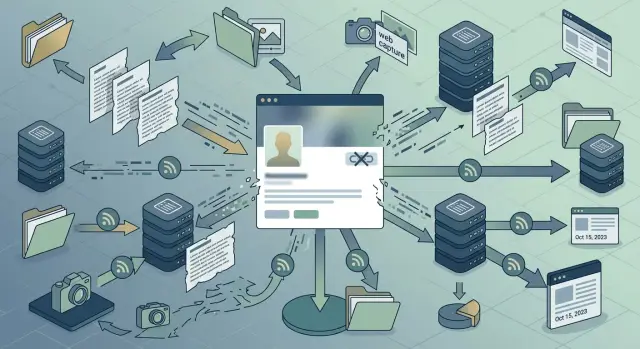
Why a deleted profile can still appear
If you delete a social profile and still see it online, you're usually looking at a copy, not the original.
Deleting the account removes the page on the social network. It does not remove pages that copied your details earlier. It also does not make search engines update right away. For a while, search can still show old results, snippets, image previews, or cached pages even after the source is gone.
Lead-gen databases are a common reason this happens. Many of them save public profile details while the page is live, then publish their own version later. That copy can include your name, photo, short bio, employer, job title, city, or contact hints. Once their page exists, it can stay up long after your original account is deleted.
A simple example makes this easier to see. You delete a public professional profile on Monday. A people-search site scraped it last month, saved the bio and headshot, and built its own page. By Friday, your original profile is gone, but the copied page is still indexed. To anyone searching your name, it looks like the profile survived deletion. Usually it didn't.
What keeps showing up is often one of three things:
- a copied page on a lead-gen or people-search site
- an older record passed around through partner data feeds
- a cached or archived version that search still remembers
That difference matters. If the problem is a copied page, deleting the same social account again won't help. You have to remove the extra copies and then wait for search results to catch up.
How lead-gen databases got your details
Most lead-gen databases did not get your details from a form you filled out. In many cases, they copied what was public on your social profile while it was still live.
That usually starts with scraping. A bot visits public profile pages on a schedule and saves basic fields such as your name, job title, company, city, and short bio. Even a profile that was public for a short time can be enough.
The first copy rarely stays in one place. Data vendors pass records through partner feeds, list exchanges, and bulk exports. One company collects the profile data, another adds a work email, and a third puts it into a searchable database. By then, the record may appear on several sites that never had any direct contact with you.
Records also get richer as they move. A scraped bio can be matched with company details from a business directory, an email from an old event list, and a location from another broker file. What started as a simple public profile can turn into a fuller contact card.
Picture a public profile that says: Maya Chen, sales manager at North Ridge, Denver. A scraper saves that page. Later, a partner feed adds a work email from a trade show list and a company phone number from another source. Now a lead-gen database has a profile that looks complete, even though the original account is gone.
Some databases also keep a snapshot and never check the source again unless someone tells them to. So when a deleted social profile still appears online, the result often points to an old stored record, not the social platform itself.
What scraped bios, partner feeds, and archives mean
A deleted profile does not disappear everywhere at once. Once your public details have been copied, they can keep living in systems that no longer depend on your original account.
Scraped bios
A scraped bio is the simplest copy. A site or bot reads the public parts of your profile and saves your name, job title, company, location, photo, or short bio. Later, that copied text can appear on a lead-gen page, a people-search site, or a business directory even if you close the original account.
Partner data feeds
Partner feeds are harder to spot. Companies buy, share, and exchange large batches of profile data. That means one record can move through several databases without you ever seeing the handoff. If one company captured your details while your profile was public, another company may still have that record months later through a partner import.
Archived pages and cached copies
Archived pages add another layer. Search engines, web archives, and company backups sometimes keep saved versions of pages for indexing or recordkeeping. These copies are not always public forever, but some are. Even when they are outdated, they can still show your old bio, page title, or profile text.
This is why closing an account changes less than most people expect. It removes the source page. It does not reach into every database, archive, and cache that already stored a copy.
What account closure changes
Closing a social account still helps. It cuts off one active source and stops new visitors from seeing the original page. In many cases, the profile URL stops loading, the account becomes unavailable, and direct pulls from that profile stop working.
What it does not change is the copied data already sitting elsewhere. A lead-gen database may keep the record and simply note that the source profile is gone. Search engines may continue to show an old snippet for a while. Image previews, cached text, and archived pages can stay visible even after the main account disappears.
Partner feeds make this worse. If one company copied your data months ago, that record can keep moving between resellers, enrichment tools, and contact databases. Delete one source, and a later partner sync can rebuild the same profile from another seller.
Say you delete your professional profile on Monday. The profile page disappears. But a sales database scraped your bio last month, an archive saved the page title, and another vendor still has your headshot in a preview. Two weeks later, a partner sync runs and a fresh listing appears with the same name, company, and old bio line. That's why records sometimes come back after you thought they were gone.
How copies spread
It usually happens faster than people think.
Anna makes her social profile public for a few weeks while job hunting. Her page shows her name, job title, city, employer, and a short bio. During that time, a scraper copies those details into a sales contact database. A few days later, that database shares records through partner feeds. Now Anna's details move to several other vendors. One builds a recruiter-facing contact page. Another adds her to a people-search listing. A third keeps an archived copy.
None of those pages depend on Anna's original account staying online. They are separate records now.
So Anna deletes the profile after her job search. The original page disappears, but the copied entries don't vanish with it. The databases already stored her details, and some of their partners may refresh data only every few months. Some may never check the original source again unless someone asks them to remove it.
That is why search results can still show her old title or bio after account closure. One site scraped the profile directly. Another imported the same record from a partner feed. A third shows an older archived version.
Deleting the source removes one door, not the whole chain.
How to find the copies
Start with search, not removal forms. First map every copy you can find. That saves time and helps you avoid sending the same request twice.
Search your full name in quotes. Then search old bio lines, job titles, usernames, company names, and city names in quotes too. A unique sentence from your old profile often finds pages that a plain name search misses.
Next, check the sites most likely to reuse social data. People-search pages, lead-gen databases, employee directories, profile aggregators, and cached search results are common places where copies stay live after the original account is gone.
Before you act, make sure the page is really yours. Don't rely on your name alone. Use several details together, such as the same employer, an old headshot, the same short bio, dates that match when the account was active, or a username you used before. One match can be a coincidence. Two or three usually tell you the page came from your old profile or from a feed that copied it.
Then save proof. Take a screenshot, note the page title, and copy the page name or URL into one document or spreadsheet. If the page changes later, you'll still have a record of what was shown.
A simple tracker helps more than most people expect. For each page, note the site name, what personal details appear, when you found it, when you sent the request, and the current status. Plain labels are enough: new, sent, removed, or follow-up.
If you find a long list, work in batches. Start with pages that show your photo, phone number, personal email, work history, or home address. Those are the pages most likely to cause trouble and the ones other databases may copy next.
How to ask for removal
Start with the site's privacy, opt-out, or suppression page. Many lead-gen databases will not act on a general contact form if they have a separate removal process.
Keep your request specific. Don't just say please remove my data. Send the exact page URL, your name as shown on the page, and the copied details you want removed, such as your bio, job title, city, old company, or headshot.
Short requests usually work better than long complaints. The goal is to make it easy for the site to match your request to the record.
Include these basics:
- the full URL of each page that mentions you
- the personal details that were copied or scraped
- a clear request to remove or suppress the record
- a note asking them to remove cached, archived, or preview versions too
If the site offers legal request types, choose the one that fits your situation. A California resident may use a CCPA request. Someone in the EU or UK may use a GDPR erasure request. If there is no legal form, use the standard removal process and state that the data is outdated and no longer public.
Also ask about copies beyond the main record. Some sites remove the profile page but leave an archived version, a preview page, or an older mirror in place. If you don't mention those, you may get a completed reply while your details still appear somewhere else on the same domain.
After you send the request, wait a few days and check again. Take one screenshot before sending and another after the review period. Note what changed, what stayed up, and whether the page now redirects, errors out, or still shows your details. That paper trail makes follow-ups much easier.
Mistakes that keep pages online
A lot of removal requests fail for simple reasons.
One mistake happens at the start: deleting the social account before saving proof. Take screenshots, save the old profile URL if you still have it, and note unique details such as your job title, city, username, or bio line. Once the original page is gone, it gets harder to show what was copied and why the listing matches you.
Another mistake is sending a vague request. Please remove my data rarely works on its own. A better request includes the exact record URL, the copied text, and the fields that identify you. If a lead-gen page reused your headline or company line, quote that text back to them.
People also assume one removal fixes everything. Usually it doesn't. Many databases share records through partner feeds, so the same bio can appear on several sites with small changes. You remove one page, but the same details stay live elsewhere under a different layout or URL.
A fourth problem is leaving another public source online. If your old speaker page, team page, portfolio, or side-project bio still shows the same headshot and work history, scrapers can pull that data again. You remove one copy, then a new one appears because the source was still public somewhere else.
The last trap is re-listing. A page can vanish, then return after the next data refresh or partner sync. That's why one-time cleanup often isn't enough.
Quick checks before you move on
Before you stop, run through a few quick checks.
- Search more than your full name. Try old usernames, company names, and one or two unusual lines from your bio.
- Check more than one type of site. People-search brokers are obvious, but sales contact databases often keep copied profile text longer.
- Save the request date, case number, and every reply you get.
- Open the page itself and confirm it is gone on the site, not just hidden in search results.
- Set a reminder to check again next month.
That fourth step catches a lot of people. A result can disappear from Google while the page itself still loads if you paste the direct address into your browser. The opposite can happen too: the site removes the page, but search keeps showing an old snapshot for a while.
Keep a simple record as you go. A note on your phone or a small spreadsheet is enough. If the page comes back later, you won't have to start from zero.
What to do next
If copies of a deleted social profile are still showing up, don't try to fix everything at once. Start with the pages that expose the most personal detail. An old job title is annoying. A page with your phone number, personal email, home address, or family names should move to the top of the list.
Then work in batches. Five to ten pages at a time is manageable, and it makes follow-ups easier. If you send thirty requests in one evening and track none of them, some will slip through.
Use one tracker for everything: the site name, what details appear there, when you sent the request, and whether the case is still open, removed, or needs follow-up. A basic spreadsheet works fine.
Expect some copies to come back. Lead-gen databases refill records from scraped bios, partner feeds, and old archived pages all the time. A page can disappear, then show up later under a new URL or on another broker site.
If you don't want to chase dozens of sites by hand, Remove.dev can automate removals across more than 500 data brokers and keep monitoring for re-listings after a record is taken down. Whether you do it yourself or use a service, the process is the same: find the copies, document them, send targeted requests, and check again after a week or two.
That is what works. Deleting the original profile matters, but removing the copies is what actually clears the trail.
FAQ
Why does my deleted social profile still show in search results?
Usually, Google is showing an old result, a cached snippet, or a copy on another site. Deleting the social account removes the original page, but it does not erase versions that were scraped earlier.
If the result still opens, check whether it is your old profile or a separate broker page. If it is a copy, you need to remove that page and then wait for search results to refresh.
Does deleting my account remove the copies too?
No. Account deletion helps by removing the source, but copied records can stay on lead-gen sites, people-search pages, archives, and partner databases.
That is why the same bio, job title, or headshot can remain online after the social page is gone. You have to deal with the copies directly.
How did a lead-gen site get my details in the first place?
Most often, the site copied what was public while your profile was live. Scrapers can save your name, company, city, bio, and photo in one visit.
After that, the record may spread through partner feeds or vendor exports. A site showing your details today may not have scraped you itself; it may have imported the record from someone else.
What should I search for to find copied pages?
Start by searching your full name in quotes, then try old usernames, company names, city names, and unique lines from your bio. A distinctive sentence often finds copies that a name search misses.
Open each result and save proof before you act. A screenshot, page title, and URL are usually enough to track what you found.
How can I tell if a page is actually about me?
Look for more than just your name. Match two or three details, such as the same employer, headshot, old bio line, city, or username.
One detail can be a coincidence. Several matching details usually mean the page came from your old profile or from a feed that copied it.
What should I include in a removal request?
Keep it short and specific. Send the exact page URL, your name as shown, and the copied details you want removed, such as your bio, job title, city, or photo.
If the site has a privacy or opt-out form, use that instead of a general contact form. It also helps to ask them to remove preview, cached, or archived versions on the same domain.
Why did my information come back after it was removed?
Re-listing is common because data brokers refresh records from partner feeds, old exports, and other public sources. One page can disappear and then return after the next sync.
Check whether another public page still shows the same details. If so, that source may be feeding the record back into broker databases.
Should I contact Google first or the site that copied my profile?
Ask the site first. If the copied page is still live, removing the search result alone will not fix the source.
Once the page is gone, search engines usually catch up on their own, though it can take time. If an outdated snippet stays visible, then a search removal request can help clean up the result faster.
Which copied pages should I remove first?
Begin with pages that expose the most private details, like your phone number, personal email, home address, family names, or a clear photo. Those pages create the most risk and are more likely to be copied again.
A stale job title can wait a bit. Direct contact details and location data should move first.
When should I use a data removal service instead of doing it myself?
It makes sense when you find a lot of pages, do not want to track dozens of requests, or keep getting re-listed after removals. Doing it by hand works, but it takes time and steady follow-up.
Remove.dev automates removals across more than 500 data brokers, tracks requests in real time, and keeps monitoring for new listings after a record is taken down. Most removals finish in 7 to 14 days.