Duplicate data broker profiles: how to remove every copy
Duplicate data broker profiles can stay live after one opt-out. Learn how to find cloned listings, document them, and remove each copy.
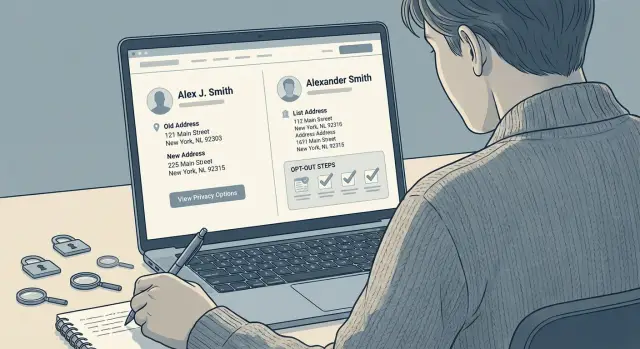
What duplicate profiles look like
Duplicate data broker profiles rarely look like exact copies. That's why they're easy to miss.
On one broker site, you might see your full name on one page, a shortened version on another, and a middle initial on a third. All three can point to the same person, but the site may store them as separate records.
Addresses create the same problem. Your current address might appear on one listing, while an older apartment, dorm, or family home shows up on another. Some sites split records by address history, so one person ends up with several pages instead of one complete profile.
Small changes are often enough to create a new listing: John Smith, John A Smith, and Jonathan Smith; a maiden name and a married name; an old street address and a new one; even two different age ranges pulled from different sources.
That matters because one opt-out often removes only one page, not every version of your record on that site. If you submit a request for the page with your current address, another listing tied to an older address may stay live.
A common pattern goes like this: you search your name, find one result, opt out, and assume you're done. A week later, the same broker still shows another page with a slightly different spelling or a different city. It feels like the request failed, but often it only covered the first listing.
Some sites also split your data across multiple pages. One profile may show a phone number and age. Another may list relatives and past cities. Both still point to you.
If you're doing personal data removal by hand, slow down and compare every result on the same site before you submit anything. If you use a service like Remove.dev, these copies still need to be tracked as separate removal targets for the same reason: each page may need its own request.
When one site shows several versions of the same person, assume each page is its own problem until you confirm it's gone.
Why one opt-out is not always enough
A single opt-out request often removes only one record, not every version of your profile on that broker. That's why duplicate profiles can keep showing up even after you get a confirmation email.
The first reason is simple: many brokers build listings from several sources. They may pull from voter files, marketing databases, old people-search feeds, property records, and scraped public pages. If those sources spell your name a little differently or attach an old address, the broker can treat them as separate people even when they're clearly all you.
The second problem is how those records are stored. Each profile page often has its own page ID inside the broker's system. When you opt out of one page, the request may apply only to that exact record. A near-match with a middle initial, a past city, or a shortened first name can stay live because it sits under a different ID.
Sites can also rebuild pages after a data refresh. You remove one listing, then the broker imports a fresh batch and creates a new page from the same source or from another source it hadn't merged yet. That's why cloned listings sometimes come back days or weeks later.
Search results make this more confusing. A broker may remove the live page, but Google or the broker's own search can keep showing the old result for a while. So you may think the opt-out failed when the page is already gone, or think the job is done when another live version is still there.
A quick example makes it clear. Say you remove "Jane A. Carter" at one address. The same site may still show "Jane Carter," "J Carter," and a profile tied to her old apartment. To the broker, those may be four separate entries.
That's why follow-up matters. One request can help, but it rarely clears every copy on its own.
Find every version before you submit
The easiest way to miss a listing is to trust the first result you see. Broker sites often keep several versions of the same person, and small differences hide them well. One page may use your full name, while another shows a nickname, a middle initial, or an old address.
Start on the broker site itself, not just on Google. Search engines may show one page and miss the rest, especially when a site updates slowly or keeps some profile pages out of search results. If you're dealing with duplicate profiles, the site search is usually where the extra copies appear.
Try a few search patterns before you submit anything: your full legal name, short forms of your first name, past cities or ZIP codes, old street addresses, and age ranges the site may still connect to you.
Open every similar result in a new tab, even if you're not fully sure it's yours yet. A profile with the wrong age by two years can still be your record. The same goes for pages that mix your current city with an address from five years ago.
Don't assume the pages are linked behind the scenes. On many broker sites, two profiles that look almost identical are still separate records. If you opt out of one and leave the others alone, those extra pages can stay live.
Before you act, make a quick list of every profile URL. A basic note is enough. Save the name shown on the page, the city, the age if listed, and the exact web address. That small step makes the opt-out process much cleaner.
If you need to check results later or send follow-ups, those saved URLs will save time. Ten careful minutes up front can spare you a second round of cleanup a week later.
Save proof before anything changes
Before you submit any opt-out request, capture the page exactly as it appears. Duplicate profiles can change fast. One copy may disappear, another may stay live, and a third may show up with a slightly different name or address a day later.
That proof helps in two ways. First, it shows that each listing existed when you asked for removal. Second, it gives you something to compare later, so you can tell whether the broker removed the right profile or only one version.
For each profile, save a full screenshot, the exact page URL, the date you found it, and the details shown on the page, such as name, age, current and past addresses, and relatives. Keep any confirmation email, ticket number, or case number tied to that request too.
Do this for every version, even when two pages look almost the same. A cloned listing may change one detail and still count as a separate profile. For example, one page might say "John A Smith," while another says "Jonathan Smith" with the same street and family members. If you only save proof for one page, it's harder to show that the second one was missed.
A simple folder system helps. Put each broker in its own folder and name files with the date and a short note like "profile 1" or "middle initial version." It sounds boring, but it can save 20 minutes when you need to follow up.
Keep all emails and case numbers in the same place as the screenshots. If the broker replies that your record was removed, you can match that reply to the exact listing you reported.
How to remove the remaining copies
After your first opt-out, don't assume the site will connect the other pages on its own. Many broker sites treat each URL as a separate record, even when the pages clearly point to the same person.
Start with the first request and wait for the site's reply or posted review window. If the broker says removals take 7 to 10 days, give it that time. Sending the same form again too soon can create confusion, especially if the site opens a second ticket without tying it to the first one.
Once the first request is in, send a separate opt-out for every extra profile URL you found. Use the exact page address each time, not just the search results page. If there's a notes box, say plainly that the listings refer to the same person and point to the matching details, such as the same name, city, age range, past address, relatives, phone number, email fragment, or photo.
If the form has no notes field, use the same email address for each request and keep the wording consistent. That makes it easier for support to see that the records are connected.
Sometimes a broker removes one page and leaves the rest alone. When that happens, reply on the same email thread instead of starting over. Say which profile was removed, list the URLs still online, and repeat that all pages refer to the same person. Short and specific works best.
Then check the site again after the review window ends. Search your full name, common misspellings, and older locations. Some sites quietly leave cloned listings in their search index even after one page is gone.
A simple tracking note helps here: save the URL, request date, case number, and outcome for each page. If you use Remove.dev, that tracking and follow-up can happen in one dashboard, which is helpful when the same profile comes back later under a slightly different version.
A simple example
Say Jennifer searches a broker site and finds three separate pages that all point to her. One page uses "Jennifer Smith." Another says "Jen Smith." A third page has an old apartment address she moved out of years ago.
At first glance, it looks like one profile split into a few versions. Many people assume one opt-out will clear all of them. It usually doesn't.
Jennifer submits a removal request for the first page only, because that's the one she notices first. A few days later, that listing disappears. Good news, but only partly. The other two pages stay live because the broker treats them as separate records.
This is common. A nickname can create one version. An old address can create another. Sometimes the site even gives each page its own record number, which means each one needs its own request.
Before Jennifer sends anything else, she saves proof of the two pages still online. She grabs the full page title, the exact page address, and screenshots that show the old apartment address or the name variation.
Then she files follow-up removals for both remaining pages. If the broker has a form, she submits each listing on its own. If the broker only allows one contact message, she includes both page addresses and explains that they belong to the same person.
A short note often works: "You removed one listing for Jennifer Smith, but two more profiles are still active under Jen Smith and an old address. Please remove these records too."
The simple rule is this: count pages, not people. If you see three listings, plan for three removal actions unless the broker clearly confirms it removed every version tied to your details.
Common mistakes that leave copies online
The biggest trap is thinking one successful opt-out means the job is done. With duplicate profiles, small differences can leave one copy behind. A middle initial, an old apartment number, or a nickname can be enough for the site to treat it as a separate record.
One mistake shows up all the time: removing the search result instead of the profile page. If a broker site has a results page and a separate profile URL, the profile is the real source. The search result may disappear for your name, but the full page can still load from a direct link and get picked up again later.
Another easy miss is sending one request without every matching URL. Many brokers store each page as its own entry, even when the details look almost the same. If you submit only the most obvious profile, the copy with a shortened first name or a slightly older address may stay live.
Old details cause trouble too. People often search for their current name and current city, then stop there. But brokers may build extra pages from a maiden name, a nickname, a past phone number, or an address from five years ago. If you've moved, changed your name, or used a shorter version of it, check those versions too.
A hidden page is not the same as a removed page. Some sites pull a listing from on-site search before they fully delete it. That looks like progress, but it's only half done if the direct URL still works. Open the saved page itself, not just the search screen, and test again after a few days.
People also quit too early. A broker may approve the opt-out, then take time to refresh its index. During that gap, the page can still appear in search or in a stale category page. Save each URL, note which variation it belongs to, and recheck after the site updates. Ten extra minutes here often catches the copy that would have stayed online.
Quick checks before you move on
A broker may accept your opt-out and still leave one or two copies behind. Before you close the case, do a fast second pass. It takes a few minutes now and can save you from finding the same record again next month.
Start with a private window in your browser. That cuts down on cached pages and saved sessions that can make an old listing look like it's still live, or hide a listing that is still public. Search the broker site the same way a stranger would search for you.
Then test both desktop and mobile views. Some broker sites show slightly different results depending on screen size or device type. A profile that disappears on a laptop can still appear on a phone version of the site, especially if the search tool loads a shorter result page.
Use a short checklist:
- Search your full name, common short name, and any middle initial you've used.
- Open each profile URL you saved during the opt-out process.
- Check whether the page errors out, redirects, or still shows personal details.
- Repeat the search on mobile, not just desktop.
- Take one last screenshot for your records.
If a saved URL still loads but the page is blank, read carefully. Some sites remove the visible profile but leave bits of data in the page title, preview text, or related-person section. That's still a problem worth tracking.
Wait and verify
Do one more check over the next few weeks. Re-listings happen when brokers refresh from a new source or rebuild a page under a slightly different URL.
A practical rhythm is simple: check again after a few days, then again after two to three weeks. If you're doing this by hand, keep the old URLs and screenshots in one folder so you can compare results fast.
If you want help with the repeat work, Remove.dev handles removals across more than 500 data brokers, tracks requests in real time, and keeps monitoring for re-listings after a profile is removed. Whether you do it yourself or use a service, don't treat the first successful opt-out as the finish line.
What to do next
Once the last copy is gone, don't assume the job is finished. Duplicate profiles often come back under a slightly different name, an old address, or a record pulled from a new source. A small follow-up routine can save you from doing the same cleanup again a month later.
Start with a simple tracker. A spreadsheet is enough. Write down the broker name, the profile URLs you found, the date you sent each opt-out, and what changed after that. If one site had three duplicate listings, track all three on separate lines. That makes missed copies much easier to spot.
Your tracker only needs a few things: which broker you contacted, which profile versions were removed, which copies are still live, and when to check the site again.
Reminders matter too. Some brokers take a listing down, then post it again weeks later. Set a check-in for the sites that gave you trouble before. A quick review after two weeks, then another one in a month, is often enough to catch re-listings before they spread.
If you're handling one or two sites, manual follow-up is manageable. Past that, it gets old fast. Name variations, old addresses, and duplicate records can turn a short task into a recurring chore.
The better your system, the less likely old records are to creep back online. Even a basic tracker and a few reminders will put you in much better shape the next time a copy appears.
FAQ
Why did one opt-out remove only one profile?
Usually because the broker treats each page as its own record. A full name, nickname, middle initial, old address, or past city can create separate profile IDs, so one request may remove only one page.
How do I know if two similar listings are both mine?
Look for matching details across the pages. The name may vary a bit, but shared addresses, relatives, phone numbers, age range, or city history often show that both listings point to you.
Should I search on Google or on the broker site?
Start on the broker site itself. Google may show one page and miss the rest, while the broker's own search often reveals extra copies tied to old names or addresses.
What proof should I save before sending a removal request?
Before you submit anything, save a full screenshot, the exact URL, the date, and the details shown on the page. Keep confirmation emails and case numbers too, so you can match each reply to the right listing later.
Do I need a separate opt-out for every profile URL?
Yes, in most cases you should. If the site shows three profile URLs, plan for three removal requests unless the broker clearly says one request covers every version of your record.
How long should I wait before checking again?
Give the site the review time it states on the form or in the email. Many removals take several days, and with Remove.dev most removals are done within 7 to 14 days, with tracking visible in the dashboard.
What if the search result disappears but the profile page still loads?
That usually means the profile was hidden from search, not fully removed. Open the direct URL you saved and test it again after a few days, because a live page can still be public even if search results changed.
Can old addresses or name variations create new profiles?
Very often, yes. Brokers build pages from mixed sources, so an old apartment, maiden name, shortened first name, or stale age range can create a fresh listing that still points to you.
What’s the easiest way to track duplicate profile removals?
A simple spreadsheet or note works well. Track the broker name, each profile URL, the date you sent the request, any case number, and whether the page is gone, hidden, or still live.
When should I use a service like Remove.dev?
If you keep finding clones, re-listings, or pages across many sites, a service can save a lot of time. Remove.dev searches and removes records across more than 500 brokers, monitors for re-listings, and sends new requests automatically when data comes back.