Expert witness data removal before your profile spreads
Expert witness data removal helps limit how old CVs, speaker bios, and directory pages get stitched into one easy profile before testimony.
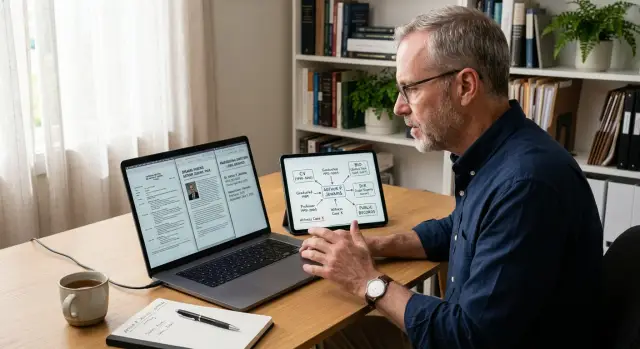
Why expert witness work creates extra exposure
Expert witnesses are easier to look up than most professionals. The work depends on trust, visibility, and a record people can verify, so details end up scattered across public CVs, speaker bios, court filings, firm profiles, conference pages, and old interviews. That makes expert witness data removal more urgent than it is for many other careers.
The problem usually is not one dramatic leak. It is accumulation.
A short bio on a law firm page might list your city, specialty, degrees, and past employers. An older conference profile might add a headshot and a personal website. A court-related directory might include an office address or phone number. Each page looks minor on its own, but together they form a clean, searchable profile.
That is where published CV privacy starts to fail. A CV is meant to show experience, but it often includes much more: middle names, licensing history, publication lists, direct contact details, and a full timeline of places you have worked. Once that information is public, it can be copied into people-search sites, marketing databases, and profile pages you never created.
Small details matter more than people expect. Your name plus a niche field may already narrow the list to one person. Add a city, a past hospital, a graduation year, or a board membership, and identification gets much easier. No one needs your home address on page one if they can piece it together from five other pages.
That is why the goal is safety, not secrecy. You may still need a public professional presence. Lawyers, courts, and clients need to confirm who you are and why your opinion matters. The real issue is limiting the extra detail that makes cross-site profile building easy for strangers, data brokers, or hostile parties.
A public expert profile should answer professional questions, not hand over a trail of personal data.
Where your details usually show up
Most experts do not expose information in one obvious place. It usually spreads across ordinary pages that seemed harmless when they went live. A conference bio, a law firm profile, an old hospital page, and a PDF CV can be enough to expose your work history, city, credentials, and direct contact details.
The usual sources are familiar. Published CVs on law firm, conference, and event sites often include full employment history, degrees, licenses, publications, and sometimes a personal phone number. Expert directories may add a headshot, case areas, fee ranges, and office locations. Old bios on university, hospital, clinic, or company pages can stay online for years after a role changes. Board memberships, speaking pages, webinar archives, and PDF uploads also add to the record. PDFs are especially stubborn because they get copied, indexed, and reposted.
Most of this material was posted for reasonable reasons. You wanted to show credibility, explain your background, or help attorneys vet your experience. The problem is that public bios often carry more detail than they need. A short speaking page might name your specialty, city, past employers, and show a headshot. That can be enough for someone to connect it to your home address record on a people-search site.
Old institutional pages are a common blind spot. Universities, hospitals, and past employers may still host bios long after you leave. Some keep archived staff pages or old press releases that still appear in search results. If your bio changed over time, those older versions may contain details you would never publish now.
For expert witness data removal, PDFs deserve extra attention. A CV uploaded once can end up mirrored on directory pages, event archives, or document-sharing sites. That is why a basic search of your name is not enough. You also need to look for old bios, speaker pages, and downloadable files that can feed data brokers.
How cross-site profile building happens
Most cross-site profile building is simple matching, not hacking. One page rarely gives away everything. The problem starts when an old CV, a speaker bio, a court directory entry, and a people-search listing all point to the same person.
The first match is usually basic: your full name, your city, and your employer. If those details appear on a hospital page, an expert witness directory, and a conference program, the record starts to look certain. A middle initial, office location, or job title makes the match even stronger.
Older pages then fill in the gaps. A published bio might include your specialty, license number, board certification year, or the dates you worked at a prior firm or clinic. Each extra detail helps sort you from other people with the same name.
A few details make matching especially easy:
- the same version of your name across several sites
- the same city or metro area
- your employer, practice, or firm name
- license, specialty, or graduation dates
- older bios that were never taken down
Once one solid bio turns up, the search gets much easier. A short conference profile can lead to a LinkedIn page, an alumni profile, or a cached staff page. Those pages may show past employers, a profile photo, or a second city tied to your history. That is often enough to find a home address on broker sites or a property record that matches your age range.
Family details can finish the rest. If a broker site lists a likely relative, and an old newsletter or association page names a spouse or family member, the profile gets stronger. From there, contact records often get folded in: old cell numbers, personal email addresses, and previous home addresses.
A simple example shows how fast this happens. Say an old expert directory lists "Dr. Jane Smith, Phoenix, Desert Spine Clinic." A past webinar page adds her specialty and license state. A broker site finds a Jane Smith in Phoenix tied to that clinic, then connects a home address, two relatives, and an old phone number. No single page looked too revealing. Together, they build a clear profile.
That is why expert witness data removal is really about breaking those links. If the matching points stay public, other sites can keep rebuilding the same profile.
A simple example of how one profile gets built
Picture a forensic accountant getting ready to testify. She has been careful with social media, so she assumes there is not much to find. The problem is that most online profile exposure does not start with social posts. It starts with professional pages that look harmless on their own.
A conference site is often the first piece. It might show her full name, headshot, specialty, and a short speaker bio. That alone gives a broker or scraper a clean identity record to start with. If the page stays up for years, it keeps feeding search results long after the event ends.
Next comes the PDF CV. Many experts share one with event organizers, courts, or directories, and that file often gets indexed. A CV can list past employers, degrees, licenses, board memberships, publications, and older office locations. Even if each detail seems routine, together they make matching much easier. A scraper now has a career timeline, school history, and name variations to work with.
An expert directory fills in another piece. It may confirm her current city, practice area, and contact path. At that point, a data broker does not need much guesswork. It can compare the city from the directory with employer names and old addresses from the CV and decide it has the right person.
After that, broker listings do the most damage. They may add address history, age range, phone numbers, and relatives. Now a stranger can move from a conference bio to a full profile that feels personal. That profile can then spread because brokers copy from each other.
Why this matters
This is why expert witness data removal matters before testimony, not after. Once a profile is copied across multiple broker sites, cleanup takes longer and the same details keep coming back.
A simple stack of public sources can be enough: one speaker page, one old CV, one directory entry, then broker records. None of those pages needs to reveal everything. Together, they do.
What to remove first
If you only have time to clean up a few details, start with the ones that make you easy to match across sites. That is the fastest win. A single public CV, old conference bio, or directory entry can give data brokers enough to connect your records in minutes.
Your home address comes first. Remove your current address anywhere it appears in full, and do not ignore old ones. Past addresses are often the bridge that connects a professional profile to people-search records, property records, and household data. Even one old street name can be enough.
Next, take down personal phone numbers and private email accounts. A private cell number used once on a speaker page or alumni listing can spread far beyond that site. Personal email is just as risky. It often becomes a matching point between public bios, leaked marketing lists, and broker databases.
Names of relatives and other people in your household should also go. These details look harmless on family pages, donation lists, and neighborhood directories, but they make profile matching much easier. If someone can tie you to a spouse, parent, or adult child, they can often pull in more addresses and contact details from older records.
Birth year, exact age, and similar identifiers come next. You do not need them for credibility. Data brokers use small facts like graduation year, middle initial, city, license year, and age range to decide that two records belong to the same person.
A useful order is:
- full home address and address history
- personal phone number
- private email address
- relatives and household names
- birth year, age, and similar identifiers
If a public page needs contact details, use business-only information. If a bio needs background, keep it broad. "Board-certified internist with 18 years of practice" is safer than a full timeline with age clues, home city, and personal contact details.
This first pass will not erase everything, but it makes cross-site profile building much harder.
A step-by-step cleanup plan before testimony
Start earlier than feels necessary. Once your name is tied to a case, even in a small way, old bios and directory pages become much easier to find.
You do not need fancy tools at first. You need a careful search, one clean list, and a follow-up habit.
- Search your name in several combinations. Try your full name, middle initial, specialty, city, former employer, and phrases like "expert witness" or your license type. Use a private browser window so old search history does not shape the results.
- Make one master list. A spreadsheet is enough. Log every CV PDF, speaker bio, directory profile, court-related mention, and people-search page that shows your phone, home address, personal email, age, relatives, or past addresses.
- Fix the pages you can reach first. Update your own website, old conference pages, association listings, and any PDF resume still floating around online. If full removal is not possible, cut the page down to work basics and remove personal details.
- Send removal or edit requests to the rest. Use contact forms, privacy requests, or direct emails. Be brief and specific about what should come down or be changed.
- Recheck after 7 to 14 days. Some pages disappear fast. Others stay cached, get copied elsewhere, or come back under a slightly different URL.
Keep notes as you go. A before-and-after screenshot, the date you sent a request, and the outcome will save time when you follow up.
If you are dealing with lots of broker pages, a service can save time. Remove.dev removes personal data from more than 500 data brokers, tracks requests in a dashboard, and keeps monitoring for relistings after the first round.
The goal is not to erase your career history. It is to leave a clean public profile that shows your work without handing out extra personal details to anyone who goes looking.
Common mistakes that keep your profile exposed
The most common mistake is simple: you remove the obvious page and assume the rest will fade on its own. It usually does not. Cleanup breaks down when old material stays indexed, copied, or reposted on sites you forgot existed.
A big one is the old PDF CV. People update the current version on their own site, but the older file is still sitting in search results, on a bar association page, in a conference archive, or inside a university directory. PDFs are especially messy because they often include a full mailing address, direct phone number, case history, and publication list in one place.
Another mistake is reusing the same short bio for years. That sounds harmless, but it makes cross-site matching easy. If the same 80-word bio appears on a webinar page, a law firm event page, a speaker directory, and an old interview, it acts like a fingerprint. A broker or scraper can connect those pages quickly, then add your city, employer, license details, and relatives from other records.
People also miss the leftovers around the main page. The profile may be gone, but the image caption still names you. The event page may still show your headshot and title. Search cache copies can keep a snippet alive after the source page changes. A lot of exposure comes from these side pages, not the main bio itself.
Another common mistake is stopping after one removal. If you get a directory page taken down but ignore data broker copies, the same details keep spreading. One broker buys from another, and old records can pop back up months later.
A quick check helps:
- search your name with filetype:pdf and your city or specialty
- look for speaker pages, event archives, and image search results
- check whether the same bio text appears word for word on several sites
- see if a removed page still has cached snippets or copies elsewhere
If you are preparing for testimony, published CV privacy matters more than most people think. One stale PDF or recycled bio can reopen the whole trail. Clean the source pages, then watch for relistings.
A quick check before a hearing or deposition
Do one last sweep 24 hours before you appear. This is not a full cleanup. It is a fast check for details that can still be found in a few clicks.
Start with a simple search for your full name in quotes. If your name is common, add your field or city. You want to see what a lawyer, reporter, or curious client sees first, not what you expect to be there.
Page one gets the attention, but page two often has the older material. Image results matter too. A headshot from a conference page can lead to a speaker bio, and that bio can lead to a PDF CV with more contact details than you meant to share.
Use this short checklist:
- search your full name in quotes and scan the first two pages
- open image results and click through to the source pages
- open every PDF that shows up, especially old CVs, case lists, event programs, and faculty bios
- look for direct identifiers such as a home address, personal phone number, personal email, names of relatives, graduation years, and exact dates tied to old jobs or licenses
PDFs are where people get careless. A polished web bio may show only your role and credentials, while an old downloadable CV still has your cell number in the header and a full mailing address at the bottom. Search inside the PDF, not just the preview.
Date clues matter more than they seem. A birth year, license year, or graduation date can help someone match your profile across data broker pages. The same goes for a spouse name buried in a community board bio or a relative listed in a people-search result.
If you find something exposed, take a screenshot and note the exact page title. That saves time when you send a removal request or add it to your cleanup workflow.
You do not need a perfect internet footprint before a hearing. You do need to catch the obvious pieces that make profile building easy.
What to do next
Do not wait until the week of testimony. Set a short review schedule now, then repeat it before each new case. For most experts, a 20-minute check once a month is enough, plus a deeper pass 7 to 10 days before a hearing, deposition, or trial.
Start with the public pages you control. Your firm bio, speaker page, old conference profile, and published CV often give away more than they need to. Keep your credentials, practice area, and contact route. Cut home location details, personal phone numbers, old headshots tied to other sites, and full career timelines that make profile matching easy.
A simple rule works well: if a detail does not help a client or court understand your qualifications, remove it from the public version.
Keep the routine short so the work does not pile up:
- review your top search results for your name and city
- replace older bios with shorter versions
- remove direct personal contact details where possible
- check whether your CV PDF is still public and indexed
- note any broker listings or people-search pages that still show up
If you handle expert witness data removal on your own, the hard part is not one request. It is keeping up with the copies. One broker pulls from another, an old directory gets scraped, and the same facts come back a few weeks later.
The best next move is a small one: block 20 minutes on your calendar today and tighten the pages you control first.
FAQ
Why are expert witnesses easier to find online?
Because your work depends on public credibility, details about you often appear on CVs, firm bios, conference pages, court records, and old employer sites. One page may look harmless, but together they make it easy to identify you and connect your professional profile to personal records.
What should I remove first?
Start with your home address, old addresses, personal phone number, and private email. After that, remove relatives' names, birth year, exact age, and anything else that helps people match you across multiple sites.
Are old PDF CVs really that risky?
Yes. A PDF CV often contains far more than a normal bio, such as old employers, dates, licenses, mailing addresses, and direct contact details. Once that file is indexed or copied, it can keep showing up long after you forgot about it.
Can a simple conference bio expose me?
Often, yes. A short bio with your full name, city, specialty, and employer can be enough for a broker site to find the right record. Add a headshot or a past job, and the match gets much easier.
Do I need to take down my whole professional profile?
No. The goal is not secrecy. Keep a public profile that shows your field, credentials, and a business contact route, but strip out personal details that do not help a court or client assess your work.
How do data brokers connect my records?
Most of the time, they compare small details across pages. Your name, city, employer, license year, graduation year, or old office location can be enough to tie a speaker page, CV, and people-search record to the same person.
When should I start cleaning this up before testimony?
Start before your name is tied to a case if you can. A good rule is a quick monthly review, then a deeper check about a week before a hearing, deposition, or trial so you have time to fix what turns up.
What should stay public on my bio?
Keep the public version narrow and work-focused. Your specialty, current role, broad experience, and business contact method are usually enough. You rarely need a full career timeline, home location details, or personal contact info on a public page.
What mistakes keep my information exposed?
A common mistake is removing one obvious page and stopping there. Old PDFs, cached copies, image pages, reused bios, and broker listings can keep the same details alive even after the main profile is gone.
Can a data removal service help with repeat listings?
If you are seeing the same details come back on broker sites, a service can save a lot of time. Remove.dev removes personal data from more than 500 data brokers, tracks requests in a dashboard, and keeps monitoring for relistings after the first cleanup.