Fake opt out portals: how to verify a broker request page
Learn how to spot fake opt out portals before you submit ID or personal records. Check domains, page details, and warning signs fast.
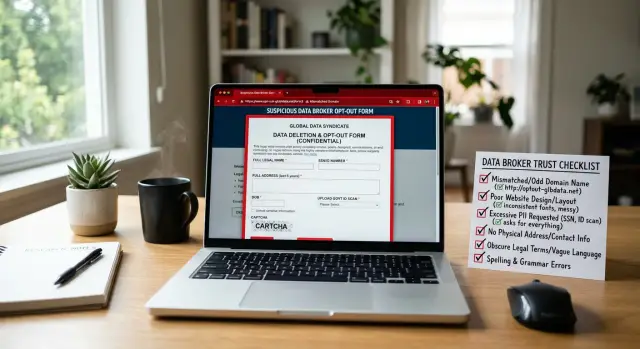
What can go wrong with a fake request page
A fake request page can do more damage than the listing you wanted to remove. These pages are built to look ordinary: a broker name, a clean form, a line about privacy rights, maybe even a support email. The goal is simple. Get you to hand over more personal data than the broker had in the first place.
That is why people fall for them. A fake opt-out portal might ask for the same things a real company sometimes requests, such as:
- a driver's license or passport image
- a selfie for "identity verification"
- a utility bill with your full home address
- a phone number and current email address
That bundle is far more useful to a scammer than a basic people-search listing. With it, someone can try account recovery, open new accounts in your name, target your family, or sell your details to other criminals. One bad upload can widen your exposure instead of reducing it.
A familiar brand name is not enough. Logos are easy to copy. So are colors, layouts, and legal text. Some phishing pages copy wording from a real data broker request page and change only the place where your files are sent. At a quick glance, the page looks normal. That is why it works.
There is another problem people miss. When you submit fresh information to a fake form, you may be updating old data for the attacker. Maybe the broker had an address from five years ago. Now the fake page has your current address, a working email, and a photo ID that connects everything.
A common mistake is trusting the first page you find in search, an ad, or a link in an email. If that page is fake, the opt-out process turns into broker removal phishing.
The rule is boring, but it saves a lot of trouble: verify first, submit later. Before you upload any document, stop and check whether the page is genuine. A two-minute pause can prevent months of cleanup.
What a real broker request page usually looks like
A real broker request page is usually plain, specific, and a little boring. That is a good sign. It should tell you what the form is for without pushing you to rush, upload extra files, or share more than the request needs.
Start with the address bar. The web address should clearly match the broker's name or sit on a subdomain that obviously belongs to that company. Small changes matter. A real company page usually does not hide behind a lookalike name, extra words, or a strange domain that has nothing to do with the business.
The page should also explain the request in simple terms. You should be able to see what data they need, why they need it, and what kind of opt-out or deletion request the form handles. If they ask for your name and email so they can find your record, that makes sense. If they jump straight to a passport, driver's license, or full date of birth with no reason, that is not normal.
A real form usually asks for the minimum needed to process the request. In many cases, that means basic contact details and enough information to identify the listing they hold. It should not feel like opening a bank account.
Legal and privacy details should be easy to find. On a real site, you can usually find a privacy policy, terms, company contact details, or a page that explains rights under laws such as CCPA or GDPR. Those pages do not need to look polished. They just need to exist, make sense, and match the company running the form.
Think about a simple example. If you are removing an old home address from a broker, a real request page might ask for your name, the address you want removed, and an email so they can confirm the request. It may explain how long review takes and what proof, if any, they accept. That is very different from a fake portal that asks for a full ID upload before it even tells you who is collecting it.
A polished design does not prove a page is safe. Clear ownership, plain explanations, visible legal details, and a minimal form are much better signs.
Red flags that should make you stop
A bad page often gives itself away quickly. If the domain looks slightly off, stop there. One extra letter, a swapped character, or a long string of random words can turn a real broker page into a trap.
The order of questions matters too. Most real request pages start with basic details such as your name, email, and the listing you want removed. A form that asks for a driver's license, passport, or selfie before it even asks who you are is a bad sign. It is even worse if there is no clear reason for the upload and no privacy notice nearby.
Pressure is another warning. Be careful with pages that say your request will expire in minutes, threaten legal action if you do not respond now, or claim your data will stay public unless you upload documents right away. Real companies can be frustrating, but they do not usually talk like that.
The page itself can tell you a lot. Spelling mistakes, broken images, odd fonts, copied logos, or buttons that lead nowhere are common on scam pages. Sometimes the form looks polished, but the rest of the site feels unfinished or copied. That mismatch matters.
Then check the business details. A real company should show a clear name, contact email, and some way to reach support. If the footer is blank, the privacy page is missing, or the contact address uses a different business name, do not send anything. The same goes for forms that show one company name in the header and another in the upload notice.
A simple rule helps: if the page wants more from you than it proves about itself, close it.
How to verify a page before you submit anything
Before you enter your name, email, or home address, stop for a minute. Fake opt-out portals can look convincing at first glance. A copied logo or familiar page title does not prove the form is real.
Start with the full domain. That matters more than anything else on the screen. Read it slowly from left to right. Look for swapped letters, extra hyphens, or added words such as "secure," "privacy," or "support" in odd places.
Then open a few other pages on the same site. The homepage, footer, contact page, and privacy page should look like they belong together. If the form looks polished but the rest of the site is thin, broken, or inconsistent, leave.
You should also be able to find a company name, a privacy notice, request terms, and some way to contact the business. If those are missing, that is a bad sign. Compare the form with what the broker asks for elsewhere on its site. If one page asks for basic details and another suddenly wants a passport scan, something is off.
A real data broker request page usually fits the rest of the site. The language is similar, the branding is consistent, and the process is explained in plain English. You should be able to tell who is collecting your data, why they need it, and what happens after you submit the request.
It also helps to verify the page another way. Close the tab, then find the company through its main website or a past email you already trust. Do not rely on a suspicious page to prove itself.
A plain-looking form is not the problem. A form that feels disconnected from the company is.
When a page asks for ID or other documents
This is where fake opt-out portals can do the most harm. A name and email are bad enough to lose, but an ID upload can expose your photo, document number, birth date, and signature in one file.
Pause before you send anything. A real data broker request page may ask for proof in some cases, but that does not mean every upload box deserves a document.
Start with one question: is the document truly needed for this request? Many opt-out requests can be handled with basic details such as your name, address, and the listing you want removed. If the page jumps straight to "upload your ID" without a clear reason, treat that as a warning.
Send the least amount of personal data that can still finish the request. If a page says a partial ID is accepted, cover anything it does not need. In many cases that can include your ID number, photo, signature, expiration date, and even part of your birth date, unless the form clearly says otherwise.
Do not upload full records just because a form has an upload box. A passport scan, tax form, medical record, or full utility bill gives away far more than most brokers need to verify identity. If they only need proof of address, a redacted document may be enough. If they only need proof of name, ask yourself why the rest of the file is still visible.
Before you upload, get clear on four things: what detail they are trying to verify, why the document is needed, whether a partial or redacted document is allowed, and whether the request matches the broker record you are trying to remove.
Take screenshots of the page, the request text, and any note about required documents before you send anything. If the site changes later, or if you need to dispute misuse, you will have a record of what was asked.
A simple example of checking a suspicious form
Picture this. You search for a data broker you want to opt out of, click a result, and land on a page that looks plain and believable. It has a logo, a privacy note, and a form labeled for removal requests.
At first glance, nothing feels off. Then you notice the domain is close to the broker's name, but not quite right. Maybe the company name is followed by an extra word such as "support," "request," or "privacy-center." That small change matters.
Then the form gets stranger. Before it asks for your name, email, or listing details, it demands a photo of your driver's license. Some real brokers do ask for ID in certain cases, but leading with document upload before basic information is unusual and risky.
That is the moment to stop.
Read the full domain carefully, compare the company details with what you already know about the broker, and see whether the page explains why it needs ID and when. If the request feels rushed or out of order, close the form.
After that, confirm the removal path from a safer source. Check the broker's main site, find its privacy page from the homepage, or use a service you already trust to manage removals. If you are still unsure, wait. You can always opt out later. You cannot take back a photo of your license once it lands on a phishing page.
Common mistakes people make
One common mistake is trusting the first search result. Ads and lookalike pages can sit above the real site, and the domain usually tells the real story. If the page name looks right but the address has extra words, odd spelling, or an unusual country code, stop there.
People also send too much, too soon. A broker may ask for proof, but that does not mean you should upload a full passport scan the moment you open the form. In many cases, a masked document, a utility bill, or an email reply is enough. Sending a full license with your photo, number, and address gives a scammer almost everything they want.
Another mistake is assuming every broker uses the same process. They do not. One site may ask you to confirm an email. Another may need an address match. A third may remove the listing with no document at all. If you send the same sensitive file to every form, you create extra risk for no reason.
Small inconsistencies matter more than people think. Fake portals often copy the look of a real broker page but miss the details. You might see a support email on a different domain, a company name spelled two ways, or contact details that do not match the privacy policy. Those small mismatches are often the clearest warning.
Another bad habit is reusing one unedited document everywhere. If that page later leaks, or if the upload was never real, the same full ID can be abused again and again.
A better routine is simple: check the exact domain before you type anything, read what proof the page actually asks for, hide fields the broker does not need, use a fresh limited document when possible, and stop if the page feels rushed or sloppy.
Quick checks before you press submit
A last review takes less than a minute. That minute can save you from handing your address, birth date, or ID to a phishing form that only looks like a real broker page.
Start with the address bar. Read the full domain from left to right, not just the first word. A page that begins with a broker name can still be fake if the real domain comes later, like brokername.security-check.example.com. The part that matters is the main domain, not the branding in the subdomain.
Then look at what the form actually wants from you. A normal opt-out request usually asks for enough to find your record, such as your name, city, age range, or email. Be careful if it jumps straight to a full ID upload, Social Security number, or extra contact details that do not seem tied to removal.
Before you send anything, ask yourself four plain questions:
- Does the domain match the company I think I am dealing with?
- Does each field seem necessary for a removal request?
- Can I find a real business name, privacy policy, support contact, or mailing address?
- Have I saved a record of what I am about to submit?
If the page feels off, back out. Bad spelling, mixed branding, broken pages, or urgent warnings are enough reason to stop.
What to do next
If a request page feels wrong, stop there. Do not upload your ID, utility bill, or selfie just to see what happens. A real opt-out request can wait a few hours while you verify the page. A stolen document can cause problems for months.
Start by checking the broker through a source you already trust. That might be an old email from the company, a privacy policy you found earlier, or a support address listed on a confirmed company page. If you cannot confirm the form, leave it alone.
It also helps to keep a separate note for every broker you contact. Write down the company name, the date, what page or email you used, what documents you shared, and when you need to follow up. If something looks wrong later, you will not be guessing which form you used last week.
If a page looks fake, report it to the real company when you can. Use a confirmed support email or privacy contact, not the suspicious form itself. A short message is enough. Say where you found the page, what it asked for, and why it looked suspicious.
If you already sent documents before noticing a problem, act fast. Contact the real broker through a verified channel and ask whether they received your request. Then watch your email, credit reports, and any account that uses the same personal details.
If you are dealing with dozens of brokers, a managed service can save a lot of time. Remove.dev automatically finds and removes personal information from over 500 data brokers, shows each request in a dashboard, and keeps monitoring for relistings so the same data does not quietly reappear.
When you are unsure, keep it simple: pause, verify, and only then submit.
FAQ
How can I tell if an opt-out page is fake?
Check the full domain first. If the address has extra words, swapped letters, odd hyphens, or a different company name than you expected, stop.
Then look for a privacy notice, company contact details, and a form that asks for the minimum needed to find your record. A page that wants more from you than it proves about itself is not worth the risk.
What should I check first before filling out a broker form?
Start with the address bar. Read the domain slowly from left to right and make sure it clearly belongs to the broker.
Do that before you type your name, email, or address. The page design matters far less than the real domain.
Can I trust a page if it has the broker's logo and legal text?
No. Logos, colors, and privacy wording are easy to copy.
A real page should also fit the rest of the site, show who runs it, explain what the request is for, and make sense when you open the homepage, footer, and contact page.
When is an ID upload request a bad sign?
It is a red flag when the form asks for a driver's license, passport, or selfie before it even asks for basic details about your listing.
Some brokers do ask for proof in certain cases, but they should say why. If there is no clear reason or no privacy notice nearby, do not upload anything.
What does a real broker request page usually ask for?
Most real request pages ask for basic details first, like your name, email, and the address or listing you want removed.
They usually explain what happens next and how long review may take. It should feel like a simple removal request, not like opening a financial account.
Is the first search result usually safe to use?
No. Search ads and lookalike pages can appear above the real site.
If you found the form through search, close it and confirm the path another way. Go through the broker's main site or another source you already trust.
Can I hide parts of my ID before uploading it?
Often, yes. If a broker really needs proof, send the least amount of personal data that still works.
Cover anything they do not need, such as your ID number, signature, photo, or full birth date, unless the page clearly says those details are required.
What should I save before I submit a removal request?
Take screenshots of the page, the request text, and any note about document requirements.
That gives you a record of what the page asked for in case the site changes later or you need to report misuse.
What should I do if I already sent documents to a suspicious page?
Act fast. Contact the real broker through a verified channel and ask whether they received your request.
After that, watch your email accounts, credit reports, and any account that uses the same personal details. If you sent a full ID, keep a closer eye on account recovery attempts and suspicious messages.
Is there a safer way to handle lots of broker removals?
Yes. If you are dealing with many brokers, a managed service can reduce the risk of using the wrong form.
Remove.dev finds and removes personal data from over 500 brokers, tracks each request in one dashboard, and keeps checking for relistings so your information does not quietly come back.