Fake payroll update scam: how public work history helps
A fake payroll update scam works better when old resumes and broker records expose your job history. Learn where the overlap happens and how to lower the risk.
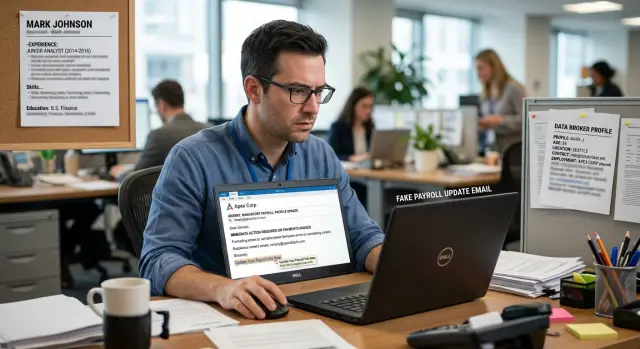
Why this feels real
Payroll emails are easy to fake because real ones are usually dull. They are short, routine, and easy to skim. A fake payroll update scam works for the same reason. It feels like one more admin task, not a dramatic emergency.
The sender also does not need much detail to sound familiar. An old company name, a past job title, or the month you started can make the note feel tied to your work life. Even if that detail is years out of date, your brain can still treat it as proof that the message is real.
That effect gets stronger when the message names someone or something you already trust. If it mentions a current employer, a past employer, or a benefits provider you have seen before, your guard drops fast. Most people do not expect a stranger to know that much, so they stop checking.
Benefits messages add another pressure point: timing. People are used to reminders about open enrollment, tax forms, direct deposit checks, and policy acknowledgments. When a note says "review this today" or "confirm before payroll closes," the deadline can push you to click before you verify anything.
The details do not even need to be perfect. A scammer can mix an old role from a resume, a home address from a data broker profile, and a familiar employer name. On a busy day, "close enough" is often enough.
Phone screens make this worse. Many people only scan the sender name, subject line, and first sentence. If those parts look normal, the message can slide past the caution you would use on a laptop.
Behind all of this is a simple trust shortcut. Payroll and benefits emails often ask you to sign in, confirm, review, or update something. The request itself does not feel strange. When a message sounds routine and uses details you recognize, it can feel safe in under ten seconds.
Where the details come from
These scams do not need fresh insider data. Old public scraps often work just fine.
Resumes are a common source. A resume posted years ago can stay online long after you changed jobs, edited your profile, or forgot the account existed. Some job boards keep archived copies, and search results or mirror sites can keep those copies alive even after the original page is gone.
That gives a scammer your past employer, job title, office city, and a rough career timeline in a few minutes. The facts are stale, but they still sound personal.
Data broker profiles fill in the rest. Many brokers list where a person lives, places they used to live, age range, relatives, phone numbers, and sometimes an employer or likely workplace. If one profile says you live in Phoenix and an old resume says you worked in payroll, benefits, HR, or finance, that is enough to tailor a message that feels plausible.
People-search sites make the problem worse because they merge data from many places into one page. A single profile may pull from old marketing lists, public records, job sites, and other broker databases. Even when one detail is wrong, the mix can still look convincing because two or three parts match real life.
In practice, the scammer is often stitching together a few pieces:
- an old resume for your role or past company
- a broker page for your city or age range
- a people-search site for address history or relatives
- cached job board pages for dates that sound right
The email does not need to be perfect. If it correctly names your employer, mentions your city, and refers to a benefits or payroll task that sounds routine, you may hesitate for a second and wonder if it is real. That second is what the sender wants.
How resume data and broker profiles fit together
An old resume and a data broker profile may look harmless on their own. Put them together, and they give a scammer a clear sketch of your work life and personal identity.
A resume often reveals more than people think. Even an outdated one can show your job title, company name, employment dates, and sometimes your team or department. If it mentions "payroll analyst," "benefits coordinator," or a unit like "North America sales," the sender now has language that feels internal.
A broker profile fills in the parts a resume usually leaves out. It may add your personal email, phone number, age range, and address history. Now the scammer is not guessing who you are. They can match the work record to a real person and contact you on a channel that feels less protected than your work inbox.
That overlap is what makes employer impersonation work. One source says where you worked. The other says where you lived while you worked there. One gives a title and dates. The other helps confirm that the same person now uses a different email or lives at a new address.
This gap-filling matters more than most people expect. A generic note saying, "We need you to confirm your direct deposit after the benefits update," is easy to ignore. A note that mentions your old employer, your former title, and a city you used to live in feels like it came from a real payroll or HR system.
Even small facts can lower your guard. The right year range. The name of a past team. An old address in the footer. None of that proves the sender is real, but it can buy a few seconds of trust.
That is why resume privacy and broker cleanup matter together. If your old work history stays public and broker profiles stay easy to find, strangers can combine the pieces into a believable story.
What the message usually looks like
Most of these emails are plain on purpose. They do not read like the old scam messages about lottery winnings or frozen bank accounts. They look like normal notes from HR, payroll, or a benefits team.
The subject line is usually boring in a convincing way: "Payroll account update needed," "Direct deposit verification," or "Open enrollment action required." Real work emails often sound just as dry.
The sender name is another trap. Instead of a random personal name, the message may show "HR Department," "Payroll Admin," or your company name. On a phone screen, that can be enough to make someone tap before checking the real address.
The body is usually short. It says your payroll, tax, or benefits details need review. It gives you a button that says "Sign in," "Confirm now," or "Update form." It adds a deadline, often the same day or before the next pay cycle, and offers a reason that sounds ordinary, like a policy update or security check.
The fake page behind the button is often copied from a real employee portal. It may use the same colors, logo style, and button labels your company uses. Some scammers even copy wording from old benefits emails, so the page feels familiar right away.
This is where public work history helps the scam. If the sender already knows where you worked, your title, or which payroll vendor your company used, the message can sound specific without saying much. "Please confirm your direct deposit details before Friday" feels ordinary when the right company name sits at the top.
One clue is how little context the message gives. Real payroll updates often include support contacts, extra explanation, or a note telling you to log in through the usual company portal instead of a direct link. Scam messages push you straight to the click.
A simple example
Picture someone named Erin. She left a mid-sized company two years ago and now works somewhere else. Nothing dramatic happened when she left. Some of her old information just never disappeared.
Her old resume is still on a job site. It shows her previous title, the company name, and the dates she worked there. By itself, that does not sound like much. For a scammer, it is a believable starting point.
Now add one more piece. A data broker profile still lists her current city and puts her in a rough age range. It may also show past addresses or relatives. None of that is secret by itself. Together, it starts to look a lot like an employee record.
A scammer uses those scraps to send a fake HR note. The message says there is a benefits correction that needs Erin's attention before the next payroll run. It mentions her old employer by name, uses a plain subject line, and sounds routine.
The note might say, "We found a mismatch in your benefits enrollment record" and ask her to confirm her tax withholding and direct deposit details the same day. It may warn that a delay could affect her next paycheck.
Erin might hesitate because she no longer works there. But the old title is right. The employment dates look right. The city matches. For someone busy, that can be just enough to click.
The form behind the message is where the damage starts. It asks for bank account numbers, routing details, tax ID information, or a copy of a pay stub. Once she enters that data, the scammer can try account fraud, tax fraud, or resell the information.
This example is ordinary on purpose. Employer impersonation often works with stale public data, not hacked records.
How to verify a payroll or benefits message
If a payroll or benefits message pushes you to act fast, slow down first. The first thing to check is not the request. It is the message itself.
Start with the full sender address, not the display name. "HR Team" can be faked in seconds. What matters is the real email behind it. A misspelled domain, an extra word, or a public email account is often the giveaway.
Next, do not use the button or link in the message, even if the preview looks normal. Open your payroll or benefits portal on your own. Type the address you already know, use your bookmark, or open the company app directly. If there is really an update waiting, it will usually appear there too.
Then check the tone. Scam messages lean hard on pressure: "update this today," "your pay may be delayed," or "confirm before payroll closes." Real payroll teams do send reminders, but they usually do not force you into a rushed click-and-log-in moment.
Finally, verify the request through a trusted route. Ask HR through the number, internal chat, handbook, or company directory you already use. Do not reply to the suspicious message to ask if it is real. If the sender is a scammer, your reply only confirms they reached a live person.
A short routine helps when you are busy:
- Check the full sender address.
- Ignore the link in the email.
- Open the payroll portal yourself.
- Confirm the request with HR or IT through a known contact.
That last step helps more than just you. If one person got the email, others at the company may have it too. Reporting it gives IT or HR a chance to warn everyone else before someone enters login details or uploads tax forms.
One rule is worth keeping in mind: if HR should already have it, do not send it by reply. That includes your date of birth, employee ID, direct deposit details, tax forms, and home address. Real HR teams may ask you to review records, but they usually do it inside the normal payroll or benefits system.
Mistakes that make the scam easier
These scams get easier when your work history is scattered across old resumes, job sites, speaker bios, and data broker profiles. The sender does not need your full employee file. A few correct details are enough to make the message feel routine.
One common mistake is leaving old resumes public after a job change. That resume may still show your employer, title, city, work email pattern, and the month you started. On its own, that may seem harmless. Paired with a broker profile that lists your home address, age range, or relatives, it gives the sender a profile that feels personal.
Repeating the same work details across many sites makes the problem worse. If your LinkedIn profile, old resume, conference bio, and people-search listings all match, a scammer has more confidence that the information is current enough to use.
People also trust familiar names too quickly. A note that mentions a real manager can feel legitimate, but names are easy to find on company pages, PDF org charts, social posts, and old team bios.
The riskiest moment is often a rushed one. If you read the message on your phone between meetings, small warning signs are easy to miss. The sender address may be slightly off. The request may ask for a "quick confirmation" of your bank details, Social Security number, or benefits login.
A few habits cut the risk fast. Remove or hide old resumes that still show past jobs and contact details. Keep public profiles sparse. Be skeptical of messages that lean on familiar names. And if you are on your phone, wait and check the message later on a larger screen.
What to do next
Start with cleanup, not panic. This type of scam works better when old job details are easy to find.
First, delete or hide resumes you forgot about on job boards, portfolio pages, and old profile sites. If a resume from three jobs ago is still public, it can hand over your past title, work dates, and even the wording your employer used around benefits or payroll.
Then search your own name with one or two past employers every few months. Look for stale resumes, people-search pages, and broker listings that still tie you to a company you left years ago.
It also helps to make a quick inventory of what is public right now: current and past employer names, job title and department, office city, and any old work email or phone number. That small check shows you what a scammer can piece together. If you see the same details across resume sites and broker profiles, start asking for deletions where the site allows it.
Manual cleanup works, but it gets tedious. If you do not want to handle broker removals one by one, Remove.dev can automatically find and remove personal information from over 500 data brokers worldwide and keep monitoring for re-listings. That reduces the amount of personal data strangers can pair with old resume details.
After that, tighten up what you share going forward. Leave enough information online for networking or job hunting, but skip extra details like direct payroll contacts, internal tool names, office extensions, or old employee IDs. Less public detail gives an employer impersonation email less to work with.
FAQ
Why do fake payroll emails look believable?
Because they sound routine. A short note about direct deposit, tax forms, or open enrollment feels like normal admin work, so people skim instead of checking closely.
If the email also mentions a real employer, old title, or city you lived in, it can feel trustworthy even when the details are stale.
Where do scammers get my job details?
Most of the time, from public scraps. Old resumes, job board copies, people-search pages, and data broker profiles can reveal past employers, titles, cities, phone numbers, and address history.
A scammer can combine a few matching details and make a message feel personal without hacking anything.
Can an old resume really put me at risk?
Yes. An outdated resume can still give away your past company, role, and work dates. That is often enough to build a fake HR or payroll message that sounds familiar.
When those work details get paired with broker data like your city or personal email, the scam gets much more convincing.
What are the usual signs of a fake payroll or benefits email?
Start with the full sender address, not the display name. Scam emails often use a name like "HR" or "Payroll" while hiding a strange domain underneath.
Watch for pressure, vague wording, and direct links that push you to sign in right away. Real payroll teams usually expect you to use the normal company portal.
Should I ever click the link in a payroll email?
The safer move is no. Open the payroll or benefits portal yourself using a bookmark, the company app, or the address you already know.
If the request is real, you should be able to find it there too. That simple habit cuts out most phishing traps.
What if the email mentions a company I used to work for?
Treat it with extra caution. Scammers often use old employer names because former job details are easy to find online and still feel familiar.
Even if the company name and dates look right, verify the request through a known HR or IT contact before you do anything.
What information are these scams usually trying to steal?
Usually login details, bank account numbers, routing numbers, tax information, or copies of pay stubs and forms. Some fake pages ask for just a username and password first, then ask for more after that.
Once they have that data, they can try account fraud, tax fraud, or sell the information to others.
How can I verify a payroll or benefits request safely?
Check the sender, ignore the link, and sign in through your normal portal. If anything still feels off, contact HR or IT using a phone number, chat, or directory entry you already trust.
Do not reply to the suspicious email to ask if it is real. That only tells the sender they reached an active person.
What should I do if I already clicked or sent information?
Act fast. Change the password for the account you used, and if you reused that password anywhere else, change those too.
Then contact your employer's HR or IT team, and if you shared bank or tax details, notify your bank and watch for suspicious activity. The sooner you report it, the better your chances of limiting the damage.
How can I lower this risk over time?
Clean up the public details that make these emails easier to write. Remove old resumes, trim public work history, and look up your name with past employers to find stale profiles.
If you want help with broker removals, Remove.dev can automatically find and remove personal information from over 500 data brokers and keep checking for re-listings, which gives scammers less personal data to pair with old resume details.