Fake pet chip renewal emails and similar vet bill scams
Fake pet chip renewal emails often use public pet names, owner names, and city details to seem normal. Learn the warning signs and next steps.
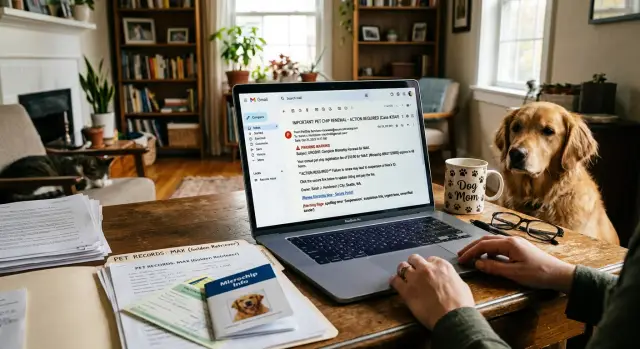
Why these emails feel routine
A fake bill works best when it does not feel dramatic. That is why fake pet chip renewal emails often look like dull admin mail instead of an obvious scam. The subject line might say "microchip renewal notice" or "payment due for pet record update." Most people have seen reminders like that before, so their guard stays low.
The pet's name does a lot of the work. Seeing "Bella," "Max," or whatever name you use every day makes the message feel personal right away. It does not read like spam sent to everyone. It reads like a note tied to a real pet, which is exactly what the sender wants.
It gets more convincing when the email includes your name and a city clue. A line such as "for Jamie in Portland" can make a plain template feel real enough to trust. Those details are small, but together they tell your brain, "This probably matches an account I already have." People often stop checking right there.
The amount matters too. A charge for $19, $27, or $38 feels ordinary. It is low enough that many people will pay first and sort it out later. That is the sweet spot for this kind of scam. A huge bill would trigger questions. A small one feels like a routine renewal, late fee, or record update.
These messages also copy the tone of real service emails. They are calm, plain, and slightly boring. No wild threats. No cartoonish language. Just a note that seems to fit the normal chores of pet ownership, like vaccine reminders, grooming confirmations, or insurance notices.
Public details make that routine feeling stronger. If your pet's name, your name, or your city appears in public pet profiles or people-search listings, a scammer can stitch them into a message that sounds familiar. The email does not need many facts. It only needs enough to feel like something you forgot about.
That is why these scams catch careful people too. They do not ask you to believe something strange. They ask you to believe something mildly annoying and completely normal.
Where scammers get the details
These scams usually do not start with a hacker breaking into a vet clinic. More often, they start with small bits of public information that anyone can collect in a few minutes.
A public pet profile can reveal more than people expect. Pet names are often posted with the owner's name, a photo, and sometimes a birthday or breed. If a scammer knows your dog is named Luna and your last name is Carter, a fake invoice stops looking random and starts looking familiar.
Lost pet pages are another easy source. People post fast when a pet goes missing, so they often include a city, phone number, neighborhood, and a clear photo. Even after the pet is found, the post may stay up for months or years. A scammer can copy those details and send a small bill that looks local, like a chip renewal notice or an unpaid balance from a nearby clinic.
Old adoption posts can be just as useful. A rescue listing from three years ago may still show the pet's name, the adopter's first name, and the town. That may sound harmless, but it gives a scammer enough to make a message feel personal.
The missing pieces often come from data broker sites. These sites can tie a name to an address, email, age range, phone number, and past cities. Once that happens, the scam gets much more believable.
Common sources include public pet profiles, lost pet pages, old adoption or rehoming posts, social posts with city or phone details, and data broker records. Put those scraps together and the email almost writes itself. "Bella's microchip renewal is due in Columbus" looks routine if Bella is your real dog and Columbus is your real city.
This is why personal data removal matters. A fake vet bill email gets much stronger when a scammer can combine pet details with address and contact information pulled from broker sites. If a message includes your pet's real name, that should make you more careful, not less. In a pet microchip renewal scam, accuracy is often just a sign that your information was already public.
A simple example
You get an email on a weekday morning with the subject line "Luna's chip renewal is due." Luna is your dog, so the message gets your attention right away. It does not look dramatic. It looks like the kind of small admin note a clinic, registry, or pet database might send once a year.
The message starts with your first name. It also mentions the city where you live. That small detail does a lot of work. A stranger saying "Hi, Megan" is one thing. A stranger saying "Hi, Megan, this notice applies to pet owners in Denver" feels close enough to real that many people stop questioning it.
Then comes the charge: $18. That amount is part of the trick. It is low enough to feel routine, almost forgettable. Plenty of pet owners have paid small fees before for records, tags, or account updates, so a fake vet bill email can slide into that same mental bucket.
You click the button because the risk seems tiny. The payment page looks normal at first glance. It asks for your card number, your full address, your phone number, and your billing details so it can "update the chip file." Now the scam is doing more than taking $18. It is collecting enough information to try a second scam later, or to make other fraud attempts look more believable.
What makes this work is how little the scammer actually needs. They may have found Luna's name in a public pet profile, a rescue page, a lost pet post, or a breeder listing. Your first name and city might come from social media, a people-search site, or a data broker record. Put those scraps together, and the email no longer feels random.
That is why fake pet chip renewal emails often look plain instead of flashy. The scam does not need a big story. It just needs a pet name you recognize, owner name city clues that feel local, and a small bill that seems easier to pay than question.
How to verify a message before paying
The safest first move is simple: stop and check your own records before you touch the message.
If an email says "Luna's chip renewal is due" or claims you owe a balance to a vet, open the paperwork you already have. Look at old invoices, chip registration emails, your vet portal, or the folder where you keep vaccine and microchip details. Many people skip this because the amount is small.
A quick check usually catches the problem:
- Confirm that your pet even has the service named in the email. Some pets are chipped but do not have any annual renewal fee.
- Compare the sender address with real past messages. Scams often use a lookalike domain, extra words, or a strange reply-to address.
- Search for the clinic or chip company on your own. Use contact details from your records, not the message.
- Call the phone number on past paperwork or a real invoice. Do not call the number inside the email.
- Check the timing. If you visited the vet last month and paid in person, a surprise balance due notice deserves a second look.
A small example shows why this works. Say an email claims "Max - renewal due" and mentions your city. That sounds routine. But when you check your papers, you see Max's chip was registered once, with no yearly plan, and the real company uses a different email domain. The scam falls apart in two minutes.
This habit matters more now because public pet profiles, owner names, and city details can leak through people-search sites and data brokers. That gives scammers enough to make fake pet chip renewal emails sound ordinary.
If a message is real, paying a day later will not hurt. If it is fake, ten calm minutes can save your card details, your money, and a lot of cleanup.
Signs the message is off
A lot of these scams work because they do not look dramatic. They look boring. That is why the small details matter more than the logo.
One common tell is the sender address. The name shown in your inbox may look familiar, but the actual domain is often slightly wrong. It might swap one letter, add an extra word, or use a strange ending that does not match the real company. Many people never check this part, and scammers count on that.
The design can fool you for a second. A copied logo or a familiar color scheme means very little if the writing feels vague. Real messages about a pet account usually mention a specific service, an account reference, or a clear reason for contact. Scam messages often stay broad: "renew now," "avoid interruption," or "confirm your pet record today."
Another red flag is when the email asks you to confirm details the company should already know. If you supposedly have an existing microchip account, they should not need you to re-enter your full name, address, phone number, pet name, and chip number just to process a routine payment. That is often data collection first, payment second.
The payment page is where many scams give themselves away. Before paying, pause and look at the business name on the form and the web address in your browser. If the email claims to come from one registry or clinic, but the checkout page shows a different company, that is a bad sign. The same goes for odd web addresses with random words, numbers, or extra hyphens.
Urgency is another clue. Routine renewals usually give you time. Scams push for action in hours, not days, and often threaten account closure, lost registration, or a late fee if you do not pay right away.
If the details do not line up, close the message and verify it another way before you pay.
Common mistakes
The most common mistake is paying because the amount looks harmless. A charge for $12, $19, or $29 feels too small to fight over, so people clear it quickly and move on. That is exactly why these scams work.
Another mistake is replying to "confirm" details. A fake vet bill email might ask for a chip number, vaccine date, pet birth year, or the clinic you use. That sounds routine, but it gives the sender more data to reuse in the next message. A short reply can turn a weak scam into a much more believable one a week later.
People also click the link in the email because it feels faster than checking on their own. If you already have an account with a chip registry or clinic, use your saved login, a bookmarked page, or a phone number from an old bill. Do not let the message choose the path for you.
A lot of people trust local details too much. An email can mention your pet's name, your last name, and your city and still be fake. Those details are often public, easy to buy, or scraped from old posts and profile pages.
One more mistake is assuming a normal tone means a real business. Scam messages often look boring on purpose. They copy the style of reminder emails, overdue notices, and auto-renewal receipts because boring messages get less scrutiny.
A simple rule helps: if money or pet records are involved, pause and verify outside the message. That takes a few extra minutes. It can save you from giving away payment details, account access, and just enough personal information to make the next scam even more convincing.
What to do next
If a message asks you to pay a small pet fee right away, stop there. Fake pet chip renewal emails work because they look ordinary. A pet name, your name, and your city can make the note feel familiar enough to click without much thought.
Your next move should be boring and slow. That is usually what saves money.
Save the email, text, or screenshot. Do not pay through the message itself. Contact your vet, chip registry, or insurer using the phone number or website you already trust, and ask one plain question: "Did you send this bill or renewal notice?"
That check often clears things up in a minute. If the office says it is fake, keep the message anyway. Forward it to them so they can warn other clients, and report it to the real chip provider if their name was used.
It also helps to clean up old public details. Many people forget about breeder pages, lost-and-found posts, old adoption listings, club profiles, and neighborhood forums. A page with "Milo," "Sarah," and "Austin" may not look sensitive, but it gives a scammer enough to build a believable fake bill for $19 or $39.
Take down anything you no longer need. Remove old pet profiles, hide your full name where you can, and trim city or contact details from public pages. If your personal data is spread across broker sites, that takes more work. Some people use Remove.dev for that step. It is a personal data removal service that removes records from more than 500 data brokers and keeps monitoring for relistings, which gives scammers less information to work with.
One more habit makes future checks easier: keep one trusted place for pet records. That can be a notes app, a folder in your email, or a paper file at home. Put your vet's real phone number, your chip registry name, policy details, renewal dates, and past invoices there.
Then when a message arrives, you have something solid to compare it against. If the amount, sender, timing, or pet details do not match your own records, treat it as suspicious and verify it before you do anything else.
FAQ
Is a pet chip renewal email usually real?
Not usually. Many real microchips are registered once and do not need a yearly renewal fee. If you get a surprise bill, check your own records or call the registry or vet using contact details you already trust.
How did the sender know my pet's name and city?
Because those details are often public. A scammer can pull a pet name, your first name, and your city from old pet profiles, lost-pet posts, rescue pages, social posts, or data broker records and turn them into a message that feels familiar.
What is the safest way to check if the bill is real?
Start with your paperwork, old emails, vet portal, or chip registration records. Then contact the clinic or registry through a phone number or website you already have, not the one in the message. If it is real, paying a day later is rarely a problem.
What are the biggest red flags in these emails?
Watch for a sender domain that is slightly off, vague wording, pushy timing, or a payment page with a different business name than the email. Another bad sign is being asked to re-enter details a real provider should already have, like your full address, pet name, and chip number.
Why do these scams ask for such a small amount?
Small charges feel routine, so people pay before they check. A bill for $18 or $27 sounds like a normal admin fee, not a major problem. That low amount lowers your guard and gives the scammer a better chance of getting payment details too.
Should I reply to ask if the email is legit?
Do not reply to the message. Save it, then contact the real vet, chip registry, or insurer another way and ask if they sent it. Replying can confirm that your email is active and may give the sender more details to use later.
What should I do if I already clicked or paid?
If you only clicked, close the page and do not enter anything else. If you paid or shared card details, contact your bank or card issuer right away, watch your statements, and ask about a card replacement if needed. If you entered personal details too, be extra careful with follow-up emails and texts that mention your pet.
Can old pet posts really be used against me?
Yes. Old lost-pet pages, adoption posts, breeder listings, and neighborhood forum posts often stay public for years. Even a few scraps like a pet name, your name, and your town can make a fake bill look real enough to trust.
Does a normal-looking email mean it is probably safe?
No. A calm, boring tone is part of the trick. Scammers copy the style of normal reminders because plain messages get less scrutiny than dramatic ones.
How can I make these scams less believable in the future?
Trim public details where you can. Remove old pet profiles, hide your full name and city on public pages, and clean up broker-site records that tie your contact details to your household. Some people use Remove.dev for that step because it removes records from more than 500 data brokers and keeps checking for relistings.