Family tree privacy for living people on genealogy sites
Family tree privacy for living people starts with checking profiles, photos, and relatives' settings so names and places stay private.
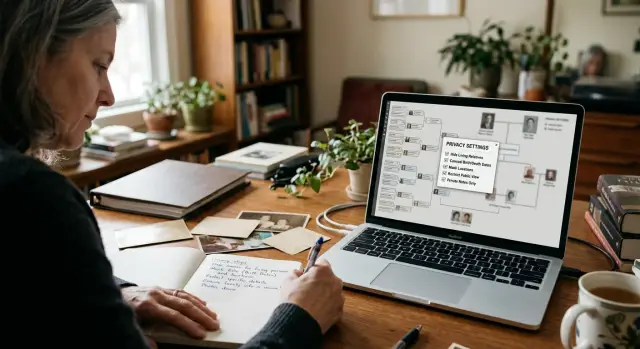
How living people get exposed on genealogy sites
Most exposure on genealogy sites is accidental. A relative builds a public tree to share old records, then adds living family members for context. What feels harmless can still give strangers a full name, an age range, and a rough place to start looking.
Some sites hide living profiles by default, but details still leak around the edges. A spouse name, a birth year, or a city can be enough to identify someone. Even when a profile only says "living," attached notes, captions, and relationship lines can still reveal who that person is.
Photos make the problem worse. A caption like "Emma at Lincoln High graduation with Mom and little brother Noah" says far more than the image alone. It can reveal children, schools, close relatives, and sometimes where a family lived at that point in time. One album can expose several people who never agreed to be included.
The problem spreads quickly because relatives copy from each other. One cousin adds a birth year and town. Another imports that branch into a new tree. A third reuses the same details in a memorial page, a local history post, or a photo caption. Once that happens, fixing one page does not fix the rest.
Search engines add another layer. A profile page can appear in search results, and image previews can surface faces, names, and captions even if very few people visit the original site. A simple search for a living person can end up pointing straight to family connections.
A typical example looks like this: an aunt uploads a public tree for a reunion, includes her daughter's full married name, birth year, and city, then adds a school photo with names in the caption. Within days, other relatives copy the branch, and the image starts appearing in search. No hacking is involved. The family posted it themselves.
What to look for first
Start with anything that can identify a living person in seconds. The biggest risk is rarely one detail on its own. It is the mix of a name, a place, a date, and a photo that makes someone easy to find.
Check more than profile pages. On many genealogy sites, private information stays visible in photo captions, attached documents, comments, story sections, and tree notes.
Look first for:
- full names, maiden names, and nicknames tied to known relatives
- exact dates and places, especially birth dates, wedding dates, and current city
- contact details such as phone numbers, email addresses, and street addresses
- school names, employers, clubs, and social handles
- photos that show faces, children, cars, house numbers, street signs, or school uniforms
A simple rule helps: if a stranger could use the detail to search, message, visit, or confirm identity, flag it.
If you are short on time, look for the riskiest combinations first. Full name plus exact birth date is a problem. Full name plus current city and employer is also a problem. A clear face photo plus close relatives' names can be just as revealing.
You do not have to remove every mention of a living person. Usually, you only need to strip out the details that make that person easy to trace in the real world. The family link can stay if that is what keeps the tree useful.
What to remove and what to hide
A good rule is simple: if a stranger could use it to find, contact, or verify someone, take it out of the public view.
Some details should usually be removed, not merely hidden. Current addresses, email addresses, phone numbers, employer details, and social media names do not belong on a public profile or in a gallery caption.
Exact birth dates are another common problem. If the site lets you keep a rough timeline, use a birth year only. That still helps with family research and gives away much less.
Photo captions deserve a close look. "Emma at her new house in Boise" seems harmless, but it ties a living person to a place and sometimes to a recent move.
For a quick cleanup, remove contact details and current address information, change full birth dates to a year where possible, delete captions that tie a living person to a town, school, employer, or home, and move research notes out of public comments and galleries.
Some facts still matter for family research. Keep those in a private tree, offline notes, or a locked account setting if the site supports it. Mark every living person as private on every related profile, not just the main page. One visible spouse, child, or sibling can still expose the same family.
Research notes are easy to forget. Public comments often contain maiden names, recent marriages, adoption details, and family conflict. Those notes might help relatives sort out history, but they do not need to sit in public view.
If you are unsure whether to remove or hide something, ask one question: would this help a stranger identify the person today? If the answer is yes, remove it from the public side and keep only the minimum in private records.
How to clean up a family tree step by step
Random edits usually miss something. It works better to make one full pass through every place your family appears, then check the results the way a stranger would.
Start with a plain list of every site, app, and shared tree your family uses. Include the obvious public tree, but also old invite-only trees, family history apps, photo albums, and duplicate trees a relative may have copied years ago. Forgotten copies are often the real problem.
Then go in order. Check the privacy settings for the whole tree, then each living person's profile, then any attached photos and documents. Search each living person's name inside the site to catch duplicates, index pages, and old versions. Edit one profile at a time and keep a short note of what you changed.
That site search matters more than most people expect. Someone may be hidden in the main tree but still appear in a search result, photo caption, story, or memorial page. Search full names, nicknames, and married names if they appear anywhere in the tree.
Work slowly. Remove or hide birth dates, current towns, email addresses, phone numbers, school names, employer details, and recent family photos. If a site lets you mark someone as living, do that first. Then check whether it also hides notes, media, and attached records. Some platforms hide the profile but leave the photo public.
Keep a short change log as you go. A note like "Emma - removed exact birth date, hid gallery, merged duplicate" saves time later if a relative asks what changed or if older data reappears.
The last step is a signed-out check. Open the tree in a private browser window or while logged out. If you can still find a living person by name, photo, or relationship path, the cleanup is not finished.
How relatives can help without making it worse
Privacy for living relatives falls apart when one person edits carefully and another adds the same details back in. Families do better when everyone follows the same simple rule before anyone starts editing.
For living relatives, do not post full birth dates, current towns, schools, phone numbers, email addresses, employer details, or children's names unless the person said yes. A stricter rule is usually better.
A short shared routine helps. Use only the minimum needed to place a living person in the tree. Send corrections by private message or family chat, not in public comments. Ask before uploading reunion, graduation, or school event photos. Double-check names and dates before merging profiles, and keep a note of who changed what.
Private messages matter. A public comment like "You have her birthday wrong, it is June 14, 1989" fixes one mistake and creates a new privacy problem. Send that directly to the tree owner instead, with only the detail needed to confirm the correction.
Photos need the same care. A reunion picture can reveal faces, ages, school uniforms, house numbers, and location clues in the background. Ask first, especially when kids are in the image. If someone says no, leave it out.
Merges are where families make the biggest mess. Two cousins may share a name, or a living niece may get merged into an older relative with a similar birth year. Once that happens, wrong dates and relationships can spread fast. Slow down and compare names, dates, and family links before clicking merge.
A simple example with a public cousin tree
Most exposure happens this way: no one means harm, but one public upload gives strangers more than enough to work with.
Say a cousin uploads 20 reunion photos to a public tree and tags everyone by full name. One caption says, "Emma Carter, Jake Carter, and Lily Carter at the Springfield reunion." Another says Lily just started at West Ridge High.
That is already too much for a living person. Then another relative copies the same branch into their own public tree and reuses the album because it saves time. Now the same photos and names appear in more than one place, and cleanup gets slower.
Often the most revealing part is inside the image itself. A teen may be standing in front of a house number, wearing a school team shirt, or holding a certificate with a full name on it. Put that next to a city name in a caption and a stranger can piece together a lot very quickly.
The fix starts with the obvious steps. Mark the teen as living, remove every caption that names them, and switch the album from public to private if the site allows it. If not, remove the photo from the tree.
Then check the details around the image. Delete full names from captions, remove city and school names, replace tagged names with something broad like "family at reunion," and inspect the photo itself for logos, signs, badges, and house numbers.
After that, every relative who copied the tree has to make the same change in their own version. This is the step families miss most often. One corrected tree does not fix the copies.
A short message usually works better than a lecture: "Please hide Lily as living, delete her name from captions, and make the reunion album private. Her school logo is visible in two photos." That gives the person a clear task and a reason.
If those details have already spread beyond genealogy sites, the tree is still the first thing to fix. After that, a service like Remove.dev can help remove personal information from data broker sites so the same details are harder to find elsewhere.
Common mistakes that make records harder to fix
Many privacy problems stay online because people fix one page and assume the rest fixed itself. That almost never happens. The messy part is not the first edit. It is the copies, comments, and old uploads left behind.
One common mistake is hiding a profile while leaving photos public. A face photo, a graduation picture, or even a family Bible image can still expose names, dates, places, and relationships. Even if the profile now says "living" or disappears from search, the media page may still be visible on its own.
Another mistake is trusting the living-person setting too much. On many sites it hides some facts, but not every note, comment, caption, or discussion post. A relative might have written, "This is my niece Sarah in Denver in 2019," and that one line can give away more than the profile itself.
Posting a removal request in a public discussion board can also backfire. It feels faster, but it puts the problem in front of more people. Now the full name, family link, and dispute all sit in one public thread. A private message to the tree owner or the site's support team is usually safer.
Fake names create trouble later. Some people replace a living person's name with "Private Person" or a made-up name. That can confuse relatives, create duplicates, and make future cleanup harder. If the site has a real privacy setting, use that first. If it does not, remove the personal details instead of inventing new ones.
Copied trees are often the hardest records to fix. Your aunt may hide your son's profile, but an older tree made by a cousin may still show his full name and school photo. That copied tree can keep appearing in site search long after the original is cleaned up.
Before you stop, check the loose ends people forget: public photo galleries, comments under people and media, discussion boards, memorial notes, copied trees, and duplicate profiles with old names or dates. Miss those pieces, and the record often comes back in a slightly different form.
Quick checks before you stop
The last 10 minutes often catch what slips through. A tree can look clean when you are logged in and still expose relatives to everyone else.
Before you call it done:
- Search the site for each living person's full name, nickname, and married name.
- Open the tree in a signed-out or private browser window.
- Check albums, captions, comments, and shared screenshots.
- Look for copied trees made by relatives or DNA matches.
- Write down anything that still needs follow-up.
The photo section is a common miss. Someone hides living profiles, but the reunion album still says, "Emma, Noah, and Lily at Grandma's house, July 2023." The tree feels private, but the names are still public.
Copied trees are another easy miss. A cousin may have saved your branch months ago and never updated it. If you find one, note it right away instead of trusting yourself to remember.
If the same person keeps showing up outside the genealogy site, treat that as a separate job. Remove.dev focuses on finding and removing personal information from data brokers and keeps monitoring for relistings, which can help when family tree details have already spread further.
What to do when a relative will not edit their tree
Start small. A calm, specific message works better than a long note about privacy, old family arguments, or everything wrong with the tree.
Point to one profile, one fact, or one photo, then ask for one change. "Please remove Emma's birth date from her profile" is much easier to act on than "Can you clean up the whole branch?"
Keep the request narrow. People often ignore a message because it feels like homework. Give them something they can do in two minutes.
If they seem willing but unsure what to write, offer safe replacement text they can paste in, such as "Living person," "Private," "Name withheld," or "Photo removed at family request." That lowers the chance they swap one risky detail for another.
If they still refuse, use the site's reporting or privacy process. Many genealogy sites let you report a living person's profile, an unwanted photo, or personal details posted without permission.
Keep the report short. Include the profile name, what should be removed, and why it identifies a living person. You do not need to send a full family history unless the site asks for it.
It also helps to keep your own record of what happened: when you first asked, the exact profile or photo, any reply you got, when you reported it, and what changed after that. That makes follow-up much easier, especially if the same material gets uploaded again.
If the problem goes beyond one tree, think wider. A public cousin tree can expose names, photos, and locations. Data broker sites can spread that information much further.
How to keep exposure from coming back
A cleanup is rarely permanent. New GEDCOM imports, record matches, and photo uploads can put living details back in public view without much warning.
The fix is not a one-time purge. It is a small repeat habit. After any big tree update, check living profiles again. Look for full names, exact birth dates, city names, schools, employers, and tagged photos.
Keep the routine short so you will actually do it. Review your public tree and any copied trees every few months. Recheck living profiles after imports, accepted matches, or new photo uploads. Search the same names with an age range and city to see what appears outside the tree. Ask relatives to check only the branches they manage so nobody makes too many edits at once.
It also helps to watch for the same names, ages, and cities on data broker sites. A genealogy profile may not show an address, but it can still make a broker listing look more believable.
If manual follow-up starts dragging, Remove.dev can take care of part of that work by finding and removing exposed personal data from over 500 data brokers and monitoring for relistings. It will not fix a cousin's bad tree, but it can limit how widely those details spread after the tree itself is cleaned up.
Treat genealogy cleanup the same way you treat photo sharing and old people-search listings. A quick review after major tree changes, plus a deeper check every few months, is usually enough to catch problems before copied records multiply.