Find your personal data online and rank the real risks
Learn how to find your personal data online, spot the details scammers use first, and decide what to remove now based on risk.
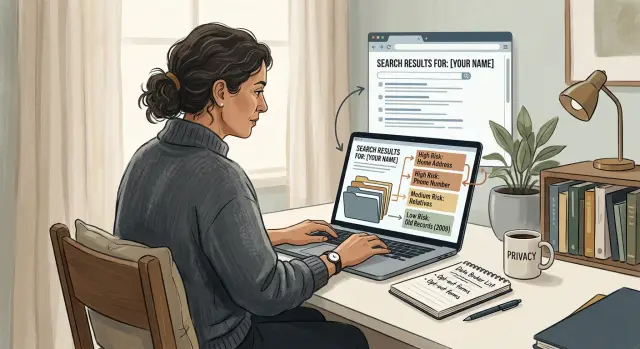
What a name search can reveal in minutes
Type your full name into a search engine and scattered facts start to connect fast. One result might show your age range, current city, and a couple of old addresses. Each detail looks minor on its own. Put them together, and a stranger gets a rough profile of who you are, where you've lived, and how to check they found the right person.
That's why searching for your own data can feel unsettling so quickly. Most of the time, you're not looking at one dramatic leak. You're seeing ordinary scraps that become useful when someone gathers them in one place.
A single people-search or broker page can show more than you'd expect: phone numbers, past streets, relatives, and other names tied to your household. Even old data still works. Identity checks often use facts from years ago, such as a former address or the name of a relative, because those details seem obscure to anyone except the real person.
Think about how a scam call gets more believable. If the caller knows your city, mentions a street you once lived on, and asks for you by full name, most people pause for a second. That pause is enough. The goal isn't perfect accuracy. It's to sound real long enough to get a reply, a code, or a click.
The bigger problem is the pileup across many sites. One page might show an old mobile number. Another might show a property record. A third might connect you to family members. None of that means much alone. Together, it can help with scam calls, fake account recovery attempts, phishing emails that mention real details, and security questions based on your past.
A simple example makes this clearer. Search for a name like "Daniel Perez" with a city. One result shows age 41. Another shows two old addresses. A broker page lists a mobile number and possible relatives. Now someone has enough to test a text, narrow down which Daniel they found, and sound believable on the first try.
That's the real issue. One page is annoying. Ten small pages can become a working script for fraud.
Set up your search so the results are really about you
A messy search gives you messy answers. Before you look for your information online, make the search as neutral as possible.
Open a private window and sign out of your email, social apps, and other accounts. Search engines learn from your history. If you stay signed in, you may see results shaped by your past clicks instead of the public results a stranger would get.
Then make a short list of the names you've used online and offline. Include nicknames, old usernames if they contain your real name, and any past cities or states tied to you. People often forget how much an old move helps narrow down a match.
If your name is common, this matters even more. "Chris Taylor" alone might pull up athletes, musicians, and strangers. "Chris Taylor" plus "Boise" or a middle initial cuts through the noise much faster.
Try a few versions of your name:
- first and last name
- first, middle, and last name
- first name, middle initial, and last name
- nickname plus last name
- maiden name or an older last name
Run each version with and without a city. If you've moved, test your current location and at least one older place. Data brokers keep stale records for years, and those records still help scammers confirm they found the right person.
Keep a plain note as you go. Write down the date, the exact search you used, and anything that looks like a real match. A note on your phone or a simple spreadsheet is enough.
That note becomes your map later. You'll start to see which searches keep pulling up the same phone number, age range, relatives, or address. Once that pattern is clear, it's much easier to tell random noise from real exposure.
Search your name like a scammer would
If you want a realistic picture of what's out there, don't search like a casual user. Search like someone trying to grab fast facts: where you live, how to reach you, where you work, and what could help with a password reset.
Start with your full name in quotes. That cuts out a lot of noise and shows exact matches first. If your name is common, add one detail at a time until the results start to look like you.
A good first batch looks like this:
- "First Last"
- "First Last" + city
- "First Last" + employer
- "First Last" + school
- "First Last" + phone number
Don't stop at the main web results. Check images, maps, and people-search pages too. Images can surface old profile photos, property shots, and event pages. Maps sometimes reveal old business listings or address pins tied to your name.
Then repeat the search with older details. A scammer will try your last city, a street you used to live on, an old phone number, or an email you used years ago. Past details often lead to current ones because broker sites copy, merge, and resell records.
One search pattern is especially revealing: old email plus full name. That can bring up forum posts, public profiles, mailing list archives, and forgotten account pages that still point back to you.
When you find a page with current details, save it right away. Take a screenshot that shows the page, the date, and the exposed information. If the page changes later, you'll still have a record.
Keep those screenshots in one folder and name them clearly, such as "current address" or "mobile number on broker site." That makes the next step much easier, whether you send removal requests yourself or use a service to handle broker removals.
You don't need to collect everything on the first pass. The goal is to spot the details a criminal would use first: current address, phone number, personal email, relatives, and any page that ties those pieces together.
Which details deserve attention first
Not every result carries the same risk. Some pages are outdated or just messy. Others give a stranger enough detail to contact you, fake trust, or answer identity checks.
Put your home address and mobile number at the top of the list. A street address gives someone a physical location. A mobile number gives them a direct line for calls, texts, and scam attempts. When both appear together, the risk jumps because the listing is ready to use.
A full birth date also deserves fast action. Exact dates help scammers tell you apart from other people with the same name. They also show up in account recovery flows, credit checks, and identity questions more often than most people realize.
Relatives' names matter more than they seem to. If a page lists your spouse, parents, siblings, or adult children next to your record, it can help someone write a convincing message or guess answers to security questions. One bad listing can expose more than one person.
Past addresses belong higher on the list than many people expect. Old addresses appear in loan forms, insurance records, and identity checks all the time. They also help confirm that a leaked profile really belongs to you.
Job title depends on context. On its own, it may not matter much. Next to a work email, office phone, city, or public work profile, it becomes far more useful for impersonation. Someone can call your workplace or send a message that sounds specific enough to get a reply.
A simple rule helps: the more a page combines identity details with contact details, the faster it should be removed. A record that shows your full birth date, mobile number, home address, and your sister's name is far more urgent than a page that only says you work in sales.
If you're sending broker removal requests, start with pages that bundle several high-risk details on one screen. Those are the listings a criminal would use first.
Make a simple risk map
A search gets messy fast. A risk map keeps each result in its place so you can act on the pages that matter first.
Use three labels only: now, soon, and later.
- Now: the page can help someone contact you, locate you, or verify your identity.
- Soon: the page adds context, but doesn't do much on its own.
- Later: the page is old, thin, or too vague to be useful to most people.
A "now" result usually has current contact or identity details. Think home address, phone number, email, date of birth, relatives, employer, or a people-search page that combines several of those in one place.
A "soon" result is weaker, but still worth tracking. It might show a past city, an old username, a workplace, or a social profile with enough detail to connect a few dots. Alone, it may not be a serious problem. Paired with other pages, it can become one.
A "later" result is usually stale or thin. An old sports roster, a decade-old forum comment, or a page that lists only your name with no contact details can wait.
One rule saves a lot of time: log one strong example before chasing duplicates. If the same broker shows your address on five nearly identical pages, record the clearest one first. Note the site name, what it exposes, and your risk label. Then move on.
A people-search result with your full name, age range, current city, relatives, and phone number is "now." A work bio with your name and company is often "soon." A 2012 event page that mentions only your first and last name is "later."
This approach keeps you from getting buried. Remove the "now" items first, work through "soon" next, and leave the weak leftovers for later.
A simple example of the process
Chris starts with the most basic search: his first and last name in quotes. He finds almost nothing. That's common, and it can create a false sense of safety.
He tries again with an older clue tied to him: a city where he lived five years ago. The results change fast. Two data broker pages show up on the first page, both with his full name and a phone number he still uses.
At first, he isn't fully sure the record is his. The name is common enough. Then he opens the preview text and sees a relative listed on one page. It's his aunt. That confirms the match.
Now the order is obvious. The broker pages go to the top because they expose details that can be used right away. A working phone number can feed scam calls, password reset attempts, and fake delivery texts. An old forum profile with no phone number and no address is annoying, but it can wait.
His first pass is simple:
- remove the two broker pages with the live phone number
- save the forum posts and old social profiles for later review
- write down the exact search terms that found each result
This step matters. A single clean search isn't enough. Small changes like an old city, middle initial, or relative's name often uncover the pages that matter most.
Chris sends removal requests for the broker listings first. If he uses a service that tracks broker requests in one place, the process gets a lot less tedious when many sites are involved. Either way, he keeps notes on what he asked to remove and when.
Two weeks later, he repeats the same searches. One page is gone. The other is still live, so he follows up. He also checks whether the same phone number appears on new broker pages. That's when the process starts to feel manageable: less random scrolling, more clear decisions based on risk.
Common mistakes that slow you down
The first mistake is usually searching too narrowly. People check only their current name and city, then assume the results are complete. That misses a lot. Old surnames, common misspellings, past towns, and even a middle initial can pull up records you'd never see with one quick search.
Another mistake is spending time on pages that feel creepy but don't raise much risk. A random old forum comment is annoying. A broker listing with your full name, age, home address, relatives, and phone number is usually worse. If you clear low-risk pages first, you can waste an hour and leave the most useful scammer data untouched.
Old phone numbers are easy to ignore, and that's a mistake too. A number you stopped using three years ago can still connect your name to old accounts, past addresses, and family members. Sometimes one stale phone number acts like a thread. Pull it, and several other records appear.
People also forget to track which sites repeat the same details. That makes the problem look bigger than it is. If five broker pages all use the same old address and one phone number, note that pattern. It tells you which detail is spreading and which sites may be copying from the same source.
A simple note sheet helps more than most people expect. For each result, record the site name, what detail appears, how risky it feels, and whether that same detail shows up elsewhere.
One more trap is assuming a single removal solves the problem. It often doesn't. Data gets reposted, sold again, or pulled into a fresh listing weeks later. That's why follow-up matters. If you're doing this manually, set a reminder to recheck the same searches.
A quick check before you remove anything
Before you send a removal request, stop for five minutes and log what you found. The first job isn't speed. It's getting a clean record so you don't waste time later.
Start with the page itself. Write down the exact page title and the date you saw it. If the broker changes the page or asks for proof, that note helps. A screenshot helps too, but the title and date are the minimum.
Then check whether the listing looks current or old. Old data still matters, but not all old data carries the same weight. A page with a phone number you stopped using eight years ago is different from a page that shows your current address, relatives, and month and day of birth.
Your quick review should answer four questions:
- What is the page called, and when did you find it?
- Does the profile look current, outdated, or mixed?
- Does it show address, phone, relatives, age, or birth date?
- Is this a separate listing, or another version from the same broker?
That last point matters a lot. Many brokers create several pages from one profile. You might see a search result page, a profile page, and a cached copy that all point to the same record. Group those together before you count them. Otherwise one broker can look like three separate problems.
It also helps to mark which requests need a follow-up check. Some pages disappear fast. Others say the request was received, then keep the record live for days. A simple note like "check again in 7 days" is enough.
Don't aim for a perfect spreadsheet. Aim for a short, reliable log. That gives you a cleaner removal plan and keeps you from sending the same request twice while missing the listing with your real phone number.
What to do next and how to keep watch
Once you've found your data online, resist the urge to clean up everything at once. Start with the pages that can do the most harm fast. A page with your full name, home address, phone number, age, and relatives is a bigger problem than an old mention on a hobby forum.
Send removal requests for the highest-risk pages first. In most cases, that means people-search sites and broker listings that make it easy to confirm your identity or guess security answers.
A simple order works well:
- pages with your address, phone number, or full birth date
- listings that connect you to family members or past addresses
- pages that show your employer, job title, or business contact details
- anything that makes account recovery scams easier
- lower-risk mentions you can deal with later
Keep one running list so you don't lose track. A plain spreadsheet is enough. Record the page name, what it exposed, when you found it, when you sent the request, and what happened next.
That list becomes useful fast. After a few requests, dates blur together. If one broker asks you to try again after a week, or a page disappears and comes back, you'll want a clear record.
Recheck the same searches in 7 to 14 days. That window makes sense because many removals take time to process, and some sites republish records after a refresh. Use the same search terms each time so you can compare results instead of starting over.
Your first sweep should become a routine, not a one-time project. For many people, a monthly check is enough. If your job puts you in public directories, or you've moved recently, check more often for a while.
If manual work starts to pile up, Remove.dev is one option for the repetitive part. It removes personal data from more than 500 data brokers, tracks each request in a dashboard, and keeps monitoring for re-listings so the same record doesn't quietly come back.
The goal is simple: use a method you can repeat. Same queries, same tracker, same follow-up window. Each round gets faster, and your exposure gets smaller in a way you can actually see.
FAQ
How do I search my name without getting personalized results?
Open a private window and sign out of your email, social apps, and other accounts first. Then search your full name in quotes and try a few versions, like a middle initial, nickname, old last name, and past city, so you see results a stranger is more likely to find.
Which details should I worry about first?
Start with pages that show your home address, mobile number, full birth date, personal email, or relatives. A page becomes more urgent when it bundles several of those details together, because someone can use it right away for scam calls, phishing, or account recovery attempts.
Why do old addresses and relatives still matter?
Because they help confirm identity. A scammer can use an old street, a family name, or a past city to sound believable or answer security questions that still rely on older facts.
What should I do if I have a very common name?
Add one detail at a time until the results start to look like you. A city, middle initial, employer, school, or even an old phone number can cut through the noise much faster than searching the name alone.
Should I save screenshots before sending removal requests?
Yes. Save a screenshot, the page title, and the date before you do anything else. If the page changes later or the site asks for more proof, you will have a clear record of what was exposed.
How can I rank search results by risk without overthinking it?
A simple three-part system works well. Mark results as now, soon, or later based on whether they can help someone contact you, locate you, or verify your identity today.
Do I need to remove every page that mentions my name?
No. Remove the pages that expose contact details, identity details, or both first. Old mentions with just your name and no phone, address, or family ties can usually wait until the higher-risk pages are handled.
What if the same broker has several pages about me?
Group them before you count them. Many brokers make a search page, a profile page, and near-duplicate copies from the same record, so log one strong example first and note the rest as related versions.
How often should I repeat the same searches?
Check again in 7 to 14 days after your first round of requests. After that, a monthly review is enough for many people, though you may want to check more often if you recently moved or your work puts you in public directories.
When does it make sense to use a removal service instead of doing this by hand?
If the manual work starts piling up, a service can save time by sending requests, tracking status, and watching for re-listings. Remove.dev handles removals across more than 500 data brokers and keeps monitoring so old records are less likely to quietly return.