Home warranty quote privacy: where your details can spread
Home warranty quote privacy matters because one form can feed agents, lead sellers, and brokers. Learn what to skip and what to delete later.
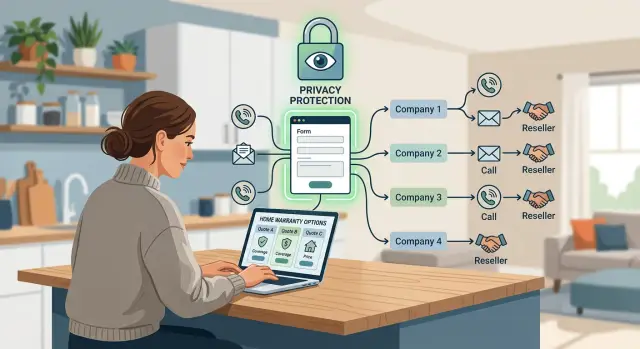
Why one quote request can spread farther than you think
A home warranty form looks simple. You type in your name, phone, email, ZIP code, and a few details about the house. Then the calls start, sometimes within minutes.
That happens because the form is often more than a request for one price. Many sites collect leads, then pass them to several home warranty companies, outside sales partners, or call centers. In some cases, the company on the page is not the only company seeing your details.
The fine print is where this usually hides. A checkbox or consent line may allow contact by phone, text, email, or prerecorded calls. It may also allow sharing with "marketing partners" or "service providers." Those broad terms can cover more businesses than most people expect.
A single quote request can move through a short reseller chain. A comparison site gathers your data. A lead seller packages it. Several buyers may pay for the same lead. Each buyer may use its own sales team or hire a call center. That is why one form can turn into repeated calls from numbers you do not know.
You can still compare home warranty prices safely. You just need to compare with less exposure. Before you send a form, assume that any field you fill in can be copied, stored, and shared. If a site only needs your ZIP code and home type to show a rough price, do not give your full street address, birth date, or a second phone number.
That simple habit will not stop every sales call. It does limit what spreads if the lead gets resold. For home warranty quote privacy, the first win is simple: share only what the quote really needs.
Who may get your details after you hit submit
The page in front of you may look like one company. Your details can still move through several hands before a real quote reaches you. That is where home warranty quote privacy starts to slip.
A common chain looks like this:
- You submit a form to a comparison site or quote page.
- The site sends the lead to an aggregator or reseller.
- The lead gets forwarded to agents, warranty brands, or call centers.
Each step can add another company to the chain. That is why calls, texts, and emails may come from names you do not recognize.
A direct provider form is different from a lead form. With a direct provider form, you are usually sending your details to the company that will price the plan and try to sell it to you. With a lead form, your contact information is often the main product. The site collects it first, then decides which companies get access.
Many pages do not make that clear. The logo at the top may belong to a comparison site, not the company that will contact you later. Sometimes the only clue is the small print near the button.
That submit button can do more than send a quote request. It may also count as consent for calls, texts, prerecorded messages, and sharing with partner companies. The wording is often bundled together, so one click can cover several types of contact at once.
That is why follow-up can feel random. You might expect one or two home warranty companies, then hear from a reseller, a call center, or a company that was never named on the page you used. If the form fed a wider lead network, your quote request probably traveled farther than you planned.
Which fields you can skip when comparing prices
When you compare plans, less often gets you the same price range. Good home warranty quote privacy starts with a simple test: does this field change the quote, or does it just give the seller another way to contact you?
Most forms can give a basic estimate with a small set of details:
- ZIP code
- Home type
- Whether you own the home
- Rough home size or the plan level you want
That is usually enough to tell whether a company is even close to your budget. Some forms also ask for your street address. If the site will show a quote with only a ZIP code, use that instead.
Be more skeptical of fields like a second phone number, alternate email, work phone, full birth date, move-in date, or names of other household members. Those details rarely improve pricing. They do make follow-up easier for sales teams and anyone else who gets the lead.
A second phone number is an easy skip. It gives callers one more line to try. An alternate email can turn one quote request into messages across two inboxes. A work phone is worse if you want to keep quote traffic out of your job. Full birth date is another field to question. Home warranty prices are based on the property and the plan, not your exact date of birth.
If a site requires contact details, one email and one phone number is usually enough. You do not need to hand over every way to reach you. When a quote form starts asking for more than the home and the plan, it is often collecting a lead, not just giving you a price.
A safer way to compare quotes step by step
If you want prices without starting a week of calls and emails, slow down before you fill out the form. A little care up front helps a lot.
Start with a shopping-only email address. It keeps quote traffic out of your main inbox, and it makes follow-ups much easier to spot and delete. Give a phone number only if you actually want a call. If the form allows email-only contact, take it. If the phone field is required, decide whether that quote is worth the tradeoff.
Leave optional fields empty unless they change the price in a real way. Many forms show boxes for street address, move-in date, spouse name, or extra home details that are not needed for a first comparison. Then read the consent text next to the submit button. The headline may promise a quote, but the fine print may also allow calls, texts, prerecorded messages, or sharing with partners.
One more habit is worth keeping: save a screenshot before you hit submit. Capture the page, the privacy wording, and the consent language. If the follow-up gets messy later, that screenshot gives you a record of what you agreed to.
A simple example of how the reseller chain works
Picture a homeowner named Lisa. She wants to compare prices before renewing coverage, so she fills out two home warranty quote requests on a Tuesday morning. Both forms ask for the usual details: name, address, email, phone number, home type, and when she wants coverage to start.
She expects two replies, maybe three. Instead, by lunch she has four calls, two texts, and a few emails from brands she never visited.
What happened is pretty ordinary. The first site was not just collecting her details for one company. It was also acting as a lead seller. After Lisa hit submit, her information could be passed to a partner network, then to a call center, then to several warranty brands or agents that buy fresh leads. The second site may have done the same thing. Now two quote requests have turned into a much wider pool of buyers.
This is where privacy breaks down. A form can look like a simple price check, but the fine print may allow sharing with "partners," "affiliates," or "marketing providers." Those words can cover a long chain.
Lisa notices one pattern fast: the phone calls are the most aggressive part. Her mobile number likely triggered most of the follow-up. Email matters too, but a phone number is easier to route to sales teams right away, reuse across campaigns, and match with other records.
Next time, Lisa would handle the search differently. She would compare any pricing information she can get without a full form. If a form is required, she would leave optional fields blank, skip the mobile number unless she is ready to talk, and use a separate email address for quote shopping. Then, after choosing a plan, she would go back and clean up any extra details she shared so the same request does not keep following her for weeks.
What to remove after you choose a plan
Once you pick a home warranty company, clean up the rest of your quote trail. Old accounts, saved forms, and marketing settings can keep your phone ringing long after you are done shopping.
Start with the companies you did not choose. If you made an account just to see a price, delete it if you no longer need it. If deletion is not available, remove as much as you can from the profile and ask support to erase your saved contact details.
Clean up the obvious places
Turn off text alerts and marketing emails in every quote account you opened. Delete any shopping account that has no reason to keep your data. Ask each company to remove saved phone numbers, alternate emails, and mailing addresses. Also clear browser autofill if you entered a personal cell number, spare email, or a family member's contact information.
Keep a short list of the brands you actually trust. That sounds basic, but it helps. If a new caller says they are "following up on your quote," you can check your list and see whether you ever meant to hear from them. If the name is not there, you can say no and move on.
Also check your inbox rules and SMS settings. Some companies keep sending reminders that are really marketing. Unsubscribing is worth the minute it takes. Clearing autofill helps too. If your browser keeps suggesting the same personal number or backup email, you can end up spreading it again the next time you shop for insurance, alarms, or another household service.
This cleanup will not pull your details back from every reseller. It does reduce fresh sharing and repeat contact.
Mistakes that lead to more spam and sharing
Most people do not end up with nonstop calls because of one form. It usually happens because of a few rushed choices stacked together.
One common mistake is submitting the same request on several comparison sites in one afternoon. Each site may send your details to a different set of sales teams, brokers, or lead buyers. Repeated submissions can make you look like a hot lead, so the calls come faster and from more numbers.
Using your everyday phone number on every form makes that worse. Once that number gets copied across a few databases, it can keep circulating long after you stop shopping. It feels more invasive because it follows you into work, dinner, and weekends.
Another easy miss is the prechecked consent box. Some forms quietly allow calls, texts, and contact from "partners" unless you untick the box yourself. A polished site can fool people too. Nice branding and trust badges do not always mean you are dealing with the actual warranty company. Sometimes the page is just a lead collector, and its whole job is to pass your details on.
The last mistake is not saving what the form said when you signed up. A screenshot of the privacy wording, the consent text, and the page you submitted can save a lot of guesswork later. Without it, it is much harder to work out who got your data and why they think they can contact you.
The practical fix is simple: compare on fewer sites, use a separate email for quote shopping, avoid your main phone number when possible, untick boxes about partner offers, and save screenshots before you submit.
A quick check before you send the form
A 30-second home warranty quote privacy check can save you weeks of calls, texts, and follow-up emails. Before you hit submit, ask one plain question: do these details help produce a price, or do they just make you easier to market to?
For a basic estimate, most forms do not need much. Your name, ZIP code, property type, and an email address are often enough to start. If a phone number is required, give one number only. Skip your work number, a second number, and your full birth date unless there is a clear reason for each field.
The small print by the button matters more than the form itself. That is often where companies ask for consent to call, text, or share your details with partners. If the text says your information may go to "affiliates," "partners," or "marketing providers," assume more than one company may contact you.
That is the moment to decide whether the quote is still worth it.
What to do next if your details are already circulating
Once your details are out, the goal changes. You are no longer just comparing prices. You are trying to slow the spread, find the source, and cut off repeat contact.
Start with a basic record. Write down the company name, phone number or email, the date, how they contacted you, and what they said. If possible, note which quote form you used and whether you told them to stop. After a few entries, patterns usually show up fast.
If a company identifies itself, send a clear opt-out request where the law allows it. Keep it short: "Please stop contacting me and remove my information from your marketing lists." If they offer email or text, use that so you have a copy. Save screenshots.
After you identify the source, block repeat callers. Do not block first and sort it out later. Note the number, see who it belongs to, then block it if the contact continues. That keeps your record clear and helps you avoid blocking a number tied to a real service you still need.
Also check whether your information has moved beyond quote forms. Search for your name, city, phone number, and email on people-search and data broker sites. If your details appear there, the problem is bigger than home warranty spam.
At that point, manual opt-outs can take a lot of time. If your information keeps resurfacing on broker sites, Remove.dev can help remove it from data brokers and keep checking for relistings.
A common pattern is simple: you request one quote on Monday, opt out from three callers by Friday, and then new companies call the next week. When that happens, treat it as a resale problem, not a one-off annoyance. The practical next step is cleanup, tracking, and removal.
FAQ
Why did one home warranty quote request lead to so many calls?
Because many quote pages are lead forms, not direct requests to one company. After you submit, your details may be shared with resellers, partner brands, agents, or call centers, so one form can turn into contact from several businesses.
Is a quote site the same as the actual home warranty company?
Not always. A direct provider form usually sends your details to the company selling the plan, while a comparison or lead site may pass your information to other companies behind the scenes. The easiest clue is the consent text near the button.
What details do I really need to share for a basic quote?
For a rough estimate, ZIP code, home type, and a few basic property details are often enough. If the form can price without your full address, birth date, work phone, or a second email, leave those fields blank.
Should I give my phone number when comparing plans?
Only if you want calls. If a site offers email-only contact, use that. When a phone number is required, give one number only and skip extra numbers so follow-up stays easier to control.
What should I check before I hit submit?
Read the small print next to the submit button, not just the big headline. Watch for wording about calls, texts, prerecorded messages, affiliates, or marketing partners, and save a screenshot before you send anything.
How can I compare quotes without cluttering my main inbox?
Use a separate shopping email so quote traffic stays out of your main inbox. That makes it easier to compare offers, spot spam, and shut things down later without cleaning up your personal email.
What should I remove after I choose a home warranty plan?
Go back to the companies you did not choose and delete any shopping accounts you made. If full deletion is not available, ask support to remove saved phone numbers, alternate emails, and marketing preferences.
What should I do if companies keep contacting me after I opt out?
Start keeping a simple record of who contacted you, when, and from what number or email. Then send a short opt-out request, save a copy, and block repeat callers after you have noted who they are.
How can I tell if my quote request was resold?
Repeated calls from names you do not recognize are a common sign. Another clue is getting texts or emails from brands you never visited, which often means your original form moved through a reseller chain.
When does it make sense to use a data removal service?
If your details keep showing up on people-search or data broker sites, manual cleanup can take a lot of time. In that case, a service like Remove.dev can help remove your information from many brokers and keep checking for relistings.