Insurance quote forms and where your data goes next
Insurance quote forms can send your details to many lead buyers. See how calls, texts, and broker listings start, and what you can do.
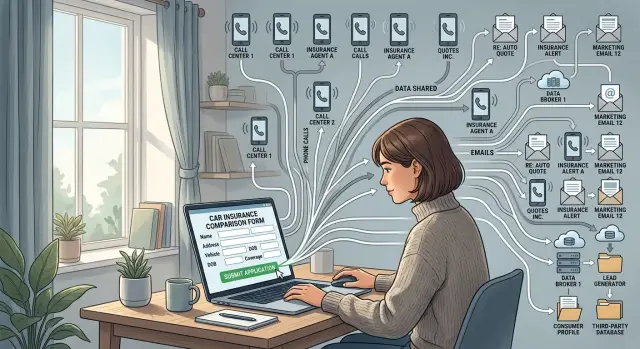
Why one quote form can lead to months of outreach
A lot of people assume an insurance quote form sends one request to one company. Often, it does not. One form can pass your name, phone number, email, ZIP code, and coverage details to several insurers, marketing partners, or lead buyers at once.
That is why the calls can start so fast. Many forms feed into automated lead systems, and buyers want the freshest lead first because those people are more likely to answer. You can submit a form during a lunch break and get a call before you are back at your desk.
The bigger issue is that the first share is often only the start. Once your details enter a lead marketplace, they can be copied into several databases, matched with public records, and sold again later. One quote request can turn into weeks or months of calls, texts, and emails from companies you do not know.
Insurance shopping data also sticks around longer than most people expect. Buyers may try again around renewal dates, after rate changes, or when older leads get sold in bulk. Even when the first wave slows down, the same details can surface again.
Sometimes the problem spreads beyond calls. After a form submission, your information can show up in data broker listings, especially when it gets tied to your address, age range, household data, or vehicle ownership. Then the original quote request stops being the whole issue. People-search sites and broker databases can keep circulating the record long after you forgot about the form.
Insurance quote forms can still be useful, but they are not always simple quote tools. Some are lead collection forms first and quote forms second. That difference is easy to miss, and it is often why one quick search turns into a long run of spam calls and new listings.
What happens right after you press submit
Most quote forms collect more than people realize. Along with your name, phone number, and email, they may ask for your ZIP code, street address, age range or date of birth, vehicle details, driving history, home details, and whether you already have coverage. Some also capture your IP address, device data, and the exact time you submitted.
After you hit submit, that data often does not go to one insurer. On many quote sites, it goes into a lead marketplace within seconds. The easiest way to picture it is a fast auction. Several buyers get a ping, look at the lead, and decide whether to buy it.
In some setups, one buyer gets the full record right away. In others, buyers see a partial version first, then the winner gets the full contact details. That is why the first call can come almost instantly, sometimes before you close the browser tab.
If nobody buys the lead at the first price, the process may continue in the background. The system can lower the price, change the buyer pool, or send the same lead into another exchange. What looked like one request can be routed again and again until someone takes it.
That also explains why different callers know different pieces of information. One may know your car year. Another may know your ZIP code and renewal date. A third may only have your phone number and email. They are often working from different versions of the same submission.
In plain terms, the chain is simple: you enter your details, the form sends them to buyers or a lead exchange, one buyer accepts or passes the lead along, and the record may then spread through that buyer's own sales network. You did fill out one form. Behind the scenes, your data may have been copied, scored, and passed around within minutes.
Who may receive your details
The first copy usually goes to the company running the form. That might be a comparison site, a marketing company, or a brand that looks like an insurer but mainly collects leads. Even if you never buy a policy, that company may still keep your contact details, ZIP code, date of birth, car or home details, and the time you submitted the form.
From there, the record can move to other groups. Licensed agents may buy it so they can call, text, or email you with quotes. Call centers may get it to work through large batches of leads. Lead exchanges may pass the same record to new buyers. Data brokers may match it against other databases and fill in missing details.
That is why one form can lead to both real insurance outreach and unrelated spam. One buyer may contact you directly. Another may resell the lead within minutes. A broker may connect your phone number and address to older records you never meant to share again.
A simple example makes the chain clearer. You fill out a form for auto coverage on a quote site. The site operator sells that lead to three agents. One agent uses an outside call center. Another uploads it to a lead marketplace because they do not want that ZIP code. A broker then takes the name, phone number, and address, matches them against other sources, and builds a fuller profile.
That profile can include your age range, household members, likely income band, homeownership status, and past addresses. You did not type all of that into the form, but brokers often fill in the gaps.
The problem is not only the first call. It is the chain behind it. Once several buyers have a copy, it gets much harder to tell who has your details and where the next contact is coming from.
How one request turns into many records
One quote form can create several records about you in a few seconds. The form owner keeps a copy, then sends the lead to buyers, partners, or a marketplace. Each company that receives it may save its own version, even if nobody ever gives you a quote.
That is how one request becomes many records. Your name, phone number, email, ZIP code, age range, and coverage type can end up in separate sales systems, call center tools, and marketing lists.
Buyers then sort those records. They do not all want the same people, so leads are filtered by things like location, age, household profile, insurance type, homeownership status, and how recently the form was submitted. If your details match more than one buyer's rules, several companies may take the same lead. Some call right away. Others save it for later campaigns, even if you ignore every message and never buy anything.
The record can also get fuller over time. A buyer may match your form data with data it already has or with outside records. A basic entry like "Sam, 41, looking for auto coverage in 60614" can grow into a much larger profile with a mailing address, estimated income range, vehicle details, property records, or alternate phone numbers.
That matching does not need any follow-up from you. It can happen in the background because your email, phone number, or address lines up with another database. Once that happens, the next company that gets your record may receive a fuller version than the first one did.
So the form is only the starting point. After that, copies move, records sit in storage, and every match can add another layer to the profile.
A simple example of how the spread happens
Say Nina wants a better car insurance rate before her policy renews. During a coffee break, she opens a quote form, enters her name, phone number, email, ZIP code, and car details, then presses submit.
She expects a couple of quotes on the screen. Instead, her phone rings before she closes the tab.
The first caller says they can help her compare rates. A minute later, another number calls. Then a third. By the end of the hour, she has missed calls from companies she has never heard of, along with two texts asking when she is free to talk.
That usually happens because the form did not send her details to one insurer. It sent the lead to several buyers, and some of them may have passed it along again. Each buyer has the same incentive: call fast, before someone else closes the sale.
Later that day, Nina gets an email with a subject line about lowering her premium. Over the next week, more messages arrive from different brands. A month later, the calls start again as her renewal date gets closer. She only filled out one form, but several companies now have some version of the same record.
That is what makes these forms frustrating. The first submit feels small. The follow-up can drag on much longer than the form took to complete.
How to spot a lead-selling form before you use it
A lot of quote forms look simple on purpose. Big buttons, a few boxes, and a promise of quick rates. The part that matters is usually buried near the bottom in small text.
Before you enter your name, phone number, or address, scroll down and read the consent text. If it is hard to find, hard to read, or vague, that is already a warning sign.
Lead-selling forms often use phrases like:
- "Partners" or "trusted partners"
- "Affiliates" or "marketing partners"
- "You agree to be contacted" by phone, email, or text
- "Even if your number is on a do not call list"
- "Up to X providers" or "multiple companies"
That wording usually means your details are not going to one insurer. They may go to a chain of lead buyers, agencies, and companies you have never heard of.
Check whether the form actually names the companies that may contact you. Some do. Others hide the names behind a pop-up, a long disclaimer, or a phrase like "our network." If the names are missing, assume your information may travel farther than you expect.
One detail matters a lot: how many companies are allowed to contact you. If the page says "up to 8," "up to 12," or anything similar, that is not a one-to-one quote request. It is a distribution system.
If you still want to compare rates, use a separate email address and a secondary phone number if you have one. That will not stop resale, but it can contain the damage if the form feeds a larger lead market.
A simple rule works well here: if you cannot tell who gets your data in under a minute, do not submit the form.
Common mistakes that make it worse
Most people do not get buried in calls because of one field alone. It is usually a series of small decisions. One site asks for a phone number, another asks again, and by the third submission your details may already be moving between several buyers.
The first mistake is using your main mobile number everywhere. Once that number lands in a few sales databases, the calls keep going to the phone you actually answer. If you are only shopping around, giving your everyday number to every site is often the part people regret first.
Another common mistake is filling in more than the form really needs. If boxes for spouse details, homeownership, current insurer, or exact move date are optional, leaving them blank is usually safer. Extra fields make your profile easier to match, sort, and sell.
People also make the spread worse by submitting the same details on several comparison sites in one day. It feels efficient. In practice, each site can create a separate lead record with its own consent terms, so the same person may be sold more than once.
A lot of trouble starts because people trust the button and skip the fine print. The page may say "See my quotes" or "Get started," while the consent text says you agree to calls, texts, or emails from partners and other third parties. Those are very different things.
A little caution goes a long way. Use a separate email or phone number when you can, skip optional fields unless they clearly affect the quote, avoid stacking several comparison forms back to back, and read the consent line before you press submit. That extra minute is usually worth it. Cleaning up a spread-out record takes much longer.
What to do if the calls have already started
Move quickly, but keep it simple. Once the calls begin, the first goal is to slow the flood and create a paper trail.
Start with the form you used. If the page is still open, take screenshots of the full form, the consent text, and any checkbox you clicked. If the page is gone, check your browser history, confirmation emails, and saved autofill details. That small block of consent text often explains why several companies suddenly have your number.
When a caller gets through, ask two short questions: "Which site gave you my details?" and "Are you the insurer or a lead buyer?" Some callers will dodge the question, but others will name the form, the publisher, or a partner. Write it down.
A short log helps more than most people expect:
- Date, time, number, and company name
- Saved voicemails and texts
- Any opt-out request you made
- Whether the caller said where your details came from
Use your phone's built-in tools for a week or two. Turn on spam filtering, send unknown callers to voicemail, and let real businesses leave a message. Screening calls will not fix the source, but it lowers the daily stress.
Then start opting out anywhere you can find your details. If a caller names a company, ask to be removed from its contact list. If you find new people-search pages or broker listings with your phone number or address, remove those too. This matters because lead data often spreads beyond the first campaign.
If you notice your information appearing across many broker sites, manual opt-outs can get old fast. That is where a service like Remove.dev can help. It removes personal data from hundreds of data brokers and keeps checking for relistings, which is the part many people miss.
A quick check before you submit
A quote form takes less than a minute. The calls and emails can last much longer.
Before you type anything into a quote form, pause for a few seconds and check who is asking, what they will do with your details, and whether you really need to share every field.
If you cannot tell who runs the site almost immediately, leave it. Look for a real company name in the header, footer, or contact page. If the site feels vague, crowded with ads, or pushes you to submit fast, trust that feeling and move on.
Then read the consent text near the button. You want plain wording about who may call, text, or email you. If it mentions partners, marketing affiliates, or "up to X providers" without naming them, your details may travel much farther than you expect.
If you already know which insurer you want to hear from, use that insurer's own form instead of a comparison page. It is usually cleaner. Fewer middlemen means fewer chances for your data to spread.
Before you submit, ask yourself five things:
- Can I see the company that runs this site?
- Does the form clearly say who may contact me?
- Is there a direct insurer form I can use instead?
- Do I need to give my main phone number right now?
- Can I leave optional fields blank and still continue?
Your phone number deserves extra caution. If you are not ready for follow-up calls, do not treat that field like a minor detail. One form can put your number into several sales systems at once.
Be stingy with optional fields too. Apartment number, alternate phone, date of birth, and household details are often not needed for a basic estimate. If the form still works without them, skip them.
If a form asks for more than you expected before showing any quote, that is usually a bad sign. Close it and try a simpler, more direct option.
Next steps if you want less data exposure
The easiest way to limit the spread is to avoid broad comparison sites when you can. If an insurer lets you request a quote on its own site, start there. One direct submission usually creates fewer copies of your details than a form that sends leads to several buyers.
It also helps to separate quote shopping from your everyday inbox. A dedicated email address makes follow-up easier to track and keeps repeat marketing out of your main account months later. If a form asks for a phone number you do not want widely shared, stop and decide whether you really need that quote.
Older broker records matter more than most people realize. If your name, address, email, or phone number is already sitting in broker databases, new leads are easier to match back to you. Cleaning up those older records can make future matching harder.
A simple routine works well: use direct insurer forms before comparison sites, keep a separate email for quote requests, write down each site where you submitted your details, and check for old people-search or broker listings tied to you. That note-taking sounds dull, but it pays off. If calls start three weeks later, you have a short list of likely sources instead of a mystery.
If the cleanup starts eating too much time, Remove.dev is built for exactly that kind of problem. It removes personal data from over 500 data brokers, monitors for relistings, and lets you track requests in one dashboard. It will not stop every sales call overnight, but it can reduce the amount of brokered data that lead buyers use to identify and match you.
Small habits beat one big cleanup. Use fewer comparison forms, keep your quote trail separate from daily accounts, and clear out old broker records whenever you can.
FAQ
Why did I start getting calls right after filling out one quote form?
Many quote forms send your details into a lead system within seconds. Several buyers may get the same lead, and the first ones often call right away because a fresh lead is more likely to answer.
Can one insurance quote form really send my data to multiple companies?
Yes. A lot of quote pages are built to distribute leads, not just show one company's price. Your name, phone number, email, ZIP code, and coverage details may be shared with several agents, call centers, or marketing partners.
What information do insurance quote forms usually collect?
Most forms ask for more than basic contact details. Along with your name and phone number, they may collect your address, age range, date of birth, vehicle or home details, current coverage, IP address, and the time you submitted the form.
How can I tell if a quote form is selling leads?
Scroll to the text near the submit button before you type anything. If you see phrases like "partners," "affiliates," "marketing partners," or "up to X providers," assume your data may be passed around.
Is it safer to use an insurer's own site instead of a comparison site?
Usually, yes. A direct insurer form tends to keep your details with one company, while a comparison site may pass them to several buyers. Fewer middlemen usually means fewer copies of your data.
What should I avoid putting into a quote form?
Keep it minimal. If fields like spouse details, homeownership, move date, or alternate phone number are optional, leave them blank unless they clearly change the quote.
What should I do if the spam calls have already started?
Start by saving proof. Take screenshots of the form and consent text, keep a log of calls and texts, and ask callers which site gave them your details and whether they are the insurer or a lead buyer.
Why do the calls and emails come back weeks or months later?
Because the record often stays in sales systems and gets reused later. Buyers may try again near renewal dates, after price changes, or when older leads are sold again in bulk.
Can my quote request lead to data broker or people-search listings?
Yes, that can happen. Once your quote data gets matched with older records, brokers may build a fuller profile tied to your phone number, address, household details, or past addresses.
How can I reduce data exposure the next time I shop for insurance?
Use a separate email for quote shopping, avoid broad comparison forms when you can, and think twice before giving your main mobile number. If your details are already spread across broker sites, a service like Remove.dev can remove them from many brokers and keep checking for relistings.