Loyalty program privacy: what your shopping data reveals
Loyalty program privacy matters because routine purchases can connect emails, phones, and home addresses into profiles that follow your household.
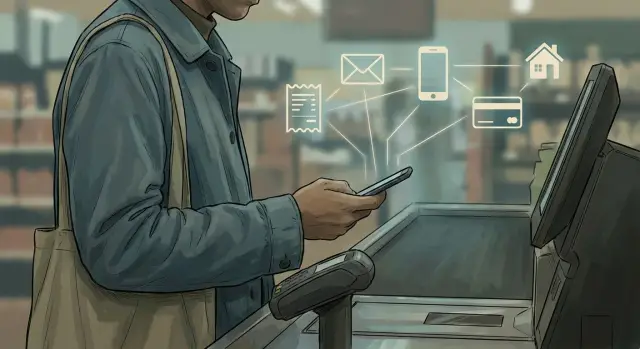
Why the discount isn't really free
That 10% off coupon usually has a price. To get it, you often hand over a phone number, email address, or store login. The savings feel small and ordinary. The data trail lasts much longer.
Once your name or contact details are attached to a purchase, the store can connect today's cart to the next one. A few trips do not reveal much. Months of trips can reveal quite a lot.
That is why loyalty program privacy matters. A rewards account can show when you shop, which location you use, what brands you prefer, and how often your household buys the same items. Even plain, boring purchases can expose routines: coffee every Monday morning, allergy medicine every spring, diapers for a year, then toddler snacks after that.
Nothing about those products sounds sensitive. That is the catch. Grocery stores, pharmacies, and big box retailers see the everyday details of daily life, and everyday details become very revealing when they pile up.
A store does not need to ask for anything highly personal to learn personal things over time. Regular orders can hint at a pregnancy, a new pet, a diet change, an illness, a move, or money stress. If two people use the same account, or shop in similar patterns from the same home, the record can start to describe a whole household instead of one shopper.
The discount is real. The cost is just less visible because you pay in data, not cash. Saving $2 on paper towels can feel like an easy win. The profile built from hundreds of ordinary purchases can last far longer than the receipt.
What stores collect when you sign up and shop
The sign-up form looks short, but the profile rarely stays small. A basic store account often starts with your name, email, phone number, and date of birth. That can seem harmless when you just want a coupon or points, yet it gives the store a steady way to recognize you across visits.
Then the shopping history fills in the rest. Each purchase can add the items you bought, the time, the store location, the coupon used, and whether you returned anything later. If you pay with a card, the store may not keep the full card number visible, but it can still keep a payment token that links future purchases to the same person.
The account usually gathers more than receipts. It can also collect app activity, such as searches, taps, and offers you opened. It may log device details like your IP address, browser type, phone model, and app identifiers. Email and text responses matter too. If you click a sale notice, that often becomes part of the record. Saved preferences, favorite items, and shopping lists can sit there as well.
The bigger change happens when you use the same account online and in store. Now two streams of behavior become one file. The website can see what you browsed but did not buy. The store can see what you bought in person. Put together, that can reveal your interests, routines, budget, and timing in much more detail than most people expect.
Pickup and delivery orders add even more context. A saved address can reveal where you live, where you send gifts, or which family member gets certain items. A pickup order can show which store you use most, what time you are usually available, and who is allowed to collect orders for you.
A simple grocery example makes the point. If you log into the store app at home, clip digital coupons, pay with the same card in person, and sometimes order pickup, the store can connect your contact details, device, payment method, address, and purchase habits into one profile. That profile is far more detailed than a paper receipt.
How separate purchases become one profile
One purchase looks ordinary. A few months of purchases tied together tell a much bigger story.
Stores do not need your full identity every time to keep adding to the same record. They look for repeated details such as your email, phone number, loyalty ID, or a payment card token. If the same token shows up in store and online, separate checkouts can land in one profile.
That profile often pulls from more than the register. If you sign into the app, browse the website, open a coupon email, ask for a digital receipt, or leave items in your cart, those actions can connect to your purchase history. What felt like random browsing on Tuesday can sit next to your Saturday store visit and last month's online order.
Old details can keep the matching going. A phone number you used two years ago, an older email address, or a past home address may still sit in account data. If a new order shares any of those details, the system may stitch the records together again. Many people think, "I used a different email this time," but they paid with the same card or logged into the same app.
A small example makes this easier to see. You buy vitamins in a store with your phone number at checkout. A week later, you order soap from the same retailer while signed in. Later, you tap a saved card in the app to buy paper towels for pickup. To you, those are three separate errands. To the store, they can look like one steady timeline.
And the profile keeps growing. Every purchase adds something: your usual shopping days, the brands you repeat, the coupons you accept, your rough budget, and the products that hint at life changes. Once a store has one reliable thread to follow, your separate purchases stop being separate at all.
How shopping data can expose a whole household
A store does not need a family tree to guess who lives together. A shared home address is often enough. If two people use the same delivery address, billing address, or phone number, their records can start pulling toward one household profile.
That gets even easier when a family shares one rewards account. One person signs up for discounts, then a spouse uses the phone number at checkout, a teenager uses the app for snacks, and someone else orders school supplies for home delivery. What looks like separate errands can turn into one long history tied to the same home.
The mix of purchases says more than most people expect. Grocery orders, over-the-counter pharmacy items, baby products, pet food, lunchbox snacks, and school supplies can point to the size and shape of a household. Even without a name for every person, stores can make a decent guess about who is there and what stage of life they are in.
A few signals show up again and again: the same street address on several accounts, one rewards number used by different people, repeated purchases for adults, children, and pets in the same history, shared pickup patterns, and overlapping contact details such as a home phone or email alias.
Pharmacy and grocery data together can be especially revealing. Cold medicine for a child, prenatal vitamins, gluten-free staples, and classroom treats bought month after month can suggest health needs, ages, routines, and even school calendars.
A simple example says a lot. One account buys cereal, allergy medicine, and kid shampoo. A week later, the same account adds printer ink, sports drinks, and birthday candles. Over time, that history can suggest parents, at least one school-age child, and regular family shopping handled under one login.
At that point, the privacy issue is no longer about one shopper. A routine store account can quietly map a home.
Where the data can spread next
A store account rarely stays inside one store. The email address, phone number, device details, and purchase history tied to that account can be shared with ad networks, analytics firms, and data brokers. Stores often describe this as "marketing" or "measurement." In plain terms, it means your shopping record can help shape profiles far beyond that checkout screen.
That is where the tradeoff gets steeper. A grocery run can hint at a pregnancy, a medical issue, a new pet, a move, or the ages of children in the home. Once those signals leave the store, they can start showing up in ads on your phone, streaming apps, and social feeds.
The chain is usually simple. You sign in to a store account with your email or phone number. The store matches that identity with purchases, coupons used, and sometimes location data. Then a partner or broker connects that record to other profiles tied to the same person or household.
That is why ads can start reflecting home life, not just one purchase. Buy allergy medicine, school snacks, and dog food in the same month, and the profile may sort your home into broad categories like "family household" or "pet owner." Those labels can travel.
Old purchase data can keep moving long after you forget about it. A store may stop showing you a certain coupon, but the data can still sit in partner systems, broker files, or merged household records. Even stale information can affect the ads you see and the assumptions companies make about your income, habits, or living situation.
One account can also feed other profiles. If two adults share an address, payment card, or device, a broker may connect them. Then one person's store account starts filling in the other person's profile too. That is how a simple rewards sign-up can turn into a wider map of a household.
A simple example from everyday shopping
This is easier to understand when you look at one ordinary week.
A parent signs up for a grocery rewards account to get fuel points. That feels harmless. The store asks for an email, a phone number, and maybe a home address, and the discount appears right away.
A few days later, the same parent uses that account again for a pharmacy refill. Then they use the same email for curbside pickup. Then they order diapers, wipes, and baby food through the store app because it is convenient.
None of those purchases looks dramatic on its own. Put together, they tell a fairly clear story. The store can infer that there is a baby in the home, that someone in the family uses a certain medication, and that this household prefers pickup on weekday evenings.
Then the offers start to change. Coupons lean toward baby items, cold medicine, snacks for school lunches, and household basics. Ads outside the app may start following the same pattern because the account has become a detailed contact profile, not just a discount card.
A second adult can get pulled in without much effort. Maybe they use the same phone number at checkout. Maybe they pick up an order for the first person. Maybe they pay with a card already tied to that account. That can be enough for the store to treat both adults as part of one household.
Once that happens, shopping habits blend together. One person buys protein powder and razor refills. The other buys prenatal vitamins or kids' medicine. Soon the profile looks less like one shopper and more like a shared home with routines, ages, health clues, and spending patterns.
That is the tradeoff many people miss. The fuel discount is real, but the account data behind it can reveal much more than what was in the cart that day.
How to limit tracking step by step
You do not need to quit every rewards program. You just need to stop handing over extra details out of habit.
Start with a separate email for retail accounts. If one store shares your details or gets breached, your main inbox is not tied to every purchase, receipt, and promo message. It also makes old accounts easier to find when you want to clean them up.
Slow down on sign-up forms. A store usually needs enough information to process payment and send a receipt. It rarely needs your birthday, a backup phone number, or other extra details. Those fields help build account data, and the profile can keep growing every time you shop.
Retail apps deserve a quick check too. Many ask for location, contacts, camera access, or constant notifications. Most of the time, you can turn off nearly all of that and still browse products, place orders, or scan a barcode in the store.
A simple checkout rule helps:
- If the discount is small, use guest checkout instead.
- If you need an account, fill in the minimum.
- Do not save extra cards or old addresses unless you use them often.
- Check account settings every few months and remove stale details.
- If you stop using the store, ask for deletion if that option exists.
That last step matters more than people think. An unused account can still hold years of purchase history, old delivery addresses, and payment details. Some retailers offer deletion tools in account settings. Others handle it through a privacy request under laws such as CCPA or GDPR.
A good test is simple: would you still make the trade if the form showed everything the store keeps? If the offer is only a dollar or two, guest checkout is often the better deal.
If you want extra distance after cleaning up old accounts, Remove.dev can help remove personal details from data brokers. That will not erase what a retailer keeps in its own systems, but it can reduce how far your information spreads once it leaves the store.
Mistakes people make without noticing
A lot of privacy loss comes from small habits that feel harmless. One store login here, one app scan there, and soon a retailer can see far more than a single receipt.
A common mistake is using the same email and phone number for every store account. That makes matching easy. Your grocery chain, pharmacy, hardware store, and baby store may feel separate, but repeated contact details help build one larger profile around your shopping patterns.
Another easy slip is scanning the app for every tiny purchase. A bottle of water, cold medicine, printer paper, pet food, a birthday card - each trip adds another clue. Over time, that purchase history can suggest your schedule, your health interests, whether you have kids or pets, and even when you moved.
People also merge family activity without thinking about it. If two adults and a teenager all use one account to collect points, the store gets a blended view of the whole home. That can connect names, ages, products, and shopping times in a way that makes household links much stronger.
Old account details cause problems too. Many people leave past addresses, expired cards, and old phone numbers on file for years. Those details may seem inactive, but they still help match you to older records. If a store already has three addresses tied to the same account, it has a much easier time connecting past and present identity data.
The biggest misunderstanding may be the unsubscribe button. Stopping promo emails usually stops promo emails. It does not usually stop data collection, profiling, or sharing allowed under the account terms.
A simple rule helps: treat store accounts like small data hubs, not just coupon tools. Remove old addresses and cards you no longer use. Avoid putting the whole family on one profile unless you really need to. Skip the scan on purchases that are not worth the discount. And read privacy settings separately from email settings.
If you want the discount, that is fine. Just do not hand over a full map of your household by accident.
Quick checks before you join or log in
Pause for ten seconds before you tap "create account" or enter your phone number at checkout. That short pause can save you from giving away more data than the discount is worth.
Start with one question: do you actually need an account for this purchase? Some stores make guest checkout easy, while others push sign-in because it helps them tie your order to a longer history. If you are buying a one-time item, skipping the account is often the better move.
Then check whether the savings are meaningful. A 5% coupon or a small points bonus may not be a fair trade if it adds your email, phone number, home address, and shopping habits to a long-term profile. That is when the privacy cost stops feeling abstract.
If you do sign up, keep the profile thin. Leave optional fields blank unless they are truly needed. Skip birthday, secondary email, and extra phone numbers. Do not save your card unless you shop there often. Turn off marketing boxes before you finish. If the store lets you control purchase-history settings, check those too.
One mistake people miss is mixing very different kinds of shopping in one account. If the same login covers groceries, pharmacy orders, baby products, and household items, the store can build a much clearer picture of your life. Add family purchases, and that profile can start pointing to other people in your home as well.
A shared account used for cold medicine, school snacks, pet food, and diapers says far more than any single receipt. It can suggest health needs, children in the house, and daily routines.
If you already have accounts everywhere, review what is stored and trim what you can. And if your contact details have already spread beyond the store itself, Remove.dev is one option for removing personal data from many data brokers that collect and resell it.
What to do next
You do not need to quit every loyalty program tonight. Start with the accounts you already have. Small cleanup steps usually work better than a big promise you never finish.
This week, pick two or three store accounts and review them all the way through. Check what each one holds: your name, phone number, saved cards, delivery addresses, purchase history, and marketing settings. If you opened an app for one discount and never went back, delete the app and close the login if you can.
For the stores you still use, look for privacy controls in the account area or help center. Some retailers let you delete an old profile, erase saved details, or send a formal removal request. It takes a little time, but it reduces how much account data can keep circulating after you stop shopping there.
If your information has already moved beyond the store, account cleanup only fixes part of the problem. Many people later find their name, address, phone number, and household links on broker and people-search sites after years of routine shopping, sign-ups, and shipping records. Remove.dev is built for that part of the cleanup. It removes personal information from more than 500 data brokers and keeps monitoring for relistings.
Keep the habit simple so it lasts. Put a reminder on your calendar every three or four months to review saved store data, old logins, and app permissions. Ten minutes is enough to catch accounts you forgot, delete stale details, and turn off tracking you did not mean to leave on.
That is the practical way to handle loyalty program privacy: fewer open accounts, less saved data, and regular check-ins. Start with the easiest two accounts today.
FAQ
Is a small store discount worth giving my phone number or email?
Usually not for a one-off purchase. A small coupon can turn into a long record tied to your email, phone number, payment method, and shopping habits.
If you shop there often and the savings are real, use the account with as little info as possible. For a small discount, guest checkout is often the better deal.
What data does a loyalty or store account usually collect?
Most accounts start with basic details like your name, email, phone number, and sometimes your birthday. After that, the store can add your purchase history, coupon use, returns, app activity, device details, and saved addresses.
If you use the same account online and in person, that record gets much more detailed over time.
Can a store connect my online and in-store shopping?
Yes. If you sign in online, use the same phone number at checkout, or pay with the same saved card, those purchases can end up in one profile.
That means browsing, app use, pickup orders, and in-store receipts may all sit in the same timeline.
Can normal shopping really reveal private things about me?
They can. One purchase does not say much, but repeated orders can hint at a baby in the home, a pet, diet changes, seasonal health issues, or money stress.
The pattern matters more than any single item. Ordinary shopping becomes revealing when it builds up month after month.
How do stores figure out who lives in my household?
A shared address, phone number, rewards account, or payment method can be enough to pull people into one household record. Pickup patterns and mixed purchases for adults, kids, and pets make the match even easier.
That is why one account can end up describing a whole home, not just one shopper.
Does unsubscribing from emails stop the tracking?
No. Unsubscribing usually stops marketing messages, but it does not usually stop the store from keeping purchase history or using the account for profiling and sharing allowed under its terms.
You need to check the account settings and privacy options separately if you want to cut down tracking.
What is the safest way to use rewards programs?
Use guest checkout when you can. If you need an account, give the minimum, skip optional fields, avoid saving extra cards and old addresses, and turn off app permissions you do not need.
A separate email for retail accounts also helps keep your shopping history from being tied to your main inbox.
Should my whole family use the same rewards account?
In most cases, no. A shared account blends everyone’s purchases into one history, which makes it easier to infer ages, routines, health clues, and household size.
Separate accounts are usually better if you want less overlap. If you must share one, keep the profile lean and avoid storing extra details.
What should I clean up in old store accounts?
Start with saved cards, old delivery addresses, old phone numbers, and backup emails you no longer use. Those details can keep older records connected to new purchases.
If you stopped shopping there, close the account or ask for deletion when that option exists. An unused login can still hold years of data.
What can I do if my shopping data already spread to data brokers?
First, trim or delete the store accounts you do not need anymore. That reduces what retailers keep in their own systems.
If your info has already spread beyond the store, a service like Remove.dev can help remove personal data from many brokers and keep watching for relistings. That will not erase a retailer’s own records, but it can reduce how far your data travels.