Marketplace dispute pages can expose your name and city
Marketplace dispute pages can leave names, cities, refund notes, and archived order details visible in search long after the sale ends.
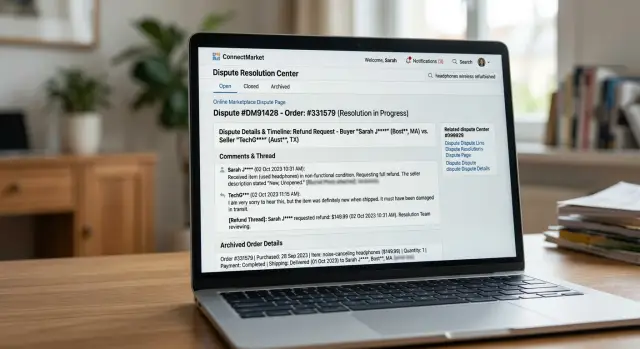
Why these pages can expose more than a listing
A product listing feels temporary. It goes up, sells, and disappears. The trouble often starts after the sale, when a refund request, complaint, or public comment turns into a page of its own.
Marketplace dispute pages can stay live much longer than the original listing. The item page may vanish, but a refund thread, feedback page, or old order record can still sit on the site with enough detail to identify a real person.
That is why these pages often feel more exposed than the sale itself. They pull separate details into one place. A first and last name may appear next to a city. An order note might mention a neighborhood, pickup point, or phone number. A comment thread can add timing, payment details, or the reason for the refund.
Each detail may seem harmless on its own. Together, they create a much clearer picture. Someone searching your name may not just find that you bought or sold something. They may also see where you live, what item was involved, and the back-and-forth around the problem.
Feedback sections make this worse. Buyers and sellers often write in a hurry, usually when they are annoyed and trying to prove a point. That is when extra details slip out. A seller may post, "Buyer from Bristol collected in person." A buyer may reply with part of an address, a surname, or a delivery note copied from the order page.
Archived pages add another problem. Even when the marketplace removes the original sale or changes the page layout, older versions of order pages and complaint records can still hang around in search caches or archives. That can keep names and cities searchable long after the transaction feels finished.
For most people, the risk is simple: one messy refund or public comment can expose more personal data than the listing ever did. If you are trying to keep your details out of search results and off data broker sites, one leftover page can undo a lot of careful habits.
What details usually stay visible
Most people expect a marketplace listing to show the item, the price, and maybe a rough location. The surprise comes later. On dispute pages, small account details often stay attached to refund posts, complaint threads, and old order pages long after the sale is over.
The first thing that often stays visible is the name tied to the account. Sometimes it is a full name. More often, it is a display name that still points back to you because it matches your email handle, another profile, or a username you use elsewhere. That alone can be enough for someone to connect the dots.
Location details show up more often than people expect. A city name, neighborhood, or pickup point may appear in an order record or inside a message thread. Even a partial location can narrow things down fast, especially when it sits next to a sale date, a first name, or a specific item.
Refund pages can expose more than buyers and sellers think. The refund reason, short complaint notes, and bits of message history may stay visible in some form. A line like "seller never arrived in Dayton" or "refund approved after pickup in Leeds" gives away both a place and the fact that a real transaction happened. That makes the page easier to trust, and easier to find.
Archived order pages and receipts can leave behind small pieces of data that look harmless on their own. Order numbers, dates, item titles, and the amount paid can all stay in the page text. Put together, those details can confirm identity, show buying habits, or help someone match the page to another account.
Search results can make this worse. Even after a marketplace hides or edits a page, the snippet in search may still show your display name, city, and part of the dispute text. So the live page may look cleaned up while the result preview still exposes the part you wanted gone.
A simple rule helps here: if a page mentions a person, a place, and a transaction, treat it as public.
How old marketplace pages stay in search
A listing can disappear while the page around it keeps living on. That is why marketplace dispute pages often stay visible in search long after a sale ends, a refund is settled, or a seller edits the post.
Many marketplaces give feedback pages, dispute threads, and order discussions their own web address. Once that page is public and search engines visit it, it can start showing up on its own. The original product post may be gone, but the comment page can still be indexed with a name, city, username, or order note attached to it.
Closed listings create the same problem. A sale may be marked complete, canceled, or removed, yet the public discussion page can stay online because the marketplace keeps it as part of the transaction record. If a buyer wrote, "I am in Portland, call me after 6," or a seller replied with a full name, those details may still sit on a page that search engines already know.
Why edits do not fix it right away
Even after a marketplace changes or hides a page, search results do not update at once. Search engines often keep an older title, snippet, or saved copy for a while. So a result can still show a person's name and city even when the live page shows less.
A few things keep the old version hanging around. Feedback and refund pages often have a separate URL from the listing itself. Public replies can remain visible after the item is sold or removed. Search engines may keep older copies of the page text, and third-party archives can preserve older versions after edits.
That is why deleting one comment does not always solve the problem. Search can keep pointing to the old version until the page is crawled again, and archive sites may keep a copy even longer.
If you search your name and see an old order or dispute page, do not assume the marketplace has fully cleaned it up just because the live page looks different. Check the search snippet and any archived versions too. That is often where the exposed detail still shows.
A simple example of how this happens
Maya sells a used phone on a marketplace and offers local pickup. The sale feels ordinary, so she writes "Pickup in Columbus" on the item page and signs one message with her full name because she wants to look trustworthy.
A few days later, the buyer says the battery drains too fast and opens a refund thread. Now the conversation moves to a dispute page that feels less public than the listing. In many cases, it is still easy for search engines to find.
The buyer writes, "I drove across Columbus for this phone, and Maya Smith told me it worked fine." Maya replies in a hurry: "We met near Clintonville, and you checked the phone before paying." Neither comment seems serious on its own. Together, they create a searchable record with a full name, city, neighborhood, item type, and a complaint.
Then the original listing expires. Most people assume the problem is gone with it. But the awkward part can stay up: the refund thread, feedback comments, or an archived order page that still shows bits of the deal.
The pattern is common. The listing mentions local pickup and a city. A buyer opens a refund or complaint thread. Both sides add names and location details in replies. The listing disappears, but the dispute page stays live in search.
Months later, someone searches Maya Smith plus Columbus. The phone listing is gone, yet the dispute pages still appear. That is what catches people off guard. The part they thought was temporary turns out to be the part that lasts.
This is why buyer-seller feedback privacy matters more than people expect. A short listing might only show a product and a price. A refund thread often shows much more because people start explaining, defending, and correcting each other in public.
If that page is copied by archives, scraper sites, or search caches, it can stick around even longer. One rushed reply in a refund thread can leave more personal detail online than the original sale ever did.
How to check what is visible
Start with a plain search, not with your marketplace account open. Use a private window or sign out first. That gives you a cleaner view of what anyone else can see.
Search your full name in quotes, then try it again with your city. A search like "Jane Smith" "Austin" can pull up old dispute pages, profile pages, and refund comments that are easy to miss if you only search your name by itself.
Then widen the search. Try old usernames, shop names, product titles, and any nickname you used in messages or feedback. If you sold a handmade lamp under a shop name three years ago, that shop name may still lead to a dispute thread or archived order page today.
Check more than web results
Do not stop at the first page of normal search results. Check image results too. Screenshots of disputes, profile pages, or order summaries sometimes appear there even when the page itself is harder to find.
Also look at cached or archived versions when they appear. A page may look gone on the marketplace but still show a saved copy in search for a while. That is often where names and cities stay visible longer than expected.
Pay close attention to routine-sounding pages such as dispute or refund threads, buyer and seller feedback pages, order history pages, and old profile or store pages. These often keep more detail than the original listing. A short refund comment, shipping issue, or seller reply can be enough to connect your name, city, and purchase history.
Save proof before you ask for removal
Take screenshots before you contact the marketplace or edit anything. Capture the full page, the search result, and the page address if it is visible. If the result later disappears, you still have proof of what was public.
Name each screenshot clearly so you can track it. If you find several pages, make a simple list with the search term that exposed each one. That saves time when you send removal requests yourself or use a service to keep track of where your personal data keeps showing up.
What to ask the marketplace to remove
When you contact support, ask for the specific public items that expose you. A broad note like "please remove my data" is easy to ignore. A short list of page names, screenshots, and the details shown usually gets a faster response.
Start with anything visible on dispute pages. That often includes public comments, refund threads, seller replies, and dispute summaries that stay live after the case is closed. If your full name, city, phone number, or email appears anywhere on the page, say that clearly.
Then ask about older order records. Some marketplaces leave archived order pages, past dispute logs, or receipt-style pages open long after the sale is over. If one of those pages still shows your shipping city or real name, ask for the page to be removed from public view, not just edited.
Your request should cover four things: hide or delete the public comments tied to the dispute, remove any archived order details that are still public, redact your name and contact details from any visible page, and deindex closed disputes and old order pages from search results.
Keep the message calm and short. Support teams are more likely to act when the request is specific. Long complaints about the order itself usually slow things down.
It also helps to explain why the page matters. A closed refund thread can still appear months later when someone searches your name and city. That turns a one-time dispute into a long-term privacy problem.
Plain wording works well: "Please remove or hide the public dispute comments and archived order page for case 18427. The page shows my full name, city, phone number, and email. Please also remove the closed dispute page from search indexing."
That gives support the page, the exposed details, and the action you want. If they will not delete the page, ask for redaction and deindexing next.
Common mistakes that keep pages searchable
Most pages stay public because of small habits, not one big mistake. On marketplace dispute pages, people often type more than the site needs, then assume the thread is private or temporary.
A common slip happens in refund messages. A buyer wants quick help, so they paste a full name, phone number, order number, street, and even a shipping screenshot into the conversation. That may move the argument along, but it also gives search engines more text to index.
Usernames cause trouble too. If your public account name is your real first and last name, every reply adds another page tied to that identity. A generic handle is usually safer than turning your profile into a name tag.
City names are another easy mistake. People mention where they live in every reply to prove delivery timing, local pickup details, or return costs. After a few posts, your name and city can appear together often enough to become searchable.
Deleted listings do not always take the whole trail with them. The product page may disappear while the complaint page, refund thread, or archived order page stays live. Some sites keep those pages for records. Search engines may also keep showing an older copy for a while, even after the original page changes.
That last part catches many people. They remove the post, check once, and stop there. A cached result, quoted snippet, or archived version can still show the same details days or weeks later.
A quick cleanup helps. Read old refund messages like a stranger would. Replace real-name usernames if the site allows it. Remove city mentions that are not needed. Search your name with your city and any old username, then check again after the page is edited or deleted.
Buyer-seller feedback privacy usually breaks down through repetition. One overshared refund note may not do much on its own. Ten small mentions across disputes, comments, and archived pages can build a clear public trail.
If you need to post during a dispute, keep it plain. State the problem, the order date, and what fix you want. Leave out the extra details that make you easy to find later.
Quick checks before and after you post
A few small habits can stop a routine sale from turning into a searchable record. Dispute pages, comment threads, and old order pages often stay public longer than people expect.
Before you post, strip out anything that points back to your real identity. A username like "AnnaK_Chicago" is easy to remember, but it also gives strangers two useful facts in one line.
A short pre-post check goes a long way. Use a username that does not include your real first or last name. Leave your city, neighborhood, and ZIP code out of public comments. Keep phone numbers, alternate emails, and payment details out of messages that could become part of a dispute record. If possible, move address fixes, refunds, and delivery problems into private support channels.
This matters most when a sale gets messy. People often stay careful in the listing itself, then post too much in a refund thread because they want to solve the problem fast.
A common example is simple: "I am in Columbus and still have not received it, please refund me, Sarah Miller." If that thread stays indexed, both the name and city can start showing up in search.
After the sale closes, do one more pass. Old pages are easy to forget, and that is exactly why they keep exposing people.
A few days later, and then again a few weeks after that, revisit any dispute, refund, or feedback page tied to the order. Remove or edit comments that reveal your full name, city, or contact details. Search your name with your city and the marketplace name to see what appears. Repeat the search later, since archived pages and cached results can show up late.
If you find something public, act fast. Ask the marketplace to remove the page, limit indexing, or delete the exposed text from the thread.
Do not assume a closed case disappears on its own. Many archived order pages stay live long after the issue is over, and a two-minute check now can save a lot of cleanup later.
What to do next if old pages are already public
If old marketplace dispute pages are already showing your name, city, or order details, start by making a clean list. Do not rely on memory. Record every page that still shows personal details, including cached versions, comment pages, refund threads, and archived order pages.
For each page, save the title, what personal detail is visible, and whether it still appears in search results. A screenshot helps too. This makes your removal request easier to review and saves time if support asks for proof later.
A simple order works best. List every public page with the exact detail exposed. Send removal requests to the marketplace first. Then check which pages were deleted and which still appear in search. If copies turned up elsewhere, note those too, and come back later to watch for reposts or relistings.
When you contact the marketplace, be specific. Send the exact page addresses, point out the personal details on each page, and ask for both content removal and search deindexing if they cannot fully delete the page right away. Short, clear requests usually work better than angry ones.
After that, track what changes. Some pages disappear fast, but old search results can stay visible for days or weeks. Mark each page as removed, still live, or removed but still indexed. That distinction matters, because a deleted page and a searchable page are not the same problem.
If your name or city also started showing up on data broker sites, manual cleanup gets tiring fast. Remove.dev helps with that by finding and removing personal data from over 500 data brokers worldwide, then monitoring for re-listings so the same details do not quietly come back.
Set a reminder to search again after a week, then again after a month. Old pages can resurface through reposts, scraped copies, or relisted marketplace accounts. A quick repeat check can catch the pages you missed the first time.
FAQ
Why does a dispute page stay in Google after the listing is gone?
Because the dispute or feedback page often has its own public web address. Once search engines index that page, it can stay visible even after the item listing is gone.
The listing may expire, but the refund thread, comment page, or old order record can still live on by itself.
What personal details do these pages usually expose?
Usually it is a mix of small details: your name or username, city, neighborhood, order date, item title, and pieces of the refund conversation.
One detail may seem minor, but a person, a place, and a transaction on the same page can make you easy to identify.
If I delete a comment, will it disappear from search right away?
Not right away. The live page may change first, but search results can keep showing an older snippet for days or weeks.
Archived copies can also keep the older version longer, so check both the live page and the search preview.
How can I check what strangers can see about me?
Start in a private window or while signed out. Search your full name in quotes, then try it again with your city, old usernames, shop names, and product titles.
Look past normal web results too. Image results, cached pages, and archived copies can still show details that the live page no longer shows.
What should I screenshot before I contact the marketplace?
Save the search result, the full page, and the page address before you edit anything. That gives you proof of what was public if the page changes later.
Clear screenshots also make support requests easier to review and can save back-and-forth with the marketplace.
What should I ask the marketplace to remove?
Ask for the exact public page to be removed or hidden, not just edited. If full deletion is not possible, ask them to redact your name, city, phone number, or email and to remove the page from search indexing.
Keep the request short and specific. Page address, exposed detail, and the action you want is usually enough.
Should I use my real name or city in refund messages?
No. Use a public username that does not include your full name or location, and keep city names, phone numbers, and email addresses out of public replies.
If a case gets messy, move address fixes and payment details into private support channels when the site allows it.
Are cached and archived pages still a privacy problem?
Yes. A cached result or archived copy can still expose your details even after the marketplace cleans up the live page.
That is why a page can look fixed on the site while search still shows your name, city, or dispute text.
How often should I search again after a page is removed?
Check a few days after the edit or removal, then again after a few weeks. Search results often lag behind the live page.
It is also smart to run the same searches again after a month, because reposts and scraped copies can appear later.
Can Remove.dev help if this spreads beyond the marketplace?
If your name or city from a dispute page starts appearing on data broker sites, Remove.dev can help with that part. It finds and removes personal data from over 500 data brokers and keeps watching for re-listings.
For the marketplace page itself, you still need to ask the marketplace to remove, redact, or deindex the page.