Mentor bio personal email exposure on archived cohort pages
Mentor bio personal email exposure can last for years when cohort pages, staff lists, and web archives keep old contact details visible.
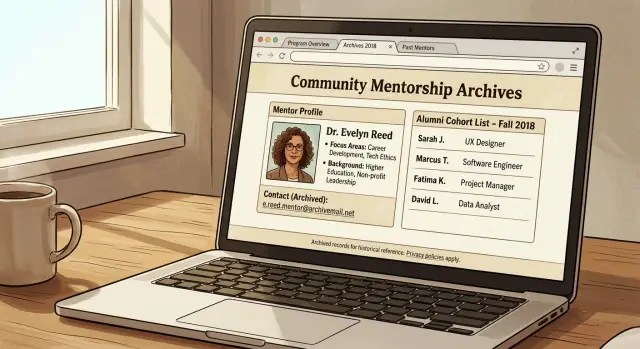
Why a volunteer bio can stay public for years
Volunteer bios usually go live fast. A program needs a page for a new cohort, asks for a headshot and a few lines, and publishes whatever contact details you send. After that, the page often gets ignored.
That is how a personal email stays public for years. The role ends, but the page stays up because it still helps the program look active, show past mentors, or fill out an alumni archive. A bio meant for a short volunteer stint can turn into a long-term public contact record.
Old cohort pages are easy to forget. Staff changes. Interns leave. Attention moves to the next class. Meanwhile, older pages sit online untouched. Nobody checks whether the email on a 2021 mentor profile still belongs there, or whether you ever wanted it visible that long.
The problem gets worse because one bio rarely stays in one place. It often gets copied to an alumni directory, an event recap, a PDF brochure, or an old program packet. Search engines and web archives may save their own versions too. Even if the main page is updated later, those copies can keep the address alive online.
That is what makes alumni page privacy so annoying. You are not dealing with one page. You are dealing with a trail.
And the risk is not theoretical. A public personal email can bring junk outreach, unwanted newsletter signups, and cold pitches that use your mentor role to sound familiar. It can also make phishing easier. When scammers see your real name, photo, volunteer history, and email together, they have enough detail to write messages that look believable.
A stale bio can also invite contact you do not want. Former applicants, recruiters, sales reps, and random strangers may treat that old page like a current contact card. If the program worked with students or early-stage founders, the volume can get irritating fast.
The worst part is simple: the bio finished its job a long time ago, but your email is still doing free work for the internet.
How the contact trail grows
A public mentor page often starts out feeling harmless. A program adds your name, a short bio, and a personal email so founders or students can reach you easily. On its own, that may seem fine. The trouble starts when the same line gets copied elsewhere and nobody cleans it up later.
One profile on the main program site often gets reused for a later cohort, an alumni page, or a mentor roster for the next season. The audience changes, but the contact details stay the same.
A common chain looks like this:
- your email appears on a mentor bio page
- the same bio is reused on a new cohort or alumni page
- a newsletter or PDF handbook copies the same contact line
- an internal directory, event page, or staff page republishes it
Each extra copy gives search engines another page to index. People rarely find just one result. They find a cluster of pages, files, event recaps, and cached snippets that all point to the same address.
PDFs make this worse. Many programs upload welcome packets, demo day guides, or mentor lists, then forget about them. Those files can stay online for years, even after the main bio page is edited or removed. Sometimes the PDF shows up first in search because it contains the email in plain text.
Older versions can stick around in places you do not control. Search engines may keep an outdated snippet for a while. Web archives may preserve the page exactly as it looked when your email was still public. So even if the current site is clean, the older version may still be easy to find.
Nobody sets out to build a long-term record of your contact details. People reuse old content because it saves time. A new staff member copies last year's cohort page. An alumni page borrows the same bio because it already exists. Still, the result is the same: one short volunteer role can leave your email scattered across multiple pages, old files, and archived copies.
A simple example of how it happens
Take Maya, a marketing mentor in a 10-week startup cohort. The organizer asks for a short bio, a headshot, and one email address so founders can book time with her. Maya shares her personal Gmail because it feels temporary.
For a few months, her bio sits on the public cohort page. It includes her name, job title, and a line like "Email Maya at..." Search engines crawl the page, so her address starts appearing when someone searches her name.
Then the cohort ends. The page is not removed. Instead, staff copy the mentor list into an alumni page so future applicants can see past mentors. Maya's bio moves over almost word for word. Now the same email is on two public pages.
The trail keeps growing:
- spring: Maya's bio appears on the live cohort page
- summer: the same text is reused on an alumni page
- fall: Maya asks for her email to be removed from the current page
- an archived or cached version still shows the older copy
- months later, search results show several pages with the same address
This is where cleanup gets messy. Even after the program edits the page, search engines may keep an old snippet for a while. Archive services may also keep a snapshot of the page as it looked before the edit.
So one listing turns into several search results over time. Someone searching Maya might find the current alumni page, an older cohort page, and an archived version that still shows the full address. Each result looks separate, even though all of them came from one volunteer role.
To Maya, it was one quick scheduling choice. To everyone else, it looks like a stable public contact trail.
How to check your own exposure
Start with search, not email requests. If your name and email were posted once on a mentor page, they may now appear on alumni pages, event listings, speaker bios, and old PDF programs. A quick search usually shows the full trail faster than the program itself can.
Search your full name in quotes and your personal email in quotes. Try a few variations if needed, such as a middle initial, an old job title, or the program name. This is usually the fastest way to see whether the original page was copied elsewhere.
Then check the places that tend to linger:
- old mentor pages and cohort directories
- alumni lists and archived class pages
- event pages for panels, workshops, and demo days
- PDF schedules, brochures, and handbooks
- search previews and web archive copies
It helps to be a little stubborn here. PDFs are easy to miss, and they often rank well in search. Search engines may also show part of your email in the preview even after a page changes, so open the result and compare the live page with what the search result still shows.
Saved copies matter too. If an old cohort page was removed, a cached preview or archive copy can still expose your address. You do not need to inspect every archive on the internet. Just check whether the page still appears in search results, preview text, or a well-known archive.
As you find pages, make a simple record. A note on your phone works, but a spreadsheet is better if there are several results. Write down the page title, the organization name, the full page address, what personal detail appears, and the date you found it.
Take screenshots before you ask for changes. It sounds picky, but it saves time later. If the page owner edits the page but the search result still shows your email, the screenshot gives you proof of what was public and where it appeared.
If one volunteer role turned into several pages, do not be surprised. That is normal. The point of the search is to map the whole problem before you start asking for fixes.
What to ask the program to change
When you contact the program, keep the request narrow and clear. Staff can usually fix a privacy issue quickly if they know the exact page, the exact text, and what you want changed.
Start with the main point: ask for the email to be removed everywhere it appears, not just hidden on the live page. If the address stays in the page code, in a PDF, or in an older bio file, it can still be copied, indexed, or found later.
A short note usually works better than a long explanation. Mention the pages you found, paste the email as it appears, and say what should replace it.
You can ask for four things in one message:
- remove the personal email from the mentor bio, alumni page, and any cohort directory
- check downloadable files such as PDFs, welcome packets, speaker sheets, and archived program brochures
- replace the personal email with a role account or contact form
- check older copies on subdomains, past cohort sites, old event pages, or retired program websites
That last part matters more than people think. Many programs rebuild their site every year, but old cohort pages stay online on a forgotten subdomain or older domain. The current bio may look clean while a 2021 mentor page still shows the address in plain text.
If you want to make the job easier for the staff member, give them a replacement contact method. A team inbox is better than another personal address. A contact form is often even better because it lets people reach the program without exposing an email on the page.
Be direct, but do not overdo it. Plain language is enough: my personal email is still listed on these pages and files, please remove it everywhere it appears and replace it with this contact method.
Before you send the note, ask one more question: "Do you have older copies of this page on any past program site or subdomain?" That single line often uncovers the pages that keep the trail alive.
Once they reply, ask them to confirm which pages and files were updated. That gives you a clean record if the same email shows up again later.
Mistakes that keep the email visible
Most of these problems stay live for boring reasons, not dramatic ones. People fix the page they can see, then miss the copy they forgot existed.
The most common mistake is editing the current mentor page and assuming the job is done. Many programs also keep a separate alumni page, old cohort page, or staff archive. Those older pages can still rank in search or sit in cached copies for years.
Another common mistake is replacing the email with an image. That feels safer, but it often fails. Image files can still be saved in web archives, copied into social posts, or pulled into PDFs that stay public long after the site changes.
Pages people forget
A volunteer profile rarely lives in one place. It spreads.
If you are cleaning this up, check the extra spots people usually miss:
- alumni and past cohort pages
- PDF handbooks and event programs
- speaker decks uploaded after a talk
- newsletter archives with mentor introductions
- old application or FAQ pages that mention office hours
PDFs are a big one. A program may remove your email from the website but leave last year's mentor guide online with the full address in plain text. Search engines can index that file, and other people can download and repost it.
Forwarding addresses create another quiet problem. If a mentor uses something like [email protected] or forwards mail from a branded alias into a personal inbox, the public address may still lead straight back to the same account. On the surface the cleanup looks finished, but the trail still ends at your everyday inbox.
Small programs often shrug this off because they think nobody is looking. That is a mistake. Even a tiny mentoring cohort can be copied by spam bots, scraped into contact databases, or preserved by archive tools. Low traffic does not mean low exposure.
The safer approach is to treat every public mention as its own cleanup task. Update live pages, remove archived bios where possible, replace downloadable files, and stop listing direct personal emails in future mentor materials.
A quick cleanup routine
One page coming down is a good start. It is rarely the end of the job.
The same address can live in search snippets, old PDFs, archive copies, and data broker listings long after the main page changes. A quick review every few months is usually enough to catch leftovers before they spread again.
What to check
Use a short routine:
- search your full name, your email address, and both together every few months
- check the search result title and snippet, even if the page itself is fixed
- look for files, not just web pages
- watch for the same email on people-search and data broker sites
- keep a small log with the date, the site name, what changed, and what still needs work
This works because cleanup usually happens in waves. First the live page changes. Then the cached result drops. Then copied versions turn up somewhere else. If you only check once, you miss the later steps.
A simple log also saves time when you need to follow up. If a program says the bio was removed, you can reply with something specific like, "The live page is gone, but the PDF download still shows my old email." That gets better results than starting from scratch each time.
If the same address keeps appearing on broker sites, the cleanup has moved beyond one school or one nonprofit. In that case, Remove.dev can help remove personal data from over 500 data brokers and keep monitoring for re-listings, which is useful if you do not want to chase dozens of sites by hand.
The goal is not perfect privacy overnight. It is to stop one old volunteer bio from turning into a permanent public trail.
Next steps to prevent repeat exposure
Cleaning up an old mentor page is only part of the job. To keep the same problem from coming back, change how you share contact details for future volunteer work.
The easiest fix is to stop using your main personal inbox on public bios. Use a separate address for mentoring, speaking, or other short-term community roles. If that address starts pulling in spam or gets copied to other sites, you can replace it without affecting your daily email.
A role-based contact makes old pages less risky. If a program wants a public email, give them one meant for that role alone, not the address tied to shopping accounts, school logins, bills, and family messages. Even a simple alias helps if an archived cohort page stays live for years.
Before you join a new program, ask one direct question: how long do mentor and alumni pages stay online? Many organizers do not think much about cleanup after the cohort ends. Ask whether pages are archived, whether bios stay searchable, and who handles edits or removal later. That short conversation can prevent a lot of future cleanup.
It also helps to think beyond the original site. If your email was public for a while, it may already have been copied to people-search or data broker sites. If that happens, removing one bio may not solve the whole problem. Remove.dev is built for exactly that kind of follow-up: it finds and removes personal data from broker listings and keeps watching for it to reappear.
Start with the oldest public pages first. Those often feed the rest. Clean up the old copies, switch future volunteer profiles to a separate contact method, and check for reposts now and then. That is usually enough to stop one temporary bio from turning into a long-lived contact trail.
FAQ
Why is my old mentor bio still online?
Because those pages rarely get cleaned up after the program ends. Staff often reuse the same bio on alumni pages, old cohort pages, event recaps, or PDFs, so one temporary profile can stay public for years.
What is the real risk of leaving my personal email on an archived cohort page?
A public personal email can bring spam, cold outreach, and fake messages that sound believable because they use your real name and volunteer history. It also gives strangers a simple way to treat an old bio like a current contact page.
How do I check where my email is still showing up?
Start by searching your full name in quotes, your email in quotes, and both together. Check web pages, PDF files, event pages, alumni lists, and search previews, then save screenshots and note each result you find.
What should I ask the program to change?
Keep it short and specific. Send the page URLs, point to the exact email shown, ask for it to be removed everywhere it appears, and give them a safer replacement like a team inbox or contact form.
Do I need to ask them to remove it from PDFs too?
Yes, because files are often the copy people miss. A mentor guide, handbook, or event program can stay indexed long after the live page is fixed, and sometimes the PDF appears first in search.
Why does Google still show my email after the page was updated?
Search results can lag behind the live page. Even after a site owner removes your email, Google may keep the old snippet for a while, so check both the result preview and the page itself before assuming the cleanup is done.
What if the page is gone but an archive still shows my email?
Ask the site owner to remove the live copy first, then check whether the archived version still appears in search or on a well-known archive. You may not be able to erase every saved copy, but you can shrink how easy it is to find.
How can I stop this from happening again?
Use a separate address for mentoring, speaking, or short-term roles instead of your main inbox. Before you join, ask how long mentor and alumni pages stay online and who can edit or remove your bio later.
Should I use a separate email for volunteer work?
Usually, yes. A role-only address is much easier to replace if it starts getting spam or gets copied across old pages, and it keeps your daily personal email out of public bios.
What if my email also shows up on people-search or data broker sites?
That means the problem has spread beyond one organization. At that point, a broker removal service like Remove.dev can save time by removing your data from many broker sites and checking for re-listings instead of leaving you to chase them one by one.