Remove personal data from neighborhood marketplace apps
Learn how to remove personal data from neighborhood marketplace apps by cleaning seller pages, buyer chats, pickup plans, and old posts.
Why marketplace apps reveal more than you think
A neighborhood marketplace post can look harmless. You list a couch, a stroller, or a bike, add a few photos, and wait for messages. But a public listing often gives away more than the item itself.
The problem is usually not one big leak. It is a pile of small clues. A rough map area shows what part of town you live in. A profile photo can match your social accounts. Old listings show what you buy, replace, or sell often. Even your message times can hint at when you get home.
Those details build a pattern. A stranger might notice that several photos were taken on the same porch, that you answer most buyers after 6 p.m., and that your sold listings stay visible for months. None of that sounds serious on its own. Together, it can point to where you live, when you are home, and how to find you again.
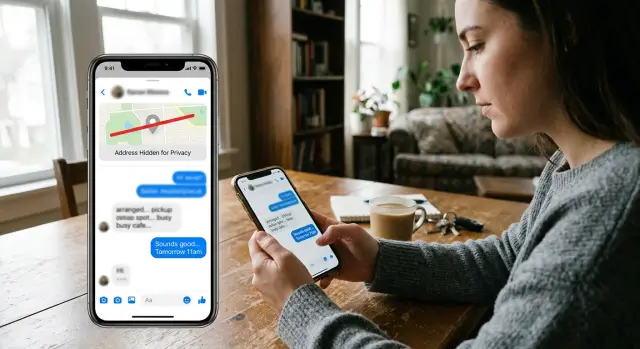
Buyer chats add another layer. People often reply with more detail than they mean to share: "I am home after 7," "Come by my apartment," or "I can meet once I finish school pickup." In a quick exchange, that feels normal. To a stranger, it can reveal your routine, your family situation, and how easy your home is to locate.
If you want better marketplace app privacy, think of every post as public information. Even when the app feels casual, your seller page, photos, reviews, and messages can all connect back to real life.
What your seller page gives away
Your seller page can reveal more than the listing itself. A stranger does not need your full address to learn a lot about you. A familiar username, a public profile photo, a few old listings, and some reviews can be enough to connect your sales account to your real identity.
Profile photos are one of the easiest ways to get matched. If you use the same photo on other apps, someone can trace it in minutes. Even a casual picture can expose a workplace badge, school logo, street sign, or part of your building.
Usernames cause the same problem. Many people reuse the same handle across shopping apps, forums, and social media. Once that name is connected, a buyer may find your hobbies, city, full name, and other accounts. Boring choices work best here: a plain photo or no photo, and a username you do not use anywhere else.
Old listings also leave a trail. One post might mention a neighborhood. Another might show the same living room wall. A third might say pickup is easiest on weekday evenings. Bit by bit, your seller page starts to tell a story about where you live and how you spend your time.
Reviews can make that worse. Buyers often overshare without meaning to. A review like "easy porch pickup near Maple Park" or "seller met me after work by Westview Apartments" can reveal details you never posted yourself. Even comments like "friendly mom" or "college student" narrow things down more than most people expect.
Treat your seller page like a flyer anyone can read. Keep it plain. Remove anything that ties the account to your home, workplace, or daily routine.
How buyer messages expose your routine
The chat box often leaks more than the public listing. Most sellers focus on the item description first. The private message thread is where people start talking like they already know each other, and that is where too much information slips out.
A buyer does not need much to map your week. If you always answer after 5:30 p.m., or you write "sorry, just got off work," you have already shared part of your schedule. Repeat that a few times and a stranger can guess when you commute, when you are home, and when you are less likely to reply.
Saved replies can leak even more. A quick message with your phone number feels convenient when several buyers ask the same question. It also puts that number into chats, screenshots, notification previews, and someone else's contact list.
Moving the conversation to another app creates more risk. A messaging app may show your full name, profile photo, status text, or last-seen time. That is a lot of personal detail to trade for a faster reply.
Small talk is another weak spot. Buyers ask friendly questions, and sellers answer without thinking. "I am home after dinner" or "weekends are easier because I work late" sounds harmless, but it sketches out your routine.
A few simple habits help:
- Keep the conversation inside the marketplace app when you can.
- Share a phone number only if pickup really requires it.
- Avoid phrases tied to your routine, like "after work" or "before school pickup."
- Use broad time windows instead of your exact plans.
"Available tomorrow between 6 and 7 p.m." tells the buyer enough. "I leave the office at 5:30 and get home around 6" tells them much more than they need.
Safer pickup plans for local sales
A good pickup plan should feel a little boring. That is usually a sign that it is safe. You want a place with other people nearby, visible cameras, and an easy way to leave.
A coffee shop entrance, grocery store parking lot near the front, pharmacy lot, or police station exchange area is usually better than your driveway. Foot traffic helps. Cameras help too. Most of all, you want a spot where both people can arrive, finish the sale, and leave without learning much about each other.
What a good pickup plan looks like
Do not send your full address early. Share a broad area first, like the name of a shopping center or a nearby main intersection. That gives the buyer enough to judge distance without telling them your street, building, or unit.
Keep your timing tight too. Instead of saying, "I work from home" or "I am around all evening," offer a short window such as "I can meet between 5:30 and 6:00." Small details about your schedule add up fast.
A simple plan looks like this:
- Pick a place with steady foot traffic.
- Stay near an entrance or well-lit area.
- Share the exact spot only when the meeting is set.
- Offer a short meeting window.
- Bring another person if the item is expensive.
Porch pickup is where many sellers slip. It sounds easy, but it can expose more than expected. A package left outside may sit next to your house number, mailbox, delivery label, or nameplate. One clear photo can tie your seller page to your home.
That gets riskier if your address is already listed on people-search or data broker sites. In that case, a stranger may only need your first name, neighborhood, and one listing photo to connect the dots. Public meetups take a little more time, but they keep your home out of the deal.
Before you publish a listing
A safer sale starts before the post goes live. Price matters, but privacy matters first. A photo, a location pin, or a casual line in the description can reveal more than you expect.
Use a quick check before every post:
- Look at the photos first. Use a plain wall or neutral floor if you can. Crop out mail, shipping labels, car plates, family photos, mirrors, and anything outside a window that makes your home easy to spot.
- Remove small identity clues. House numbers, school names, work badges, sports uniforms, and custom signs make it easier to connect the listing to a real person.
- Widen your location if the app allows it. A general area is usually enough. You do not need to show your exact block to sell a lamp.
- Keep early messages inside the app. Built-in chat gives you a record and keeps your personal number out of the sale.
- Confirm the item, price, and pickup window without explaining your schedule. The buyer does not need to know when your partner is away or when your kids are at practice.
It is also worth checking app permissions on your phone. A marketplace app rarely needs constant location access, your full contact list, or your whole photo library. If possible, allow only the camera or selected photos, and use location only while the app is open.
If you sell often, clean up old posts once a month. Sold listings can keep working against you long after the item is gone.
A simple example of a safer sale
Picture a normal sale from start to finish.
A parent wants to sell a stroller their child has outgrown. Before posting, they change their profile photo. The old one showed part of the front porch and the house number in the background. Easy to miss, easy to fix.
The listing itself stays simple. It covers the stroller's condition, price, and general area, but not the seller's street, building, or regular hours at home. A buyer replies right away and asks for the address so they can "pick it up now."
Instead of sending the address, the seller keeps the reply short. They offer to meet at a grocery store parking lot about five minutes away. It is public, busy enough to feel safe, and close enough to stay convenient.
They also avoid sharing their routine. Rather than saying, "I am home every day after school pickup at 3:30," they offer a broader choice: early evening today or late morning tomorrow. The buyer still gets enough information to plan.
At the meetup, the stroller changes hands, payment is made, and the sale is done. The buyer got what they needed. The seller stayed polite and practical. Most of all, the seller never shared their street address, family schedule, or extra details that had nothing to do with the item.
That is what good seller page privacy and buyer message safety look like in real life. Small choices do most of the work.
Mistakes that expose more than you meant to share
Most privacy leaks on marketplace apps do not come from one dramatic mistake. They come from a few habits that seem harmless.
One common problem is reusing the same photo everywhere. If the image in your listing also appears on Instagram or Facebook, a buyer can connect the sale to your real name very quickly. Sometimes the background does the damage on its own: a school logo, a family photo, a street number, or a recognizable porch.
Another mistake is leaving sold listings public for months. Old posts build a pattern. They may show what part of town you live in, what your home looks like, and when you are usually available. One listing is not much. Ten old listings tell a story.
Phone numbers are another weak spot. Sharing your number too early often pushes the sale into text messages, where buyers can keep contacting you after the deal is done. Caller ID apps and public records can connect that number to your full name, age, and address.
Small details that reveal your routine
People also give away too much in casual scheduling messages. "I will be home alone after 8" or "Nobody is at my place until Sunday" may feel like harmless planning. It is not. Those lines tell a stranger when your home may be easier to approach.
Safer habits are simple:
- Use fresh photos cropped tightly to the item.
- Delete or hide sold listings.
- Share a phone number only when pickup is confirmed.
- Keep timing broad until you have chosen a public meeting spot.
If your name, phone number, or address has already spread beyond the app, the problem grows fast. Data brokers often collect those details from many sources and republish them in one place.
What to do if your information is already out there
If a listing, message, or seller page has exposed too much, start with the parts you control.
Delete old listings that show your street, building, car plate, or repeated pickup spot. Trim your profile so it does not reveal your full name, neighborhood, school, or workplace. Replace photos you have used on other accounts. If the app lets you limit who can view your seller page, do that too.
Then search for what is still visible. Look up your full name, phone number, email address, and seller username one by one. If you reused the same handle across apps, search that as well. This is where many people realize the bigger issue is not the marketplace app alone. It is the way different accounts connect.
If your photos are part of the problem, take new ones against a plain background. Cropping old images is not always enough, especially if earlier versions were saved, shared, or reposted.
After that, check whether your details appear on data broker sites. These sites collect names, addresses, phone numbers, and family links, then republish them. Manual opt-outs take time, and records often come back.
If that sounds familiar, Remove.dev is one way to deal with it. The service removes personal information from more than 500 data brokers worldwide, monitors for relistings, and sends new removal requests when your data shows up again. That matters when you are trying to keep a marketplace profile from being tied back to your real-world identity.
Once the cleanup is done, make a clean break. Use a new handle, fresh photos, a trimmed profile, and safer pickup rules. It will not erase every copy overnight, but it will cut down what strangers can learn from your next listing.
FAQ
How can a marketplace listing reveal where I live?
Even a basic post can leak your rough area, your schedule, and parts of your home. A few small clues across photos, reviews, and old listings can point back to your street or building.
Should I use my real photo and normal username on my seller page?
Usually no. A reused profile photo or handle makes it much easier for someone to connect your seller account to your social accounts, full name, or workplace. A plain photo or no photo, plus a fresh username, gives away much less.
Is it safe to give buyers my phone number?
Not at the start. Keeping the chat inside the app gives you a record and keeps your number out of screenshots, caller ID tools, and saved contacts. Share a number only if the meetup truly needs it and the plan is already set.
Where should I meet a buyer instead of using my home address?
A public place near other people is the safer default. Think of a grocery store entrance, coffee shop front area, pharmacy lot, or a police exchange spot. The goal is to finish the sale without showing a buyer where you live.
When should I share the exact pickup location?
Wait until the meeting is confirmed. Early on, a broad area or nearby intersection is enough for distance planning. Share the exact spot later, and keep the time window short so you are not giving away your whole evening.
Are porch pickups too risky?
They can be. Porch pickup may expose your house number, mailbox, delivery labels, or other details in person or in photos. If you want less risk, use a public meetup and keep your home out of the sale.
What should I check in photos before I post an item?
Start with the background. Crop out mail, shipping labels, family photos, mirrors, car plates, house numbers, and anything visible through a window that could identify your home. Fresh photos against a plain wall are usually the safest choice.
How do I answer buyers without revealing my daily routine?
Keep it short and broad. Instead of saying when you leave work or when school pickup ends, offer a simple window like "tomorrow between 6 and 7 p.m." That gives the buyer enough without mapping your routine.
Should I delete old sold listings?
Yes, if the app allows it. Old posts build a pattern over time, showing repeated backgrounds, neighborhoods, and your usual availability. Cleaning them up every month cuts down what strangers can piece together.
What if my name, phone number, or address is already out there?
First, remove or edit anything you still control, like old listings, profile details, and reused photos. Then search your name, phone number, email, and seller handle to see what else is public. If broker sites have your details, a service like Remove.dev can handle removals across hundreds of sites and keep watching for relistings.