Old newsletter signups can keep your data in circulation
Many people do not realize old newsletter signups can still feed list brokers, profile matching, and rented mailing lists years later.
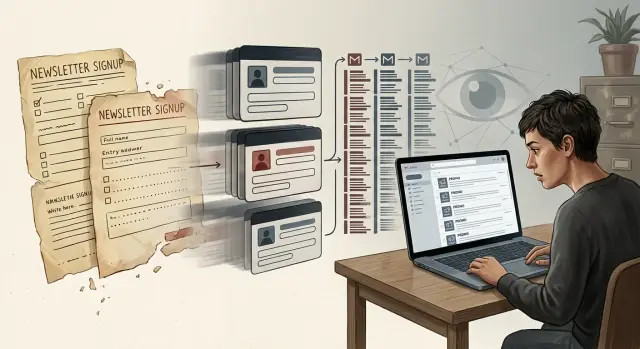
Why old signups still matter
One of the easiest privacy mistakes is assuming an old signup disappeared when you stopped caring about it. In many cases, it did not.
A newsletter account is only one part of the record. Your email address, name, location, purchase history, and past clicks can stay behind long after you forget the password. Companies often keep inactive records for reporting, ad targeting, customer history, or simple inertia. If you signed up for a store newsletter in 2019 and never opened another message, that profile might still exist today. It could still carry tags like "interested in travel," "shops for kids," or "lives in this ZIP code," even if those details are old.
Silence is not deletion. When you stop opening emails, the sender mostly learns that you're inactive. Your data can still be stored, scored, copied to another system, or matched with outside records later.
Imagine you signed up for a home decor newsletter with an old Gmail account, opened three emails, and ignored the rest. A year later, the brand switches email providers and imports the whole list. Your record stays because you're still a past contact. Later, that same email gets matched with outside data and your profile fills out again. You did nothing, but the file kept moving.
That is why dormant accounts matter. They do not need to be active to stay useful to marketers. They only need to sit in one database long enough to be copied, synced, or enriched. Deletion is a specific action. Silence is just silence.
Where your contact info keeps moving
Forgotten signups rarely stay in one place. The same email address can live in an email platform, a customer database, an old campaign export, and a backup copy no one has checked in years.
The path is usually simple. You sign up once for a discount or download. The brand keeps your account after you lose interest. Your details get copied into another marketing system. Later, that system gets shared with a partner, rented out as audience access, or matched with outside data.
List rentals make this harder to see. Another brand can reach you through a rented audience even if you never gave that brand your email yourself. You may never see your address handed over directly, but your profile can still be used to place ads or offers through a partner's system.
Then there is profile appending. If a company has your email and a name or ZIP code, it can match that with outside records and add more detail. That can mean a phone number, home address, age range, household details, or likely interests.
Small bits of data do not look like much on their own. Together, they create a much fuller record than the one you first gave away.
Data brokers do this every day. They pull fragments from signups, purchases, public records, loyalty programs, app activity, and other sources, then merge them into one profile that keeps circulating.
If you signed up for a home decor newsletter in 2019, that old record could still sit in a backup list years later, get matched to a postal file, and help place you in a "recent mover" or "homeowner" audience. You forgot the signup. The profile did not.
A simple example
A coupon popup is enough to start the chain.
You buy running shoes, see an offer for 10% off, and enter your email. Maybe you add your phone number for order updates. It feels like a small trade: a discount in exchange for a few promo emails.
For a while, that is all it is. Then you stop opening the messages and forget the account. The store does not. It still has a profile with your email, purchase date, ZIP code, and a rough guess at your interests based on what you bought. That profile can sit in a marketing database for years.
Months later, you start getting promos from a different brand selling gym gear, socks, or outdoor clothes. You do not remember signing up there. Sometimes it is a sister brand. Sometimes it is a partner reaching a rented audience.
The record can travel further through matching. If your email appears in another file, the two records can be connected. One file might hold your email. Another might hold your mailing address, age range, or shopping habits. Once those pieces get combined, the forgotten shoe-store signup starts to look less like one old coupon and more like a live customer profile.
That is why an account can feel dead on your side and stay active on theirs. The inbox goes quiet for a while. The data often does not.
What unsubscribing really does
Clicking "unsubscribe" usually solves a smaller problem than people expect. In most cases, it tells one sender to stop using your email for one mailing program. It does not erase every copy of your record, and it does not pull your details out of the wider databases that may already have them.
With old signups, your address may now sit in several places at once: the brand's email tool, an older backup, a CRM, an analytics platform, and a partner database used for audience matching or list cleanup.
A basic unsubscribe often does three things. It marks your address as "do not email" in one system, removes you from a specific campaign or brand list, and keeps a suppression record so you are not added again by accident. What it usually does not do is delete the rest of your customer profile.
That distinction matters. An opt-out means "stop sending me promotions." A deletion request means "remove my personal data," subject to the rules that apply in your region. Some companies still keep a minimal suppression record after deletion so they can honor the opt-out later and avoid adding you back through another import.
There is also a timing problem. One system updates quickly, while older tools and exported files lag behind. If a team uploaded a list last month, unsubscribing today may not touch that old file. The same goes for partner tools that sync on a delay.
So if the emails stop, that is good, but it is not proof that your profile is gone. It may only mean one sender got the message.
How to check it step by step
Start with your inbox. Old welcome emails, coupons, receipts, and shipping updates are often the easiest way to see which companies still know a certain address.
Search old folders first. Promotions, Spam, Archive, and Trash usually hold more than people expect. Look for terms like "welcome," "thanks for signing up," "unsubscribe," and old brand names. As you find them, make a rough list of every store, app, raffle, or newsletter tied to that address.
Then check the accounts you can still access. Look for account deletion, privacy settings, marketing preferences, or a data removal form. Some companies hide deletion under "privacy," "data," or "account management" instead of "close account," so it is worth poking around a bit.
Next, search your email, name, and phone number on people-search and broker sites. If a listing shows your contact details, save the site name and the date. A simple note on your phone or a small spreadsheet is enough. The point is to remember what you checked, what you requested, and what needs a follow-up.
A quick example makes the process clearer. Say you find old emails from a clothing shop, a meal kit app, and a raffle you entered in 2021. You may have ignored all three for years, but each one can still hold profile data, share updates with partners, or match your email with other records.
The note you keep matters more than it sounds. Without it, you will forget which accounts you checked, which broker listings you found, and which requests need another look in two weeks.
Why the profile stays alive
A profile usually survives because many small records get tied together over time, not because one giant file exists somewhere. A newsletter you joined in 2018, a store account you forgot, and a shipping form you filled out once can all point to the same person.
Your email address often does most of the work. People keep the same email for years, so it becomes an easy match point across old lists, checkout records, loyalty programs, and broker files. Even if one record is thin, that same email can connect it to older data with your name, city, phone number, or past address.
One detail can unlock a lot
This is where appended profiles matter. If one database has your email and another has your postal address, a broker can combine them. If a third source has an age range, household income band, or likely interests, those details can get attached too. Suddenly the profile looks much fuller, even though you never gave all that information to one company.
Household matching makes it worse. If two or more people share an address, brokers may treat them as part of the same home record. That can pull in a spouse, parent, roommate, or adult child. One old signup can help fill gaps in someone else's profile at the same address.
Why deleted data comes back
Even when a record gets removed, it can return on the next refresh. Brokers buy, swap, and update files in batches. If your details show up again from another source, the system can rebuild the same profile with slightly different fields.
That is why one-time cleanup often falls short. The problem is not only one record. It is the same identity getting rebuilt again and again from leftover data trails.
Mistakes that keep the data alive
The biggest mistake is using one personal email for everything. If the same address goes into coupon popups, downloads, store accounts, giveaway forms, and app signups, it becomes an easy way to match records across companies.
Stopping at "unsubscribe" is another common mistake. It can block future campaigns, but it does not always remove the account itself. Your profile may still sit in a customer system, stay in reports, or get updated later with new details from appended profiles.
A few other habits make the problem worse. Adding your phone number when an email address would do creates another strong matching point. Leaving old accounts open after a one-time purchase or download keeps data sitting around longer than necessary. Forgotten event forms, quizzes, contest entries, and abandoned carts can also leave a live record behind.
Social sign-in deserves a closer look too. It is convenient, but it can pass along more than people realize. Depending on your settings, a site may get your name, email, profile photo, and other details that help fill out a broader contact profile.
Say you used the same email for a recipe download in 2018, a retail checkout in 2020, and a webinar in 2022. You unsubscribe from two of them, but never delete the accounts. To you, those are dead signups. To a database, they can still look like one person with a long history and fresh matching points.
Inbox cleanup helps. Account cleanup matters more.
Quick checks for this week
Do not try to fix everything at once. A short, useful cleanup is better than a perfect plan you never finish.
Start with five brands or sites you remember giving your details to years ago, especially stores, giveaway forms, coupon offers, and comparison tools. Log in and delete any account you no longer use. If you still want the account, remove saved phone numbers, mailing addresses, birthday details, and any other profile fields you can edit.
It also helps to separate your inboxes. Use one email address for personal communication and another for shopping, promos, and low-trust signups. That makes it easier to see who keeps passing your information around, and it keeps your main inbox out of a lot of future matching.
One more thing matters here: deleting messages is not the same as deleting the account behind them. If a brand still has your profile, your contact info can stay in circulation even after years of silence.
If you start seeing the same promotions under different brand names after this cleanup, that is a strong clue your data moved beyond the original signup. At that point, deleting a few accounts may not be enough.
What to do next
Start with what you can see. Search your inbox for "welcome," "subscription," "newsletter," "preferences," and brand names you barely remember. Then search your email, phone number, and home address on a few people-search sites. You do not need a perfect list on day one. A rough list is enough to begin.
When you find a live account or a broker profile, ask for deletion, not just an unsubscribe. Unsubscribing usually stops future emails from one sender. It often does nothing to the account behind it, the profile attached to it, or the copy already sitting in other databases.
A simple month-long plan works well:
- In week 1, list the accounts, newsletters, and broker profiles you can identify. Save screenshots and confirmation emails in one folder.
- In week 2, send deletion requests to companies with accounts and opt-out or removal requests to broker sites.
- In week 3, check the same records again. If a listing is still public, send a follow-up and note the date.
- In week 4, search again for your email, phone, and address. Anything that came back goes on your repeat-removal list.
Expect some records to return. That does not always mean the first request failed. Data gets copied, sold, and re-added all the time, so the follow-up check matters almost as much as the first request.
If manual removals start to feel like a second job, that reaction makes sense. Remove.dev automatically finds and removes personal data from over 500 data brokers, monitors for re-listings, and tracks requests in a dashboard. Most removals are completed within 7 to 14 days, which makes it a practical way to keep old signups and broker records from resurfacing.
A good goal for this month is not total disappearance. It is to close the obvious accounts, remove the broker listings you can find, and set up a repeat check so your contact info does not quietly spread again.
FAQ
Why do old newsletter signups still matter if I stopped opening the emails?
Because silence is not deletion. A brand can still keep your email, name, ZIP code, purchase history, and interest tags in old systems, backups, or shared tools even if you have not opened a message in years.
Does unsubscribing remove my data?
Usually no. Unsubscribing often just tells one sender to stop mailing you from one system. If you want the profile gone, look for account deletion or a privacy or data deletion request.
How can my info spread if I only signed up once?
One signup can be copied into an email tool, a customer database, an export file, a backup, or a partner system. Later, that same record can be matched with outside data and turned into a fuller profile.
What is an appended profile?
It is a profile built by joining small bits of data from different places. Your email from one company can be matched with your address, phone number, age range, or household details from another source.
Why does my data come back after I delete it?
Data sellers refresh their files all the time. If your details show up again from another source, the same profile can be rebuilt with slightly different fields, so one cleanup pass is often not enough.
What should I search for in my inbox first?
Start with old folders like Promotions, Spam, Archive, and Trash. Search for words like "welcome," "thanks for signing up," "unsubscribe," plus old brand names, receipts, and shipping emails to see which companies still know that address.
I want to keep an account. What should I remove first?
Keep only what you need to use the account. Remove saved phone numbers, mailing addresses, birthday details, profile photos, and old shipping or payment info, then switch off marketing if you can.
Does deleting old emails help with privacy?
Not really. Deleting emails clears your inbox, but it does not erase the account or the customer record behind it. If the company still has your profile, your data may still move through other systems.
What is a simple way to clean this up without spending all month on it?
Pick a small batch instead of trying to do everything at once. Find a few old accounts and broker listings, send deletion requests, then check again in a couple of weeks and note what still appears so you can follow up.
When does it make sense to use a data removal service?
If broker opt-outs keep turning into a second job, a removal service can save time. Remove.dev finds and removes personal data from over 500 brokers, watches for re-listings, and shows request progress in a dashboard. Most removals are done in 7 to 14 days, and plans start at $6.67 a month.