Opt out request spreadsheet you can actually keep updated
Use this opt out request spreadsheet to track dates, proof, follow-ups, and final status so manual removals do not slip through.
Why manual opt-outs get hard to track
Manual opt-outs feel easy at first. You find one broker, fill out one form, save one screenshot, and move on.
The trouble starts when the same small task repeats across a dozen sites. Every broker has its own form, timeline, and reply pattern. One says to wait 10 business days. Another sends a confirmation email with no finish date. A third asks for ID a week later. If you miss that message, the request stalls.
Dates are usually the first thing to blur. Then the repeat work starts. You check the same broker twice because you forgot when you sent the request. Or you send a second request because you can't tell whether the first one went through.
That sounds minor, but it adds up fast. Ten minutes here, 15 there, and suddenly you're spending an hour on work you already did. Manual opt-outs are rarely hard because of the forms themselves. They're hard because of all the loose ends.
Proof causes a separate mess. A confirmation email sits in one folder. A screenshot lands in Downloads. A case number ends up in a notes app. When a broker says it never got your request, you know you saved proof somewhere, but finding it becomes another task.
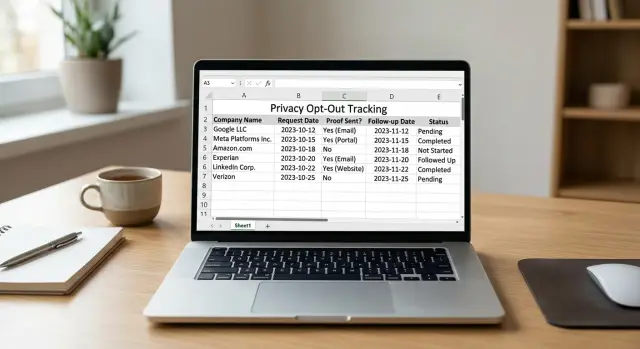
That's why a simple spreadsheet helps. It gives every request one home instead of scattering the trail across email, screenshots, and memory. You can log the company name, the date sent, what proof you saved, when to follow up, and the final result.
A quick example shows the difference. Say you sent requests to 12 brokers over two weekends. Three confirmed by email, four showed a success page, two asked for ID, and the rest stayed silent. Without one record, that pile starts to look the same very quickly. With one sheet, you can open a single file and see what's done, what's waiting, and what needs your attention next.
What your spreadsheet should track
A good opt out request spreadsheet should answer one question fast: what happened with this request, and what do I need to do next?
The simplest setup is one row per company. If you send a second request later, either add a new row or clearly mark it as a follow-up round. Don't make the sheet more complicated than it needs to be.
The columns that matter
Start with a handful of columns you'll actually keep updated:
- Company name
- Listing or page
- Request method
- Submitted date
- Confirmation date
- Follow-up date
- Final status date
- Status
- Proof
- Notes
Each column solves a real problem.
The company name sounds obvious, but it matters when brokers use similar names or run several sites. Use the exact name you contacted, not a shorthand you'll forget later.
The submitted date matters more than most people expect. Many companies ask for 7 to 45 days to process a removal. Without a date, you can't tell whether they're late or still within their own timeline.
The proof column keeps the tracker honest. If a broker says it never got your request, you need something concrete: a screenshot of the final page, a confirmation email, a case number, or a certified mail receipt. Put the file name or short description in the sheet so you can find it quickly.
For status, keep the labels short and consistent. "Sent," "Waiting," "Needs follow-up," "Removed," and "Denied" are enough for most people. Too many status labels make the sheet harder to scan.
Use notes for exceptions, not for the whole story. One broker may ask for photo ID. Another may remove one profile but leave an older duplicate live. A short note can save you 20 minutes later.
If you want one extra column, add "Next action." That turns a passive log into a working checklist.
A template you can copy
Your spreadsheet should be boring on purpose. If it feels too detailed, you'll stop using it after a week.
Copy this into Google Sheets, Excel, or Numbers:
| Company | Listing/page | Request method | Submitted date | Confirmation date | Follow-up date | Final status date | Status | Proof | Notes |
|---|---|---|---|---|---|---|---|---|---|
| ExampleDataCo | Profile page or search result name | Web form | 2026-03-01 | 2026-03-01 | 2026-03-08 | 2026-03-10 | Removed | Screenshot_ExampleDataCo_0301.png | Asked for ID, then confirmed removal |
| PeopleSearchSample | Search result page | 2026-03-02 | 2026-03-09 | Waiting | "Opt-out request sent Mar 2" | No reply yet |
This works because each company gets one clear line. You probably don't need separate tabs by month, state, or broker type unless you're tracking a very large number of requests. For most people, one clean sheet is easier to trust.
Dates should always live in their own columns. Don't bury them in notes like "sent on March 1, followed up on March 8." When dates have separate cells, you can sort the sheet in seconds and see what needs attention this week.
The proof column is where many trackers fall apart. Put the screenshot file name, the email subject line, or the ticket number there. Later, if a broker says it never got your request, you have something concrete to check instead of digging through your inbox for 20 minutes.
Keep notes short. One sentence is usually enough. Good examples are "asked for driver's license" or "listing came back after removal." If your notes turn into paragraphs, the tracker gets messy fast.
If you already use a service for broad coverage, keep this sheet for the few manual cases you still handle yourself. It doesn't need to do everything. It just needs to show what you sent, when you sent it, and what happened next.
How to use it without falling behind
A spreadsheet only works if you update it while the details are fresh. If you wait until the end of the week, small things disappear: which site asked for ID, which email address you used, and whether a broker said it needed more time.
Start with the brokers you've already contacted. That gives you a first batch of rows and makes the sheet feel useful right away. Open your sent folder, old screenshots, and any confirmation pages you saved, then enter those requests first.
After that, keep the routine simple. One row per broker, one request at a time. Don't bounce between tabs, notes, and screenshots while trying to fill in 10 rows at once. That's how dates get mixed up.
A basic routine looks like this:
- Pick one broker you already contacted or want to contact today.
- Enter the company name, listing or page, request method, and submitted date.
- Save your proof right away and give the file a name that matches the row.
- Add the follow-up date before moving to the next broker.
- Update the status as soon as any reply comes in.
The file name matters more than it seems. If your spreadsheet says "PeopleFinder - 2026-03-10" but your screenshot is named "IMG_4482," you'll waste time later. Use a simple naming pattern like "brokername-date-request" or "brokername-date-confirmation." When a broker pushes back, you can find proof in seconds.
Set the follow-up date before you leave the row. That's the habit that keeps the sheet alive. If a broker says to allow 10 business days, enter that date immediately. If it gives no timeline, pick your own, such as 7 or 14 days.
When replies come in, update the row right then. Mark whether the request is waiting, removed, denied, or needs more information. Add one short note if something changed, like "asked for ID" or "profile removed from search, still on detail page." Short notes beat long summaries every time.
A small example helps. Say you sent three requests last month and got one confirmation email yesterday. Open the sheet, find that broker's row, change the status, add the confirmation date, and save the screenshot or email reference with the same broker name and date. That takes about 30 seconds and prevents a lot of guessing later.
If you're doing this by hand, consistency matters more than perfection. The goal isn't a fancy tracker. It's a tracker you'll still trust after 40 or 50 requests.
A realistic example
Picture one person, Alex, doing manual opt-outs on a Saturday afternoon. They send 12 requests over one weekend, moving from one broker site to the next, saving screenshots, copying email confirmations, and logging each result in a spreadsheet.
At first, it feels manageable. Twelve requests doesn't sound like much. The mess shows up a few days later.
By Monday, four brokers have replied by email. Two confirm the request was received. One says the removal is complete. One asks Alex to reply with ID. The other eight say nothing.
Without a tracker, that week gets fuzzy fast. Alex would have to search the inbox, remember which sites used forms instead of email, and guess which requests still need follow-up. With a simple sheet, each row tells the story.
It might look like this in plain English:
- Broker A: sent Saturday, confirmation saved, status "Waiting"
- Broker B: sent Saturday, no reply yet, follow-up due Friday
- Broker C: sent Sunday, asked for ID, proof saved, status "Needs action"
- Broker D: sent Sunday, removal confirmed Wednesday, status "Removed"
Now the useful part: Friday comes around, and Alex filters the sheet by follow-up date. Five rows appear. Those are the brokers that stayed silent and now need a second message. No guessing. No rereading every old email. The sheet shows exactly what needs attention this week.
The final status column keeps the whole project honest. Once Alex marks a request as removed, it stops taking up mental space. Open requests stay visible until there's a real outcome. That matters because silence is common. Some brokers confirm quickly. Some remove the record without saying a word. Some need more than one reminder.
After two weeks, Alex can look at the sheet and see a clear split: three removed, two waiting, one needs documents, and six still open or in follow-up. That's much better than a vague feeling of "I think I handled most of them."
Mistakes that create confusion later
Most spreadsheet problems don't show up on day one. They show up three weeks later, when you can't remember what you sent, where you saved the screenshot, or whether a broker actually removed your listing.
One common problem is using different status words for the same result. If one row says "sent," another says "submitted," and a third says "requested," they all mean the same thing, but your sheet stops being easy to scan. Pick a short set of labels and stick with them.
For most people, these are enough:
- Not started
- Sent
- Waiting
- Needs follow-up
- Removed
- Denied
Another problem is saving proof in random places. A confirmation email in your inbox, a screenshot on your desktop, and a PDF in Downloads will slow you down later. Save everything in one folder, then note the exact file name in the sheet. Even a basic note like "brokername-2026-03-10-confirmation.png" is much better than "saved somewhere."
Follow-ups get missed for a simple reason: no date was set. People often assume they'll remember to check back in a week. Usually they don't. Every time you send a request, add the next follow-up date right away.
A different mistake is marking a request done too early. Sending a form is not the same as being removed. A page can stay live for days, or a broker can send a generic reply and do nothing. Mark a request as removed only after you confirm the listing is gone or hidden.
The last trap is keeping the real notes inside email instead of in the sheet. Your inbox may have the full story, but future you won't want to dig through 40 messages to find it. Put the useful part in the spreadsheet: who replied, what they asked for, and what happens next.
If your notes live in one place, the work stays clear. If they live in five places, it turns into guesswork.
A 10-minute weekly review
An opt out request spreadsheet only helps if you open it often. Once a week is enough for most people. Put 10 minutes on your calendar and review the sheet from top to bottom.
A short check every Friday works better than a big cleanup once a month. Small fixes stop the usual problems: forgotten follow-ups, missing screenshots, and rows that sit in limbo for weeks.
Start with follow-up dates. Filter or sort that column and handle anything due today or already overdue. Then scan for empty proof or notes cells. If you sent a request but didn't save the confirmation email, screenshot, or case number, add it now while it's still easy to find.
Next, sort by status. Rows marked "Sent" or "Waiting" for longer than expected need a closer look. Check for duplicates too. The same broker can end up in your sheet twice if you used both a web form and email.
Also review any broker that asked for more information. If it wants ID, address confirmation, or a reply from the same email, note exactly what it asked for and when you answered.
This quick pass should leave you with a short action list, not a pile of detective work. By the end, each row should show what happened, what proof you saved, and what comes next.
If one broker asks for a copy of your ID, don't just write "needs info." Write "asked for ID on May 6, sent on May 7, waiting for reply," then set the next follow-up date. That one extra sentence can save you 20 minutes later.
If you handle some removals yourself and use a service for others, add an "Owner" column. That makes it obvious who is handling each request and helps you avoid sending the same opt-out twice.
When to keep using a spreadsheet and when to get help
Your next step depends on volume. A small list is still reasonable to handle by hand. If you only need to contact a handful of brokers, a spreadsheet may be all you need.
Keep using your sheet if you're tracking fewer than 20 brokers, can spare 15 to 30 minutes each week for follow-ups, and don't see many re-listings. In that situation, don't overcomplicate it. A plain spreadsheet and a weekly reminder work well.
Things change when requests start piling up. Some brokers ignore the first request. Some ask for extra proof. Some remove your record, then post it again months later. Once the list gets long, manual tracking turns into repeat work, and that's usually when people stop updating their sheet.
If you're dealing with dozens of brokers, multiple name variations, old addresses, or frequent re-listings, getting help starts to make sense. Remove.dev can handle removals across more than 500 data brokers, track requests in one dashboard, and keep monitoring for re-listings after your data is removed. For broad, ongoing cleanup, that's much easier than maintaining the whole process by hand.
Even then, keeping your own simple record still helps. You can note when you started, which brokers mattered most to you, and which manual cases still need attention. A personal log is useful whether you do everything yourself or hand most of it off.
A good next step is simple: open a blank sheet tonight, add your first five brokers, and log the dates and proof you already have. If that already feels like more admin than privacy work, that's a sign you may want more than a spreadsheet.