Parent move into care privacy checklist for adult children
Use this parent move into care privacy checklist to reduce exposure from home listings, mail forwarding, and medical forms during a care move.
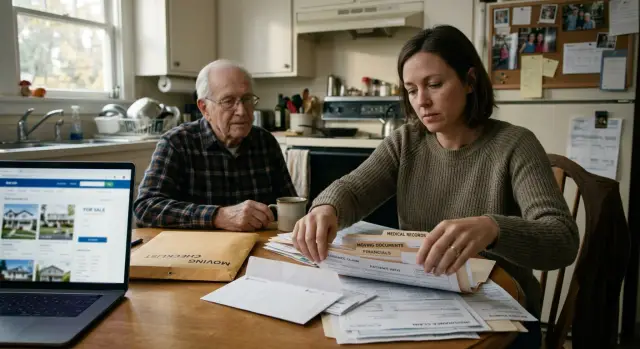
Why a care move can expose two households
A parent's move into care often creates one paper trail for two homes. The parent's old address shows up in sale paperwork, utility shutoffs, clinic updates, and insurance records. At the same time, an adult child often gives their own address, phone number, or email as the new contact.
That is where the exposure begins. The parent's former home gets tied to the child's current home, and that link can spread farther than most families expect.
Usually it is not one form that causes the problem. It is the same details being copied again and again. A real estate listing can feed agent notes and public records. A mail change can connect the old address to the new one. A hospital, pharmacy, home care agency, or assisted living intake form may list the child as both emergency contact and billing contact. Once one office has that information, the next one often reuses it.
Street addresses are only part of it. Names, phone numbers, and email addresses spread too. If a daughter uses her everyday cell number and personal email with the realtor, the movers, and the care facility, those records start pointing to the same person and both homes. That makes it easier for people-search sites and data brokers to build a fuller profile.
A simple example shows how fast this happens. A son helps sell his mother's house, forwards her mail to his place for a few weeks, and puts his own number on medical forms so staff can reach him quickly. Each step makes sense on its own. Together, they create a clear trail between her former address and his home.
Once that trail lands in broker databases, it can keep circulating long after the move. That is why privacy cleanup often becomes part of the move itself.
Where leaks usually start
Most privacy problems during a move do not start with hacking. They start with normal paperwork done quickly, by different people, during a stressful week.
When a parent moves into care, the old home, the new residence, and the adult child's contact details often get tied together. Four places usually cause the first leaks:
- real estate listings and showing notes
- mail forwarding and account updates
- medical and care intake forms
- reused contact details across many services
Real estate is often the first issue. Listing photos can reveal house numbers, family photos, mail on a counter, pill bottles, alarm panels, or a view that gives away the exact lot. Listing text can also say too much. Phrases like "moving closer to care" or "seller entering assisted living" tell strangers why the house is being sold.
Open houses add another layer. Agents, buyers, cleaners, stagers, and sign-in sheets can spread phone numbers and schedule details faster than most families expect.
Mail changes create the next wave. Forwarding mail, rerouting packages, updating utilities, and changing pharmacy delivery all leave records behind. If everything gets pointed to the adult child's home for convenience, that address can end up attached to medical bills, retail accounts, repair visits, and public databases.
Medical and care paperwork is another common source of spread. Doctor offices, labs, pharmacies, transport services, and care intake teams all ask for slightly different details. In practice, one daughter might list her mobile number on a hospital form, her home address for billing, and her work email for updates. A week later, those details may sit in five separate systems.
If you are building a privacy checklist for a parent's move into care, start by choosing one contact method for each purpose before forms go out. If records have already spread, data broker removal can help later, but stopping fresh exposure usually saves more time.
Start with one shared contact sheet
Before you call anyone, make one contact sheet for the move. It can be a note, spreadsheet, or shared document. The point is simple: stop people from giving out different details to different offices.
This matters more than it seems. During one week, a doctor, pharmacy, insurer, bank, realtor, and family member may all ask for contact details. If each person answers from memory, the old home, the care address, and your own address can end up mixed together.
Pick one phone number and one email for move-related tasks. Use the inbox and number that someone will actually check every day. For many families, that means a dedicated family email and one adult child's phone, at least during the transition.
Your sheet should also spell out which address belongs in each situation:
- billing address
- care residence address
- emergency contact address
- mailing address, if it is different
- old home address, marked "do not use unless required"
Be specific. Some providers only need a billing address. Some need the care location for visits or transport. Others do not need your home address at all.
Keep a running log of who has what. Write down each company or office, which address they were given, and the date you updated it. If someone asks again two weeks later, you will not have to guess and risk repeating the wrong detail.
A small example makes the point. If the real estate agent has the old home and your cell number, but the pharmacy has the care address and your email, that may be fine. If a home health form also gets your home address by accident, you have now spread a second household address for no good reason.
A clean contact sheet saves time. More than that, it keeps private details from drifting farther than they need to.
Handle the home sale without oversharing
A home sale can put more personal data online than most families expect. Photos, listing text, and showing notes often spread quickly across real estate sites and search results. When a parent is moving into care, that can expose the empty house and the adult child's home at the same time.
Once a listing is copied, scraped, and reposted, pulling it back gets harder. So it pays to slow down before the house goes live.
Before the photographer arrives, walk through every room slowly. Remove family photos, award certificates, prescription labels, shipping boxes, calendars, fridge notes, visible alarm panels, and any house numbers near doors or windows. Small details matter. A package label or framed certificate can reveal full names, dates, and old addresses.
Ask the agent one plain question: "What will the public actually see?" You want to know whether the listing shows a phone number, email address, exact showing instructions, or remarks that suggest the home is vacant. A separate email address and separate phone number for buyer questions are usually better than using your everyday contact details.
One step people often miss is the photo file itself. Images can include metadata, and map pins can be more exact than needed. Check that location data is stripped from photos and that the map does not point buyers to a side gate, back entrance, or other detail you would rather keep private.
A common mistake looks harmless. A daughter forwards her parent's mail to her own house, then uses her own number on the listing. Now one search can connect both homes. A neutral listing cuts down that trail.
Treat mail forwarding as a temporary bridge
Mail forwarding helps during a rushed move, but it should not become the long-term plan. Every forwarded envelope can teach another company where your parent now gets mail, and sometimes where you live too.
A broad forwarding order feels tidy, but it can spread a new address across banks, clinics, insurers, charities, and subscription accounts faster than most families expect.
Start narrow. Forward the mail that could cause real problems if missed, then update senders one by one over the next few weeks.
It helps to keep three streams separate from the start:
- personal mail, such as banking, insurance, and routine household bills
- estate or property paperwork tied to the old home
- medical letters, pharmacy notices, and care billing
Estate papers often need different handling than medical notices, and mixing them makes it easier to send private details to the wrong place.
Watch the first month closely. If a sender starts mailing the new address without you giving it directly, the forwarded item was probably enough for them to update their records. Make a note of those senders, then decide whether that address should stay on file.
This matters even more if your parent's mail is coming to your home. One forwarded letter can connect your address to your parent, the old property, and a cluster of accounts. Once that data spreads, it can end up in broker databases.
When the main accounts are updated, stop the broad forwarding order. Leaving it in place for months creates a quiet leak that is easy to miss until both households start getting more unwanted mail.
Be careful with medical and care intake forms
Medical and care intake forms often spread personal details farther than families expect. One form can end up in billing, nursing notes, transport records, pharmacy files, and an online portal. That is why these forms deserve a slower review than most people give them.
Fill in what the provider truly needs, and pause before adding extra details "just in case." If a field is optional, leaving it blank is usually better than giving another address, another phone number, or a second email that can be copied into other records.
A common mistake is using the adult child's home address on every form by default. That can tie the parent's care records to the child's household, especially when papers get reused for mailings, invoices, prescription notices, and ride services. Use the parent's current mailing address when it makes sense. Use the adult child's address only when there is a clear reason.
Before you hand over a form, ask a few direct questions:
- Which teams or outside vendors will see this?
- Will this go into more than one system?
- What prints on labels, envelopes, or transport paperwork?
- Can emergency contacts stay separate from billing contacts?
These questions matter because copied details tend to stick. A receptionist may enter one address, then that same address shows up on wristband labels, after-visit summaries, pharmacy notices, or transport sheets without anyone checking it again.
Portals need a second look. After the first appointment or intake, open the account and scan every profile field, not just the main contact page. Check printed documents too. Small errors often show up there first.
A simple example is common. A daughter uses her home address for a rehab intake so she can get updates quickly. Two weeks later, billing mail, medication notices, and ride paperwork all carry her address. Now both homes are easier to connect in public records and broker databases.
If that kind of spread has already happened, fix it early. Ask each provider to correct the record in every system they use, not just the screen in front of you.
Put tasks in the right order
Moves get messy when everyone starts calling, forwarding, and filling out forms at once. A better order keeps the old home, the care address, and your own contact details from getting tied together in public records and vendor databases.
First, clean up what outsiders can see before the house is marketed. Take down framed certificates, family photos, medication boxes, calendars, and any paperwork that shows names, doctor offices, or account numbers. Check social profiles too. A casual post about the move can give strangers the timing and location.
Then set up move-only contact details. One phone number and one email for this transition keep real estate agents, movers, utilities, care staff, and service desks from spreading a personal inbox or family cell number across dozens of systems.
After that, update accounts in a set order:
- Banks, credit cards, and insurance first.
- Doctors, specialists, and pharmacies next.
- Utilities, subscriptions, and delivery services after that.
- Less sensitive accounts last.
This order works for a simple reason. Financial and medical records tend to get copied into other systems, so it is better to fix those early and carefully. Use the same contact sheet each time so names, phone numbers, and addresses stay consistent.
About two weeks later, check again. Search the parent's name, the old address, the new address, and the move-only phone number and email. Look at real estate pages, people-search sites, and public records that may have updated after the move. If broker listings start to appear, this is usually the point where data broker removal saves a lot of manual work.
It is not glamorous, but this order cuts down on avoidable exposure. It also makes mistakes easier to spot and fix.
A realistic example
Lisa is helping her father move from his longtime house into assisted living. She is doing what most adult children do under pressure: packing boxes, signing forms, talking to agents, and trying not to miss anything. On paper, each step looks small. Put together, they expose two homes instead of one.
The first leak comes from the house sale. The real estate listing includes the street number, and the photo set shows family photos, a framed military certificate, and a custom mailbox by the front walk. A stranger does not need much more to connect that listing to public records and old people-search sites.
Then Lisa files a mail forward so her father does not miss bills or care notices. It works, but now medical letters, prescription notices, and insurance mail start landing at her house. Her address becomes tied to his name in new records. If that data spreads, her home becomes part of the trail too.
A few days later, a non-emergency transport company picks her father up for an appointment. The intake form stores his old home address, the assisted living address, Lisa's cell number, and her home number because she listed both in a rush. One routine trip creates another record with several contact points.
At that stage, Lisa has three jobs:
- trim public details from the home listing
- keep mail forwarding short and reviewed often
- give only one contact number and the minimum address details on new forms
That is where a clear privacy checklist earns its keep. Small controls, used early, stop a lot of later cleanup.
Mistakes that create extra exposure
Many families underestimate how much damage small admin choices can do. A few common mistakes connect two homes in ways that are hard to undo later.
One is using the adult child's address as the default for every account. It feels neat at first. Then that address starts showing up in bank files, pharmacy records, insurance systems, and people-search sites. Soon the parent's old home, the sold home, and the child's home all appear in the same record trail.
A safer approach is to limit where the child's address appears. Use it only where it is truly needed. For other accounts, use the parent's current mailing contact or the care facility's mail process if that setup makes sense.
Another problem is old data left behind in patient portals and pharmacy profiles. A hospital may update one record, but the lab, specialist, pharmacy, and delivery service may still hold an old address or a former emergency contact. That creates misdirected mail, exposed prescription details, and duplicate records that spread farther.
The same thing happens with records people forget about. Voter registration, insurance policies, utility accounts, and even discount programs can keep old addresses active for months. Those records often feed commercial databases later, even after a house is sold.
People-search sites are especially stubborn. Many families assume a sold address will disappear on its own. It often does not. Some sites keep the old listing, connect it to relatives, and add a guessed new address from mail forwarding or public filings.
That is why data broker removal matters. If no one handles that step, both households can stay exposed long after the move is over.
Quick checks for the first month
The first 30 days are when small leaks turn into bigger ones. A home listing gets copied, a clinic saves an old number, or a bank letter lands at the wrong place. A short weekly review catches most of this before it spreads.
Once a week, search the basics for both households:
- your parent's full name, any common short name, old phone numbers, and current and former addresses
- your own name, phone number, and address if you have been listed as the contact person
- the property address with terms like "for sale" or "owner"
- listing images to see whether photos were copied to other sites
When listing photos go live, check them that day and again about a week later. Look for house numbers, family photos, diplomas, prescription bottles, calendars, or papers left in view. If the agent fixes the main listing, check copy sites too. They often keep the older version longer.
Physical mail is still one of the best warning signs. Save envelopes for a few weeks and watch for patterns. A lab bill, pharmacy notice, or insurer letter usually means the same old address sits in several records, not just one.
Keep a simple note of what changed. Write down who you contacted, the date, which address or phone number they had, and what they updated. That saves time when the same sender gets it wrong again.
If old details keep showing up on people-search sites, act early. Manual opt-outs work, but they add up fast when you are protecting two homes.
What to do next
Before everyone gets busy again, pick one person to own the cleanup. That person does not have to do every task by hand. They just need to track what was sent, what changed, and what still shows up online.
Without one owner, loose ends pile up fast. A home sale page stays indexed, a forwarding address turns into a public record, or an old intake form gets reused with too much personal detail. Small misses add up.
A simple follow-up plan is enough:
- choose one adult child or trusted helper as the main contact
- keep one shared note with old addresses, new mailing details, broker opt-outs, and dates
- set reminders for 2 weeks, 30 days, and 90 days to search both names, both addresses, and phone numbers
- check people-search sites and data broker listings again after the home sale closes and after mail forwarding starts
This matters because data often comes back. A record removed today can reappear after a county update, a marketing list refresh, or a new public filing. Rechecking is part of the job.
If manual follow-up is too much, a service can take over some of that work. Remove.dev finds and removes exposed personal data from more than 500 data brokers, keeps watching for re-listings, and lets you track requests in a dashboard. That can help when you are already juggling move logistics, care decisions, and family paperwork.
The best next step is boring, which is why it works: assign the owner today, put the reminder dates on the calendar, and run the first recheck before the month ends.
FAQ
Why can a parent’s move into care expose two households?
Because the move often ties your parent’s old address to your current contact details. A home sale, a mail forward, and a care intake form can all connect names, phone numbers, emails, and both addresses in one record trail.
What should I set up before I call agents, doctors, or care staff?
Make one shared contact sheet first. Pick one phone number, one email, and decide which address should be used for billing, care, mailing, and emergency contact before anyone starts filling out forms.
How can a home listing leak private information?
Real estate pages can reveal more than the house itself. Photos may show family pictures, pill bottles, certificates, shipping labels, alarm panels, or house numbers, and the listing text can say too much about why the home is being sold.
Should I use my home address on my parent’s forms and accounts?
Usually no. Use your address only when there is a real need, because once it lands in billing, pharmacy, transport, or insurance records, it can be copied into other systems and tied to your parent’s old home.
Is mail forwarding a privacy risk?
Use mail forwarding as a short bridge, not a long-term fix. Forward the mail that really matters, update senders directly, and end the broad forward once the main accounts are corrected so your address does not spread farther than needed.
What should I ask when filling out medical or care intake forms?
Ask who will see the form, whether the details go into more than one system, what prints on labels or envelopes, and whether billing and emergency contacts can stay separate. That small pause often prevents your address or phone number from being reused everywhere.
What order should I handle updates during the move?
A simple order helps. Clean up the house and listing first, set up move-only contact details next, then update financial accounts, medical providers, utilities, and lower-risk accounts after that.
What mistakes create the most extra exposure?
Two habits cause a lot of trouble: using the adult child’s address as the default everywhere and letting old portal or pharmacy records sit unchanged. Those mistakes create duplicate records and make it easier for people-search sites to connect both homes.
How do I check whether our information has already spread online?
During the first month, search your parent’s name, old address, current address, and phone numbers, then check your own details if you were listed as the contact. Watch physical mail too, because a misdirected bill or pharmacy notice often means the same bad data sits in several places.
When does a data removal service make sense?
If the details are already showing up on people-search sites or in broker records, a removal service can save a lot of manual work. Remove.dev removes exposed personal data from more than 500 data brokers, most removals finish in 7 to 14 days, and the service keeps monitoring for re-listings so old records do not quietly come back.