PDF mirror sites can keep files online after deletion
PDF mirror sites and preview tools can keep personal files reachable long after the source page is removed. Learn why it happens and what to check.
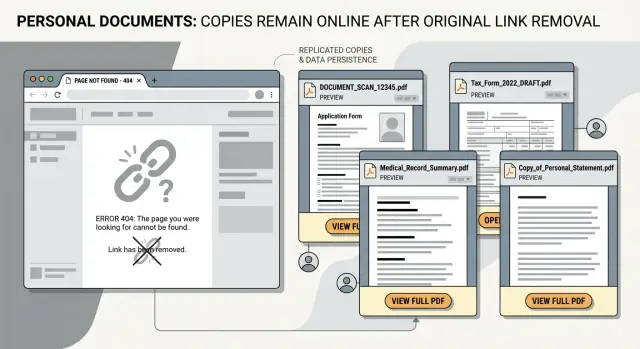
Why deleting a page doesn't always delete the file
Deleting a web page often removes the signpost, not the file itself. The page may be gone, but the PDF can still sit on another server, inside a preview tool, or in an archive that copied it earlier.
That gap catches people all the time. They delete the page, see a 404 error, and assume the document is gone everywhere. A broken page only tells you that one address stopped working. It does not prove that every copy was removed.
This happens often with personal documents. A resume on an old hiring page, a court file in a public record system, or a scanned form on a small business site can spread beyond the place where it first appeared. Once a crawler, preview service, or mirror site copies the PDF, that copy can keep working on its own.
So if the main page is dead, don't treat that as proof. The page may be gone. The file may still be online.
What mirror sites and preview tools keep
A PDF mirror site stores its own copy of a file instead of loading it from the original page every time. Some do this to speed up previews. Others collect public documents during crawls. Either way, once the file is copied, it can live separately from the page that first linked to it.
Document preview tools often work the same way. To show a PDF in a browser, pull text for search, or let someone read the file without downloading it, the service may save a local version first. It may also create extra versions, such as a thumbnail, a text extract, or a smaller PDF that loads faster.
If the original page disappears later, those stored versions do not always disappear with it.
You usually see this in three places:
- search previews that cached a public PDF
- viewer pages that host their own read-only copy
- archive or scrape-based pages that picked up the file during a crawl
The confusing part is that these copies often get a new web address. The original file might have lived at one URL, but the mirror saves it under a different domain, filename, or internal ID. Deleting the original link does nothing to the copied one.
Some services also separate the file from the page around it. They keep the PDF, but not the rest of the site. So even when the source page is gone, the document can still open through a preview page or a mirror listing. To a normal user, it looks like the file was deleted. In reality, it was removed from only one place.
How a deleted file stays reachable
A simple chain usually causes this.
A site uploads a PDF and puts it on a public page. Search engines, document preview tools, and mirror sites scan that page, fetch the file, and sometimes store their own version so they can show a preview, extract text, or speed up access later. Once that happens, the file exists in more than one place.
The original site has its copy. A preview service may keep another. Search systems may hold a cached PDF or a text-only version made from the file. If the original page is removed later, those extra copies do not always disappear at the same time.
That is why people still find the file through other paths. A search result may lead to a preview page. A direct link shared in email or chat may still open the document. A bookmark saved months ago can still work.
In plain terms, the front door is locked, but a side door is still open.
This matters most when the PDF contains personal details. Names, home addresses, phone numbers, signatures, account details, and ID numbers can stay visible long after you thought the file was gone. Removing the source page is only the first step. Each stored copy usually has to be dealt with where it is actually hosted.
A simple example
Picture a job seeker named Mia. A year ago, she uploaded her resume as a PDF to an old profile page on a small hiring site. The file included her full name, mobile number, city, home address, and a scanned signature.
Later, Mia got a new job and cleaned up her old profiles. She deleted the page and assumed the resume was gone too. If you visit the original profile now, it shows an error. That feels final.
But before the page was deleted, a document preview tool had already fetched the PDF so it could show a quick view in search or inside a browser reader. Some preview services keep a separate copy for speed, indexing, or caching. That copy can stay online even after the source page disappears.
So Mia's profile page is gone, but the PDF preview still opens on another domain. Her resume may also appear in search under a filename like "resume-mia-smith.pdf." Someone searching her name can still find it and read the details she thought she had removed.
The risk is not abstract. A phone number can lead to spam calls and scam texts. A home address gives strangers more information than they should have. A scanned signature is worse. It can be copied and misused.
That is why deleting the main page is never enough on its own. The page and the file do not always disappear together.
How to check if copies are still online
Start with the exact file name. Search for it in straight quotes, like "john-smith-resume.pdf." If the filename is generic, try a few versions. A copied file often keeps the old name even after the original page is gone.
Then search your name with words that match the document type. Resume and CV are obvious, but statements, forms, transcripts, and applications show up often too. A search like "Jane Doe" PDF or "Jane Doe" statement can find copies that a filename search misses.
Do not stop at the standard web results page. Open previews, thumbnails, and any result that shows a quick-view panel. Sometimes the preview loads a live PDF even when the main page looks dead.
Watch for a second address. The page you clicked may sit on one domain, while the file itself loads from a different preview or mirror domain in the background. That second URL matters because it tells you who is still hosting the file.
A short checklist helps:
- search the exact filename in quotes
- search your full name with document words such as PDF, resume, CV, statement, or form
- open previews and thumbnails, not just the main result
- check whether the PDF loads from another domain
- save screenshots of the file, the page, and the address bar
Before sending any removal request, write down every live URL you can find. Include the page URL and the direct file URL if the browser shows both. That saves time later, because a host may remove one page but leave the PDF copy online.
What to do, in order
If a file is still showing up after you deleted the original page, do the cleanup in order. Starting with search results can waste time, because search engines often keep pointing to copies that are still live.
- Find the site hosting the file right now. Search the exact filename, a unique sentence from the PDF, and your name if it appears in the document. Note every URL that opens the file or a preview of it.
- Ask that site to remove both the PDF and any preview page built from it. Some sites delete the file but leave the viewer page behind.
- Wait until the page is actually gone or returns an error. Then ask search engines to refresh or drop the outdated result. If you do this too early, the result often comes back.
- Check again a few days later. Cached copies can last longer than the source, and different services update on different schedules.
Keep a basic log while you do this. A simple note with the URL, the date, who you contacted, and the current status is enough. It helps more than most people expect.
A small example makes the order clear. Say an old resume PDF was posted on a club website years ago. You get the club to delete it, but a preview service still has its own page with your phone number visible. The club is done. The preview site still needs a separate request. After that, search results can be cleared more easily.
Do not assume one success fixes everything. Search again with the filename and with one odd sentence from the document. If anything is still live, repeat the same steps for that copy.
Common mistakes that keep a file online
The most common mistake is deleting the page that mentioned the file and assuming the PDF is gone too. Often, the page and the file live at different addresses. The page disappears, but the PDF still opens through a direct file URL or a mirror.
Another mistake is checking one search result, seeing an error page, and stopping there. That only proves one copy is down. It says nothing about cached versions, preview pages, old directories, or mirror domains holding the same file.
People also miss copies because files can have more than one name over time. A document may appear under the original filename, a cleaned-up title, a scanned filename, or an older folder path. If you search only the name you remember, you can miss live copies.
Preview pages get ignored for the same reason. They look temporary, so people treat them as unimportant. But a preview can still expose enough of the file for someone to read, download, or copy personal details from it.
A few habits help avoid wasted time:
- search the title, filename, and a few unique phrases from inside the document
- check preview pages, direct file links, and normal page URLs separately
- look for renamed files, older folders, and duplicate uploads
- recheck later in case the document comes back
One more mistake is treating one removal request as the end of the job. A file can be copied again, indexed again, or re-listed somewhere else later. That is common with personal documents that were scraped once and spread to multiple places.
Quick checks before you assume it is gone
Before you move on, spend ten careful minutes checking the obvious loose ends.
Search for your name with likely file words from the title. If the file was a resume, court record, report, or invoice, try your name with those words and add "pdf." Test each address on its own. The old page URL and the preview URL are not always the same thing.
Check whether the same document appears on other domains. One PDF can show up on a document host, a search preview page, and a mirror with a different address. The layout may change, but the filename, page count, or text snippet often gives it away.
Save proof right away. Take screenshots, copy the exact URLs, and note the date. If the page changes tomorrow, you will still have a record of where the file appeared and what was visible.
Then recheck later. Search indexes and preview tools often lag behind removals. Look again after about a week, then once more after that. A result can vanish from search while the direct URL still works, and the reverse can happen too.
One small tip: check on both desktop and mobile if you can. Preview pages sometimes show up differently, and a hidden copy is easier to spot on one version than the other.
If you find more than one copy, treat each domain as a separate problem. Each usually needs its own removal request.
What to do next
If you found only one or two copies, manual cleanup is usually manageable. You can contact the host, the preview service, and then the search engine once the file is no longer accessible.
It gets harder when the same file shows up in many places under slightly different titles, filenames, or cached results. That is where people lose track. One request gets approved, but another copy stays live on a preview page or comes back in search a week later.
A simple habit helps: set reminders to recheck the same search terms. Use the document title, your name, the filename, and any unusual phrase inside the PDF. Check again after a few days, then again after a couple of weeks.
If the document exposed personal details, think beyond the PDF itself. The file may be one leak, but your home address, phone number, age, and relatives may also be listed on data broker sites. Cleaning up those listings will not remove mirrored documents, but it can reduce how much of your personal information stays easy to find.
That broader cleanup is where Remove.dev fits. It focuses on finding and removing personal information from data brokers and keeps monitoring for re-listings, which can help shrink the rest of your public exposure while you handle document-specific takedowns with the sites actually hosting the file.
The basic plan is simple: remove the live copies, verify that they are really gone, and check again later. It is repetitive, but it works.
FAQ
Why can a PDF still open after I deleted the page?
Because the page and the PDF are often not the same thing. The page may be deleted, but a preview service, mirror site, or archive may still have its own copy under a different web address.
Does a 404 error mean the document is gone everywhere?
No. A 404 only shows that one address stopped working. It does not prove that search previews, mirror domains, cached copies, or direct file links are gone too.
Where do these extra PDF copies usually come from?
Most copies come from crawlers, document viewers, and search previews that fetched the file while it was public. Some save a full PDF, while others keep a text extract, thumbnail, or read-only viewer copy.
How do I tell who is still hosting my PDF?
Start by opening the result and watching the full address bar. If the page loads from one domain but the PDF comes from another, the second domain is usually the host you need to contact.
What should I remove first: the file or the search result?
Remove the live copy at the host first. If you ask a search engine too early, the result often comes back because the file is still reachable somewhere else.
What should I search to find copied PDFs?
Use the exact filename in quotes first. Then try your full name with words from the document, such as resume, CV, statement, form, transcript, or PDF, and also search a unique sentence from inside the file.
Do preview pages matter if the original page is gone?
A preview page can still show enough text, images, or download access to expose personal details. Even if the original page is dead, the preview may still let people read the document.
How long can mirrored or cached copies stay online?
It varies, but they often stay up longer than people expect. Some disappear in days, while others remain until the host gets a direct removal request and search systems refresh their index.
What proof should I save before sending removal requests?
Save screenshots, copy every URL you find, and note the date before you contact anyone. That record helps if one page is removed but the PDF, preview, or cached version stays live.
Can Remove.dev remove mirrored PDF copies for me?
Not directly for mirrored PDF takedowns. Remove.dev focuses on finding and removing personal information from data brokers and keeps monitoring for re-listings, which can reduce your broader exposure while you handle the document hosts separately.