People search sites vs lead-gen databases and ID vendors
People search sites vs lead-gen databases can look similar, but they collect data in different ways. Learn what ID vendors hold and what you can remove.
Why these categories get mixed up
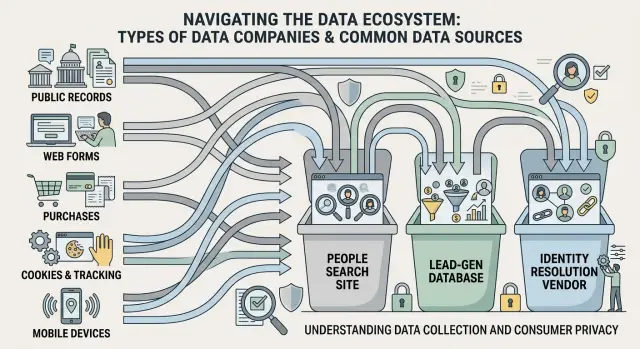
It's easy to lump people search sites, lead-gen databases, and identity resolution vendors into one bucket. From the outside, the experience feels the same: a company has your data, you didn't give it to them directly, and now you want it gone.
But these companies do different jobs. That changes what they collect, how visible it is, and what kind of removal you can realistically expect.
People search sites are the easiest to spot. They often publish a page with your name, age, current or past addresses, phone numbers, and possible relatives. You can search for yourself and see the record in a browser.
Lead-gen databases work differently. They usually don't build a public page for strangers to browse. Instead, they collect and sell contact details, job information, company data, and signs that someone might be ready to buy. Your record may sit behind a login, inside a sales tool, or in a list sold to another business.
Identity resolution vendors are harder to notice. They connect records across devices, apps, offline files, hashed emails, ad IDs, and household data. In simple terms, they help other companies decide that your phone, laptop, old mailing address, and loyalty account belong to the same person. You may never see a public record from them at all.
The confusion gets worse because these companies often feed one another. A people search site may buy source data from brokers. A lead-gen company may add identity resolution data to a sales profile. After one opt-out, the same details can show up somewhere else, or even on the same site again later.
That is why removal rules are uneven. The label matters less than the way the company uses the data, whether it publishes it, whether it sells it, and which privacy laws apply. One successful opt-out doesn't always end the cycle.
What people search sites usually collect
People search sites build public profile pages about real people. Their raw material often starts with public records, then grows with data bought from other brokers. That mix is why a profile can look strangely complete even when you never gave the site your information.
A record often begins with details pulled from property records, court files, business filings, marriage records, and old phone directories. Old phone books sound outdated, but they still feed many databases. If your family owned a home, moved a few times, or appeared in local records, those pieces can be stitched together quickly.
Many of these sites also buy outside lists and compare them against what they already have. They try to match a name, address, phone number, and age range to the same person. Voter files, marketing lists, and change-of-address data often fill in the gaps. The result is usually less like one official file and more like a patchwork that keeps growing.
What appears on the public page is usually the information people worry about most: past and current addresses, approximate age, phone numbers, email addresses, relatives, and possible associates. Some pages also include property ownership, court entries, or aliases. Even wrong details can cause problems because people tend to trust whatever shows up high in search results.
That public visibility is the clearest difference. People search sites often publish profile pages that anyone can find through a search engine, so many of them also offer an opt-out form or privacy request page. They do that because a visible profile creates legal and reputational pressure.
A common example is simple: you search your own name and find a page listing a phone number from ten years ago, two old addresses, and names of relatives. That is typical people search data. It feels personal, but much of it came from public records mixed with broker-to-broker sharing.
What lead-gen databases usually collect
Lead-gen databases often start with something you entered yourself. That might be a quote request, giveaway entry, newsletter sign-up, webinar registration, or one of those "check your rate" forms that asks for more than it seems to need.
This is where the difference from people search sites matters. A people search site often puts data on a public page. A lead-gen database may never show you a public profile at all. Your information can still be packaged, scored, and shared behind the scenes.
Common sources include quote and estimate forms, sweepstakes entries, coupon sign-ups, event registrations, and partner offers that pass your information to other marketers.
After that, the record often gets extra layers added to it. A lead-gen company may match your form data with business details from company websites, conference attendee lists, public filings, or other B2B data vendors. If you used a work email, the record may be tied to your employer, job title, industry, and company size.
Some databases also sort people into sales categories. That can include income range, homeowner status, age band, seniority, buying intent, or whether someone is likely to ask for quotes again. These are often guesses, not facts, but they still affect who gets your data and how often they contact you.
Home services are a good example. You ask for one roofing quote, and then calls and emails start arriving from several companies you never contacted. That usually means your request went into a lead marketplace or list system, not just to one business.
Removal is often harder here. The data may live inside a CRM, ad platform, or rented list used by sales teams. There may be no public page to opt out from, and one request may not reach every company that already received the record. That is why lead-gen data broker removal often takes more digging than a standard people search opt-out.
What identity resolution vendors usually collect
Identity resolution vendors don't usually look like people search sites. You will not often find a page with your name, age, and relatives. Instead, these companies build records in the background so they can decide whether different signals point to the same person or household.
Those signals can include cookies from web browsing, mobile ad IDs from apps, hashed email addresses, postal addresses, device and browser data, and other identifiers that look harmless on their own.
Put together, though, they can form a fairly accurate picture. If the same hashed email shows up on a shopping site, a phone app, and a newsletter sign-up, the vendor may treat those records as one person. If several devices appear at one address again and again, the vendor may group them into one household.
That matching work is the whole business. A marketer may use it to build ad audiences. Another company may use it to measure whether an ad led to a purchase. Some use similar data for fraud checks, such as spotting when a login suddenly comes from a new device in a new place.
This is why most consumers have no idea the vendor exists. You may never visit its site, buy anything from it, or see your profile. Your data can still flow in through partners, app software, website tags, or older customer files shared for advertising or measurement.
Removal is less direct here than with a people search site. In many cases, you can ask the company to suppress a hashed email, cookie, mobile ID, or address from ad use. Full deletion may be possible under laws such as CCPA or GDPR, but some vendors keep part of a record if they say it is needed for fraud prevention, security, or legal obligations.
That is what makes identity resolution vendors so slippery. The record is real, but it is often hidden, partial, and spread across IDs you don't recognize at a glance.
What you can usually remove from each one
People search sites are usually the most direct. If a site shows a public profile with your name, age, past addresses, phone numbers, or relatives, that page is often the easiest thing to remove. Many of these companies have an opt-out form or privacy request page. When it works, the public listing disappears, though the company may still keep a record behind the scenes for legal or internal reasons.
Lead-gen databases are less predictable. If a company uses your email, phone number, job title, or company details for sales and marketing, you can often ask it to stop selling that record, stop contacting you, or suppress it from future campaigns. That helps, but it does not always mean a full wipe. Old imports, business data, or copies already sent to partners may stay in circulation until those systems refresh.
Identity resolution vendors are usually the hardest to deal with because the record is often invisible. They connect identifiers such as email addresses, device data, phone numbers, household links, and browsing signals. In many cases, you can limit sale, sharing, or ad use. Full deletion is less common when the data is kept for fraud checks, security work, compliance, or legal duties.
A realistic rule is pretty simple:
- Public pages can often be taken down.
- Marketing uses tied to your email or phone can often be reduced.
- Records kept for fraud, legal, security, or compliance reasons may stay longer.
- Copies held by downstream partners may remain active until their files update.
That last point trips people up. You remove one listing, then a similar record shows up somewhere else a few weeks later. Usually that doesn't mean your first request failed. It often means another buyer, affiliate, or broker refreshed from an older file.
So data broker removal usually means fewer places can use or publish your data, not a promise that your data never existed.
How to tell which type has your data
Start with the most basic question: can anyone see the record on a public web page? If the answer is yes, treat it like a people search site or another public-facing broker first. Public pages usually make the pattern obvious: name, age range, past addresses, relatives, phone numbers, and often an opt-out page.
If there is no public page, think about how your details may have been collected. If the record seems tied to a form you filled out, a guide you downloaded, a quote you requested, or a sales call you received, a lead-gen source is more likely. If ads seem to follow you from your phone to your laptop, identity resolution is a better guess.
A few quick clues help sort it out:
- Open browser page with your name and address: usually a people search site.
- Extra sales calls or emails after a form fill: usually lead-gen.
- Matching across devices or household signals: often identity resolution.
- No visible record, but companies still know more than you shared once: likely a background data or matching vendor.
A small example makes this easier to spot. If you search your name and find a page with your old address and possible relatives, that is usually the public-facing type. If you signed up for a webinar and three software companies emailed your work address the next day, that points more to lead-gen. If you browse on your home Wi-Fi and then see the same ad on another device, identity resolution vendors are a more likely source.
When you send a request, keep a record of the company name, the date, and the identifiers you used. Save whether you sent your full name, old address, phone number, email, or a profile URL. It saves time later, especially when records reappear or companies have similar names.
A simple example from everyday life
A move is a good way to see how these companies work.
Say you move to a new apartment, update your mailing address, and open a utility account. Within a few weeks, your new address can start showing up in places that do very different jobs, even though they all look like "data brokers" from the outside.
A people search site may pick up the change first through public records, property data, court filings, change-of-address signals, or records bought from other brokers. The result is a profile that shows your new address next to old ones, along with relatives, age range, and past phone numbers.
Now add one more step. While setting up the move, you ask for a quote from a home security company or internet provider. You enter your email and phone number into a form. That information may end up in a lead-gen database because the whole point is to collect contact details tied to someone who looks ready to buy.
An identity resolution vendor works differently. It may never show you a public profile. Instead, it tries to connect your new address with older email accounts, mobile ad IDs, browser signals, and devices in the same household. For that company, the useful part is the match itself.
This is why one successful opt-out can feel incomplete. You remove your profile from a people search site, and that page may stay down. But another company can refresh your data from a separate source, or an identity vendor can keep linking the same person through devices and emails you still use.
That is the frustrating part of consumer data removal. You are usually dealing with several pipelines, not one leak.
Mistakes that waste time
The biggest mistake is assuming every company holds the same kind of data. That is almost never true. A people search site may publish your age, relatives, and old addresses. A lead-gen database may only tag you as a likely homeowner or shopper. An identity resolution vendor may not show a public profile at all. If you send the same request to all of them, you often end up with the wrong form, the wrong proof request, or no result.
Another common mistake is using different details in different opt-out requests. If one request uses your work email, another uses a personal email, and a third uses an old phone number, you make matching harder. Pick one email address and one phone number for requests, then use them consistently unless a company asks for something else.
A few habits waste the most time: sending blanket requests before checking what type of company you are dealing with, assuming one opt-out removes copies already sold elsewhere, searching only your own name when the record may be tied to a spouse or shared address, and never checking again after a move, job change, or new account sign-up.
That third point causes a lot of confusion. One removal request usually affects one company. It does not pull back copies another firm bought last month. So even when your opt-out worked, the same address or phone number can still appear somewhere else.
Household data is also easy to miss. If a broker ties your address to your partner or adult child, your details can stay linked through that shared record. Search your full address and close relatives, not just your own name.
Timing matters too. Moving, changing jobs, opening a utility account, or joining a store loyalty program can push fresh data into circulation quickly. A one-time cleanup helps, but a second check a few weeks later often catches what the first round missed.
A quick check before you send requests
A bad request usually fails for a simple reason: it goes to the wrong kind of company, or it asks for the wrong action. Before sending anything, look at the record itself and how the company describes your data practices.
If there is a public page that shows your name, age, relatives, old addresses, or a map pin, you are probably dealing with a people search site. If there is no public profile, but you remember giving your details away for a quote, giveaway, newsletter, or form fill, that points more toward a lead-gen database or a partner behind it.
If the company talks about matching by email, phone number, advertising ID, cookie, or device, that usually points to identity resolution or ad-tech data systems. They often do not show a consumer-facing profile, and that changes what you should ask for.
A simple filter helps:
- Public profile with your name on it: ask for deletion or suppression of that record.
- Data you handed over in a form or sign-up: ask to delete the stored lead and stop sharing it.
- Email, phone, or device matching language: ask what identifiers they hold and how to opt out of matching or sale.
- Marketing emails only: unsubscribing may stop messages, but it may not delete the data.
- Any record you find: save screenshots first, including the page title and date.
That last step matters more than it seems. Records can change fast, and some pages disappear right after an opt-out request. A screenshot gives you proof of what was listed, which helps if support later says the page never existed or asks for more detail.
What to do next if records keep coming back
When records reappear, better order usually works better than more effort. Start with public listings. If a site shows your name, age, address, relatives, or past cities on an open profile, remove that first.
Those pages are the easiest to verify. You can search, take a screenshot, send the opt-out, and check whether the page is gone a few days later. That gives you a clear baseline.
Next, go after records tied to your email address or phone number. These often come from quote forms, old sign-ups, giveaway entries, or lead forms you filled out once and forgot about. They may not appear in public search results, but they still drive spam calls, sales emails, and quiet data sharing.
Keep a simple log with the company name, what data appeared, when you sent the request, and when you checked again. That is enough to spot repeat sources. If the same phone number appears on several sites after one insurance quote or home value form, you have probably found where the spread started. If a broker removes your record and then posts it again later, your log will show the relisting.
Check progress in rounds instead of checking every day. Public people search pages may disappear first, while other records show up weeks later after databases sync or resellers refresh their files. Search again using the same name, old address, email, and phone variations.
If this keeps turning into a monthly chore, handing it off can make sense. Remove.dev helps people remove personal data from over 500 data brokers, tracks requests in one dashboard, and keeps monitoring for re-listings so new requests can go out when records come back. For this kind of problem, that ongoing follow-up matters more than a one-time cleanup.
FAQ
What is the difference between a people search site and a lead-gen database?
A people search site usually shows a public page with your name, age range, old addresses, phone numbers, and relatives. A lead-gen database usually keeps your record behind a login and uses it for sales calls, emails, or list sharing after you filled out a form, asked for a quote, or signed up for something.
Which type is usually easiest to remove from?
People search sites are often the easiest starting point because the record is visible and many have an opt-out form. Lead-gen and identity matching companies are harder because the data may sit in private tools, partner systems, or ad databases you cannot see.
Why does my information come back after I opt out?
That usually means the first request worked, but another company refreshed the same details from a different source. Data moves between brokers, resellers, and partners, so one opt-out rarely stops every copy at once.
How can I tell which kind of company has my data?
Start by checking whether you can see a public profile in a browser. If you cannot, think about what happened before the data showed up: a quote form points more to lead-gen, while ads or matching across devices points more to identity resolution.
Can one online form really lead to calls from several companies?
Yes. One quote request, giveaway entry, or webinar sign-up can feed your details into a lead marketplace or partner network. That is why you may hear from several companies you never contacted directly.
What can I usually ask an identity resolution vendor to do?
In many cases, you can ask them to stop using your email, phone, cookie, mobile ad ID, or address for ad matching or sale. Full deletion may be limited if they keep part of the record for fraud checks, security, or legal reasons.
Does unsubscribing delete my data?
Not usually. Unsubscribing often stops messages, but the company may still keep your record and keep sharing or selling it unless you send a privacy request that asks for deletion, suppression, or no sale.
Should I use the same contact details in every opt-out request?
Use the same email address and phone number each time unless the company asks for something else. Consistent details make matching easier and cut down on delays from support teams asking for more proof.
What should I save before sending a removal request?
Take screenshots of the page, the company name, the date, and the exact details shown. That proof helps if the page changes, disappears, or comes back later under a similar record.
When does it make sense to use Remove.dev instead of doing it myself?
If records keep reappearing or you do not want to handle dozens of requests yourself, a managed service can save time. Remove.dev removes personal data from over 500 brokers, tracks requests in one dashboard, usually finishes most removals in 7 to 14 days, and keeps watching for relistings so new requests can go out automatically.