People search sites copy each other: why listings return
People search sites copy each other through shared broker feeds, public records, and reseller files. Learn why removals repeat and what to check next.
Why listings keep coming back
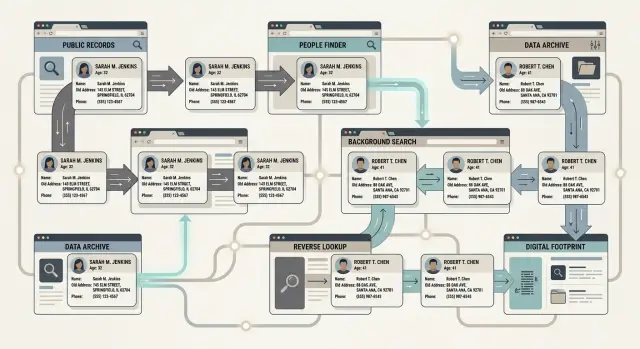
People search sites copy each other. The phrase sounds blunt, but it matches what many people see. You remove one profile, feel finished, then the same name, age, address, or phone number appears on another site a few days later. Sometimes it even returns on the same site.
One removal usually affects one copy. It does not wipe out every version already sitting in other databases, old exports, partner feeds, or cached records waiting for the next refresh.
Say your old apartment address is removed from Site A on Tuesday. Site B still has the same record from a file it bought last month. On Friday, Site A refreshes from that file, or from another seller with the same stale data. The listing is back. The first removal still worked. It just did not reach the other copies.
A few things keep this loop going. The same record can exist in many places at once. Old details get added back from a different seller. One company may run several near-identical domains. And update schedules rarely line up, so removals and reposts cross over.
That timing issue matters. A site can honor your opt-out today while a partner keeps distributing the same record for another two weeks. During that gap, your information keeps moving.
New domains add another layer. Some listings reappear under a different site name with the same layout, the same fields, and nearly the same wording. It looks like a new problem, but it is often the same record taking another path back online.
That is why monitoring matters. If the record feeding these pages is still active somewhere else, a one-time opt-out only solves part of the problem.
Where the same data comes from
When two people search sites show the same profile, they usually started with the same raw material. Most of these sites are not building a profile from scratch. They buy, trade, and combine data from a small pool of sources that keeps circulating.
Public records drive much of it. Property records, court filings, voter files, business registrations, and similar records can be collected, packaged, and sold again and again. One broker buys a file, cleans it up a little, and resells it. Then another broker does the same.
That is why the same misspelling, old address, or wrong age can show up on several sites at once. The error travels with the file.
Marketing databases add another layer. They fill in missing details like phone numbers, email addresses, household members, and past addresses. The result can look detailed even when parts of it are wrong.
Old web pages also stay in the mix. Scraped social profiles, cached directory pages, archived contact listings, and old forum posts can keep feeding broker files long after the original page is gone.
A typical listing is often a patchwork: a public record with your name and address, a marketing file with a phone number, an old scraped profile with a past employer, and a broker match that guesses your age or relatives. Put together, it looks precise. In reality, it is often recycled data stitched into one profile.
If a county property record shows your address from 2019, a marketing database adds a cell number you no longer use, and an old directory adds a relative who moved away years ago, several sites can buy that bundle and publish the same wrong profile.
How to tell when two sites use the same feed
The clue is usually in the mistakes. Two pages can look different while the record underneath is the same.
Repeated typos are one giveaway. If your middle name is missing the same letter on both sites, that is rarely random. Matching age bands and relatives are another clue. When two pages show "45-49" and list the same three relatives in the same order, they are probably reading from the same source.
Old addresses can tell the same story. If two sites list your 2014 apartment first, then a 2018 rental, then your current address last, the match is hard to dismiss. Timing matters too. One site changes first, and another shows the same change three or four days later. That often means a shared vendor pushed a new batch.
Brokers do not always update live. Many import records in waves. So if one listing disappears but a near-identical page shows up elsewhere a week later, you are often seeing the same shared pipeline surface again.
How one record spreads
One record rarely stays in one place. A broker collects a thin profile from a public record, an old marketing file, or a commercial data seller. A reseller buys it, mixes it with other files, and turns it into a larger batch. Several people search sites import that batch. Later, a refresh recreates the listing after you removed it.
The path is usually simple:
- One company collects the record.
- Another bundles it with millions of others.
- Several sites import that bundle.
- A later refresh puts the record back.
That last step frustrates people most. You remove the page you can see, but the source file still contains your data. The next update builds the page again, sometimes with the same details and sometimes with a slightly different version of them.
Say a reseller still has an old record tying Maria to an apartment she left two years ago. Three people search sites import that batch. Maria opts out of one site and the page disappears. Two weeks later, the site runs a fresh import from the same supplier, sees Maria again, and creates a new listing. It may not match the old page exactly, but it points to the same person.
That is why data broker listings often return in waves. You are not dealing with one page. You are dealing with a chain of sellers, resellers, and imports.
What a relisting looks like
Take Maya. She moved last year and changed her phone number a few months later. One old broker still shows her former address and the number she no longer uses. Several people search sites copy that record almost unchanged, so she finds three pages with the same street, the same age range, and the same relatives.
She opts out of the first site and the page disappears. A week later, another site shows the same wrong address and old phone number. After she removes that one, a fourth site appears with only part of the old phone number and a shortened address. It looks new, but it is the same record coming back through a shared pipeline.
That is the part that wears people down. You are often not fixing three separate mistakes. You are chasing one bad record as it gets copied into fresh listings.
If the same details keep returning, the page you removed may not be the real source. The better move is to remove every visible copy you can find, then keep checking for re-listings.
How to remove listings without wasting time
When people search sites copy each other, one opt-out rarely fixes the whole problem. A simple routine works better.
Start with a wide search. Look up your full name, old cities, past states, common misspellings, maiden names, and nicknames that have appeared in public records. If you have a common name, add an age range or a relative's name so you can tell your listing from someone else's.
Before you submit anything, save proof. Take screenshots and note what each site shows: address, phone number, relatives, age, email, and any old employer or school. It takes a few extra minutes, but it saves time if a listing returns or a site asks you to confirm the record later.
Then work in order:
- Remove the listing you can see now.
- Search for other sites showing the same details, even if the page looks a little different.
- Submit removals to those sites next.
- Keep a small log with the site name, the date you sent the request, and the result.
That middle step matters. If three sites show the same apartment number, landline, and relatives, they may all be pulling from the same feed. Removing only one page leaves the others in place long enough to recreate it.
Be careful with verification. Some sites ask for extra personal details to process a removal. Give only what they need to identify the record. If the page already shows your old address and age, you usually do not need to send more unless the form requires it.
Then wait and check again. Most removals are not instant. A follow-up after 7-14 days is normal. Search the same name variations, compare them to your screenshots, and repeat the process for any copies still live or newly returned.
Mistakes that slow things down
The most common mistake is treating one deleted page as the whole job. It rarely is. One profile can exist on a main site, a partner site, and another page built from the same data.
Another mistake is changing your details from one request to the next. If you use one email address on Monday, another on Friday, and shorten your name in one form but not another, matching gets messy. Consistency helps.
Skipping old details also causes trouble. Old phone numbers, past street addresses, former last names, and old usernames still help brokers tie records together. Leaving them out can leave half the record alive.
People also stop too soon. Many sites refresh on a schedule. A profile disappears, then comes back after the next sync. Recheck after a week or two, then again later. If you are doing this by hand, keep one record of every request so you do not repeat work or miss an alias.
A fast check after each removal
When one page disappears, do a quick check instead of assuming the record is gone.
Search your full name with your city. Search your phone number by itself. Search your email address by itself. If the old page showed a past address or relative, search those combinations too.
Then compare the details, not just the page title. Two pages can look different and still point to the same record. Match the age range, relatives, and old addresses. If those details line up, treat it as the same listing even if the domain or URL changed.
Keep a short log as you go. Note the date a page disappeared, the site name, and the details that were shown. This sounds boring, but it helps you spot patterns fast. If the same phone number vanishes from one site on Tuesday and shows up on another on Friday, both pages probably came from the same pipeline.
Check again a few days later. Some sites remove the public page first and rebuild it after a partner refresh.
What to do if you want less manual work
If you have removed a few listings by hand, you already know the hard part is not the first request. It is keeping up when the same details appear again next month.
The fix is usually not more effort. It is a repeatable routine. Keep one plain list in a notes app, spreadsheet, or document. Track the site name, the date you sent the request, any confirmation number, when you plan to check again, and whether the listing stayed down. A simple calendar reminder for monthly rechecks is often enough to catch new copies early.
If the repeat work keeps eating your time, using a service can make sense. Remove.dev handles removals across over 500 data brokers, tracks each request in a dashboard, and keeps monitoring for re-listings so you do not have to restart the process every time the same record resurfaces.
Manual people search removal still works for small cleanups. Once the cycle turns into steady upkeep, the smarter move is to keep records, recheck on a schedule, and offload the repeat chasing if you can.
FAQ
Why did my listing come back after I removed it?
Usually, the first removal worked. The problem is that other brokers, partner sites, or old data files still have the same record and can publish it again during the next refresh.
Does a different site name mean it is a different record?
Not always. If the new page shows the same old address, age range, phone number, or relatives, it is often the same record showing up through another site name or a shared supplier.
How can I tell if two people search sites use the same feed?
Look for repeated mistakes. The same typo, the same order of relatives, and the same old addresses on two sites usually mean both pages came from the same source or the same batch of data.
What should I search to find copycat listings?
Start with your full name and city, then try old cities, past states, old phone numbers, email addresses, maiden names, nicknames, and common misspellings. If your name is common, add a relative or age range so you do not confuse your record with someone else's.
How long should I wait before checking for re-listings?
A quick check after 7 to 14 days is normal because many sites update in batches, not right away. After that, check again later since some pages vanish first and then return after a partner refresh.
What proof should I save before sending an opt-out request?
Save screenshots before you submit anything. Capture the site name, the date, and the details shown on the page, like addresses, phone numbers, relatives, age, and email, so you can match the record again if it returns.
How much personal information should I give during a removal request?
Give the least amount needed to identify the record. If the page already shows your old address or age, use that when the form asks, but avoid sending extra details unless the site requires them.
What mistakes make manual removals take longer?
One common problem is treating one deleted page as the whole job. People also slow themselves down by using different emails or name versions on each request and by skipping old details that brokers still use to tie records together.
Can I handle this myself, or is a service better?
You can do a small cleanup by hand if you keep a simple log and recheck on a schedule. Once listings keep coming back across many sites, the repeat work usually becomes the hard part, not the first opt-out.
What does Remove.dev do if the same listing keeps coming back?
Remove.dev finds and removes personal data from over 500 brokers, tracks requests in a live dashboard, and keeps watching for re-listings so new requests can go out automatically. Most removals finish in 7 to 14 days, plans start at $6.67 a month, and there is a 30-day money-back guarantee.