Pet adoption privacy: how rescue pages feed broker data
Pet adoption privacy matters because names, cities, and pet details from rescue pages can spread to data brokers and stay searchable for years.
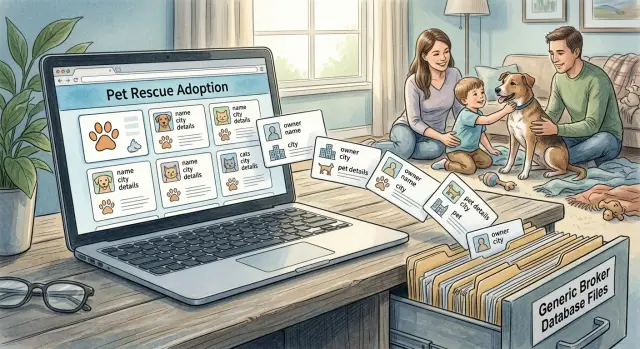
Why rescue pages can stay visible for years
A rescue profile can look harmless when it first goes up. It might show only a first name, a city, a pet name, and a short adoption story. In real life, that's often enough to connect one family to one household, especially in a smaller town or when the pet has an unusual name.
That's where the problem starts. A page meant to help one dog or cat find a home can turn into a long-term public record. Years later, someone can search the pet's name, match it with the owner's first name and city, and find the same old listing.
The page doesn't even need to stay on the rescue's site to remain visible. Search engines can keep it in results, other sites can copy it, and cached or archived versions can outlast the original post.
Why old pages stick around
Old rescue pages keep circulating for a few simple reasons. Search engines may hold onto them long after they stop changing. Other sites may scrape parts of the listing. Social posts can keep sending people back to an old page. Cached versions and archives can preserve details even after the rescue edits or removes the original.
That means a page that felt temporary can behave more like a public directory entry. A small set of details can go much farther than most people expect. "Megan in Tulsa adopted Pepper" sounds vague at first. Add the pet's breed, age, or adoption month, and it gets much easier to identify the right person.
Data brokers don't always need a full address to start connecting dots. Names, cities, dates, photos, and pet details are often enough. What began as a happy adoption update can leave a searchable trail for years.
What usually appears on a rescue profile
Rescue and adoption pages often share more than people realize. The goal is simple: help a pet find a home quickly. But one post can include enough information to point back to a real person or family.
Sometimes the adopter, foster, or previous owner is named directly. It may be a full name, or just a first name and last initial. Even that can narrow the field more than people think.
Location details are common too. A rescue may mention the city, county, neighborhood, shelter, or adoption event where the pet was seen. On their own, those facts may seem harmless. Paired with a name and a pet photo, they can make it much easier to figure out where someone lives.
Pet details do a lot of the matching. A post may include the pet's name, breed, age, color, weight, health notes, and several clear photos. That matters because people often reuse the same pet photos and pet names on social media, vet reviews, neighborhood groups, or lost-and-found posts. One unusual breed mix or one distinct photo can connect records that were never meant to be connected.
Comments and captions can reveal even more. A line like "Adopted by the Smith family in April" or "Now living with two kids and another dog in Mesa" gives away dates, family structure, and location. Even friendly updates like birthday posts, adoption anniversaries, or thank-you notes can build a timeline.
A typical profile may reveal:
- the adopter's, foster's, or owner's name
- a city, county, shelter, or event location
- the pet's name, breed, age, and photos
- dates tied to adoption, transport, or medical care
- comments about children, other pets, or home routines
None of these details looks serious on its own. Together, they can sketch a very clear picture of a household.
How data brokers turn one page into a profile
A rescue page may show only a first name, a city, a pet's name, a short story, and maybe a contact detail for pickup or follow-up. For a data broker, that's often enough to begin matching a real household to a much larger set of records.
The first step is collection. Brokers and their partners scan public pages, cached copies, and archived versions that stay online after the original page changes. So even if a rescue group removes an old adoption post, the details may still survive in copies saved earlier.
Then comes matching. A broker can compare one rescue profile with other public records, including:
- name and city combinations
- age ranges and household members
- past and current addresses
- phone numbers or email handles found elsewhere
- social profiles or old forum posts
A pet's name can make the match stronger than people expect. If an adoption page mentions "Milo" in Austin, and another record shows a household in Austin with social posts about Milo, that's another signal that both records point to the same family. Pet names are personal, and that makes them useful for confirmation.
After that, the data spreads quickly. One broker may publish a profile with names, likely relatives, address history, and property details. Other brokers may copy, buy, or refresh the same data. One rescue post can lead to many listings, each holding slightly different pieces of the same picture.
Picture a simple case. A rescue page says "Sarah in Denver adopted Luna" and mentions that Luna is a senior beagle who needs daily medication. A broker can pair Sarah and Denver with address records, then use Luna's name to check social posts or cached pages. Soon the family may appear in several databases, even though the starting point was just one public adoption story.
This is why the issue isn't only the rescue page itself. It's what happens after small details become public and get stitched into a profile that's much harder to erase.
A simple example of how this spreads
Say the Ramirez family adopts a dog from a local rescue. The rescue posts a photo on its website and social pages: "Luna went home with Elena Ramirez in Phoenix." Sometimes there's more detail, like the adoption date, the dog's age, or a note that Luna loves kids and yard time.
That looks harmless. For the rescue, it's a warm update. For a data broker, it's another data point.
A broker can copy the adopter's full name and city from that post, then compare them with other public records. A property record may show an Elena Ramirez at an address in Phoenix. A people-search site may already list a phone number tied to that home. A social profile may mention the same dog name. Once those details line up, the broker can attach the rescue post to the household profile.
Pet details help more than most people think. A dog name, breed, or adoption month can work like a small fingerprint. If "Luna" shows up on a rescue page and later in an Instagram caption or neighborhood post, it becomes easier to tell which Elena Ramirez is the right one.
After that, the spread is quiet. One broker republishes the record. Another copies it. Old versions stay cached or get scraped into new databases. Years later, someone searching the family's name may still find their city, possible address, relatives, and clues about daily life, such as having children or a fenced yard because that was mentioned in the adoption story.
That's how a cheerful rescue post can turn into a long trail that follows a family for years.
How to see what's already out there
The first step is simple: find the pages that still connect your name, your location, and your pet. Most people search only their full name. That misses a lot.
Try a few search combinations that match the way rescue pages and broker profiles usually spread:
- your full name + city
- your name + pet name
- rescue name + pet name
- rescue name + adoption year or month
- old usernames tied to the adoption post
Be patient and try small variations. A page might list "Jen Carter" in one place and "Jennifer Carter" in another. If your pet had an unusual name, search that too. A dog named Pickles or a cat named Juniper can make you much easier to find.
Old photos can also reveal the trail. If the rescue page used pictures of your pet, run an image search on those photos. One old adoption photo can lead to reposts on rescue sites, cached pages, social media copies, and broker profiles built from those scraps.
A quick example helps. Say you adopted Milo from a rescue in Denver in 2020. Search your name with Denver, then your name with Milo, then the rescue name with Milo. You may find the original profile, a people-search site that copied your city, and another broker page showing address history and possible relatives.
When you land on broker pages, focus on the details that create the biggest risk first. Address history, age range, relatives, and household members matter more than a pet bio. Those details make it easier for someone to confirm they found the right person.
Save screenshots as you go. Capture the page title, your name, the visible details, and the page address. That gives you a clean list of what to remove first, and it helps if the page changes later.
Don't forget the source. If the rescue still has the original page up, ask whether they can edit it or take it down. A polite note often works, especially if the page shows your full name, city, adoption date, or photos that identify your home.
What to do step by step
Start at the source. Search for the original rescue page, adoption listing, and any social posts tied to it. Look for your name, your pet's name, your city, adoption dates, breed details, and public comments. Save screenshots before anything changes.
Then contact the rescue, shelter, foster group, or page owner. Keep the message short and specific. Ask them to remove or edit anything that connects the pet profile to your household.
That usually means full names, city or neighborhood details, phone numbers, email addresses, and comment threads that mention your home, work, children, or daily routine.
If the profile was shared on social media, ask for the post and the comments to be deleted, not just hidden. Hidden posts can still be copied, cached, or seen by people who already follow the page.
Once the original source is cleaned up, move on to the broker sites that copied it. Search your name together with the pet name, rescue name, breed, or city. Small details can connect records fast.
Send opt-out requests to each broker that still shows the copied information. If you don't want to do that manually across hundreds of sites, Remove.dev can handle removals from over 500 data brokers and keep checking for relistings after the first cleanup.
Check again after 7 to 14 days. That gives the rescue page time to update and gives brokers time to refresh their databases. Run the same searches again and look for fresh copies on sites you didn't see the first time.
Keep a simple log while you do this. A notes app or spreadsheet is enough. Write down the site name, the date you sent the request, any reply you got, and when you checked again. That small habit saves time when a listing comes back or a broker asks for follow-up.
Common mistakes that keep the data online
The most common mistake is removing the rescue page and assuming the job is done. Usually it isn't. Once a page has been indexed, copied, or scraped, the same details can keep showing up on people-search sites, broker databases, and old search results long after the original listing is gone.
A first name, a city, a pet name, and a few facts about the adoption can be enough to point back to a real household.
Removing the source but not the copies
The rescue page is often only the starting point. Data brokers may copy the owner name, city, email fragments, or pet details and fold them into a broader profile. If you contact only the rescue and ignore the copied listings, your information can still remain easy to find.
A common case looks like this: a family gets an old adoption profile deleted, but months later they still find the same city and pet name on two people-search sites. The source is gone. The copies are not.
Another easy miss is cached results and archive pages. Search engines can still show an old page title or snippet for a while, even after the page itself disappears. In some cases, archive services or mirror sites keep a saved version that still appears when someone searches your name.
Requests that are too vague
Many takedown requests fail because they don't give enough detail. "Please remove my information" is easy to ignore, especially on a site with many similar profiles.
A better request usually includes:
- the exact page title
- the full page address
- a screenshot of the page
- the name, city, and pet details shown
- a short note that the data is personal and should be removed
One more thing gets missed all the time: pet names can be searchable on their own. If the pet has a rare name, someone may find the profile by searching the pet name plus the city, breed, or rescue. People often search only their own name and miss those results entirely.
That's why one-pass cleanup usually fails. You need to check the original page, copied broker listings, cached search results, and searches that use the pet's name instead of yours.
A quick privacy checklist
These checks are simple, but they catch a lot:
- Does the rescue or adoption page show your full name, last initial, or a name pattern that matches your social accounts?
- Are there location clues like a city, neighborhood, event venue, or shelter name?
- Do the photos match images you've posted publicly elsewhere?
- Do broker sites show your address, age range, household members, or relatives next to the same city?
- Do search results still show old snippets after the rescue page was edited or removed?
- Have you searched both your name and your pet's name?
One match doesn't always mean a serious problem. Several matches together usually do.
What to do next
Decide whether you want to send removal requests yourself or pay for help and save the time. If your name, city, phone number, or pet details show up on only one or two sites, a manual approach may be enough. If they appear across many broker pages, doing it alone can turn into a slow, repetitive job.
The part many people miss is that one cleanup pass is rarely enough. Data brokers copy from each other, refresh old records, and sometimes relist the same person weeks or months later. Rechecking matters.
A practical approach is simple:
- search your full name with your city and your pet's name
- write down the rescue pages and broker sites that still appear
- remove the easiest matches first, then check again in a week or two
- keep a record of what disappeared and what came back
That record helps more than you'd think. You can spot patterns quickly. Maybe one broker removes a listing within days while another keeps republishing it. Then you know where your time actually matters.
If the list is long, a service can make sense. Remove.dev automates removals across more than 500 data brokers, sends legally compliant requests where needed, and keeps monitoring for relistings. Most removals are completed within 7 to 14 days, and you can track requests in a live dashboard.
Whichever route you choose, measure progress by what stops appearing. When searches for your name, city, and pet details stop bringing back the same old pages, you're making headway. Keep going until the repeat matches thin out and stay gone.
FAQ
Why is an old rescue page still showing up after it was removed?
Because copies often outlive the original. Search engines, cached pages, archives, and people-search sites may keep older versions long after the rescue edits or deletes the first post.
Can a pet adoption post really identify my family?
Yes. A first name, city, pet name, photo, breed, or adoption date can be enough to narrow it down to one household, especially in a smaller city or with an unusual pet name.
Does my pet’s name actually make me easier to find?
Pet names are personal, and many people reuse them on social media, vet reviews, or neighborhood posts. When a broker sees the same name tied to the same city, it helps confirm they found the right person.
How do I check what’s already online about me and my pet?
Start with a few simple searches: your full name and city, your name and pet name, and the rescue name with the pet name. If you have old adoption photos, image search those too to spot reposts and copies.
Should I contact the rescue first or the data broker sites first?
Go to the original source first. If the rescue page or social post stays public, other sites can keep copying it. After that, send opt-out requests to any broker sites that still show your details.
What should I include in a removal request?
Keep it specific. Include the exact page address, the page title, a screenshot, and the details that identify you, such as your name, city, pet name, or photo. Short and clear usually works better than a long message.
If a page is deleted, will Google results disappear right away?
Not always. A page can vanish while the search snippet or cached copy lingers for days or weeks. That is normal, so check again after a short wait instead of assuming the request failed.
How long should I wait before checking again?
A short check is a good default. Many removals and site updates show up within about 7 to 14 days. After that, run the same searches again and see what stayed gone and what came back.
When does it make sense to use a removal service instead of doing this myself?
A service makes sense when your details appear on many broker sites or keep coming back. Remove.dev handles removals from over 500 brokers and keeps watching for relistings, which saves a lot of manual work.
Can my information come back after it was removed?
Yes, that can happen. Brokers copy from each other and refresh old records, so one cleanup pass is rarely enough. Keep notes on what was removed and recheck from time to time.