SIM swap attempt risks from exposed phone data online
A SIM swap attempt gets easier when your phone number, address, and account clues appear in people-search sites. Learn what to remove first.
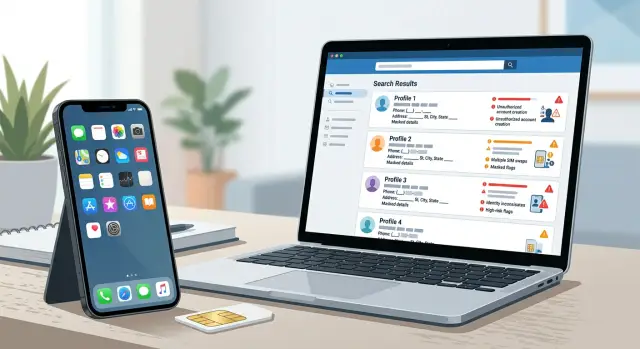
Why exposed phone data matters
A phone number on its own usually leads to spam calls and junk texts. The bigger risk starts when a public page ties that number to your full name, old addresses, relatives, and other personal details. That gives a scammer a much clearer picture of who you are.
Data broker sites are a common source of that picture. Many of them connect one number to current and past homes, relatives, age ranges, and sometimes email addresses. If someone is planning a SIM swap attempt, those scraps help them sound real when they contact your carrier.
Old address history is especially useful. Carrier support may ask for a billing ZIP code, a past address, or other account details to check identity. A scammer does not need perfect data. They need enough correct answers to get past a rushed support check or make a port-out request sound believable.
The timing gets worse when you are changing numbers or moving to a new provider. That window often includes support calls, SIM activation, account updates, and text-based verification. Busy moments create confusion, and confusion gives fraudsters room to pretend to be you.
That turns phone number exposure into more than a privacy issue. It can lead to account takeover. Once someone gets control of your number, they can intercept login codes, reset passwords, or lock you out of email and financial accounts.
A simple example shows how this works. Imagine an old broker profile shows your name, mobile number, and two past addresses. You switch carriers on Friday afternoon. A scammer calls support that same day, answers a few identity questions with those old details, and tries to move your number first. Data that looked harmless becomes a direct fraud tool.
What scammers look for before they call a carrier
Most carrier fraud does not start with a technical hack. It starts with a script and a pile of public scraps.
Before a scammer tries a SIM swap attempt, they usually collect enough details to sound like the real customer. The goal is simple: make the support agent feel like the caller already knows the account.
A full name and mobile number are the starting point. That pair can lead to data broker listings, old marketing databases, leaked contact lists, and people-search sites. Once a scammer has both, they can search outward and build a better story.
A current or past address helps a lot. Carriers may use address history as part of identity checks, and even when they do not ask for it directly, a caller can drop it into casual conversation to sound convincing. An old address can still work if it matches what is stored on the account.
An email address linked to the account is another common piece. It gives the scammer a way to guess recovery flows, search for other breached accounts, or mention the email on a call as if they own it. If that same email is also used for banking or cloud storage, the risk gets worse fast.
Small clues help too. A bill screenshot from an inbox leak, a forum post complaining about service, a public resume that mentions a work phone plan, or a family member's post about a shared account can all make the script sound more real.
Scammers are not looking for one secret fact. They want a believable bundle of facts. The easier it is to connect your phone number to your address, email, and personal history, the easier it is for someone to sound like you for five minutes. Often, that is all they need.
Which listings make a SIM swap easier
The most dangerous listings are often the plain, boring ones. A scammer does not need your full identity file. They need enough matching details to sound like you when they call a carrier or get through a basic account check.
People-search sites are usually the biggest problem. If one page shows your full name, current phone number, age range, and street address together, it gives a caller a ready-made script. Some data broker listings go further and add relatives, past homes, and alternate numbers. Those details help because account recovery still sometimes leans on old address history or family ties.
A few types of pages show up again and again in real-world fraud. People-search pages that pair your number with your address or age are bad enough on their own. Broker profiles that add past addresses, relatives, or alternate numbers are worse. Old marketplace ads where you once wrote "text me" can confirm that a number belonged to you. Social profiles that reveal your birthday, travel plans, or a recent phone upgrade fill in the gaps. Cached copies of removed pages are frustrating too, because old data can stay visible long after you thought it was gone.
Old marketplace posts are easy to forget. A listing for a couch, bike, or used phone can confirm that a number belonged to you, even if the post is years old. It can also reveal your city, your writing style, or the types of devices you use.
Social profiles add timing. A birthday post, vacation photo, or phone upgrade announcement can make a SIM swap attempt sound believable at exactly the wrong moment. If someone already has your broker profile, those posts help them answer simple questions or pick a time when you are less likely to notice service problems.
Cached pages are the most annoying part. You may remove your number from one site, but an older copy can still sit in search results for a while. Before you change numbers or switch carriers, check for those stale copies too. Fraudsters do not care if the data is old if it still sounds close enough to pass a quick human check.
A simple example of how it happens
Picture a person named Maya who is moving and planning to switch phone providers that same week. One data broker listing still shows her full name, mobile number, and an old home address. That may not look like enough to cause harm, but it gives a scammer a solid starting point.
The scammer searches a little more. A social profile confirms the city Maya lives in now and mentions her birthday month in an old post. With that, the scammer has a believable story. If a carrier asks a few basic questions, the answers sound close enough to pass as real.
Timing matters here. A move or provider change creates confusion, and scammers like that. They contact the carrier and claim they need help moving the number to a new SIM because the phone was lost, damaged, or replaced. In a SIM swap attempt, the goal is simple: get the carrier to move the victim's number before the victim notices.
If the request goes through, Maya's phone suddenly loses service. At first, she may think the outage is part of the switch. That delay gives the scammer a small window. A small window is often enough.
Now the scammer starts signing in to accounts tied to that phone number. Email is usually first. Then banking, payment apps, shopping accounts, and anything else that sends one-time codes by text. Those codes no longer go to Maya. They go to the new SIM in the scammer's hands.
That is why phone number exposure is more than an annoyance. A single broker page, plus a few scraps from social media, can make a fake customer support call sound real enough. The attack does not need deep technical skill. It often starts with stale public records, a rushed support agent, and a moment when the real owner assumes the service drop is normal.
Cleaning up old listings before you change carriers will not solve every risk, but it removes details that make the story work.
What to clean up before changing numbers or providers
Before you switch carriers or change your number, clean up what is already public. If old pages still tie your name, phone number, and address together, a scammer has an easier time building a believable story for a carrier agent.
Start with a simple search for your current number, full name, email, and old addresses. Check several versions of your name if you use a middle initial, a shortened first name, or a maiden name. Old details matter because many carrier checks still rely on past addresses or basic account history.
As you search, make a short note of every page that connects your number to identity details. A listing becomes more dangerous when it shows more than just a number. Age, city, relatives, past streets, employers, and links to social profiles all help a scammer.
Focus first on people-search and data broker pages, old marketplace or classified posts, forgotten business directory pages, forum profiles, community pages, and cached copies that still show up in search.
Remove the pages with your current number first. That is the fastest way to cut down phone number exposure before any change starts. Then clean up the pages you control yourself. Delete old sales posts, take your number off business pages you no longer use, and edit forum profiles that still show contact details. People forget about a five-year-old post selling furniture or a club profile they never updated, but those scraps still help a SIM swap attempt feel real.
One more step matters just as much: move your logins away from SMS where you can. Use an authenticator app, passkeys, or backup codes for email, banking, and any account that can reset other accounts. If someone gets your number during the switch, SMS should not be their shortcut into the rest of your life.
Once the obvious pages are cleaned up, then start the carrier or number change. Doing it in that order closes easy gaps before the risky part begins.
What to update with your carrier right away
Cleaning up public data helps, but you also need to tighten the carrier account itself. A phone number alone should not be enough for a rep to move your line, send a new SIM, or approve a port-out.
Start with the account passcode. If your carrier offers a separate port-out PIN or number lock, turn that on too. Many fraud cases happen during a number transfer, not just a SIM replacement. Pick something new, not the last four digits of your phone number, your birthday, or your address.
Then check the email address on the account. If it is old, rarely used, or shared with someone else, change it now. Password reset emails and account alerts often go there first, so a stale inbox gives an attacker one more opening.
Authorized users deserve a second look. People forget that an ex-partner, former assistant, or family member may still be listed on the account years later. If they do not need access now, remove them.
It is also worth asking how SIM changes are verified. Ask your carrier what has to happen before they approve a device swap, eSIM activation, or number port. If the answer sounds too easy, ask for stronger checks on the account.
A short call or chat with support should cover five things:
- set or reset the account passcode
- enable a port-out PIN or number lock if available
- confirm the account email and recovery details
- remove old authorized users
- turn on alerts for logins, SIM changes, and line changes
Those alerts help more than people expect. If someone tries to log in, orders a replacement SIM, or changes account details, you want to know right away. Minutes matter.
If you are switching providers, do this before you start the transfer. A common mistake is cleaning up the account after the move is already in progress. By then, the request may already be in the system.
Mistakes that leave the door open
A number change or carrier switch can feel like a clean break. Often it is not. A SIM swap attempt gets easier when old details stay public and still match your name, address, and recovery settings.
One common mistake is leaving the old number on public profiles, forum bios, staff pages, or directory listings. If that number still appears next to your name, it gives a scammer a starting point. They do not need every detail at once. They need enough to sound believable on a call.
Using the same number for classifieds and personal accounts creates an easy trail. A marketplace ad exposes the number. Data broker listings can then connect it to your full name, past homes, relatives, and age range. That gives a fraud caller a much better script when they try to talk a carrier rep into making changes.
Past addresses matter more than many people expect. After a move, people often update banks and shopping sites but forget people-search pages. Old address records can still be used as identity checks, especially when paired with a phone number from somewhere else.
Another weak habit is relying only on SMS for account recovery. If someone takes over the number, text codes go with it. Use an authenticator app or security key where you can, and set a carrier PIN that is not tied to your birthday, ZIP code, or any old address.
A final mistake is assuming one opt-out solves the problem for good. Many data broker listings come back after a database refresh or a partner feed update. That is why ongoing checks matter.
A quick self-check helps: search your old number with your name, remove numbers from public bios and old ads, clean up past address listings after a move, and replace SMS recovery where possible.
Small loose ends are often enough for a scammer. Clean those up before and after a carrier change, and the switch does more than just give you a new number.
Quick checks before and after the change
A number change or carrier switch is not finished when the new SIM starts working. The next few days matter just as much. A SIM swap attempt often shows up first as a small odd detail, not a dramatic warning.
Start with a simple search. Put both the old number and the new number in quotes and look them up separately. You want to see whether either one already appears on people-search pages, old business listings, forum profiles, or cached contact cards.
Use this short checklist around the change:
- search the old number before the switch and save screenshots of what appears
- search the new number once it is active, then check again after 7 to 14 days
- review recovery methods on email, banking, and payment apps
- treat sudden loss of service, missing texts, or unexpected SIM notices as warning signs
- save proof of removals and your carrier security settings in one folder
That 7 to 14 day window matters because data broker listings do not always vanish at once. Some sites update fast. Others copy data from somewhere else and keep stale records live for days or weeks. If the old number still points to your full name, address, or relatives, carrier fraud gets easier.
Do not skip the recovery check. If your email still uses the old number for password resets, or your bank sends one-time codes to a number you no longer control, you still have a weak spot. Go through the accounts that can unlock everything else first. Email comes before shopping apps.
Service issues deserve attention. If your phone suddenly drops to no service in an area where it normally works, call the carrier from another line as soon as you can. The same goes for repeated failed login alerts, missing verification texts, or a notice that your SIM changed when you did nothing.
Keep records, even if it feels a little fussy. Screenshots of search results, removal confirmations, and notes showing that you added a carrier PIN or port-out lock can save time later.
What to do next
Start with the pages that give a scammer the full picture in one place. If a listing shows your phone number, home address, age, and relatives together, move it to the top of your removal list. Those pages make a SIM swap attempt much easier because they help someone sound convincing when they call your carrier.
A simple order works well. Remove people-search and data broker pages that show your number with your address and family ties. Check again after the first round of removals, because many sites repost data or copy it from somewhere else. Switch important accounts to app-based 2FA, passkeys, or backup codes so a stolen number is not enough to get in. Then add carrier protections such as a port-out PIN, account passcode, and any number lock your carrier offers.
Do not stop after one round. That is the part many people miss. Data broker listings often come back, and one old page is sometimes enough to help a fraud caller answer a few identity questions.
If you are changing numbers or moving to a new provider, do the cleanup before the change if you can. Otherwise, your old and new number can both end up tied to the same profile trail for a while.
If manual opt-outs sound like a weekend you do not want, Remove.dev handles removals across more than 500 data brokers, keeps monitoring for re-listings, and lets you track requests in real time. That kind of ongoing cleanup fits this problem better than a one-time sweep.
The goal is simple: make your number harder to connect to your identity, and make your accounts harder to take over even if someone tries.