Prescription discount cards privacy and what to remove
Prescription discount cards privacy gets messy after signup. See where household data may travel and what you can still delete, opt out of, or remove.
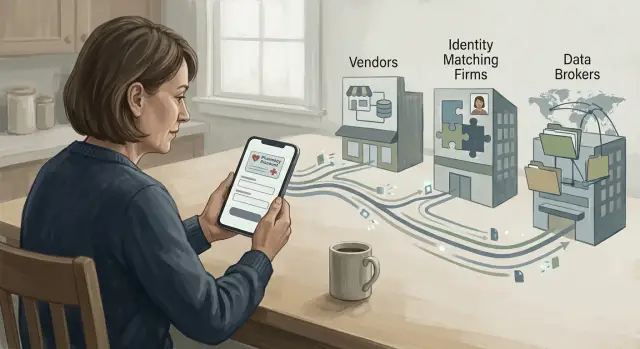
Why this signup spreads more than you expect
Most people think they are doing one simple thing: getting a lower price at the pharmacy. You enter your name, phone number, email, ZIP code, and maybe your date of birth. You expect that information to stay attached to a discount card.
That is why privacy issues around prescription discount cards catch people off guard.
The card, the app, and the pharmacy are often different businesses. The pharmacy fills the prescription. The coupon company runs the discount program. Other companies may handle identity matching, analytics, ad tracking, email delivery, or customer support. One signup can pass through more companies than you ever see on screen.
That creates a data trail fast. Your contact details can be matched with home address records, device data, past purchases, and public records. Even if the app never asks about your family, a broker may still connect your profile to a spouse, children, or other people at the same address. What started as a search for one coupon can turn into household-level data.
A simple example shows how this happens. A parent signs up to compare prices for one antibiotic. The app gets an email address and phone number. A partner matches those details to an address and an age range. Another system logs which pharmacy was searched and when. No screen says, "we are building a household profile," but that can still happen in the background.
This does not mean every company sees every detail. It also does not mean a signup reveals your full medical record. But it can reveal enough to sort you into categories, connect you to a household, and keep that record moving through broker and marketing databases.
How the vendor trail works
A prescription discount card or coupon app usually starts with one company, but your data rarely stays in one place.
When you sign up, you may give a name, email, phone number, ZIP code, home address, and sometimes your date of birth or insurance status. That becomes the first record. After that, the trail often gets wider.
Many companies rely on outside services for email delivery, app analytics, ads, customer support, and fraud checks. Each one may receive part of the same signup record, plus extra details like your device type, IP address, or which offer you clicked before you signed up.
The pattern is usually simple. The card provider collects what you type in. Email and analytics services log contact data and app activity. Matching and ad companies compare your identifiers with other files. Then data brokers merge those matches into a larger profile.
The matching step is where most people lose track of what is happening. An email address is useful on its own. A phone number is useful too. Put either one next to a street address, and many vendors can decide those records belong to the same person or the same home. They do not need every field from one source. They can stitch records together from several places.
Once an address gets tied in, the file can shift from an individual profile to a household profile. That means one signup can help brokers connect spouses, partners, parents, adult children, or roommates at the same address. They may add likely age ranges, shopping habits, move history, and other labels that have nothing to do with the original coupon signup.
So the privacy issue is bigger than one app. It is about the full vendor chain behind it.
The frustrating part is that a record can come back even after one company removes it. A later data refresh, a new partner upload, or an old broker file can recreate the same person or household entry. Cleanup usually takes more than one request and more than one round.
What household data can be inferred
A pharmacy coupon signup can turn into a household profile very quickly. The form may ask for your name, address, email, and phone number. That seems basic, but those details are often enough to match you to older marketing files, public records, and broker databases.
Once that match happens, the record may stop being about one person. It can become a rough picture of the whole home.
If your address appears in other datasets, companies can guess who lives with you or lived there recently. A spouse, adult child, parent, or former roommate may get tied to the same household file. Even if they never used the app, the shared address can pull them into the same cluster.
After the first match, companies often add a few common inferences: age range, life stage, estimated income, shopping categories, device IDs, and health-related interest signals based on searches, coupon use, or pharmacy visits. These are often guesses, not confirmed facts. Still, they can follow you around like facts.
If someone looks up coupons for cholesterol medicine, sleep aids, or asthma treatment, that behavior may feed an audience label tied to health interests. The file may not name a condition, but the signal is still there.
Device data makes the picture sharper. A mobile ad ID, browser activity, or app session can be linked to an email address, phone number, or home IP. Once that link is made, activity on one screen can reinforce the profile attached to the household.
That is why cleanup after signup matters. You are not only trying to remove a single coupon account. You may also need to deal with the extra profile built around your home, your devices, and the people connected to your address.
What you can still remove after signup
Signing up does not lock everything in place. You usually cannot erase the fact that a pharmacy, coupon vendor, or payment system processed a transaction, but you can still cut down a lot of the spread that happens around it.
Start with the data that tends to travel furthest: your name, address, phone number, email, and the household links built from them. Those details often end up in people-search sites and broker profiles, where one signup can help confirm that you live at a certain address or belong to a certain household.
If your goal is personal data removal, focus first on the places that copy and resell identity data, not just the place where you used the discount. That usually means people-search listings tied to your name and address, broker profiles built from contact details and household matches, leftover marketing accounts that still have email permission turned on, and ad settings or mobile ad IDs linked to the app on your phone.
These steps do not erase a past signup, but they can make it much harder for that signup to keep feeding other profiles. If a broker can no longer match your phone number to your address and household, later ad data becomes less useful.
Marketing cleanup matters too. Open the app and any related account emails, then turn off promo emails, SMS, personalized ads, and account sharing settings if they exist. On your phone, reset or limit the mobile ad identifier and review tracking permission for the app. If the app no longer helps you, delete the account if that option exists, then remove the app itself.
For the broker side, manual opt-outs work, but they take time. If you do not want to send requests one by one, Remove.dev handles removals across more than 500 data brokers and keeps checking for re-listings, which matters because profiles often come back.
What usually stays
Some records usually remain because companies need them for legal, billing, tax, fraud, or audit reasons. That can include transaction logs, payment records, customer support messages, and pharmacy records tied to a prescription.
You may also find that a company suppresses some data rather than fully deleting it. That is still worth doing. Suppressed data is less likely to appear in marketing systems or public people-search pages.
The realistic goal is not a perfect wipe. It is to shrink the vendor trail, break the household links that brokers build, and stop the next round of sharing before it starts.
How to clean it up step by step
Start with your inbox, not the app. Search for the coupon name, "discount card," "Rx savings," and the email address or phone number you used. Old welcome emails, refill alerts, and card confirmation messages can help you find every account tied to the signup.
Then make a simple list in a notes app or spreadsheet. Write down the app name, website, any saved card number, the email used, and whether you signed in with Google, Apple, or Facebook. Many people delete the app and forget the web account is still open.
A practical cleanup order looks like this:
- Open each app and website account you found.
- Turn off ad tracking, data sharing, sale or sharing of personal information, and location access where those settings exist.
- Delete saved profiles, dependents, insurance details, and payment information you do not need.
- Close unused accounts and request account deletion when that option exists.
- Keep the confirmation email or the on-screen notice after each change.
After that, move to the broker side. Search people-search sites and household data brokers for your name, old addresses, phone numbers, and close relatives. If a listing matches you, send an opt-out request and note what was removed.
Do not rely on memory. Save proof as you go. A folder with screenshots, dates, copied request text, and confirmation numbers can save a lot of time if the same profile shows up again.
Your record should include:
- the date you changed settings or closed the account
- a screenshot of the privacy setting or deletion request
- any case number, email reply, or confirmation page
- the broker name and the listing details you asked to remove
This is the part most people skip. The app account, the web account, and broker listings do not disappear together. A plain record of what you found and removed makes the next cleanup much faster.
A simple example from one household
A parent downloads a coupon app to lower the cost of one prescription. It feels like a one-time task. They enter an email, phone number, home address, and date of birth, then move on.
The problem starts with reuse. That same email may already be tied to grocery rewards, a pharmacy loyalty account, and a big-box store app. Once the coupon app and its partners match that email and address, the new profile is no longer about one prescription. It becomes another piece in a larger household file.
Say the parent lives with a spouse and one adult child. Public records and broker files often connect people by address. So even if only one person signed up, the household match can pull in the other two names. After that, the family may notice more health-related ads, more direct mail, and people-search pages that list relatives together more clearly than before.
That does not mean every record can be erased. A pharmacy may need to keep certain transaction records. But the marketing trail around the signup can still be cut back, and the order matters.
Start with the source, then move to the copies. Delete the coupon app account if you do not need it, and turn off marketing and sharing settings first. Check the pharmacy rewards account and any store rewards account using the same email. Remove extra profile details and opt out of promo sharing where possible. Then remove people-search listings that connect the household by address, phone number, or relatives.
It also helps to send removal requests for each adult tied to that address, not just the original signup. If you clear one person but leave the rest of the household linked, the same profile can come back. Recheck in a couple of weeks, because household links often reappear.
That order saves time. If you remove broker listings first but leave the app account and store profiles active, the same data can flow back out again.
Mistakes that slow the cleanup
The slow part is often not finding a broker. It is losing track of your own signup and sending weak requests.
One common mistake is deleting the app before you save what you used to join. Keep the email address, phone number, username, and any member ID or coupon account number first. If a broker or coupon company asks you to verify the record, those details help them find the right profile.
Another problem is treating one opt-out like a permanent fix. Household data gets copied, sold, and listed again. A record removed in March can show up later with a slightly different address, a shortened first name, or another adult from the same home attached to it.
People also mix up two separate jobs. Pharmacy records are not the same as broker listings. A pharmacy may need to keep prescription and billing details for legal or safety reasons, while a broker profile is usually marketing data built from many sources. If you send a broker opt-out to the pharmacy, or ask a broker to delete regulated medical records, the request goes nowhere.
Using too many email addresses creates a mess fast. Someone signs up with Gmail, emails support from a work account, then sends opt-out requests from an old Yahoo address. A month later, they cannot tell which reply matches which request. Use one inbox for the cleanup, or keep a simple note with dates, company names, and confirmation numbers.
The last mistake is sending requests with too little identity detail. That feels safer, but it can slow things down if your name is common. You do not need to hand over extra documents unless they ask, but basic matching details help: full name, current city, past address, age range, and the email or phone tied to the signup.
Cleanup moves faster when your records are boring and consistent. Save the account details, keep your request history, and check again later instead of assuming one round fixed everything.
A quick checklist before you use another app
A little caution up front can save a lot of cleanup later. The problem often starts before you even search a price. The signup screen may look simple, but the company behind it, its ad tools, and its data partners can turn one account into a much wider profile.
Start with the company name. Many discount tools use a brand name that sounds like a pharmacy service, while the actual operator is a marketing company, a benefit manager, or a data-heavy app business. If you cannot tell who runs the program in under a minute, pause.
A short pre-signup check helps:
- look for the legal company name, not just the app name
- use a separate email address if you can, especially one not tied to shopping, banking, or family accounts
- say no to contacts, location, and Bluetooth unless the app truly will not work without them
- save screenshots of the privacy settings, ad settings, and account deletion options
- set a reminder to review the account later and see what changed
That separate email matters more than most people think. If the same email is already used for grocery rewards, retail coupons, and telehealth portals, it becomes much easier for outside companies to connect your household. A fresh email does not make you invisible, but it cuts down on easy matching.
Permissions deserve extra suspicion. A coupon app usually does not need your contacts. It rarely needs precise location all the time. If it asks anyway, assume that data may be used for more than showing nearby pharmacies.
Screenshots are boring, but they help when settings move or disappear later. Keep images of the consent screen, any opt-out page, and the deletion menu. If you do a personal data removal pass later, those details make the trail easier to trace.
One more habit is worth keeping: add a calendar reminder for 30 to 60 days later. Check whether the app created a profile, sent marketing emails, or added new privacy controls after signup. That small follow-up catches problems while they are still manageable.
What to do next
Start with the accounts you can still control today. Open the coupon app, discount card account, email inbox, and any pharmacy profile tied to the signup. Remove data you do not need to keep, turn off marketing messages, and close the account if that option exists. That will not pull your details back from every vendor, but it can stop the next round of sharing.
After that, shift to the places outside your control. Search for your name, address, phone number, age, and relatives on data broker and people-search sites. If the signup used a shared email, home address, or family phone plan, check for other household members too. That is often where the wider spread shows up.
These profiles are usually built from small scraps. One pharmacy coupon signup, one mailing list, one public record, and one old marketing file can be stitched together into a household record. Once that happens, deleting the app alone does very little.
A simple order works best: clean up or close the accounts you used, opt out of broker and people-search listings, watch your inbox and mailbox for new marketing tied to the same details, and recheck the same sites in two to four weeks. If the same data shows up again, repeat the removals.
That last step matters more than people expect. Relisting is common. A broker may pull your details back in after a new data sale, a fresh crawl, or a file update from another company.
If manual cleanup feels like too much, that reaction makes sense. Sending removals one by one takes time, and then you still have to keep checking. Remove.dev is one option for handling broker removals and ongoing monitoring when your information has already spread across many sites.
The next move is simple: stop new sharing where you can, remove the listings you find, and set a reminder to check again soon.
FAQ
Do prescription discount card apps share data beyond the pharmacy?
Yes, often more than you expect. The pharmacy, the coupon company, analytics tools, ad systems, and matching vendors may each get part of your signup or app activity.
That does not mean every company sees the same thing, but your email, phone, address, device data, and search behavior can still move across several systems.
Can one coupon signup expose my whole household?
They can. Once your email, phone number, or address gets matched to other records, brokers may connect you to people at the same home and build a household profile.
Even if your family never used the app, a shared address can pull them into the same record.
What pieces of data should I worry about most?
Your name, home address, phone number, and email usually spread the furthest. Those details are easy for brokers to match against public records, shopping accounts, and older marketing files.
If the app also collected device data or location, that can make the profile easier to reconnect later.
If I delete the app, is my data gone?
No. Deleting the app only removes it from your phone. Your web account, email settings, stored profile details, and broker copies may still stay active.
Before you delete anything, save the email, phone number, username, and any member ID tied to the account so you can match later removal requests.
What should I remove first after I sign up?
Start with the source account. Turn off marketing, ad sharing, and tracking settings, remove saved profile details you do not need, and request account deletion if you no longer use it.
After that, move to people-search sites and data brokers that list your name, address, phone number, and relatives.
What data usually stays even after a deletion request?
Some records usually stay. Pharmacies and payment systems may keep transaction, billing, fraud, safety, or audit records even after you close an account.
The practical goal is to cut down the marketing trail and broker copies, not expect a perfect wipe of every record.
Why do broker listings come back after I remove them?
Because the same data gets copied again. A new partner upload, a fresh broker refresh, or another active account using the same email or address can recreate the profile.
That is why one opt-out is rarely the end. Rechecking a few weeks later is normal.
Should other adults at my address send removal requests too?
Yes, if the household match is part of the problem. Leaving one adult listed at the same address can make it easier for brokers to rebuild links to everyone else.
If several adults share the home, cleaning up only one profile often leaves the door open for the record to return.
How do I keep the cleanup organized?
Use one inbox and keep proof as you go. Save screenshots, confirmation emails, dates, case numbers, and the exact account details you used to sign up.
Most delays happen when people forget which email or phone number was tied to the account, or they cannot show what they already changed.
How can I reduce the spread before I use another coupon app?
Use a separate email if you can, and deny contacts, constant location, and other permissions the app does not truly need. Take screenshots of privacy settings and deletion options before you finish signup.
Then set a reminder to check the account in 30 to 60 days. If you want ongoing broker removals instead of doing them one by one, a service like Remove.dev can handle that work and watch for relistings.