Privacy cleanup for domestic violence advocates online
Privacy cleanup for domestic violence advocates can reduce what bios, event pages, and copied directories reveal beyond an office address.
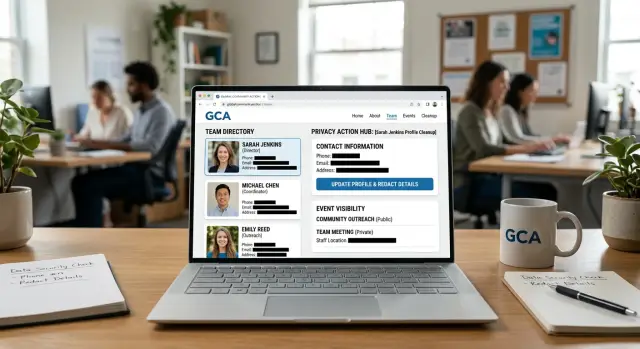
What can leak from nonprofit pages
The office address is only part of the risk. A nonprofit page can reveal a much fuller picture of a staff member's life, even when no home address appears anywhere on the site. For domestic violence advocates, that can mean strangers learning where they spend time, where they used to live, and how to trace them across other websites.
Staff bios often reveal more than people expect. A short profile might mention a former city, a university, a past employer, a professional license, or a long-running volunteer role. Each detail feels harmless on its own. Together, they can make one person easy to identify in people-search sites, old news stories, alumni pages, and copied directory listings.
Event pages create a different kind of risk. A public training page might list the exact date, time, venue, and speaker name. If that same person appears on older event pages, someone can start to guess travel habits, work patterns, and which days they are likely to be away from the office. Even a line like "joins us every Thursday" can say too much.
Reuse makes the problem worse. Once a bio or directory entry goes live, other sites may copy it without asking. That includes partner directories, conference archives, local association pages, and data brokers that scrape public pages. An old phone number, headshot, or job title can stay public for years after the original page changes.
That is why privacy cleanup needs a wider view than one webpage. The real exposure usually comes from small clues that connect: past cities and schools, old job history, event dates, copied profiles, and outdated contact details. If someone searches one advocate's name and finds the nonprofit bio, a conference page, and an old directory entry, they may learn far more than the organization meant to share.
Where these details usually appear
Most exposure starts in ordinary places, not hacked accounts. A good cleanup usually begins with pages your own nonprofit posted long ago and then forgot.
Staff and board bios are a common source. A short profile can reveal a full name, photo, job history, city, alma mater, and a direct email pattern. None of those facts looks risky by itself. Put them together, and it becomes much easier to trace someone across social profiles, people-search sites, and old employer pages.
Event pages expose a different set of details. A conference listing may include an advocate's speaking time, panel topic, direct email, and a short bio copied from another page. That can reveal more than where they work. It can show when they will be somewhere, who they work with, and what search terms someone should use to find more records.
The hardest pages to catch are often the ones nobody checks anymore. Old PDF flyers, annual reports, conference programs, partner pages, chamber directories, and volunteer listings can keep outdated information online for years. PDFs deserve special attention. People treat them like files, but search engines can still index them. An annual report from three years ago might still show a full staff roster, headshots, and direct contact details even after the main staff page was cleaned up.
Copied pages are often the bigger problem. A nonprofit may shorten a bio on its own site, but a partner, event host, or local directory can keep the older version online for years. Editing one page rarely ends the problem.
A simple test helps: search each advocate's name with the nonprofit name, old job titles, and file types like PDF. Outdated pages often show up first.
A simple example of how exposure spreads
Picture an advocate named Maya who works at a small nonprofit. Her staff page looks harmless. It shows her full name, job title, headshot, and a bio with details about past programs, speaking topics, and where she studied.
A month later, the nonprofit hosts a webinar. To fill the speaker box quickly, someone copies Maya's bio from the staff page and pastes it onto the event page. This time they add her direct work email so attendees can send questions. The webinar platform also creates a public speaker profile with the same text.
Now there are three pages with the same details, and they do not stay in one place. A partner directory picks up the event page, copies Maya's name, role, email, and organization, then adds a phone number pulled from an old contact sheet. Another directory copies that listing. Search engines index both.
This is where exposure gets worse than most teams expect. Each copy adds one more piece. One page has the full name. Another has the email. A third has a phone number. Put together, the trail can reveal work routines, old affiliations, professional contacts, and enough detail for someone to keep digging.
Months later, Maya's nonprofit updates her staff page and removes the extra details. The problem is not gone. Old event pages are still live. Directory copies still show the earlier version. Search results may keep outdated snippets for weeks or longer, even after the original page changes.
A small edit on day one is easy. Chasing copied details months later is much harder.
How to do a privacy cleanup step by step
Treat this as an inventory, not a one-time edit. Start by listing every public page that names staff, board members, speakers, volunteers, or program leads. Include the main site, older campaign pages, blog posts, event listings, newsletters, and downloadable files.
Next, search each name with the nonprofit name and city. Try a few versions of the search, not just the full name. A speaker page might use a middle initial, and an old PDF might still show a former title. This is often how copied directory listings turn up.
A first sweep should cover team directories, event pages, speaker profiles, PDFs, image file names, document metadata, and partner sites that may have copied your original text. Exposure is rarely just the office address. A short bio can reveal a direct phone number, a personal email, a work routine, a neighborhood, or an older employer that helps someone connect the dots. Even a headshot file name can expose a full legal name when the public page only shows a first name.
As you review pages, mark details the public does not need. In most cases, a job title, a short role summary, and a shared contact method are enough. Remove direct numbers, exact schedules, personal social handles, and anything else that makes offline tracking easier.
Do not stop with your own website. If a partner group, conference host, or local directory copied your text, ask them to replace it with the safer version. Keep the request short and specific so it is easy to act on.
After edits go live, recheck everything. Search results and copied pages often lag for a few days, and old files sometimes stay public by mistake. If the same names also appear on people-search sites, broader personal data removal may be worth doing.
What to change on staff bios
A staff bio should help people trust the organization, not map a person's private life. The best bio is usually shorter than most teams expect.
Start with the person's role, work focus, and broad experience. A good bio can say someone supports survivors with housing, court prep, or crisis response without telling readers where they grew up, where they studied, or what their family looks like.
A simple rewrite often fixes most of the risk. Instead of a full life story, use two or three lines that answer three questions: what does this person do, who do they help, and what topics can they speak on?
For example, this is safer: "Jordan Lee is an advocate who helps survivors with safety planning and referral support. Jordan has worked in community services for eight years and speaks on trauma-informed outreach."
This is riskier: "Jordan grew up in a small town outside Tulsa, studied at Central High and State College, is a parent of two, and is in the office every Tuesday and Thursday."
Contact details need the same treatment. Remove personal email addresses, cell numbers, and direct social media profiles from public bios. Use a team inbox, a main office number, or a contact form managed by the organization.
Regular routines also give away more than people think. If a bio says someone works late on Wednesdays, covers a certain shelter every Friday, or is available at one office on specific days, that creates a pattern others can track.
Photos deserve a close look too. A friendly headshot is fine, but crop out badges, license plates, building names, street signs, whiteboards, and anything reflected in glass. Even a lanyard or a poster in the background can reveal a location.
Before publishing, keep the bio focused on role, topics, and broad experience. Use shared contact details instead of personal ones, cut hometown and schedule details, and search the staff member's name to see if an older bio is still copied elsewhere.
What to change on event pages and directories
Event pages should tell people what the event is, who it helps, and how to attend. They do not need to map an advocate's movements. If a page names the hotel, lists arrival times, or says who works the Friday evening shift every month, it gives away a pattern that can follow someone far beyond the office.
A safer page keeps the focus on the program. Say that a staff member will speak on housing safety or survivor support. Skip details that show where they will stay, when they travel, or which location they return to each week.
Speaker intros should be trimmed down. Many nonprofits use warm, detailed bios, but event listings are not the place for a life story. A short line like "advocate with eight years of survivor support work" is usually enough. You rarely need past employers, former towns, volunteer groups, or a note that someone "commutes in from" a certain area.
Directories need the same care. Community calendars, partner sites, and old conference pages often paste your text word for word. If the original listing is too detailed, that detail spreads. Use a shorter description from the start so copied listings carry less personal information with them.
It also helps to remove hotel names, room blocks, arrival windows, travel dates, and routine schedule details tied to one person. Swap full staff contact details for a shared program email or main office line when possible.
Old event pages are easy to forget, and that is a problem. A training from last year may still show a speaker name, city, session time, and downloadable program. Once registration is over and the page no longer helps the public, take it down or strip it to a basic recap.
None of these details looks dramatic alone. Together, they can make a person much easier to track.
Common mistakes that keep details online
A lot of privacy work fails for a simple reason: people fix the page they can see and miss the copies they forgot about. That leaves names, schedules, contact details, and past locations online long after a cleanup starts.
One common mistake is deleting a staff page but leaving the PDF version online. A nonprofit may remove a team bio from the site, yet an old board packet, conference handout, or annual report still shows the same full bio in a downloadable file. Search results often keep surfacing that file because it lives in a media folder no one checked.
Another problem is updating your own site while partner pages stay untouched. An advocate might shorten their bio on the nonprofit site, but a training partner, sponsor, local coalition, or event host still has the older version with a headshot, direct email, and past job history. One copied listing can spread to several sites.
Using the same long bio everywhere is another leak. If it includes a full last name, personal speaking history, city, and a direct inbox, that same block of text becomes easy to match across search results.
The leftovers are where event-page privacy often breaks down. Archived event pages may still list who spoke, when they traveled, and where they appeared. Old media folders can hold speaker sheets, PDFs, and press images that were never removed. Footer contact blocks may put direct staff emails on every page, and intake forms sometimes route through a named personal address instead of a shared team inbox.
If you want the trail to shrink, remove the copies, not just the original.
A short check before you publish
A page can look harmless and still give away too much. Before a bio, event post, or directory entry goes live, stop for two minutes and read it like a stranger would.
Ask a few blunt questions:
- Could this page help someone narrow down where I live, even if my home address is not shown?
- Does it include a direct phone number or personal email that could be replaced with a shared contact method?
- Does it reveal a pattern, like weekly office hours, regular court days, or travel dates?
- Will this still feel safe in six months if the page stays online longer than expected?
One detail on its own may seem minor. The problem is the pileup. A staff bio says you work in outreach. An event page says you will speak in Dayton next Thursday. A copied directory still shows an old direct number. Together, that is enough for someone to place you, contact you, and guess your schedule.
A good rule is to publish only what the public needs to reach the organization, not what they can use to map a person. If a line does not help a client get support, cut it.
What to do next
After you clean up the obvious pages, set a simple routine and keep it going. Privacy work slips fast when nobody owns it. Pick one person to review your public pages once a month, even if the check only takes 20 minutes.
That review should cover more than the main staff page. Event archives, speaker pages, PDF programs, volunteer listings, and old campaign pages often keep the same details alive long after a bio was updated.
It also helps to make one short bio template for everyone. Keep it plain. Use a first name and role if that fits your policy, a shared work email, and a broad description of experience. Leave out personal history, exact schedules, personal social accounts, and anything that helps someone connect work identity to home life.
Partner sites need the same rule. Many nonprofits share speaker bios with coalitions, conference organizers, grant partners, and local directories. Once copied, those pages can stay up for years.
A small tracking sheet goes a long way. Keep a record of your own public pages, partner pages that repost staff details, old event pages and PDFs, and the dates when you asked for edits or removal.
After your site cleanup, search for the same names, job titles, headshots, and contact details on data broker sites. Public nonprofit pages often feed the wider people-search market. If manual follow-up feels too heavy, Remove.dev can help by finding and removing personal information from more than 500 data brokers and continuing to watch for relistings. That does not replace safer publishing habits on your own site, but it can reduce the cleanup work after details have already spread.
The goal is simple: publish fewer personal details, leave fewer copies floating around, and make sure one person keeps checking that the fixes stay in place.
FAQ
What is the biggest privacy risk on a nonprofit staff page?
The bigger risk is usually the mix of details, not one single line. A bio with a full name, photo, past city, school, old employer, and direct email can make it much easier to trace someone across old directories, event pages, and people-search sites.
Are event pages really a safety problem if they only show work details?
Yes. A public event page can reveal dates, times, venues, travel patterns, and who will be where. Even if the page only looks work-related, it can still help someone piece together routines and future movements.
What should a safer staff bio include?
Keep it short and role-focused. A safer bio usually includes the person’s role, the type of support they provide, and broad experience, then uses a shared contact method instead of personal details.
What details should we remove from bios first?
Start with direct phone numbers, personal email addresses, exact schedules, hometown details, schools, family facts, and old job history that the public does not need. If a detail helps people map a person instead of reach the organization, cut it.
Do old PDFs and annual reports still create exposure?
They matter a lot because search engines can still index them long after the main page was cleaned up. An old PDF in a media folder can keep a full bio, headshot, and contact details public for years.
Why does old staff information stay online after we edit our site?
Because other sites often copy your text and keep the older version live. Updating your own page does not remove what a partner site, conference archive, or local directory already reposted.
How can we find pages we forgot about?
Search each person’s name with the nonprofit name, city, old titles, and terms like PDF. That usually turns up forgotten event pages, media files, copied bios, and directory listings faster than checking the site menu by hand.
Should we remove old event pages after the event ends?
Usually yes. Once an event is over, the page should be removed or stripped down to a basic recap if the public no longer needs the full details. Leaving speaker names, session times, and travel info online creates risk without much benefit.
What contact info is safest to publish?
A team inbox, main office number, or contact form is the safer default. That gives people a clear way to reach the organization without exposing one staff member’s personal inbox, direct line, or social profile.
When does it make sense to use a data removal service?
Use one if staff names, old bios, emails, phone numbers, or headshots have already spread beyond your site and manual cleanup is taking too much time. A service like Remove.dev can help find and remove personal information from data broker sites and keep watching for relistings while you keep your own pages leaner.