Privacy cleanup for aging parents at home: hidden risks
Privacy cleanup for aging parents starts with forms, deliveries, and shared accounts. See what exposes both generations and what to fix first.
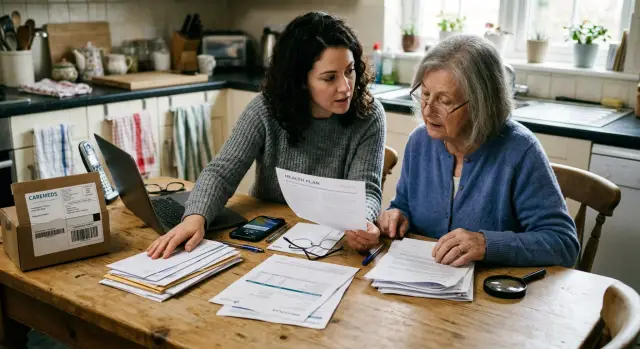
How caregiving at home creates shared privacy risks
When an older parent moves in, or when care starts happening in one home, privacy stops being an individual issue. It becomes a household issue.
A caregiver and a parent often end up sharing more than space. They share an address, delivery location, phone numbers, devices, and sometimes even an email account because it feels easier. That convenience can tie two generations into the same trail of records.
The exposure usually builds slowly. A doctor uses the adult child's phone number for appointment reminders. A pharmacy sends refill texts to the same device. A grocery app stores the parent's address, gate code, and delivery notes under the caregiver's account. One record does not look like much. Twenty records can reveal a lot.
Caregiving also puts personal details into places families do not always think about. Intake forms, prescription refills, insurance calls, home health visits, meal deliveries, ride services, and patient portals all collect bits of information. Over time those bits connect. A full name here, a birth date there, an alternate contact somewhere else, and soon a clear household profile starts to form.
Paper still matters too. Appointment letters, pharmacy labels, billing envelopes, and discharge papers often sit in plain view. A shared phone can show refill notices on the lock screen. A tablet used for telehealth may stay signed in to a patient portal. Delivery records can reveal what kind of care someone receives and when someone is usually home.
A common example is simple. A daughter uses her own mobile number for her father's doctor, pharmacy, and grocery deliveries. Now her number is tied to his full name, home address, and medication reminders. If that number gets copied into old marketing lists or picked up by data brokers, both people can get more calls, more mail, and more exposure.
That is why privacy cleanup starts at home, not just online. Most families do not have one dramatic leak. They have a pileup of small ones.
Where information leaks during everyday care
Most privacy leaks in caregiving do not start with a hacked phone or stolen laptop. They start with routine tasks: a new patient form, a refill request, a delivery text, or a neighbor helping with an appointment.
The collection points are ordinary: clinic intake forms, insurance paperwork, pharmacy profiles, emergency contact sheets, delivery signups, and home health visits. Each one asks for familiar details such as a full name, date of birth, phone number, address, or backup contact. On their own, those fields look harmless. Across several services, they create a detailed picture of both the older parent and the person helping them.
Shared contact details make that picture spread faster. Many adult children use their own number for a parent's doctor, pharmacy, insurance portal, and delivery updates because it is simpler. The trade-off is easy to miss. One number now connects two people, one home, and several health-related services. That can lead to more marketing, more scam calls, and records that data brokers can match to the same address.
Shared household accounts add another layer. A grocery app, pharmacy login, or family email inbox might hold order history, medication reminders, names of doctors, delivery notes, and emergency contacts in one place. No single record looks serious. The combined picture says a lot about daily life in the home.
People also tend to say more than a form actually asks for. A helper might say, "She lives with me now, use my number, her old house is sold, and mornings are best because of treatment." That sounds harmless in the moment. It adds extra facts about health, schedule, address changes, and family ties.
A good starting point is to notice every place where someone writes down names, dates, phone numbers, addresses, and contacts. Those small entries are often where the bigger exposure begins.
A simple home privacy cleanup
The first pass does not need to be complicated. Walk through the home with a notebook or your phone and look for places where private details are easy to see.
In the kitchen, check pill bottles, pharmacy bags, refill notes on the fridge, and stacks of mail. Near the front door, look at delivery boxes, shipping labels, visitor notes, and papers left on a table. Bedrooms and home offices often hold the most sensitive items: insurance letters, appointment printouts, login notes, and old forms.
The bathroom matters too. A prescription label can reveal a full name, pharmacy, doctor, and medical condition in seconds. Shared devices count as part of the home setup as well. Tablets, old phones, and smart speakers may show reminders, account alerts, or messages to anyone nearby.
After the walk-through, make one simple inventory of what the household uses. Keep it practical:
- accounts such as email, pharmacy, insurance, and patient portals
- devices such as phones, tablets, laptops, and smart speakers
- paperwork such as consent forms, discharge papers, and billing letters
- services such as grocery delivery, prescription refills, rides, and medical supply shipments
Next to each item, mark whether it belongs to the parent, the caregiver, or both. That sounds minor, but it matters. Shared accounts often mix two people's information without anyone noticing. One login can expose a parent's medication schedule and a caregiver's address at the same time.
Start with the highest-risk items first: anything that shows a full address, health details, or daily patterns. That usually means medication labels, appointment calendars, delivery notices, lock-screen previews, and papers that show when someone is home alone.
For most families, this first pass takes less than half an hour. It will not solve everything, but it usually reveals the easy leaks right away.
Fill out caregiving forms with less exposure
Caregiving paperwork spreads information fast. One clinic wants an emergency contact. A pharmacy wants a backup number. A delivery service wants text updates. Before long, the same address, phone number, and family names sit in a long chain of databases.
A simple rule helps: give each form only what it truly needs.
Many forms mix required fields with optional ones, and people often fill in every box out of habit. That habit creates extra exposure for both the parent and the adult child helping them. If one emergency contact is enough, stop there. If a full address is not required, leave it out. If a work number will never be used, do not add it.
Shared email can be even messier. When one inbox handles appointments, refill notices, billing, and household shopping, it ties two generations to the same record. It also makes mistakes more likely. A refill reminder for a parent can end up sitting next to the caregiver's bank alerts, travel receipts, or work messages. Separate email accounts are usually better, even if one forwards copies when needed.
Before submitting any form, pause for a minute and check four things: which fields are required, who will receive updates, whether extra relatives really need to be listed, and where the finished copy will be stored.
Paper copies deserve the same care. Forms left on a counter or tossed into a drawer can reveal birth dates, medication names, insurance details, and signatures. Keep current paperwork in one secure place, such as a locked drawer or a password-protected folder, and shred copies you no longer need.
If the same details have already spread beyond doctors and delivery services, the issue may be bigger than the forms at home. In that case, broker-site cleanup can help remove information that has already been copied into public people-search databases.
How deliveries and refill notices expose a household
Privacy leaks do not stop at the clinic. The front porch, mailbox, and phone can reveal just as much.
A package label may show a full name, address, apartment number, and sometimes the sender. That alone can tell a neighbor, building staff member, or porch thief that an older adult lives there and receives regular care items. If the package comes from a pharmacy or medical supplier, it becomes even easier to guess what is going on inside the home.
The digital trail is often worse. Many families use one shopping account for groceries, household goods, and medical supplies. Then shipping updates, refill texts, and order confirmations all land in the same inbox or on the same device. A son might order paper towels, while his mother's glucose strips or incontinence products show up in the same order history.
That overlap creates two problems at once. It exposes the older parent's health routines, and it ties the caregiver's name, phone number, and address to those purchases. Over time, stores, apps, and broker databases can build a detailed household profile.
A few small changes make a real difference. Check what appears on package labels and shipping emails. Split medical orders from regular shopping if you can. Turn off notifications that name the item, refill type, or pharmacy. Shred labels, packing slips, and refill inserts before they go in the trash.
This matters even more in homes where devices are shared. A refill text on a family iPad or a shipment alert on a kitchen smart speaker can reveal more than a paper file in a drawer. The leak feels small, but repeated notices create a pattern: who lives there, what they likely use, and how often it arrives.
A simple rule works well: treat medical deliveries like bank mail. Keep them separate, keep notifications quiet, and do not leave labels where visitors, cleaners, or trash pickers can see them.
What to check in shared phones, email, and accounts
A lot of household privacy problems come from convenience. One phone gets used for everything, one email handles family errands, and one account stays logged in because it saves time.
That setup can expose both people at once. An adult child may see a parent's refill reminder, lab appointment, or insurance message without meaning to. A parent may see saved cards, work contacts, or bank alerts that belong to the caregiver.
Start with calendars, inboxes, and account recovery settings. Shared calendars often reveal more than people expect. Even a short entry such as "cardiology follow-up" says a lot. Family phone plans can also expose names, numbers, device types, and billing details to anyone with account access.
Old access is another weak spot. Former aides, ex-partners, adult siblings, and old neighbors sometimes still have logins, passcodes, or trusted-device access. An unused tablet in a drawer can be just as risky if it still signs in automatically.
Autofill deserves special attention. Browsers and shopping apps often save names, addresses, card details, phone numbers, and past searches. If a parent uses the same tablet to order groceries and check a health portal, the next person who opens the browser may see far more than expected.
Separate logins help more than most families think. Banking, patient portals, insurance accounts, and pharmacy accounts should not share the same email and password as household shopping or streaming services. It feels slightly annoying at first. It also prevents one mistake from opening everything.
A practical rule is to separate health, money, and general household tasks into different accounts. Add individual device passcodes when possible. If sharing a phone is unavoidable, sign out after sensitive tasks and turn off autofill for health and payment forms.
One small mix-up shows how easy this is to miss. A daughter orders supplies for her father from a shopping app on his iPad. Because autofill is still on, the app suggests her home address, saved card, and email. His next order now carries her details too.
A realistic example from one family
Nina moved her father, Paul, into her home for a few weeks after a hospital discharge. He needed help with new medicines, follow-up visits, meals, and rides. Nothing about it felt unusual. It was ordinary family care.
On the first day home, Nina filled out discharge paperwork with her phone number, email, and home address so she would not miss any updates. She also signed Paul up for pharmacy texts because the refill schedule was easy to forget. Then she used her own meal delivery account to order low-salt dinners for both of them.
A few days later, the household data trail started to come together. Nina's phone showed prescription texts for Paul. Her email began getting meal delivery promotions aimed at senior nutrition. A paper form on the kitchen counter showed Paul's date of birth, doctor name, and Nina's cell number in one place.
Soon after that, Nina started getting calls about medical alert devices, home care help, and insurance offers. Paul began receiving junk mail at her address. The household had become one easy bundle: older adult, caregiver, medical need, same home, same contact details.
What made the problem obvious was how specific the outreach became. It did not feel like random spam. The calls and mail lined up with the hospital timing, the pharmacy refills, and the type of food they had ordered.
They fixed it with a few practical changes. Nina created a separate email just for her father's care. She changed the pharmacy contact so notices went there and to Paul's phone when possible. She set up a separate meal delivery account under his name, turned off marketing messages, and removed her main inbox from the order history. Paper forms went into a folder instead of staying on the counter, and old copies were shredded.
They also checked public people-search listings for both names and the shared address. Within a few weeks, the calls slowed down. More importantly, their information was no longer sitting in one easy bundle.
Common mistakes that expose both generations
Most privacy problems in caregiving do not come from one huge mistake. They come from small habits that feel harmless.
Paperwork is a common one. A medication list on the kitchen counter, an insurance letter near the front door, or a delivery slip left in plain view can reveal names, addresses, doctor names, and refill patterns. A visitor, cleaner, neighbor, or even an accidental photo can capture more than you expect.
Shared logins create another mess. Many families use one inbox for pharmacy alerts, patient portals, delivery updates, and billing notices because it feels easier. The downside is obvious once something goes wrong: one compromised inbox can expose everything. Reusing the same password across medical, shopping, and household accounts makes it worse.
Old accounts also hang around. A clinic portal used during recovery, an old delivery app, or a past home health account may still hold addresses, phone numbers, insurance details, and emergency contacts. Those accounts are easy to forget and rarely checked.
Another common mistake is assuming one opt-out or one removal request fixes the issue for good. It usually does not. Data gets copied, sold, and listed again. A parent's address can reappear on a people-search site, and a caregiver's phone number can be pulled into the same household profile later.
That is why periodic checks matter. A simple review every few months catches old portals, stray paperwork, and reused logins before they turn into a bigger problem.
A 30-minute reset
You can catch a lot in half an hour. The goal is not perfection. It is to close the easy leaks first.
Start with visible paper. Check mail piles, open forms, shipping boxes, and prescription inserts. Look for full names, addresses, birth dates, member IDs, medication details, and phone numbers. Shred what you do not need and move active paperwork into one folder instead of leaving it in view.
Then check the devices people use most. Review saved logins, payment details, and autofill settings on phones, tablets, and browsers. Make sure former helpers are no longer signed in to pharmacy, insurance, grocery, or delivery accounts. Remove old cards and turn off autofill where it is not necessary.
Next, review access that tends to linger. Old contacts, outdated forwarding rules, shared calendars, and app permissions often stay in place long after care routines change. Also check which apps still have access to location, photos, microphone, contacts, or notifications.
Finish by setting one repeating reminder on the calendar. Once a month is enough for most households. Repeat the same quick review: paper mail, package labels, account access, app permissions, and saved payments.
One small example shows why this works. If a medical delivery box sits by the door with a full name and refill label, and the pharmacy account is still logged in on a shared tablet, that is enough to reveal more than most families expect. Health details, address history, and buying patterns can all show up together.
If you find old addresses, phone numbers, or family links already showing up on public people-search sites, the problem has moved beyond the house. That is where data broker removal starts to matter.
If the problem is already bigger than the home
If private details are already spread across old forms, shared accounts, delivery profiles, and people-search sites, do not try to fix everything at once. Pick three tasks for this week and give each one a clear owner.
One person can handle account security for the services used most often, such as email, pharmacy, insurance, and the phone carrier. Another can review where the household address, phone number, and caregiver contact details still appear on forms and delivery profiles. A third can track what changed, what removal requests were sent, and what still needs a follow-up.
That division helps more than people expect. Without it, everyone assumes someone else handled the problem, and the same loose end stays open for months.
A simple tracker is enough. Use a notebook or basic sheet with five columns: item, owner, date sent, current status, and next check date. Keep separate sections for forms, accounts, and follow-up checks. If a clinic says it updated a contact number, write down when. If a broker-site removal request was submitted, note when to check whether the listing is gone.
For many families, the hardest part is not the home setup. It is the public listings that already connect two generations through one address, one landline, or one caregiver email. Manual cleanup gets tiring fast.
If that part has already become an ongoing chore, Remove.dev can take over much of the broker-site work by finding listings, sending removal requests, and monitoring for re-listings. The home cleanup still matters most, but outside help makes sense once the same information keeps resurfacing.
Start small, but make it concrete. By the end of the week, each person should know what they own, the tracker should be in use, and the first round of changes should already be done.
FAQ
What should I check first at home?
Start with the things people can see right away. Check mail, pill bottles, package labels, papers on counters, and any shared phone or tablet that still shows alerts or stays signed in.
Move current paperwork into one secure spot and shred anything you no longer need.
Is it okay to use my number for my parent's doctor and pharmacy?
It can work for a short time, but separate contact details are usually safer. One shared number can connect both of you to the same address, appointments, and refill notices.
That makes it easier for spam, scam calls, and broker records to link your household together.
Should we share one email for caregiving?
A separate email is better. It keeps refill notices, billing messages, and delivery updates out of your personal inbox and lowers the chance that one account exposes both of you.
If you still need visibility, forward copies instead of sharing one login.
What paperwork should never be left out?
Any paper with names, birth dates, member IDs, doctor names, insurance details, or medication information should be put away. Kitchen counters, entry tables, and desks are common leak points.
Even one envelope or prescription label can reveal more than most families expect.
How do deliveries and refill notices expose a household?
Labels, shipping emails, and refill texts can show who lives in the home, what kind of care is happening, and when someone is usually there. Repeated notices build a pattern over time.
Treat medical deliveries like bank mail. Keep them separate when you can, mute detailed notifications, and remove labels before boxes go in the trash.
What should I check on shared phones and tablets?
Check saved logins, autofill, lock-screen previews, calendars, and old trusted devices. Shared tablets and old phones often stay signed in long after people forget about them.
Sign out after sensitive tasks and remove saved cards, addresses, and payment details you do not need.
How often should we do a privacy cleanup?
Once a month works for most homes. A quick 30-minute check of paper mail, package labels, saved logins, app permissions, and account access is usually enough.
You do not need to fix everything at once. The goal is to catch the easy leaks before they pile up.
Can an old account still create privacy problems?
Yes. Old clinic portals, delivery apps, and recovery accounts often keep addresses, phone numbers, insurance details, and emergency contacts long after care routines change.
If an account is no longer needed, close it. If you still need it, update the stored details and remove old payment info.
When is this more than just a household issue?
Usually when the same names, address, phone numbers, or family links start showing up outside the home. People-search listings, repeated spam, and very specific marketing are common signs.
That means the information has likely been copied into broker databases, so home cleanup by itself will not fully solve it.
How can Remove.dev help if our information is already out there?
Remove.dev finds and removes personal data from over 500 data brokers, then keeps checking for re-listings so the same details do not keep popping back up. Most removals are completed within 7 to 14 days, and you can track requests in the dashboard.
It is a practical option when manual opt-outs start taking too much time or when one household record keeps spreading across broker sites.