Privacy cleanup metrics: how to tell if it is working
Learn simple privacy cleanup metrics to track progress, like search visibility, broker record count, and how often removed data returns.
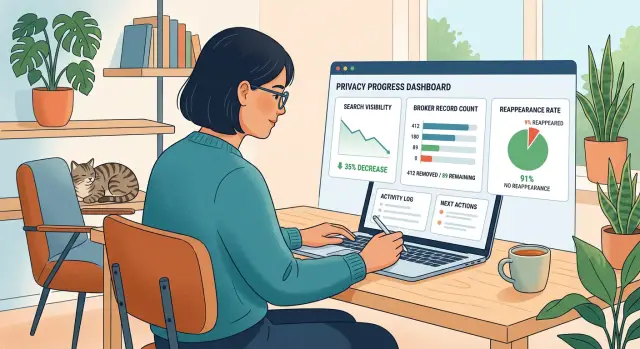
What working really means
A privacy cleanup is working when less of your personal information is easy to find.
That is the standard that matters. If a stranger searches your name, phone number, home address, or old usernames, they should see fewer exposing results, fewer broker listings, and less detail overall.
That means success needs numbers. Phrases like "better privacy" are too vague to be useful. A better scorecard looks at how many search results still expose you, how many data broker records are still live, and how often removed records come back.
Background activity matters much less than public exposure. A service can send dozens of requests, but that does not mean much if your records are still online. The real question is simple: what can someone still find in a few minutes with a search engine and a few broker sites?
Progress also tends to be uneven. One broker may remove a listing in a week. Another may take longer, ask for more proof, or relist your data later. That does not mean the cleanup failed. It means you should track the trend across many sites instead of judging everything by the slowest one.
A privacy cleanup is usually working if four things happen over time:
- Exposing search results go down.
- Confirmed live broker records go down.
- Relisted records become less common.
- The trend improves over 30, 60, and 90 days.
Days are too short for a fair read. Many removals take time to process, and search engines often lag behind changes on broker sites. What matters is the direction of the numbers, not whether every site updates on the same day.
If your visibility is dropping and fewer records stay online, the cleanup is doing its job. If the numbers bounce around at first, that is normal. Privacy cleanup rarely moves in a perfect straight line.
Set a baseline before you start
Good privacy cleanup metrics start with one simple thing: a before picture.
If you skip this step, it gets hard to tell whether anything improved or whether it just feels like progress because work is happening. You need a clean starting point.
Begin with a basic search for your full name plus your city and state. Use the version of your name that usually appears online. If your name is common, add one more detail such as a middle initial, but keep the search consistent so you can repeat it later the same way.
Save the first two pages of results. A screenshot is fine. A plain note is fine too. What matters is that you capture what showed up before any removals started. Later, you can compare result by result instead of guessing.
Next, count the broker profiles you can confirm are actually yours. Do not count every page that happens to include your name. Count only records that clearly match your age, address history, relatives, phone number, email, or other details. A smaller accurate number is better than a larger messy one.
While you review those records, write down what each one exposes. Focus on details that matter in real life: current address, old addresses, phone numbers, email, age, relatives, and workplace if it appears. Ten records that show only a name are not the same as ten records that show a home address and mobile number.
Last, write down the date of this first check. That turns a pile of notes into something measurable. When you run the same check 30 or 60 days later, you will know whether records dropped, stayed flat, or came back.
Choose the numbers that matter
If you track too much, you will stop checking. If you track too little, you will fool yourself. A small scorecard works better than a giant spreadsheet.
For most people, five numbers are enough:
- Search visibility: how many of the first 10 or 20 search results expose personal details or lead to broker pages.
- Confirmed live broker records: how many records you can open and verify are still public.
- Reappearance rate: how often removed records come back within a set window, such as 30, 60, or 90 days.
- Days to disappearance: how long it takes from the removal request to the day the listing is no longer live.
- Coverage: how many brokers you are checking or submitting to.
That last metric needs a little caution. Coverage can sound impressive, but it is not the same as results. A service might monitor hundreds of brokers, but your outcome still depends on how many live records were found, removed, and kept down. Coverage tells you the size of the watchlist. It does not tell you how much of your data is actually gone.
A simple example makes this easier to read. Say you start with 14 search results that expose personal data and 22 confirmed broker records. After a month, coverage might go up because more brokers were checked, but real progress shows up elsewhere: search visibility drops to 8, live records drop to 11, and the median time to removal is 10 days. That is a scorecard you can understand at a glance.
How to measure search visibility
Search visibility is one of the clearest privacy cleanup metrics because it shows what other people can still find in a normal search.
If a broker page falls from page 1 to page 5, that matters. If it disappears completely, even better. Either way, a drop in visibility is often the first sign that the cleanup is starting to work.
The rule is simple: search the same way every time. Use the same search terms each month, in the same order, and write them down once so you do not change them later. Good examples are your full name, your name plus city, your name plus employer, and your phone number if it has appeared online before.
Open a private browser window before each check. That will not make results perfect, but it helps reduce the effect of your previous searches and clicks.
What to log each month
Do not track every search result. Track the ones that expose personal details.
For each exposing result, note the query you used, its rank, the site type, what data appeared, and whether the result is new, unchanged, lower, or gone. Keep broker pages separate from social profiles. They are different problems. A broker listing with your home address usually needs removal work. A social profile may only need tighter privacy settings or old posts cleaned up.
A small spreadsheet is enough. One row per exposing result works well. After a few months, you will be able to see whether the same sites keep showing up, whether results are dropping in rank, and whether some records disappear from search before they disappear from the source site.
Check monthly, not every few days. Search results move around for short-term reasons, and daily checks create noise. Monthly checks give you a much cleaner signal.
How to count live broker records
Counting broker records is less exciting than checking search results, but it is one of the clearest ways to measure real exposure.
Start with one row for each broker profile you find. Not one row per company. One row per actual listing. If one broker shows two separate profiles for you, count both. They are still two live records until both are gone.
That detail matters more than people expect. Duplicates can feel like one problem, but if one profile disappears and the other stays up, your count should drop by one, not two.
Keep the tracker simple. For each record, note the broker name, the profile name or page label, the date found, and a status. Four statuses are enough: "Live," "Pending," "Gone," and "Unclear."
"Live" means the record is public now. "Pending" means a removal request was sent, but the profile still exists or has not been checked again. "Gone" means you confirmed the page is no longer public. "Unclear" is for broken pages, rate limits, or results that seem to point to a profile you cannot fully verify.
Keep proof, but do not turn this into a paperwork project. Save screenshots or notes for records that matter most, such as profiles with your current address, phone number, employer, or family links. For lower-risk records, a dated note is usually enough.
Then recount based on what is live now, not on how many requests were sent last week. If 40 profiles were live when you started and 11 are now confirmed gone, your current live count is 29. That sounds obvious, but plenty of people end up measuring activity instead of exposure.
Watch for reappearance
A removal is not the finish line. Some data brokers put the same record back a few weeks later, sometimes with only a small change. If you want a realistic view of long-term progress, track reappearance rate instead of counting only first-time removals.
A simple schedule works well: recheck old removals after 30, 60, and 90 days. That catches quick reposts and slower ones. If a record stays gone through all three checks, that means much more than a single confirmation.
What to log
Keep the notes short so you will actually keep them up to date. For each returned record, note the date it was removed, the date you checked again, whether it came back on the same broker or a different one, what data returned, and whether the reposted record is identical or slightly changed.
Track new addresses and phone numbers separately from old ones. If your old home address stays gone but a new phone number appears, that is a different problem. Mixing them together makes your numbers harder to trust.
It also helps to compare brokers. If one broker keeps reposting your profile every month while another stays clean after a single request, you have learned something useful. Total reappearance rate matters, but broker-by-broker patterns matter too.
The formula is simple: reappearance rate = returned records divided by removed records checked again. If you checked 40 removed records and 6 came back, your reappearance rate is 15%.
That number is one of the most honest privacy cleanup metrics because it shows whether the cleanup lasts.
A simple 90-day example
Picture one person starting a privacy cleanup with a clean baseline. On day 1, they find 26 live broker records tied to their name, old addresses, and phone number. They also see 14 search results in the first few pages that point to those records or repeat the same details.
That number often feels discouraging. It should not. Privacy cleanup metrics are about direction, not emotion.
By day 30, 11 broker records are gone. Search exposure has started to fall too, but not at the same speed. That is normal. Search engines often keep old pages in results for a while even after the source record is gone.
By day 60, 19 records have been removed. That is clear progress. But 3 records have also come back. This is where people often think the whole effort failed. It did not. Reappearance is part of the real picture, especially when brokers buy fresh data or rebuild profiles from other sources.
By day 90, 21 records are still gone. Two brokers keep relisting the same person, so those records need repeat requests. Search results are lower than they were on day 1, even if a few old pages still appear now and then.
The pattern matters more than hitting a perfect zero. In this example, the person went from 26 exposed records to 5 active ones, with only 2 repeated trouble spots. That is a big drop in exposure, even though the cleanup is not finished.
These are the numbers to watch in a case like this: the total number of live broker records, how many search results still expose personal details, and how often removed records return. That gives you a much better read than a report full of vague promises.
Mistakes that distort the picture
Bad measurement can make a privacy cleanup look better than it is, or worse than it is. A few habits throw off the numbers fast.
The first mistake is changing your search terms every week. If you search your name with a city this week and switch to name plus employer next week, you are not measuring progress. You are measuring a different query.
Another common mistake is counting requests as finished removals. A request sent is only a request. Some brokers act quickly, some take longer, and some need follow-up. If you roll all of that into one "done" number, the results will look stronger than they really are.
A third mistake is ignoring records that come back later. This happens a lot. A broker may remove a listing and republish it after a fresh data pull. If you count only first-time removals, your numbers can look great while your actual exposure starts creeping up again.
It also helps to keep search visibility and broker counts in separate buckets. They are related, but they measure different things. Search results tell you how easy it is for someone to find you. Broker totals tell you how many records still exist. A drop in one does not always mean a drop in the other.
Checking too often creates noise too. Daily searches swing for reasons that have nothing to do with your cleanup, and small changes can feel bigger than they are. Weekly checks are usually enough. Monthly snapshots are better if you want a cleaner trend.
A steadier method is simple: use the same search terms each time, count completed removals separately from requests sent, track returned records in their own column, keep search visibility and broker counts apart, and review everything on a fixed schedule.
If your numbers still look messy, the problem is often the method, not the cleanup itself.
A monthly check that takes 15 minutes
A privacy cleanup does not need a huge audit every month. Ten to fifteen minutes is enough if you stay consistent.
Start with the exact same search you used last month. Use the same name format, the same city or state if you added one, and the same search engine. Write down how many first-page results still show personal details, broker listings, or profile pages you want gone.
Next, count how many live broker records you can still find. Count only pages that are still public and still show your data. If a page is gone, blocked, or stripped of your details, do not count it as active.
Then spot-check a small sample of older removals. Pick five or ten records that disappeared in past months and see whether any came back. That gives you a clean view of reappearance rate without turning the check into a chore.
Also update removal times for any new cases that finished this month. If three new records were removed in 8, 11, and 14 days, write that down. Over time, you will see your usual range.
End with one plain sentence in your notes, such as: "Search results dropped from 7 to 4, active broker records fell by 12, and 1 old listing came back." That one line makes trends easy to spot later.
What to do after you start tracking
Good privacy cleanup metrics are boring on purpose. They should be easy to repeat, easy to check, and hard to argue with.
Keep the same method for at least three months. If you keep changing the search terms, the broker list, or the day you check, your numbers will jump around for reasons that have nothing to do with real progress.
A simple routine is enough: check on the same day each month, use the same name and location searches, count the same broker sites each time, and mark returned records separately from new ones.
Then use those numbers to spot where manual work slows down. If search results for your name start dropping but broker records stay flat, you may be spending time on search cleanup while missing harder broker removals. If records disappear and then come back, the first removal worked, but follow-up did not.
That is usually where manual tracking starts to get messy. What looks manageable at first can turn into too many tabs, screenshots, emails, and reminders.
If you want help with the ongoing follow-up, Remove.dev is one option to look at. It tracks requests in a real-time dashboard, works across more than 500 data brokers, and keeps monitoring for relistings so new removal requests can be sent again. Most removals are completed within 7 to 14 days, but the better test is still what your numbers look like after 30, 60, and 90 days.
Whatever tool or service you use, judge it by changes you can verify yourself. Search your name. Count live records. Note how often old listings return.
If those numbers keep improving over a few months, the cleanup is working. If they stall, you will know exactly what needs attention next.
FAQ
How do I know if my privacy cleanup is actually working?
Look at exposure, not activity. If fewer search results show your address, phone number, or broker pages, and your confirmed live broker records are dropping over 30, 60, and 90 days, it is working.
What should I measure before I start?
Start with a before picture. Save the first pages of search results for your name, then count only the broker profiles you can verify are really yours. That gives you numbers you can compare later instead of guessing.
Which metrics matter most?
For most people, three numbers tell the story: how many search results still expose personal details, how many broker records are still live, and how often removed records come back. You can also note how many days removals take, but exposure matters more than request volume.
How often should I check my results?
Monthly checks are usually best. Daily searches create noise, and even weekly checks can make small swings look bigger than they are. A steady monthly check gives you a cleaner trend.
What counts as a live broker record?
Count one row per public profile, not one row per company. If one broker shows two separate profiles for you, both count until both are gone. Only include records that clearly match your details.
Should I count requests sent as removals?
No. A sent request is only work started. Count a record as gone only when you confirm the page is no longer public or your details were removed.
Why do search results still show up after a listing was removed?
That lag is normal. Brokers and search engines update on different schedules, so a source page can be removed before search results catch up. Give it time and compare the trend over a month or two, not one day.
How do I track records that come back?
Recheck removed records after 30, 60, and 90 days. If a listing returns, log when it came back, where it reappeared, and what data showed again. That tells you whether the cleanup lasts.
Is it normal for the numbers to bounce around at first?
Early movement is rarely a straight line. One broker may remove you fast while another takes longer or reposts your data later. What matters is whether overall exposure keeps falling across several checks.
When should I stop doing this manually and use a service?
Once you are juggling too many tabs, screenshots, emails, and follow-ups, manual tracking starts to break down. A service like Remove.dev can help by finding records across more than 500 brokers, tracking requests in real time, and checking for relistings so new removal requests can be sent again.