Private profiles and public records: what still shows
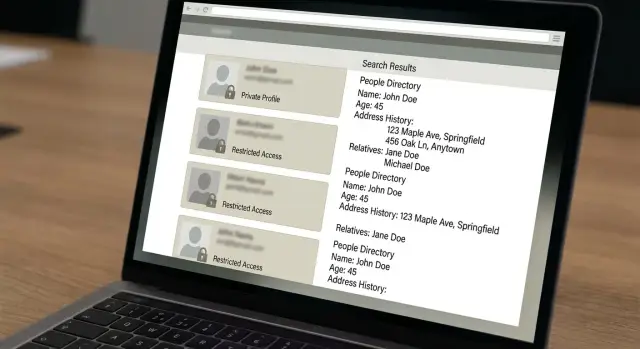
Private profiles and public records can still expose your address, age, relatives, and old listings in search and broker databases.
Why private social accounts do not solve the whole problem
Making your social accounts private helps. It closes one door. It does not remove your name, age, address, phone number, or family ties from the many other places that collect and publish them.
That gap explains why people lock down Instagram, Facebook, or TikTok, then search their name and still find old contact details, past addresses, or relatives on random sites. Privacy settings only control what happens inside that app. Search engines can still show people search sites, old forum posts, business records, court filings, voter records in some places, and data broker pages built from other sources.
Most of those sites did not create the information themselves. They copied it, bought it, merged it, and republished it. One normal life event - a move, a delivery tied to your phone number, a business filing, a property record - can spread into several databases and keep moving from site to site.
That is why someone can have private social profiles and still show up publicly. Their old city might appear on a people search page. A former phone number may still rank in search. A broker site may list relatives or past addresses. None of that requires an open social account. The data just has to exist somewhere public, semi-public, or for sale.
Locking down social media is a smart first step. It is not the finish line.
What still shows up outside social media
The details that keep appearing are usually basic, which is exactly what makes them risky. A full name, age range, current city, and past addresses may not sound serious on their own. Put them together on one page and they become a map.
Phone numbers and email matches show up often too. An old mobile number can connect you to old accounts, lead forms, or marketing databases. A partly hidden email address can still tie your name to sites you forgot years ago.
Association is another problem. Many people search sites list relatives, former roommates, or other household members. So even if your own page is thin, your name can still appear next to a parent, partner, or old housemate. That is one reason private profiles and public records are two different problems.
Some of the information comes from government or court sources that later get copied into public records online. Depending on where you live, that can include property records, court filings, professional licenses, or voter-related data. The original source may be hard to search, but broker sites often turn it into a simple summary page that anyone can read.
Old copies also linger. Search engines may keep cached snippets. Small scraper sites may republish the same record. You remove one listing, then a copy still shows your address or phone number somewhere else.
If someone searches your name, they may not find your locked social profile first. They may find an old address tied to your current city, a phone number linked to relatives, or a broker profile built from public filings. That is why "remove personal information" usually means more than hiding your posts.
Where this information usually comes from
When people think about private profiles and public records, they often assume the trail starts with social media. Usually it starts somewhere less obvious.
County and state record sites are a common source. Property records, business filings, court records, professional licenses, and voter records in some places can all put basic facts into the open. A record may exist for a normal reason, like buying a home or registering a small business. Once it is online, other sites can copy it fast.
People search sites are another major source. They pull from many places, combine the data, and publish a single profile that looks surprisingly complete. That profile may include current and past addresses, phone numbers, relatives, and age ranges, even if you never gave that site your information directly.
Marketing and lead databases add to the problem. If you asked for a quote, entered a giveaway, checked a home value, or filled out a form for a discount, your details may have been shared or sold. These databases are not always public in the same way as people search sites, but they still feed ads, outreach lists, and other broker networks.
Old directory pages can keep records alive too. A side business, contractor profile, marketplace account, or local directory entry may still show your phone number or street address years later. Even if the original page is gone, copied versions may stay online.
That copying is what makes the problem stick. One LLC filing with a home address can end up on a state site, then a people search site, then a directory mirror, then another broker that resells it. Months later, your social profiles are private, but your home address still shows up in search.
How to check what is still public
The fastest way to see what strangers can find is to search for yourself the way they would. Use a private browser window, or sign out first, so your own browsing history does not shape the results.
Start with your full name and city. If your name is common, add your state, middle initial, or an old neighborhood. Then try old phone numbers, personal email addresses, and usernames you used years ago. Old contact details often lead to pages that connect your name to past addresses, age ranges, and relatives.
Open more than the first few results. Public records online often sit a little lower because search engines mix in social profiles, news mentions, and random directory pages first.
As you go, pay attention to the details that make a listing more risky. Current or recent addresses matter most. Relative names matter too, because many sites use them to confirm identity.
Keep a simple record of what you find:
- the site name and page title
- the exact details shown
- a screenshot and the date you found it
That small log saves time later. Broker pages change often, and some sites hide details after a few visits. If you save proof early, you can compare results and see what was actually removed.
If you plan to handle opt-outs yourself, this audit tells you where to start. If you use a service such as Remove.dev, it helps you spot the highest-risk listings first and track what changed afterward.
A simple example of how this happens
Maya sets her Instagram to private. Her photos stop showing to strangers, and that feels like enough.
Then someone searches her full name.
The first result is a people search site. It shows her age range, current city, and a list of possible relatives. None of that came from Instagram. It came from records and old data sales outside social apps.
A second result is worse. A broker listing shows an address she used two years ago and ties it to her name and other names from the same household. Even if some details are slightly off, it is still enough for someone to piece together where she lived and who she may be related to.
Then an old directory page appears with her phone number. She forgot it existed. The number is no longer on her social accounts, but the page was copied years ago and kept getting indexed.
This is the part that catches people off guard. The same details spread. One broker buys data from one source. Another site copies the broker. A search engine saves the page title and snippet. Soon the same phone number or address shows up on several sites, even if the original page later changes.
So Maya's social life is private, but parts of her identity are still easy to find. That is the real split between private profiles and public records.
How to remove or reduce what shows up
Start with the pages that create the most risk. A people search site that shows your home address, phone number, age, and relatives matters more than an old forum profile or a harmless directory mention. Focus first on the records that make it easiest to find you offline.
A simple order works well. Search your full name, city, phone number, and old addresses. Write down the sites that show your current or recent address first. Submit opt-out requests one site at a time. Save screenshots, dates, case numbers, and confirmation emails. Then check the same pages again after 7-14 days.
Doing this by hand is slow, but it helps you see what actually changed. Some sites remove a listing quickly. Others ask for extra steps, such as email confirmation or an ID check with some details hidden. If a record shows both your address and family members, move it to the top of the list.
One successful opt-out does not solve the whole problem. Public records online often spread across several sites at once, and one source can feed dozens of broker listings. A small spreadsheet is usually enough to stay organized. Note the site name, page title, request date, and result. If a listing disappears and later returns, you will know it was relisted rather than missed the first time.
For many people, the hardest part is follow-up. Some brokers republish data after a few weeks or months. That is where an ongoing service can help. Remove.dev removes personal information from over 500 data brokers, lets subscribers track requests in real time through a dashboard, and keeps monitoring for relistings after a record is taken down. If you do it yourself, plan on rechecking regularly.
Mistakes that keep your data online
The most common mistake is assuming private social accounts will solve search results on their own. They usually do not. Search engines and broker sites are pulling from a different pool of data.
Another mistake is removing one page and missing the copies. The same record often appears on several sites at once, sometimes with small differences. One version may use a middle initial. Another may use a shortened first name, an old phone number, or a past address.
That matters because opt-out requests often fail for a simple reason: the request does not match the listing closely enough. If a site shows "Jennifer A Miller" and your request says "Jen Miller," the record may stay up. It helps to use old name formats, nicknames, maiden names, and previous locations when you ask a site to remove personal information.
People also stop too early. One successful removal feels like the job is done, but data brokers keep buying, copying, and reposting records. A page removed this month can come back later through a different source. Nothing new had to happen. The old record just got copied again.
That is why follow-up matters. Search again after a few weeks, then again later. If you do not want to keep repeating that work, use a system that keeps watching after the first round of removals.
A quick checklist before you move on
Do one boring check now. It can save a surprise later.
The goal is not to disappear overnight. The goal is to make your details harder to find in the places strangers actually look.
Before you call the job done, check a few basics:
- Search your full name with your city and state. Your home address should not be easy to find near the top results.
- Search your name with old phone numbers and email addresses. Those searches should stop leading straight to people search sites.
- Look at the first two pages of results. You want fewer broker pages that bundle your age, address history, and relatives.
- Pick a recheck date now. Once a month is enough for most people, and sooner makes sense after a move, a job change, a new business filing, or a new number.
One missing page does not mean the cleanup is finished. If your old address is gone but three copied listings still rank in search, keep going. The same is true for phone numbers. One stale record can spread again.
It helps to keep a short note with what changed. Write down which searches still show your name, which sites dropped your record, and when you last checked. The next review will be much faster.
What to do next
Private profiles and public records point to the same lesson: this is not a one-time cleanup. It works better as a small routine.
Start with the sites that expose the most. A listing with your home address, mobile number, age, and relatives matters more than an old entry that only shows a name and city. Make a short hit list so you know where to focus first. Then set a reminder to search again every month or two and check whether removed pages stayed down.
Be realistic about manual work. Ten opt-outs is annoying. Fifty is a part-time job. If you have the time, a spreadsheet and a recurring reminder can carry you a long way. If you do not, Remove.dev can handle removals across more than 500 data brokers and keep watching for relistings in the background.
You do not need a perfect system. You need one you will actually keep using. Search your name again in a few weeks. If the results are thinner and your old contact details are harder to surface, you are moving in the right direction.
FAQ
If my social accounts are private, why can people still find my address or phone number?
Because social privacy settings only control what people can see inside that app. Your address, phone number, relatives, and past cities can still appear on people search sites, broker pages, public record sites, and old directory pages that copied the data from somewhere else.
Where does this public information usually come from?
The most common sources are people search sites, data brokers, property records, court filings, business registrations, professional licenses, old directory pages, and marketing forms you filled out years ago. One normal event like a move or an LLC filing can spread to many sites fast.
What should I search to see what strangers can find about me?
Start in a private browser window or sign out first. Search your full name with your city and state, then try old phone numbers, personal email addresses, and usernames to see what still connects back to you.
Which search results should I remove first?
Put the riskiest pages first. A listing that shows your current or recent address, mobile number, age, and relatives should move ahead of an old forum account or a harmless profile with just your name and city.
Can my data still show up after one site removes it?
Yes, it often does. Search engines may keep old snippets for a while, and copy sites can leave the same record on other pages even after the first listing is gone. That is why one opt-out rarely fixes everything.
How long does a manual opt-out usually take?
Many manual removals show up within about 7 to 14 days, but every site moves at its own pace. Some ask for email confirmation or extra identity checks, and some records come back later if another broker republishes them.
Why do some opt-out requests fail?
Use the exact details shown on the page. If the listing uses a middle initial, old city, maiden name, or former phone number, match that in your request so the site can find the right record.
Do public records matter even if I barely use social media?
It can, in some places. Property records, court filings, voter-related records, and business filings may be public or easy for brokers to copy. Even when the original source is harder to search, broker sites often turn it into a simple profile page.
What is the easiest way to track removals?
Keep a simple log with the site name, page title, what was shown, the date you found it, and a screenshot. That makes it much easier to check what changed and spot relistings later.
When does it make sense to use a removal service instead of doing it myself?
If you have only a few pages to clean up, doing it yourself can work. If your data is spread across many brokers, a service like Remove.dev can save time by handling removals across more than 500 brokers, tracking requests in a dashboard, and monitoring for relistings after pages come down.