Public record or lead form: how to spot the source
Not sure where a broker got your details? Learn how to read profile clues, tell public record or lead form, and choose the right removal step.
Why the source matters
The source of a broker profile changes what you should do next. If the data came from a public record, the broker may say it is republishing information found elsewhere. If it came from a lead form, the broker may be holding data that started with a quote request, a giveaway signup, or some other form fill.
That difference changes the removal plan. A public-record profile often calls for one type of opt-out. Lead-form data usually calls for a broader deletion request that covers marketing data, partner sharing, and resale. Treat both cases the same, and you can waste days sending the wrong message.
The catch is that many profiles are not purely one or the other. A broker might pull your name, age range, and old address from county or court records, then attach a current mobile number or personal email from a lead source. The page looks like one record, but the details may have very different origins.
A simple example makes this clear. Say a profile shows an address you left eight years ago, the names of relatives, and a rough property value. That looks old and record-based. But the same page also lists an email address you only used last month to ask for home insurance quotes. That newer detail probably did not come from a courthouse file. It likely came from a form, a partner network, or a sold lead.
When you guess wrong, cleanup gets messy:
- You ask for a public-record suppression when the broker actually needs a marketing-data deletion request.
- You remove one listing but leave newer lead data active elsewhere in the broker's system.
- You miss the real source, so the data comes back on the next refresh.
- You spend time arguing about where the data came from instead of removing what matters first.
The best first move is practical, not perfect. Figure out the most likely source so you can send the right type of request, but do not wait for total certainty. If a profile mixes old and new details, plan for both paths.
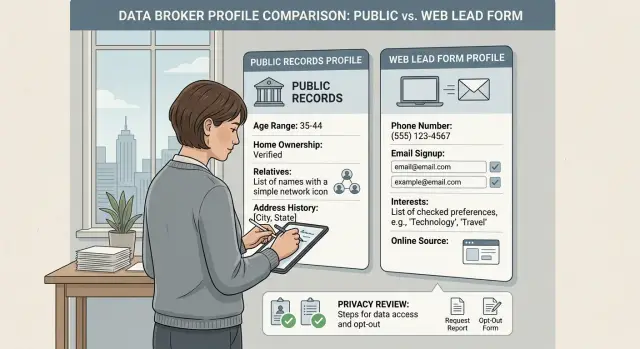
What a public-record profile often looks like
A public-record profile usually feels dry and a little uneven. It often reads like a stitched-together file, not a marketing record. The details tend to be broad, older, and tied to places where records were filed.
One common clue is an age band instead of a full birth date. You might see "45-49" or "born around 1978" instead of a precise date. That often points to county, state, or other government records that were copied and merged over time.
Address history is another strong sign. Public-record profiles often show several past addresses spread across many years, sometimes going back a decade or more. Lead-form profiles usually lean toward newer contact details. Record-based profiles keep old apartments, former family homes, and mailing addresses that no longer matter.
Household names can also give it away. If the profile lists "possible relatives," "household members," or people who likely lived at the same address, the source is often property, tax, voter, or utility-linked records. The broker may not know whether those people still live together. It is often just matching names to a shared address from the past.
You also see the same types of details over and over in record-based profiles: property ownership or sale dates, court filings, voter registration details, business registrations, and professional or trade licenses. These usually come from government files directly or from companies that collect those files in bulk. That is why a page may include a parcel-related date, a case number, or a business entity name even when the rest of the profile looks thin.
Another clue is the way the profile mixes accurate old facts with fuzzy current ones. For example, it may correctly show that Maria owned a home in Phoenix in 2016, list two adults tied to that address, and mention a nursing license from the same state. But her current phone number is missing, wrong, or buried under guesses. That uneven pattern often points to public records first, with a few extra data points added later.
When you see this kind of profile, assume the broker may refresh it from the source records again. Removing the broker listing still matters, but that may not be the whole job. You may also need to check the underlying record, or at least understand which government file is feeding the page.
What a lead-form profile often looks like
A lead-form profile feels more like a marketing file than a public record. It often includes details you would only get if someone typed them into a box, picked them from a dropdown, or answered a survey.
That means the profile may look oddly specific in some places and thin in others. You might see a current email address, shopping interests, or signs that you recently asked for a quote, but no deed, court record, or voter-file detail behind it.
A few clues show up again and again. Exact categories such as income band, pet owner, parent, homeowner, or renter are common. So are brand interests like fitness gear, meal kits, luxury travel, or baby products. Recent intent labels are another giveaway: insurance shopper, auto loan seeker, moving soon, comparing colleges. Survey-style answers also fit this pattern, including hobbies, favorite stores, or political leanings.
Those fields feel volunteered because they usually are. Public records rarely say you own a dog, prefer a retailer, or asked for solar quotes last week.
Timing matters too. If a broker profile seems to know what you were shopping for recently, that often points to a form submission, a giveaway entry, a comparison site, or a partner marketing list. Public records move slowly. Lead data can appear fast.
The wording is often a clue by itself. Form-based data tends to come in neat labels such as "income $75k-$100k," "interested in home security," or "likely pet owner." That kind of packaging is common in advertising and lead sales. Official records usually do not read like that.
You may also spot details that feel too personal for a courthouse file but too generic to be true firsthand facts, such as "health-conscious buyer" or "planning a vacation in 6 months." Those are usually marketing guesses built from forms, tracking, or survey answers.
A good test is simple: would a county office, court, or property database ever collect this detail? If the answer is no, a form or marketing source is more likely.
When a profile looks like this, start by checking where that email address or phone number has been used. Old quote tools, sweepstakes, store accounts, and "get a free estimate" pages are common sources. For removal, the first move is often the broker's marketing opt-out rather than a public-record dispute.
How to inspect a profile step by step
Start with a calm read, not a removal request. A data broker page often mixes old facts, fresh contact details, and guesses from ad systems. Your job is to sort the page before you act.
Most people look at the newest item first. That can throw you off. The oldest facts often tell the real story.
Read the profile from oldest to newest. If you see a past address from ten years ago, an age range that still fits, relatives, property dates, or a court-related entry, that points more toward public records. These details tend to stick around for a long time.
Next, mark anything that feels too specific to come from a government file. A rarely used email address, a mobile number you gave to get a quote, a spelling mistake you make on forms, or a nickname used on signup pages often points to a lead form or a list built from form data.
Then compare each contact detail with what you use today. A current phone number, your newest apartment, or the email you use for shopping can be a strong sign that the broker got recent data from a form, a partner list, or ad-tech sharing. Public records are usually older and slower.
It helps to sort the page into three buckets. First, record clues such as old addresses, ownership dates, court items, or voter-style details. Second, marketing clues such as shopping interests, income bands, "likely homeowner" labels, or very current contact details. Third, mixed clues, where an old address sits beside a new phone number.
Mixed profiles are common. A broker may have started with public records and later added newer details from forms or ad exchanges.
Before you do anything else, write down the strongest clue on the page. One sentence is enough: "This looks form-sourced because it shows my current burner email and a phone number I only use for quotes." Or: "This looks record-sourced because the page leans on old addresses and property dates."
That short note makes the next move easier. If the strongest clue points to public records, focus on the broker opt-out and keep checking for relisting. If it points to form data, ask for deletion and look for the form source too. Save a screenshot first. Pages change fast, and the clearest clue can disappear.
A simple example
Maya Lopez moved two years ago and filled out an auto insurance quote form a few months back. Later, she finds a broker profile about her.
Part of the page looks old. It shows her previous address, her age range, the county where she used to live, and two relatives. Those details often point to public records or older people-search data copied from them.
But one part looks much newer. The profile says she is "shopping for auto insurance," lists a Gmail address she made this year, and shows her current mobile number. That does not fit the old-address pattern. It looks much more like data from a lead form.
When a profile has mixed clues, the newest and most specific clue usually matters most for the first request. In Maya's case, that is the recent email, current phone number, and the quote-shopping label. Those details suggest the broker may still be getting fresh data from a form submission, not just keeping an old file alive.
So Maya's first removal request should mention the whole profile but call out those recent fields by name. She does not need to prove the exact source. She just needs to ask the broker to delete the profile, stop sharing her data, and remove the recent contact details and interest tags tied to her name.
If the page comes down and stays down, the older public-record data may have been the bigger part of the problem. Her next step is to keep an eye on brokers that copy address and family data, since those sites often rebuild similar profiles from the same old record sets.
If the page comes back with the same current phone number or the same insurance-shopping note, the next step changes. Now the lead form matters more than the old address. Maya should look for the site where she requested the quote, check confirmation emails, and send a deletion or opt-out request there too.
That is the practical rule: if both sources appear, start with the freshest clue. Old record data explains why a profile exists. Recent lead-form data often explains why it keeps coming back.
Common mistakes when guessing the source
Most people guess too fast. A profile can look like it came from a courthouse, a voter file, or a form you filled out years ago, but brokers often mix sources.
One mistake is assuming every profile came from public records. Some brokers prefer that impression because it makes the profile sound fixed and official. In reality, many pages are built from softer data such as sweepstakes entries, quote forms, old account signups, and list purchases.
Another mistake is ignoring copied data. One broker may scrape or buy a profile from another broker, then repackage it with extra details. In that case, the page you found is not the original source. Removing it from one site may help, but the same data can still sit with the broker that supplied it.
A third mistake is sending the wrong type of request first. If the page looks like a marketing profile, a simple opt-out may work faster than arguing about public records. If it looks tied to a regulated source, a privacy-rights request with the right legal basis may work better.
A fourth mistake is stopping after one removal. Data comes back all the time. A broker can buy a fresh list, scrape another site, or rebuild your profile from a partner feed a few weeks later.
A safer approach is to look for more than one clue before acting. Check whether the profile has oddly specific fields such as household income band, hobbies, or shopping interests. That usually points away from pure public records. Look for old addresses, relatives, or property details too, but remember that those details are often copied from another broker rather than taken directly from the source.
If you compare the wording and data points across a few broker pages, you can sometimes spot a pattern. The same typo, age range, or nickname showing up everywhere often means one source is feeding the rest.
One more trap catches a lot of people: they think a successful opt-out means the problem is solved. Often it just means one copy is gone. If the data is still being refreshed behind the scenes, you need follow-up checks.
Quick checks before you send a request
If you are stuck, the profile itself usually gives you enough to make a smart first move. Take two minutes before you send anything. That pause can save you a second round later.
Use this quick check:
- Find one detail that looks official, such as a case number, parcel ID, deed date, license entry, or full legal name with a middle initial.
- Find one detail that feels self-reported, like a newer cell number, a shopping email, an income range, an interest tag, or a form-style contact field.
- Check how old the data looks. An address from years ago mixed with a current phone number often means the broker merged more than one source.
- Choose the request type based on that mix. A plain opt-out may work, but some profiles also call for a legal privacy request.
- Save a screenshot before the page changes. Include the date and the full profile view if you can.
The first two checks tell you a lot. If you can point to one official clue and one self-reported clue, you are probably looking at a mixed profile. That is normal. Brokers often combine courthouse records, property files, and form data into one page.
The age of the data tells you what likely happened next. Old addresses, past counties, and home sale dates usually came from public records. Recent phone numbers, current employer details, or a niche email alias often came from a lead form, quote request, or partner list.
That changes the next step. If the page looks mostly record-based, start with the broker's opt-out process and be ready to send a privacy request under a law that applies to you, such as CCPA or GDPR. If it looks mostly form-based, use the same email, phone number, or location details the broker likely has on file. That makes the match easier.
A simple example: a profile shows your legal name, an old purchase date, and a parcel number, but it also lists a mobile number you only use for online quote forms. That is probably not one source. Send the opt-out for the whole profile, keep the screenshot, and if the record stays up, follow with a legal removal request that names the fields you want removed.
What to do next
Once you have a decent guess about the source, do the simple thing first. Start with the broker that shows the most complete profile, not the smallest one. A full profile usually gives you more clues, and it often feeds smaller copycat sites later.
If one listing has your full name, age, current city, two old addresses, and a relative, start there. If another only shows an email and a phone number, it can wait. Removing the fuller record first often cuts down what spreads next.
Your next move should match the clues you found. When the profile looks like a public-record entry, use a formal opt-out or privacy request and include the exact details shown on the page so the broker can match the record quickly. When it looks like a lead-form profile, check for an account-based deletion option, an unsubscribe path, or a direct request that names the email address or phone number they listed.
A simple order works well:
- Save the profile details, a screenshot, and the date.
- Start with the broker that exposes the most about you.
- Write one clear request based on the likely source.
- Check back in a week or two and note what changed.
Do not assume one request ends the problem. Profiles come back. A broker may relist your data after a refresh, a partner feed update, or a new public-record import. That is why tracking matters. Even a basic spreadsheet with broker name, request date, status, and recheck date can save a lot of repeat work.
If you are still unsure, pick the request with the least friction first. Ask for deletion or suppression of the listed profile, then watch how the broker responds. Their reply often tells you more than the page did.
If you need help doing this across many sites, Remove.dev is built for that kind of follow-up. It finds and removes personal data from more than 500 data brokers, then keeps monitoring for relistings so the same profile does not quietly return.
The goal is not to guess perfectly. It is to act on the strongest clue, remove the worst exposure first, and keep enough records so the next round takes five minutes instead of fifty.
FAQ
How can I tell if a profile is mostly public-record data?
Look for older addresses, age ranges, relatives, property dates, case numbers, or license entries. Those details usually come from records filed with counties, courts, or state agencies. If the page feels old and uneven, start with the broker opt-out and keep checking for relisting.
What makes a profile look like lead-form data?
A current email, a mobile number you used for quotes, shopping labels, income bands, or tags like "pet owner" usually point to form data. Those details often come from quote tools, giveaways, partner lists, or ad data. In that case, ask for deletion of the profile and the recent contact details, not just a basic opt-out.
What if the page has both old addresses and my current phone number?
Treat it as a mixed profile. Use the freshest and most specific clue to guide your first request, because that is often why the profile keeps coming back. Mention the whole page, but name the current phone, email, or interest tags you want removed.
Do I need proof of the exact source before I ask for removal?
No. You only need a solid guess to start. Save the page, write down the strongest clue, and send the request that fits what you see. If the data returns, then dig deeper into the source.
Should I start with the biggest broker page first?
Start with the broker showing the fullest profile. That page gives you more clues and is often the version other sites copy or buy. Removing the biggest exposure first usually saves time.
What should I save before sending a request?
Take a full screenshot and note the date. Keep the exact name, addresses, phone numbers, emails, and tags shown on the page. That record helps if the broker asks for details or the page changes after you contact them.
Why does my data come back after an opt-out?
Brokers refresh profiles from public records, partner feeds, and bought lists. One opt-out can remove a copy without stopping the next data import. If the same recent phone number or email comes back, check the form or site where you used it and send a deletion request there too.
Is a public-record opt-out different from a marketing-data deletion request?
Usually, yes. A record-heavy page often needs a broker opt-out or a privacy request tied to the listing itself. A form-based page often needs a broader deletion request that covers marketing data, sharing, and resale. If the profile is mixed, ask for removal of the full profile and call out the recent fields.
What is the fastest way to inspect a broker profile?
Read the page from oldest to newest. First mark record clues like old addresses or property dates, then mark self-reported clues like a current shopping email or quote-only phone number. After that, write one short note about the strongest clue and use it to choose your first request.
When is a service like Remove.dev worth using?
It helps when your information is spread across many brokers or keeps getting relisted. Remove.dev finds and removes personal data from more than 500 brokers, tracks requests in real time, and keeps monitoring for reappearances so you do not have to repeat the same work by hand.