Real time request tracker: what good progress looks like
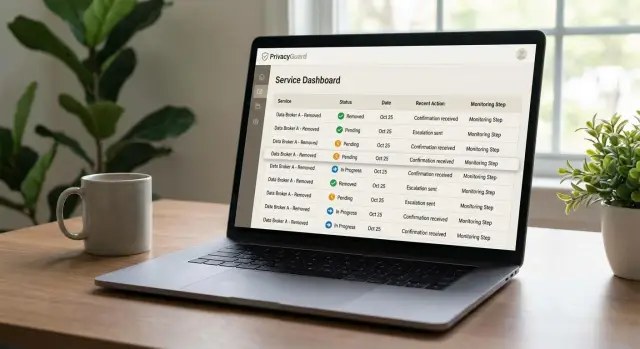
A real time request tracker should show clear status changes, dates, actions, and next steps, so you can verify progress without guessing.
Why vague tracking creates doubt
If a dashboard shows only "In progress," you're being asked to trust a black box. That's a problem with any real-time request tracker. Privacy work already happens out of sight. The tracker should make that work visible, not blur it.
"In progress" can mean very different things. The request might not be sent yet. The broker might have received it and stayed silent. The broker might have asked for more information. The first attempt might have failed and triggered a retry. Or the service might have stalled and never said so.
Those aren't small differences. They change what you should expect next and how long you may need to wait.
Missing dates make the wait feel endless. A status without a sent date, a last update, or a next step leaves you guessing whether the request moved yesterday or two weeks ago. Even patient users start to wonder whether anything happened at all.
People don't need cheerful promises. They need proof they can check in a few seconds. A useful tracker shows timestamps, a clear status label, and some sign that the service actually contacted the data broker. Without that, the dashboard feels decorative.
Silence creates another problem. Many people assume no news means someone is still working behind the scenes. Sometimes that's true. Sometimes it means the request stalled, bounced, or needed follow-up and nobody said so.
Take a simple case. You ask for removal from a people-search site. Day 1, the request is sent. Day 4, the broker asks for ID. Day 6, the proof is submitted. Day 11, the listing is removed. If your dashboard says only "In progress" the whole time, you can't tell real progress from delay.
A good tracker doesn't need to drown you in technical detail. It just needs enough detail to replace doubt with a clear timeline.
What should be visible at a glance
A real-time request tracker should make sense in about five seconds. If you open it and see only "Processing" or a colored dot, that's not enough. You should be able to tell what request you're looking at, what already happened, and what you're waiting on now.
Start with the basics. The broker or site name should be easy to spot, not buried in a details panel. Right next to it, the current status should use plain language such as "Request sent," "Waiting for review," or "Removed." Simple wording beats clever labels every time.
The sent date matters more than many dashboards suggest. Without it, you can't tell whether a request is moving at a normal pace or sitting still. The tracker should also show the last update time. "Updated recently" is too fuzzy.
Just as useful, the tracker should tell you what happens next. That might be a wait period, such as "Broker usually responds within 7-14 days," or a direct note like "We'll follow up automatically if no reply arrives." This is where many services get vague, and that vagueness makes people assume nothing is happening.
A good tracker gives you one clean line of logic: who the request is for, what stage it's in, when it was sent, when it last changed, and what to expect next. If one of those pieces is missing, it's harder to judge real data removal progress.
Picture one entry for a people-search site. You see the site name, the status says "Request sent," the date shows last Tuesday, the last update was this morning, and the note says "Waiting for broker response. Follow-up will be sent automatically after 10 days." That's enough detail to calm most doubts without burying you in legal or technical noise.
On a privacy service dashboard, clarity matters more than volume. If a service says you can track requests in real time, each request should answer one basic question: "What is happening with my data right now?"
What each status should mean
A tracker helps only when each label has one clear meaning. "In progress" is too broad. You should be able to tell what already happened, who needs to act now, and what happens next.
"Sent" should mean the request actually left the service. That could be an email, an API submission, a browser-based form submission, or a formal privacy-law request. If the tracker says "Sent," it should also show a timestamp and the name of the broker or site that received it. Anything less feels like a placeholder.
"Waiting" should explain who is holding things up. Maybe the broker hasn't replied. Maybe the broker asked you to confirm an email address or upload ID. Those are very different situations, and the tracker should say which one it is. If you have to guess who needs to act next, the label is too vague.
"Completed" should show what changed. A good tracker says the listing was removed, hidden from public search, or marked for deletion, not just "Done." Better still, it notes when that outcome was checked.
"Failed" should never be a dead end. It should include the reason, such as an invalid form, a rejected identity check, or no legal basis for that request, plus the next step. Maybe the service retries. Maybe it asks you for one document. Maybe that broker needs a different removal path.
"Monitoring" needs plain language too. It should mean the service is still checking for relisting after removal, not that the request is sitting in some vague review state. If a record comes back, monitoring should lead to a new removal request.
If a tracker can explain each status in one short sentence, people trust it more. If every label needs a support ticket to decode, the tracker isn't doing its job.
How to read one request from start to finish
A good tracker lets you read one case like a timeline, not a guessing game.
Start with the first recorded action. You want to see when the request was sent and, in plain language, how it was sent. That might be an API request, a browser-based submission, or a formal removal demand under a privacy law. If the service hides that, you can't tell whether work actually started.
Then look at the status history over time. A single badge that says "In progress" is weak. A useful dashboard shows movement: sent, received, waiting for reply, removed, or retried after a failed attempt. Small changes matter because they show the service is still working the case.
Notes are where delays start to make sense. Maybe the broker asked for ID. Maybe the site blocked automation. Maybe the first form failed and a second method was used. Good notes are short, clear, and tied to a date.
If a request stalls, check whether a new action was taken. This is one of the easiest ways to spot real work. If a broker didn't respond within a week, the tracker should show a follow-up, a second request, or a switch to another method.
This is one place where the service's own process matters. Remove.dev says it uses direct API integrations, browser automation, and privacy-law removal demands. If a service works through several channels like that, the tracker should reflect the shift when the first route doesn't work.
The last thing to confirm is what happens after removal. A finished case shouldn't disappear. It should move into monitoring so the service can watch for relistings and send a new request if your data shows up again.
If the timeline shows the date, method, updates, notes, and post-removal monitoring, you're looking at a tracker that tells a clear story.
A simple example of one removal request
Picture one record on a people-search site. It shows a person's home address, age, and past cities. That's often the sort of listing people want gone first because it feels personal right away.
On day one, a good dashboard should show that the request was sent. Not just "In progress," but the date, the site name, and the current status. You should be able to tell that the case moved from discovery to request sent without guessing.
By day three, the site replies and asks for ID. That's a normal pause, not a bad sign. The tracker should say exactly that: the broker requested verification, what kind of proof is needed, and whether the service already handled it or needs something from you. If all you see is "Pending," that's too vague.
After the proof is sent, the case may sit for a few days. That can still be fine. What matters is whether the tracker shows the last update and the next expected step.
A clear timeline might look like this:
- Day 1: removal request sent
- Day 3: ID requested by the site
- Day 4: proof submitted
- Day 8: record no longer visible
On day eight, the best sign is simple: the listing disappears, and the status changes to something like "Removed" or "Completed." Better still, the tracker notes how removal was confirmed, such as a fresh check by the service.
Then the case shouldn't vanish from view. It should move to monitoring. That tells you the service will keep checking for relisting and send another request if the record comes back.
Common ways people misread trackers
A tracker can look busy and still tell you very little. People often judge the wrong signals first and miss the details that show whether any real work is happening.
One common mistake is trusting colors without reading the actual status text. Green, yellow, and red feel clear, but they can hide vague wording. A tracker should tell you what happened, not just how to feel about it. "Submitted to broker" and "Removal confirmed" are very different states, even if both show up in green.
Another easy mistake is assuming every delay means nothing is happening. Data brokers don't all reply at the same speed. Some removals move in a day. Others take a week or two, especially when the service is waiting on manual review or processing through legal channels. A pause isn't always a bad sign if the tracker still shows the last action, the date, and the next step.
People also confuse discovery with removal. Finding your record is only the start. If a dashboard says your data was "Found" or "Matched," that doesn't mean it's gone. Good tracking makes a clear split between discovery, request sent, broker response, and verification after removal.
The last mistake is ignoring cases that never move again. One stuck request is normal. A pile of old cases with the same label for months isn't. If a service claims ongoing monitoring, you should see stale requests get revisited, rechecked, or reopened when a listing comes back.
A simple way to judge progress is to ask four questions: What exact action happened? When did it happen? What still needs to happen? Has this case been checked again after the first request?
Red flags that suggest missing work
A real-time tracker should leave you calmer after you check it. If it leaves you guessing, that's usually a bad sign.
The biggest warning sign is a request that sits in the same status for weeks with no movement and no explanation. Some brokers are slow, so delays do happen. Still, you should be able to see whether the service sent the request, checked for a reply, or tried again.
Other red flags are easy to spot. You can't see when the request was sent or when someone last touched it. A case says "Completed" but shows no outcome, such as removed, denied, or unable to verify identity. Every broker page looks identical even though brokers use different forms, rules, and review times. A rejected request has no next step, no retry, and no record of follow-up.
That last point matters. Rejections are normal in data removal. Names don't match, ID is missing, or the broker asks for a different form. If the tracker stops there, the service may be doing only the easy part: sending the first request and moving on.
A small example makes this obvious. Say your record appears on two broker sites. One accepts a quick web form. The other asks for extra proof and usually takes longer. If both requests show the exact same labels, the same timing, and the same final message, the tracker is probably hiding real differences instead of reporting them.
Good tracking doesn't need to be complicated. A clean dashboard can stay simple and still show the basics: send date, latest action, current status, and final outcome. If a service can't show that much, be careful.
When a company claims very broad broker coverage, detail matters even more. Without visible dates, outcomes, and follow-up, you're not really seeing data removal progress. You're seeing a promise.
When detail turns into noise
More detail doesn't always build trust. A tracker can look busy and still leave you unsure about what's actually happening.
That usually happens when the screen is filled with tiny system logs. You see timestamps, retries, queue numbers, and internal notes, but not the simple story: was the request sent, did the broker respond, and what happens now?
Internal codes are a common problem. A line like "BR-447 moved to AUTO-R2" might be useful to the company, but it tells most people nothing. Plain language works better. "Second removal attempt sent" is enough.
Repeated updates can also make a tracker feel worse than it is. Ten separate entries for the same retry sequence create clutter. One grouped update is easier to read: "3 contact attempts sent over 48 hours. Waiting for broker response." That gives context without forcing you to scan every minor event.
For each request, four things should be easy to spot: the latest meaningful action, the current status in plain language, what the service is waiting on, and when you should expect the next update.
If those points are clear, the tracker feels calm instead of noisy.
What to check before you sign up
A good tracker should make sense almost immediately. Open the screen and ask one simple question: can you tell what changed today in about 10 seconds? If the answer is no, the service may be doing less than it claims, or hiding the work behind vague labels.
The best way to judge a tracker is to look for proof of action, not comforting colors and badges. "In progress" means very little on its own. You should be able to see what the company actually did, when it did it, and what happens next.
Before you pay, look for a readable timestamp, visible actions taken, a clear way to spot delays, finished cases separated from active ones, and plain language throughout. You shouldn't need support just to decode statuses.
A quick test helps. Imagine one broker removed your phone number yesterday, another has ignored two requests, and a third needs a new follow-up next week. Can you spot those three situations in seconds? If not, the dashboard is probably too vague.
This is where many privacy services fall short. They show the outcome only after the hard part is done, which leaves you guessing for days. A better setup shows the path as it happens.
Comparing privacy services
Before you pay for any privacy service, ask to see a sample tracker view. Not a polished promo image with a few check marks. You want the normal customer screen, with real statuses, dates, and the next step shown clearly.
A good tracker should answer three questions fast: what was sent, when it was sent, and what happens now. If you have to guess, the tracker isn't doing its job.
When you compare services, check the same details each time. Look for the dates a request was created, sent, updated, and completed. Look for the exact action taken, not a broad label like "Processing." Check whether follow-ups are visible when a broker doesn't respond. See whether the tracker shows the method used, such as an API request, browser submission, or legal removal demand. Then check what happens after a removal is marked complete.
That last part matters because data brokers often relist people later. Better services move completed requests into ongoing monitoring and send new requests if the listing comes back.
A quick comparison can save you a lot of manual work. Imagine two companies both claim they remove your data. One shows only "In progress" for weeks. The other shows the request date, a follow-up sent three days later, and a final removal notice, then keeps watching for relistings. The second one is easier to trust because you can see the work.
If you want a concrete example, Remove.dev says it tracks every request in real time through a dashboard, uses several removal methods behind the scenes, and keeps monitoring for relistings after a case is closed. Most removals are completed within 7-14 days. That's the sort of detail worth looking for when you compare services.
If a company won't show a sample tracker or explain what each status means, skip it and keep comparing.
FAQ
What should I see right away in a real-time request tracker?
Start with the site or broker name, the current status in plain words, the date the request was sent, the last update time, and what should happen next. If you cannot get that story in a few seconds, the tracker is too vague.
Is "In progress" a good enough status?
No. That label is too broad to be useful. It should say whether the request was sent, whether the broker replied, whether more proof is needed, or whether the service is waiting to retry.
Which dates matter most on a removal request?
The sent date and the last update matter most. Those two timestamps tell you whether the case is moving at a normal pace or just sitting there.
How do I know who needs to do something next?
Check whether the status says who is waiting on whom. If the broker asked for ID, the tracker should say that. If the service already sent a follow-up, it should say that too.
What should "Sent" mean?
It should mean the request actually went out, not that it was queued or prepared. A useful tracker also shows when it was sent and, ideally, how it was sent.
How can I tell a normal delay from a stalled request?
A short pause is normal if the tracker still shows recent action and a next step. It starts to look stalled when the same status sits there for weeks with no update, no follow-up, and no explanation.
What should happen after my listing is removed?
It should move into monitoring, not disappear. That way the service can check for relisting and send a new removal request if your data shows up again.
Can a tracker show too much detail?
Yes. A page full of internal codes and tiny system logs can hide the simple story you need. The best trackers keep the plain status, latest action, and next step easy to spot.
How long do removals usually take?
Many removals take about 7 to 14 days, though some move faster and some need extra proof or follow-up. What matters most is not a perfect speed promise but visible progress along the way.
What makes Remove.dev's tracker easier to trust?
Remove.dev says it tracks every request in real time, shows progress in a dashboard, uses several removal methods when needed, and keeps watching for relistings after a case is closed. That gives you a clearer timeline than a dashboard that only shows broad labels.