Rebate form privacy: how one claim becomes a household file
Rebate form privacy matters because one coupon claim can feed partner databases, household matching, and future marketing profiles.
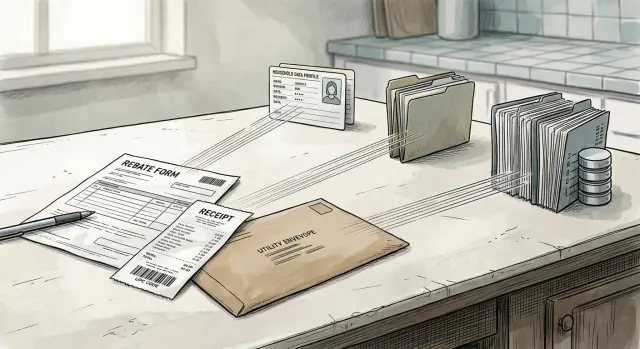
Why a rebate form can follow you for years
A rebate form feels temporary. You buy something, send your name, address, email, and receipt, then wait for the payment. It looks like a one-time exchange.
It usually is not.
That submission can turn into a record that moves through several companies and stays in databases long after the rebate ends. The brand may sponsor the offer, but another company may process claims, another may issue the payment, and others may handle fraud checks, reporting, or ad measurement. Later, pieces of that trail can end up with data brokers too.
Once the form is digital, it is easy to copy, sort, and match. Your address can connect to past purchases. Your email can connect to ad data. Your receipt can confirm what you bought, when you bought it, and sometimes where. No single company needs the whole story. A few matching details across different systems can do the job.
That is how a rebate becomes a household profile. It stops being "one person claimed $20 back" and starts looking more like "this home buys baby products" or "this address responds to appliance offers." One small form can help confirm who lives there, what they buy, and how they shop.
The real problem is the time gap. You may forget the form in a week. The record can stay useful for months or years because companies still want it for accounting, fraud review, audience matching, or resale. The rebate ends quickly. The data trail usually does not.
What a rebate form usually collects
A rebate claim looks simple, but it often gathers more than people expect. The issue is not one field. It is the full bundle of details collected at once.
The first layer is basic contact information: your full name, home address, email, and phone number. Each piece may seem harmless on its own. Together, they point to a real person at a real household.
Then come the purchase details. A receipt can show the store, date, price, product name, model number, and sometimes a UPC or serial number. That tells the processor what you bought, when you bought it, and how much you spent.
The form can also reveal household clues without asking directly. A shared last name plus a street address can suggest who lives together. The product itself can say a lot too. A rebate for a baby monitor, air fryer, printer, or allergy medicine can hint at life stage, income, habits, or family setup.
Online forms often collect a second layer in the background. That can include your IP address, browser type, device details, cookies, and the exact time you submitted the claim. If you start the form on your phone and finish it on your laptop, that may create two related records instead of one.
Optional fields are where people often give away extra information for no real benefit. Common examples are a second email address, a mobile number for "updates," a birth date, gender, shopping preferences, or survey answers. Many people fill them in out of habit, or because leaving a box empty feels wrong. A better question is simple: does this field help them send the rebate, or does it only help them learn more about me?
Even the uploaded receipt matters. It may show the last four digits of a card, loyalty program details, the store location, and other items bought in the same trip. By the time you finish, the submission can look less like a coupon request and more like a small household file.
Who handles the data after you hit submit
The brand on the rebate page is often just the name you recognize. After you submit the form, your details may pass through a brand, a rebate processor, retail or marketing partners, and outside vendors that help match records across systems.
The rebate processor is usually the busiest part of the chain. It checks whether your purchase fits the rules, confirms the date, product, store, and receipt, and flags duplicate claims. To do that, it may keep your name, address, email, phone number, receipt image, and product details even after the rebate is approved or denied. That is useful for fraud checks and customer support. It also means the record can stay around longer than most people expect.
The brand may then receive a cleaned-up version of that data for reporting. Instead of seeing only that one person got a rebate, it can learn that a household at a certain address bought a certain product at a certain store during a certain campaign. If the brand already works with loyalty programs or ad measurement partners, the rebate record can be compared with older purchase or marketing data.
Sometimes a partner does not need the whole form to identify you. A few matching fields can be enough. An email address, mailing address, ZIP code, phone number, purchase date, and product code can connect the rebate to an existing household file. In other cases, the data is converted into an internal ID or a hashed email and matched behind the scenes.
That is the part many people miss. You are rarely handing information to one company for one narrow purpose. You may be feeding several systems at once, and each one can keep a piece that still points back to your home.
How one submission becomes a household profile
A rebate claim starts as a one-time form, but the matching step is what makes it stick.
Most submissions include enough details to connect you to older records, even if your name is written a little differently or you used another email in the past. Street address, email address, phone number, and purchase details tied to a store or card are all strong match points.
The address is often the strongest link because it points to a home, not just one person. If a processor or partner already has data tied to that address, your rebate can be added to the same household file. That means one person buying a dishwasher or blender can help define the whole home as a certain kind of buyer.
Once that happens, the rebate may sit next to older records such as warranty cards, retailer data, public property records, or past marketing lists. Put together, those pieces can suggest how many adults live there, what brands the household buys, whether the home responds to discounts, and what it may buy next.
The file can keep changing over time. If someone else at the same address fills out another promotion later, the profile gets another update. If you change emails but keep the same phone number, or move and forward mail for a while, those signals can help connect the old record to the new one.
That is why rebate privacy matters. The issue is not only the first form you send. It is the way one small submission can keep feeding a household record long after the rebate check or gift card is forgotten.
A simple example: the blender rebate
Picture a simple kitchen purchase. You buy a blender for $89, and the box offers a $25 rebate if you submit within 30 days.
The claim looks harmless. You upload a receipt, type your name, home address, email, and maybe a phone number, then add the model number and a photo of the UPC from the box.
That one form gives different parts of the story to different companies.
The rebate processor gets the full packet. It can see who filed the claim, where that person lives, what product was bought, when it was bought, and which store sold it. If the form asks for contact preferences, it gets another clean way to reach the household later.
The brand learns something slightly different. It now knows that a real household bought its blender, responded to an offer, and cared enough about the discount to finish the claim. That behavior matters almost as much as the product itself.
The retailer may already know the same purchase through a loyalty account, a payment card token, or online order history. Once the rebate is approved, the purchase can be easier to match across records because the address, email, and item details line up.
A data vendor may not receive the whole form, but it may not need it. A matched email, mailing address, or household ID can be enough to attach labels like "small appliance buyer," "coupon responder," or "kitchen upgrade interest" to the home.
Months later, the rebate check is old news, but the record can still be active. The household starts seeing ads for mixers, air fryers, storage containers, and warranty offers. Printed mailers show up with cookware deals. In some broker listings, the home may now appear as a household tied to kitchen purchases, deal-seeking behavior, or recent product ownership.
That is how a one-time blender rebate becomes a longer profile.
How to cut down the trail
Good habits start before you type the first field. A rebate often looks like a quick task, but extra details can outlast the discount by a wide margin.
The easiest win is to pause for a minute and separate what the form needs from what it wants. Read the whole page before you start. Many forms mix required fields with optional ones, and they are not always labeled clearly. If the offer needs your name, receipt, and mailing address, leave out extras like birth date, income, shopping preferences, or survey answers unless you truly want to share them.
Using a separate email for promotions also helps. It keeps follow-up messages out of your main inbox and makes it easier to notice when that address gets reused later. If marketing emails start arriving from related brands or vendors, you have a better clue about where the sharing began.
Phone numbers deserve the same skepticism. If the form asks for one, check whether it is actually required. In many cases, email and mailing address are already enough to process the payment. A phone number gives companies one more strong identifier to match across systems.
The privacy notice matters too, even if it is dull. Look for plain signs that your data may be shared with partners, affiliates, or outside marketing companies. Pre-checked boxes deserve extra attention. They are an easy way to say yes to more tracking than the rebate needs.
Finally, keep a copy of what you sent. Save the confirmation page, the receipt, screenshots of the form, and any email that confirms your claim. That small record can save a lot of time later if you want to trace where your information may have gone.
None of this makes a rebate private. It does reduce the trail.
Mistakes that make tracking easier
A rebate form feels small. The mistake is treating it like a throwaway task.
One common slip is using your main email address, especially the one tied to banking, bills, taxes, or everyday shopping accounts. That address is a strong identifier. If it already appears across retailers, loyalty programs, and older purchases, it becomes much easier to connect this rebate to the rest of your history.
Another mistake is checking every marketing box just to finish faster. Those boxes may allow messages from the brand, the rebate processor, or other partners. One quick yes can open the door to much more tracking than the payment itself requires.
People also upload too much. A full receipt photo may reveal the last four digits of a card, other items in the cart, the store location, the transaction number, and the time of purchase. If the form only needs proof of the item and date, sending the whole receipt gives away more than necessary.
A lot of shoppers assume a familiar brand keeps the data in one place. Usually it does not. The brand may rely on a rebate processor, a fraud vendor, marketing partners, and outside matching services. That does not automatically mean anything improper happened. It just means more hands may touch the data than most people expect.
Paper forms do not solve this either. A mailed rebate can still be scanned, entered into a system, matched to other records, and stored for later use. Offline paperwork often ends up in the same kinds of databases as online submissions.
The safer habit is simple: give the least information you can, skip extras, and read the consent boxes before you click. Saving $20 on a toaster is nice. Building a long-term household file by accident is not.
Quick checks before and after you submit
A few small checks can make a real difference.
Before you submit, look at every field one more time. If something is optional, leave it blank unless there is a clear reason to fill it in. Pay close attention to phone number requests and survey questions. They often help profile you more than they help process the rebate.
Also check who is actually running the offer. The brand on the box is not always the company handling the form. The fine print may name a rebate processor, fulfillment company, or separate privacy policy. That name often tells you more about where the data may go next than the logo at the top of the page.
Take a screenshot before you send the form and save the terms if they appear on the page. After you submit, keep the confirmation email, submission date, and any claim number. This takes two minutes and gives you a paper trail if you later need to challenge a marketing use or compare what you shared with what shows up elsewhere.
Then watch what happens over the next few weeks. If you start getting new mailers, coupon books, warranty pitches, or marketing emails tied to that product category, pay attention. A blender rebate followed by kitchen offers is not proof by itself, but it is a useful clue.
What to do if you already sent one
If you already submitted a rebate, do not assume the trail is permanent. You can still clean up part of it.
Start with your own records. Search old inboxes for rebate emails, confirmations, attached PDFs, and shipping notices. If you mailed a paper form, look for photos, scans, or even the product box if it listed the claim address and terms.
Write down exactly what you used on the form: full name, email, phone number, home address, and any alternate contact details. Small differences matter. If you used a second email or an old apartment number, that version can still show up in a broker file later.
Next, search large people-search and broker sites for your contact details. Try a few combinations, such as your name plus city, your phone number, or your address by itself. If your information appears, file opt-out requests where you can. Some sites remove records quickly. Others make you work for it.
Keep a short log while you do this. Note which site showed your data, what details were listed, when you sent the opt-out, whether the record disappeared, and when you plan to check again. Re-listings are common, especially when brokers buy fresh data from another source.
If you do not want to chase those sites one by one, Remove.dev can take over much of that cleanup. It finds and removes personal information from more than 500 data brokers and keeps monitoring for re-listings, which is useful when one purchase starts feeding wider consumer data sharing.
This is also a good time to watch for repeat exposure. If the same phone number and address keep appearing together, that usually means the household record is still moving between vendors. A simple log makes that pattern easier to spot and easier to deal with.
FAQ
Is a rebate form really a privacy risk?
Yes. A rebate form can outlast the offer because it often includes your name, address, email, receipt, and product details. That bundle can be stored, matched to older records, and used to build a household profile long after the payment arrives.
What does a rebate claim usually collect?
Most claims ask for your full name, home address, email, and proof of purchase. Many also capture product details, store info, submission time, and, on online forms, device or browser data in the background.
Who gets my data after I submit a rebate?
Usually more than one company. The brand may sponsor the offer, but a rebate processor, payment vendor, fraud checker, and marketing or matching partners may each handle part of the record.
Why does my home address matter so much?
Your address ties the claim to a home, not just one person. That makes it easier to connect your rebate to other purchases, past mailings, and records tied to the same household.
Can I skip the optional fields?
In most cases, yes. If a field is not required to send the rebate, leaving it blank cuts down what can be stored and shared. Birth date, survey answers, shopping preferences, and extra contact details often help profiling more than payment.
Should I use a separate email for rebate forms?
A separate email is a smart default for rebates and promotions. It keeps your main inbox cleaner and makes it easier to spot when that address starts getting reused for marketing.
Can my receipt expose more than I expect?
Often, yes. A receipt can show the store, time, transaction number, other items you bought, and sometimes the last four digits of a card or loyalty details. If the form only needs proof of the item and date, sharing the full image may reveal more than needed.
Are paper rebate forms safer than online ones?
Not really. A mailed form can still be scanned, entered into a database, matched to other records, and kept for later use. Paper may feel less exposed, but the data can end up in the same kind of systems.
What should I keep after I submit a rebate?
Save the confirmation page, claim number, receipt copy, and any emails tied to the submission. Those records make it much easier to trace what you shared and deal with problems later.
What can I do if I already sent a rebate form?
Start by checking old emails and writing down the exact name, address, phone number, and email you used. Then look for that information on people-search and broker sites and send opt-out requests where you can. If you want help doing that at scale, Remove.dev can remove your data from hundreds of brokers and keep watching for re-listings.