What to redact on proof documents before sharing them
Learn what to redact on proof documents like court notices, leases, and utility bills so you can verify your address without exposing extra private data.
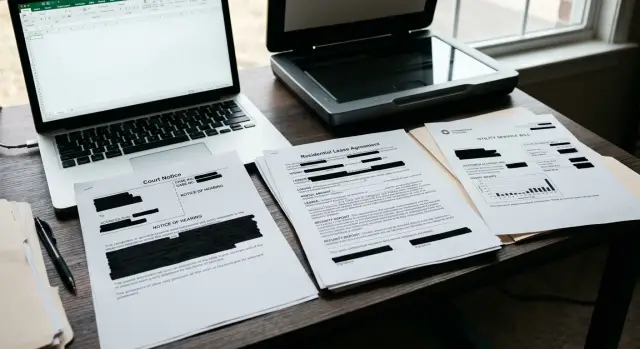
Why these documents need extra care
Court notices, leases, and utility bills often show far more than a reviewer needs. One page can reveal your full legal name, home address, account number, payment history, case number, landlord details, and even other people's names.
When you use one of these files as proof for a removal request, the goal is usually narrow: confirm who you are or where you live. Everything else should stay private unless the request clearly asks for it.
This is where screenshots cause trouble. A cropped image can still leave a barcode, reference number, or balance visible in the corner. Some files also keep hidden text layers or metadata that do not show on screen but still travel with the upload. A document can look clean and still expose more than you meant to share.
Each document type has its own risks. Court notices can reveal case details that have nothing to do with identity. Leases can expose rent, signatures, landlord contact details, and the names of roommates or family members. Utility bills often include account numbers, service IDs, usage data, and payment status. If the reviewer only needs proof of address, most of that is unnecessary.
A narrow rule works well: leave visible only the lines that confirm your name, address, document date, and anything the request specifically requires. Hide the rest.
A quick gut check helps. If a stranger saw the page for five seconds, what could they learn about your life beyond your address? If the answer includes finances, legal matters, household members, or account access details, the file needs more work before you send it.
That extra minute is worth it. Once a full document is uploaded, copied, or forwarded, you usually cannot pull those details back.
What needs to stay visible
People often worry so much about redacting a document that they cover the parts a reviewer actually needs. The file still has to prove something.
In most cases, keep your full name visible exactly as it appears on the document. If the request is tied to a specific address, that address also needs to stay readable. If either one is blurred, cropped, or partly covered, the proof may fail.
The date matters too. Many removal requests require something recent, not a notice or bill from years ago. If the document shows an issue date, statement date, notice date, or lease date, keep that part clear.
You should also leave the issuer visible. On a court notice, that means the court name. On a lease, it may be the landlord or property company. On a utility bill, it is the utility provider. Without that context, the page can look like a random document with a name and address on it.
Usually, the best version is not the full document. It is the smallest page or section that answers four questions: who is it for, what address does it confirm, when was it issued, and who issued it.
If those answers are easy to read, you can usually hide a lot more around them.
What to redact on court notices
A court notice can prove your name and address, but it often carries much more private detail than a removal request needs. Trim it hard.
Start with the case number. In many systems, that number can be used to look up filings, hearings, or other records. If the reviewer does not clearly ask for it, cover it.
Look closely at names. Court papers may list the other party, witnesses, attorneys, clerks, or other people in a header, footer, or mailing block. Those names do not help prove your address, and leaving them visible can expose someone else's information too.
Dates need judgment. A general notice date may need to stay visible if the document must look recent. Hearing dates, filing times, service details, continuance notes, and internal routing marks usually do not belong in the shared copy.
Machine-readable elements are easy to miss. Barcodes, QR codes, tracking marks, and internal reference numbers can point to more information than the page shows at a glance. Redact them completely, not with a thin box that still leaves edges visible.
If the notice includes pages explaining the dispute, charge, or filing history, do not send those pages unless they are required. For proof purposes, the story behind the notice is usually irrelevant.
A safe rule for court notices is simple:
- Keep the page that shows your name, address, issuer, and a recent date if needed.
- Hide case numbers unless the request clearly requires them.
- Hide other people's names, contact details, hearing details, and tracking codes.
- Leave out pages that explain the dispute or filing history.
If the redacted notice still feels too revealing, use a different proof document. A utility bill is often easier to clean up safely.
What to redact on leases
A lease can prove your address, but it also exposes a lot of details nobody needs for a simple review. Full leases are one of the most common overshares.
As a rule, if a line does not help confirm your name, your address, or the lease date, it probably does not need to stay visible. That usually means covering landlord phone numbers, email addresses, mailing addresses, and payment instructions. It also means hiding rent, security deposit, late fees, concession terms, and other money details.
Leases often reveal other people too. Shared agreements may include roommates, guarantors, co-signers, or emergency contacts. If only your own proof is needed, cover the other names before you send the file.
Do not forget signatures and initials. People often redact the financial section but leave handwritten signatures, initials in page corners, lease IDs, and reference numbers untouched. Those details can still be copied or matched later.
Extra pages usually do not help. Parking rules, pet addendums, appliance lists, move-out fees, and similar attachments may have nothing to do with proving the address. If one page already shows your name, the property address, and the lease date, sending the rest just adds risk.
Payment details deserve special care. A lease can show how much you pay every month, where payments should be sent, and sometimes bank or portal information. None of that helps with proof of address redaction.
If your lease runs 20 pages, do not assume all 20 belong in the upload. One clean page is often enough.
What to redact on utility bills
A utility bill is often the easiest proof document to use, but it still carries more data than most reviewers need.
Start with anything tied directly to the account. That includes the full account number, customer ID, billing reference, service point number, and meter number. These often appear more than once, especially in the summary box, footer, and payment section.
The payment area needs close attention. Redact the payment stub, barcode, QR code, scan-to-pay section, and any autopay or bank-linked details. Even the last few digits of a linked account can reveal more than you want to share.
Usage data is another common overshare. Bills often include daily or hourly charts, due amounts, past balances, and payment history. If the reviewer only needs proof that you live at the address, those details do not help.
For a clean utility bill redaction, keep the provider name, your name, the service address, and the bill date visible. Hide the rest unless the request asks for something specific.
A quick example makes the point. If you use an electric bill to prove your address, the reviewer does not need to see that your account ends in 4821, that you used 614 kWh last month, or that you pay by bank draft on the 12th. They only need enough to match your name and address.
Before you upload, zoom in and scan every corner of the page. Utility bills often repeat the same sensitive details in small print.
How to redact a document safely
Start with the original file when you can. A PDF from the sender is better than a screenshot, and a clear scan is better than a blurry phone photo. Screenshots often cut off details, lower image quality, and make it harder to tell what was actually removed.
Before you redact anything, make a copy and decide what the reviewer truly needs to see. For most proof documents, that means your name, address, date, and issuer. Choose those first. Then cover everything else that is not needed, such as account numbers, case numbers, barcodes, balances, signatures, or other people's names.
Use real redaction, not a black box
The safest method is a tool that applies redaction to the file itself. A drawn rectangle or marker-style shape can look fine on screen while leaving the text underneath intact. If the text is still selectable, searchable, or recoverable, it was never really removed.
A simple process works well:
- Open the original PDF or a clear scan copy.
- Mark the few details that must stay visible.
- Apply redaction to the sensitive fields with a proper tool.
- Save or export a fresh copy so the hidden content is removed.
- Reopen the final file and test it.
If you are doing proof of address redaction, this step matters a lot. A utility bill with a black shape over the account number is not necessarily safe.
Check the finished file
After saving, open the new file and test it. Try to select text inside the redacted area. Try search too. If hidden text still appears in search results, or if you can paste it elsewhere, the redaction was only visual.
Zoom in and inspect the covered areas. Make sure there is no faint text underneath. If the file has more than one page, check every page. People often redact page one and forget page two, or hide the main text but leave the same details in a footer, barcode, attachment, or file name.
A good redaction leaves only what the request needs and nothing extra.
A simple example
Say a renter needs proof of address for a removal request and chooses a recent utility bill.
They keep the details that do the job: their name, the service address, the bill date, and the utility company name. Then they redact the account number, usage graph, payment barcode, and payment section. Those details add risk without helping the review.
Instead of uploading the full statement, they send one clean page. That is often the safer move. Extra pages can include payment stubs, mailing notes, or older account details that have nothing to do with the request.
The original file stays private. If a follow-up check happens later, they still have the untouched document stored safely and can send more proof if asked.
That is the basic rule behind what to redact on proof documents: leave visible only the facts that confirm identity, address, and date. Hide the rest.
Common mistakes that expose too much
Most privacy slips happen before anyone reads the document. The file looks redacted, but the hidden details are still there.
The most common mistake is using black boxes or marker-style shapes that only cover text on screen. In many PDFs and image editors, the original words still sit underneath and can be copied, searched, or revealed in another app.
Another common mistake is sending the whole document when one page would do. A utility bill may prove your address on page one while page two shows account history or service notes. The same problem shows up with leases and court notices.
File names cause trouble too. A name like "court-case-june-final" or "lease-dispute-signed" gives away private context before the document is even opened. Keep the file name plain, such as "proof-document-1".
People also miss the details that are not front and center. Page two, attachments, back pages, scanned notes, footers, and payment slips often get overlooked. That is how account numbers, landlord details, case references, and signatures stay visible by accident.
There is also the problem of leftover originals. If you snap a photo, upload it to cloud storage, and then crop it, the uncropped version may still sit in backups or sync folders. The same can happen with scanner apps and phone galleries.
Redaction is more than covering sensitive lines. It also means removing extra pages, attachments, and copies you do not need to share.
Quick check before you upload
Before you send anything, do one last review. Most leaks happen at the end, when a document looks clean but still contains hidden text, extra pages, or a revealing file name.
Keep the parts that prove what needs to be proved. In most cases, your name, address, date, and issuer should still be easy to read. If one of those is too blurred or cropped, the document may be rejected.
Then scan for numbers in corners, headers, footers, barcodes, and page references. Case numbers, account numbers, meter numbers, and lease reference numbers should usually be hidden unless the request clearly asks for one.
Use this checklist before uploading:
- Keep your name, address, date, and issuer visible.
- Hide case, account, meter, and reference numbers.
- Remove extra pages, attachments, and unrelated details.
- Save a fresh copy so hidden text cannot be searched or copied.
- Rename the file with a plain name, like "proof-address.pdf".
Check the final saved file, not just the editing view. Open the exact PDF or image you plan to upload and try to search, select, or copy text from the redacted area. If text still appears, the redaction was only visual.
This is where people often misunderstand proof of address redaction. A utility bill may still show usage history or a meter ID. A lease may still include signatures, payment terms, or landlord contact details on a second page. A court notice may repeat a case number on every page.
What to do after you prepare the document
Once the file is redacted, treat it as a separate document with one job only. Keep the redacted copy apart from the original and apart from any version you used elsewhere. That lowers the chance of sending the wrong file later.
For document-based removal requests, less is better. Send the smallest document that proves what you need. If one page works, do not upload the full packet. If a cropped section clearly shows your name and address, that is usually safer than sending every page of a lease or notice.
It also helps to keep a basic record: where you sent the file, when you sent it, and which version you used. A proof document can be reused by accident months later, long after you forgot what it contained.
If a broker rejects the file, do not rush to send a larger document right away. First check what was missing. Many rejections come down to a blurry date, a cropped issuer name, or a redaction that covered too much around your address.
If repeated requests start eating up too much time, Remove.dev can handle removals across over 500 data brokers and lets you track each request in one dashboard. Even then, cleaner proof documents usually mean fewer follow-up questions.
The safest habit is simple: keep the original private, share the smallest redacted copy that works, and know exactly where it went.
FAQ
What should stay visible on a proof document?
Usually your full name, address, document date, and the issuer should stay visible. Keep only the smallest section or page that proves those facts and cover the rest.
Should I redact the case number on a court notice?
Yes, in most cases. A case number can expose filings or other court details, so hide it unless the request clearly says they need it.
Can I use a screenshot of my bill or notice?
A screenshot is often a poor choice. It can leave corners, barcodes, hidden text, or metadata behind, so a PDF or clear scan is safer if you can use one.
What is the safest way to redact a document?
Use a tool that actually removes the content from the file, then save a fresh copy. If the covered text can still be selected, searched, or pasted, it was only hidden on screen.
Do I need to send the full lease or full bill?
Yes, one clean page is often enough. If that page shows your name, address, date, and issuer, sending more pages usually adds risk without helping the review.
What should I redact on a utility bill?
Hide the full account number, customer or service IDs, payment stub, barcode or QR code, usage charts, balance details, and payment history. Leave the provider name, your name, service address, and bill date visible.
What should I hide on a lease before sharing it?
Cover rent, deposit, late fees, payment instructions, signatures, initials, lease IDs, and landlord contact details. If other tenants, guarantors, or family members are listed, hide their names too unless the request asks for them.
How do I check that my redaction really worked?
Open the final saved file and test the covered areas. Try search, text selection, and copy-paste; if anything still shows up, redo the redaction.
Can the file name or metadata leak information?
Yes, they can. A name like "court-case-final" or an old upload with hidden layers can give away private details before anyone reads the document, so use a plain file name and share only the finished copy.
What if my proof document gets rejected?
First, check what was missing. Many rejections happen because the date, issuer, or address was blurred or cropped, not because the file was too small. If repeated requests start taking too much time, Remove.dev can handle removals across over 500 data brokers while you track each request in one dashboard.