Data broker relist vs new source: how to tell fast
Use wording, timestamps, and record layout to judge a data broker relist vs new source before you send another removal request.
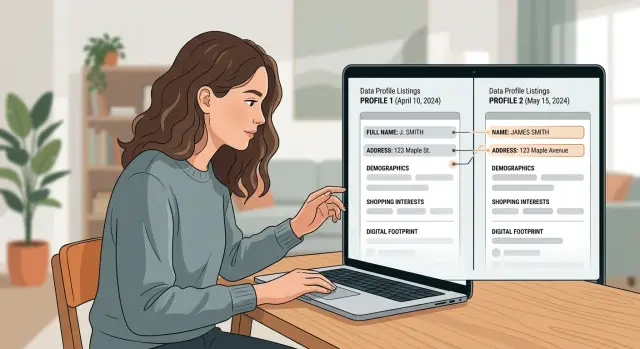
Why this is easy to misread
A quick glance can fool you. The same person can appear on dozens of broker sites, and many of those pages look similar enough that a relisted record can feel brand new.
The confusion starts with volume. Your name, age range, old addresses, relatives, and phone numbers can show up across many databases at once. When another page appears with the same mix of details, it's easy to think, "new broker, new source." Sometimes that's true. Often, it's the same record moving around again.
Small surface changes make this harder. A broker might add a new "updated" date, rearrange the page, shorten a street name, or swap one label for another. None of that proves the data is new. It may be the same profile returning after a prior removal, or the same record rebuilt from an older feed.
Another problem is overlap. Many brokers do not pull from fully separate pools of information. They buy, trade, scrape, or copy records from the same sources. So two different sites can publish nearly identical profiles even if neither got the data from you directly.
Wording changes add more noise. One page says "current address," another says "possible address." One lists a full birth year, another only an age. One shows three relatives, another shows two. Those edits can hide the fact that the record underneath is basically the same.
A bad call costs time. If you treat a relist as a new source, you may send repeat requests and chase the same record twice. If you treat a truly separate broker as just another relist, one live listing stays up.
This happens a lot when people do removals by hand. Even if you use a service like Remove.dev to keep checking for re-listings after removals, you still need to read the signs carefully before deciding what changed. A fresh timestamp alone is weak evidence. So is a different site name.
Signs it is a relist
A relist usually looks less like fresh data and more like an old page put back online. The date may be new, but the details feel copied. If you're trying to sort out a relist versus a new source, sameness matters most.
Start with the wording. If the same phrases appear across several fields, that's a strong clue. Maybe one listing says "current city" while another says "lives in." That can matter. But if both pages use the same unusual wording, the same abbreviations, and the same way of writing your name, one record likely came from the other.
Order matters too. Brokers do not just collect facts. They package them in patterns. When the same relatives appear in the same order, that often points to a copied record. The same goes for past addresses. If an old page lists Address A, then Address B, then Address C, and the newer page follows that exact sequence, it usually looks more like a relist than a separate source.
A few clues often show up together:
- The same age range or birth year appears on both pages.
- Relatives are listed in the same order.
- Old addresses appear in the same sequence.
- Odd spelling, missing initials, or strange punctuation match exactly.
- The profile repeats the same niche detail, such as a middle initial or apartment format.
Copied mistakes are especially useful. A typo can act like a fingerprint. If one page writes "Jonh" instead of "John," or uses a comma in a strange place, and the newer page does the same, that is rarely random.
A simple example makes this clearer. An older listing shows "Michael R Smith," age 42-44, with two relatives and three past addresses in a specific order. A new listing appears two months later with the same age range, the same relatives in the same order, and the same stray comma after the last name. Even if the layout changed, that still looks like the old record coming back.
This is why saved screenshots help so much. They let you compare the shape of the record, not just the facts inside it. If you already track removal history somewhere, that comparison gets much easier because you are not relying on memory.
When a broker really pulls your data from somewhere new, some details usually shift. A relist is often much lazier. It tends to repeat the same record almost line for line.
Signs it is a different source
A relist often looks like the old page with minor edits. A different source usually changes the bones of the record. The contact details shift, the layout follows a different pattern, or the listing contains facts the older page never showed.
One strong sign is a new block of data that does not look recycled. If the older page had a name, age range, and one city, but the newer one adds past relatives, property data, or a second email, that extra material may have come from another feed. Small wording changes happen all the time. Entire new sections usually mean more than a simple relist.
Phone numbers and emails deserve extra attention. If the first listing shows one mobile number and the newer page shows a landline you have never seen, that is hard to explain as a cosmetic update. The same goes for email addresses. A broker using a separate source often gets a different mix of old and current contact details.
Address history can tell the same story. Maybe the older page showed your current address and one previous city. Then a new listing appears with three older addresses, including a place you lived ten years ago. That longer history may point to a source with deeper archive records, not just a copied page brought back online.
Field order is easy to ignore, but it can tell you a lot. If one page always runs name, age, phones, relatives, while the other starts with address history, household members, and then contact details, that pattern matters. A true relist may change a sentence or a timestamp. It usually does not rebuild the whole page in a different structure.
Profile IDs can help too. If the old record used a short numeric ID and a plain person card, while the new one uses a long mixed ID with a very different template, you may be looking at another data feed entirely. In these cases, structural differences often matter more than a fresh date stamp.
If two or three of these clues appear together, treat the page as a separate source until you can prove otherwise. That is usually safer than assuming one removal request covered both.
How to compare two listings
Save both versions before you do anything else. A broker page can change within hours, so take screenshots, copy the text into a note, and save the page title and date you saw it. If one listing disappears later, you still have something solid to compare.
Then do the easy checks first. Look at the page heading, the labels used on the page, and the order of the fields. If both pages place details in the same sequence, such as name, age, address history, relatives, then phone numbers, that is often a sign you are looking at the same broker record again.
A quick review works well in this order:
- Compare the heading, subheading, and field order side by side.
- Mark any phrases that match word for word, especially unusual wording.
- Check "first seen" and "updated" dates as separate clues.
- Write down any data that is actually new, not just moved around.
- Decide whether it looks like the same record returning or a separate source.
The wording matters more than many people think. Common facts like your name or city do not tell you much, because many brokers can have those. Exact matches do. If both listings use the same odd phrasing, the same middle initial format, or the same typo in a street name, that usually points to a relist.
Dates need a careful look. A newer "updated" date does not always mean a new source. Brokers often refresh old pages after changing the layout, pulling in one new field, or simply reprocessing the same record. A different "first seen" date can matter more, especially if the record structure also changes.
Make a short list of what is truly new. Keep it strict. A changed font, a moved field, or a fresh timestamp is not new data. A new phone number, a different relative, an address that never appeared before, or a second email can be.
If almost everything matches and the only changes are layout or update date, treat it as a relist. If the structure is different and you see facts that never appeared on the older page, you are probably looking at a separate source. That small pause before acting can save you from sending the wrong request.
A simple example
Say you saved an older broker page for Anna Lee. It lists her age as 38 and shows two past cities: Phoenix and Tempe.
A few weeks later, you find what looks like a new listing. At first glance, it feels different because the page has a newer "updated" date. That can fool people fast.
Look closer. The second page still says Anna Lee, age 38. It uses the exact same wording for both past cities, in the same order. The relatives section also matches line for line, with the same three names in the same order.
That pattern matters more than the fresh date.
If two pages match on details like these, you are probably not looking at a different source:
- the same age
- the same city wording and order
- the same relatives in the same order
When all of that stays fixed, the newer date often means the broker refreshed, reindexed, or republished the same record. In a relist versus new-source check, that usually lands on the relist side.
Separate sources tend to leave small fingerprints. One may shorten a city name, another may add a county, and another may reorder relatives or drop one person. Even when the facts are similar, the structure usually shifts a little. Exact repetition is harder to explain as a totally new source.
The date by itself is weak evidence. Brokers update templates, refresh search indexes, and repost records without changing the underlying data. A new timestamp can mean "this page was touched again," not "this profile came from somewhere else."
A simple rule helps: if the content is cloned and only the date changed, treat it as the same listing until you see a real data change.
If you use a tracking service like Remove.dev, this is where the history view helps. You can check whether the older listing was already removed and whether the same profile came back with only a fresh date. If that is what happened, handle it as a repeat removal rather than a separate new-source case.
Mistakes that lead to the wrong call
Most bad calls happen because people lock onto one clue and stop there. Usually that means they see an updated date, notice a different brand name, and assume the case is solved.
That shortcut causes trouble. Brokers often refresh pages, rename fields, or republish the same record after a removal request. On the surface, it looks new. Underneath, it may be the same data in a slightly different wrapper.
Trusting the date on its own is the most common mistake. An updated timestamp can mean the page template changed, the broker reindexed old records, or the listing was touched by an automated process. It does not prove the broker found fresh personal data.
A different broker name can mislead you too. Some brokers buy, license, or copy from the same upstream source. If two listings share the same rare spelling, the same odd abbreviation, or the same formatting quirk, the new name may not matter much. A typo like "Micheal" instead of "Michael" is often more useful than the logo at the top of the page.
People also get fooled by layout changes. A mobile version may stack fields in a different order, hide some details behind tabs, or shorten labels. That does not make it a different record. Desktop and mobile pages often present the same facts in different shapes.
The same thing happens when facts are rearranged. One page may show the full address on one line, place age near the name, and move relatives to the bottom. Another may split the address into separate fields, place relatives first, and swap "DOB" for "birth year." If the underlying facts match, the presentation changed more than the data did.
Another trap is ignoring strange repeats. Unusual abbreviations such as "Ctr" instead of "Center," an old apartment number style, or a repeated wrong county name can act like fingerprints. If those details carry over, you may be looking at a relisted record, not a clean new source.
Before you act, compare the wording, the order of facts, and the odd little errors. If you already keep removal history, check the earlier request record first. That extra minute can save you from filing the wrong complaint or missing a real new source.
A quick check before you act
When a page looks new, the first guess is often wrong. A short pause can save you from treating the same record like a fresh source.
The fastest way to sort it out is to compare a few plain details before you send another removal request, close the old case, or assume the broker found new data.
Use this short check:
- Look for at least three fields that match exactly. A full name, street address, phone number, email, or even the same misspelling can tell you a lot.
- Compare relatives, age, and past cities. If most of that set matches, especially in the same order, the page often points to the same record.
- Check the date fields closely. If the only real change is the timestamp, crawl date, or "updated" label, that usually leans toward a relist.
- Scan the page structure. The same headings, field order, empty sections, and wording quirks often mean the newer page came from the older one.
- Save proof before you do anything. Keep screenshots of both pages, including the date shown on the page and the browser bar if possible.
One exact match is not enough. Two common details are not enough either. A name and city can match by chance, especially for common names.
What carries more weight is a cluster of details that line up. A rare surname, the same two relatives, the same past city, and the same layout usually tell a clearer story than a single date stamp ever will.
Screenshots matter more than most people expect. Brokers change pages, merge records, and remove lines after a request. If you do not save the older version first, you lose the easiest side-by-side check.
A simple rule helps here too: if the facts are mostly the same and the page shape is nearly identical, treat it as a likely relist until you find a real difference. A real difference is something like a new phone number, a different age range, a different set of relatives, or an address history that was not on the older page.
If you track removals in a tool like Remove.dev, keep the earlier request details or screenshots handy. That makes it much easier to spot whether a broker reposted the same record or pulled from somewhere else.
Take one minute, compare the record, then act. That minute is often the difference between a clean removal trail and a messy one.
What to do next
Once you have a rough answer, do two things right away: act on the listing and save enough proof that you do not have to re-check it from scratch later.
If it looks like a relist, treat it as the return of the same problem. Note the date you first saw it removed, the date it came back, and any small changes on the page. That gives you a clean record if the broker later claims the listing is new when it clearly is not.
If it looks like a separate source, send a fresh removal request. A different source often means the data came from another broker, a public-record feed, or an older database dump. In that case, arguing over the old request usually wastes time.
Keep your notes short. You do not need a huge spreadsheet. You just need one place where you can see what matched and what changed.
A simple record should include:
- screenshots of both listings
- the dates you found them
- the fields that stayed the same, such as name, city, age range, or relatives
- the fields that changed, such as timestamp, layout, record ID, or source wording
- the status of each removal request
This matters most when the answer is not fully clear on day one. A short record lets you make a reasonable call now, then check again later without starting from zero.
Try to keep everything in one folder, doc, or dashboard. Mixing screenshots in your phone, dates in email, and requests in browser tabs gets messy fast. Even a basic system can save you time the next time the same name appears.
If you are doing this by hand, set a reminder to check again after the broker says the record was removed. Some listings disappear, then quietly return days or weeks later.
If you do not want to keep checking relists yourself, Remove.dev can handle that part. It automatically finds and removes personal information from more than 500 data brokers, keeps monitoring for re-listings, and shows each request in one dashboard. That is especially useful when the same record keeps coming back.
The next move is simple: log what you saw, file the right request, and make it easy to spot a return later.
FAQ
What does a relist actually mean?
A relist is usually the same broker record showing up again after it was removed or hidden for a while. The page may have a fresh date or a slightly different layout, but the underlying details are mostly the same.
Does a new updated date mean the broker found new data?
No. An updated date often just means the broker refreshed the page, changed its template, or reprocessed old data. If the facts stayed the same, treat the date as a weak clue on its own.
What signs usually mean it’s the same record coming back?
Look for clusters of exact matches. The same age range, the same relatives in the same order, the same past addresses in the same sequence, or the same odd spelling usually point to a relist.
When should I treat a listing as a separate source?
A different source usually changes more than the timestamp. New phone numbers, new emails, older addresses that were never shown before, or a very different page structure often mean the data came from another feed.
What should I save before I file a removal request?
Save both versions right away. Take screenshots, copy the page text into a note, and keep the page title and the date you saw it. That gives you something solid to compare if the broker edits or removes the page later.
How do I compare two broker listings fast?
Start with the page shape, then move to the facts. Compare the heading, field order, labels, and record ID if you can see one, then check for truly new details like a phone number, email, or address that was not on the older page.
Do layout changes mean it’s a new source?
Usually not. Brokers often change labels, stack fields differently on mobile, or move sections around without changing the record itself. If the same facts and odd quirks still match, it is probably the same listing in a new wrapper.
Can a typo help me tell if two pages are related?
Yes. Copied mistakes are one of the best clues you can get. If two pages share the same typo, strange punctuation, or unusual abbreviation, that is often a sign one record was copied or republished.
What if I’m still not sure which one it is?
Use a simple rule: if the content is mostly cloned and you do not see real new data, treat it as a relist for now. Log what matched, save proof, and check again before sending the wrong request.
Can Remove.dev help with relists and repeat checks?
Remove.dev can help by finding and removing personal data from more than 500 brokers, then watching for re-listings after removal. You can track each request in one dashboard, and most removals finish within 7 to 14 days.