Remove address from neighborhood apps and HOA pages
Learn how to remove address from neighborhood apps by checking profile settings, member pages, guest access, and cached copies that keep old data visible.
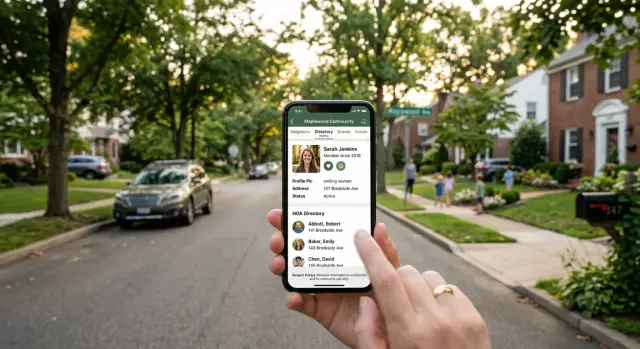
Why local platforms expose your home address
Neighborhood apps and HOA portals usually work from one basic idea: real residents use real addresses. During signup, many ask for your street address, unit number, and sometimes the names of other people in your household to verify residency. That feels normal when you want updates about packages, gates, or meetings.
The trouble starts when that same information gets reused in places you did not expect. An HOA tool might pull the address you entered into a member directory, a building roster, or a household contact card. Some systems do this by default. Others hide the setting in profile options, so people never notice their address is visible to the whole community, or to anyone with a shared invite link.
Privacy settings can also create a false sense of safety. A page marked private can still be copied, screenshotted, saved by a browser, or picked up by an internal search tool. If someone downloaded the directory as a PDF or spreadsheet before you changed the setting, your address can keep circulating anyway.
Older activity creates a second problem. You might remove your street number from your profile and still find it attached to a lost pet post, a garage sale notice, a reservation request, or a comment from last year. Local platforms are full of small pages like that, and they are easy to miss.
That is why removing an address from neighborhood apps is rarely a one-click job. You are not changing one profile field. You are dealing with signup data, directory entries, cached pages, and old posts that still carry the same details.
A simple rule helps: if a local app asked for your address once, assume it stored that address in more than one place. No need to panic. Just check beyond the main profile page.
Where your address usually shows up
Start with the parts of the site other people can see with little effort. On most neighborhood apps, your address is not sitting in one obvious box. It gets repeated across pages you forgot you ever touched.
The first place to check is your profile card or resident page. Many apps show your street address, unit number, lot number, or a map pin next to your name. Some also create a separate resident page that feels harmless because it sits behind a login. It still means dozens or hundreds of neighbors can view it, copy it, or save screenshots.
HOA directories are another common spot. A board roster, committee list, volunteer page, or member directory may pull address details straight from the community database. Sometimes the full address appears. In other cases, it is trimmed to a street name and house number, which is still enough to identify your home quickly.
Your address can also show up in things you posted yourself. Marketplace listings, lost pet alerts, event pages, comments, and archived notices sent by email often include more detail than people realize. A casual line like "porch pickup at 18 Pine Lane, Apt 2" can outlast your profile settings by months or years.
Guest previews cause a bigger problem than most people expect. Some apps show a limited public version of member pages, invite screens, or signup prompts. Even if your full profile is private, a preview may still reveal your street name, neighborhood, or house number. Email digests can do the same thing when they summarize a post and include your location in the message.
Then there are search engines and cached copies. A page may be hidden now but still appear in search results, old snippets, or stored copies from an earlier version. That happens a lot with member pages, event listings, and posts that were public for a short time.
If your address was ever attached to your name, a post, or a neighborhood role, assume it may exist in more than one place. Check live pages, old posts, email versions, and search previews, not just the main profile screen.
How to hide it in your own account
Most neighborhood apps spread your address across profile settings, directory cards, map views, and contact details. Start with the settings you control.
Open three areas in this order: profile, privacy, and account. Different apps use different labels, but the job is usually split the same way. One page stores what you entered. Another controls who can see it.
Check every field that can reveal location
Look for your street address, unit number, building name, and any map pin tied to your home. Some apps let you hide the full address but still show a rough location on a neighborhood map. For many people, that is still too much.
Delete the street line, unit number, and any extra delivery notes if the app lets you. Turn off public address visibility and hide the map pin. Review directory and member card settings, not just the main profile page. If the app allows a shorter display name, that can help too. On a small HOA site, your full name plus a map marker is often enough for someone to figure out the exact home.
Then look beyond the profile form. Addresses often stay behind in places people forget: bios, signatures, saved replies, package instructions, pet profiles, or marketplace templates. One leftover line with delivery directions can undo the rest of your cleanup.
The last step is simple and worth doing. Log out, or open a private browser window, and view your profile as another person would. Check the member directory, your profile card, and any page preview inside the app. If your street number, unit, or map pin still shows up, the address is not fully hidden.
If you share the account with a spouse or roommate, ask them to view your profile too. Some HOA pages show more to logged-in members than they show to the public. That extra check catches a lot.
Check member pages and old activity
Changing the main profile is only the start. Old directory pages, comments, and photo posts often stay visible long after you flip one privacy setting.
Start with the member directory entry tied to your property. Some apps build that page from your account details. Others pull from a household record linked to the address itself. If the page shows your street, unit number, or full name next to the home, change it there too.
Shared accounts often cause trouble here. A spouse, partner, parent, or teen account may still show the same address even if your own profile is hidden. Check every account connected to the home, especially older ones no one uses much anymore.
The biggest leaks usually come from a few familiar places: directory listings for the household, family member profiles, old posts about yard sales or packages, comments with directions or gate codes, and photos that show a house number, mailbox label, or shipping sticker.
Old activity is easy to ignore because it feels harmless out of context. A post like "package left by the side gate at 14 Oak Lane" can stay searchable inside a neighborhood app for years. A comment under a plumber recommendation can do the same if you wrote, "We are the blue house across from the park."
Edit what you can instead of only deleting the newest posts. Changing a comment from exact directions to something general is often enough. If the platform does not let you edit old replies, remove them.
Photos deserve a close look. Zoom in before leaving anything public or members-only. House numbers on the curb, a parcel label on the porch, a school name on a backpack, or a street sign in the background can all point back to your home.
If you find several old mentions, make a simple note of each one before you start deleting. It is an easy way to avoid missing the same address on a family profile or an old thread you forgot you made.
What to do about cached and copied pages
Hiding your address on the original page is only part of the job. Old copies can stay visible in search results, image results, and on sites that copied the page before it changed.
A common example is an HOA member page or neighborhood directory that now shows less information, while Google still displays your street in the snippet. Sometimes the page is gone entirely and the old preview is still there. It is frustrating, but it can usually be fixed.
Start with a few plain searches. Try your full name with your street name, then your name with the neighborhood or HOA name. If your address is unusual, search the house number too. Check regular web results and image results. Old screenshots, directory PDFs, and event flyers can appear there even when the live page looks clean.
Before you report anything, take screenshots. Save the search result, the page preview, and the full page if it still loads. If the result shows your address in the snippet, capture that too. It gives you proof of what was public and makes support requests much easier.
Ask for stale copies to be cleared
If the page owner already removed your address, ask them to refresh or remove the outdated preview. Many platforms can request a new crawl so the old snippet disappears faster. If the page still exposes your address, ask for the page to be fixed first, then ask for the cached preview to be updated.
Copied pages need separate cleanup. A neighborhood app may fix your profile while a search engine, archive, or another site still shows the old version. Each copy usually needs its own request.
A simple process works well: search your name with your street and neighborhood, check both web and image results, save screenshots before reporting, ask the platform to remove the page or refresh the preview, and then check again a few days later.
Do not assume one request solved everything. Search caches often lag behind real changes. If the result is still there after several days, compare it with your screenshots and send a follow-up with the exact stale result.
A simple example
Maya joined her HOA app for ordinary reasons: pool hours, gate alerts, and meeting notices. During signup, she entered her name, phone number, and home address without thinking much about it.
The app used that information to build a member profile. Other residents could see it, and parts of it could still appear in search if the page was not locked down well.
A few months later, Maya searched her name and street address. She found her profile, but that was only part of the problem. An old yard sale post in the neighborhood feed still had her full address in the text, and the search result preview showed it clearly.
She fixed the profile first. In account settings, she hid the profile from other members, removed the street address field, and checked whether her phone number appeared anywhere else. That part was quick, but it did not clean up the older post.
Then she edited the yard sale post. She changed the wording from a full street address to something general like "near the clubhouse." She also checked the comments. One reply repeated her address, so she removed that part too.
When she searched again, the live page looked better. Her profile no longer showed the address, and the edited post was clean inside the app. But one search result still displayed the old text in the snippet, and a copied page from a local archive still had the original version.
That is the part many people do not expect. Fixing a live page and cleaning up stale copies are two separate jobs.
Maya sent one request to the app or HOA admin about the copied page and another asking for the stale search preview to be refreshed. After that, a second check showed what was actually gone and what still needed follow-up. The profile was hidden. The post was edited. The copied version was still pending. That gap is why a quick edit rarely finishes the job.
Mistakes that keep your address visible
The most common mistake is simple: you change one setting, see the address disappear from your profile, and stop there. On many neighborhood apps and HOA sites, your address can live in several places at once. A hidden profile does not always hide the resident directory, map pin, message history, or old event posts.
Another common miss is the member page. People hide the main profile and forget that a directory entry may still show the full street address, unit number, or a clickable map. Some delete the app from their phone and assume the account is gone. Usually it is not.
People also trust "members only" pages more than they should. Those pages can still leak through email digests, shared screenshots, cached previews, or a copied page saved by another member. Documents are another weak spot. HOA newsletters, meeting packets, committee lists, and exported PDFs often sit outside the normal profile settings and can keep an old address online for months.
Shared households create their own mess. You might lock down your account and leave a spouse, partner, or roommate account unchanged. One visible household profile is enough to expose the same home again.
Old activity is a separate problem. A post about a lost package, a neighborhood sale, or a maintenance request may include your street in plain text. Even if your current profile is locked down, that older post can still be searchable inside the app or visible on a copied page.
The fix is boring, but it works: check profile fields, directory entries, old posts, attachments, newsletters, and every account tied to the household. Then log out and look again from a different browser. If the address still appears anywhere, you are not done yet.
A final check before you move on
One last sweep can save you from missing the page that keeps your address exposed. Do not stop after changing one profile setting. Old pages, cached copies, and forgotten uploads often stay visible long after your account looks fixed.
Start with the searches most likely to catch a missed listing. Search your full name plus your street name. Search your phone number plus your neighborhood name. Open your profile in a private browser window so you can see what other people see. Review PDFs, newsletters, and old event pages. Then write down what is gone and what is still pending. Memory is a bad tracking system.
The private window check matters more than people think. A page can look hidden while you are signed in, then show your house number and street name to someone else.
PDFs deserve extra attention. Many neighborhoods post meeting minutes, volunteer rosters, and event signup sheets as files instead of web pages. Search engines can still index those files, and people often forget they exist. One common miss is an old block party signup sheet with names, addresses, and phone numbers in one document.
Keep a short note with three columns: page found, action taken, and current status. It makes follow-up much easier if you need to ask for removal again or wait for a cached page to disappear from search results.
If two weeks pass and the same page is still visible, check again before assuming the request failed. Sometimes the page is gone from the site but still lingers in search for a while. What matters is knowing which copies disappeared and which ones still need work.
What to do next
The first cleanup pass usually is not the last. Local platforms change settings, old pages stay live, and copied versions can hang around longer than you expect. Treat this as a short follow-up task, not a one-time fix.
Set a reminder to check again every few weeks for a while. Search your name, address, and neighborhood name. Then open the app or HOA site and review your public profile, member listings, old posts, and any page that can still be viewed without logging in.
Keep a simple record
A small paper trail helps. It gives you something clear to send if support says they cannot find the page or claims the change already went through.
Save a screenshot before and after each edit. Write down the date you changed a setting. Keep copies of emails or support tickets. Note the exact page title or profile name where the address appeared.
If an old copy is still visible, contact the HOA manager, board, or app support and ask for that specific page to be removed. Mention cached member pages, old directories, archived newsletters, and any PDF exports you found. A short, direct request usually works better than a long complaint.
If the page disappeared from the site but still shows up in search, note that too. It often means the live page is gone while a cached version or copied page is still floating around somewhere else.
Neighborhood apps are only one part of the problem. If your address also appears on data broker sites or people-search pages, it can find its way back into other directories later. Services like Remove.dev help with that wider cleanup by finding and removing personal information from hundreds of data brokers and then watching for relistings.
A 10-minute recheck every few weeks is usually enough. That habit catches reposts early, while they are still easier to remove.