Remove personal data online: why the order matters
To remove personal data online, start with the original source, then broker opt-outs, then search cleanup so your work does not reappear.
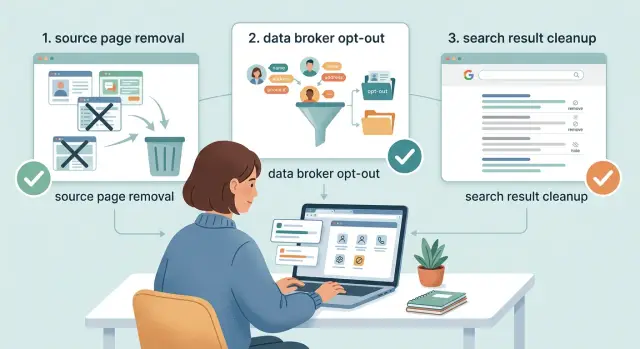
Why the order matters
When your name, address, or phone number shows up online, search results are the obvious place to look first. But a search result is usually just a pointer. If the original page stays live, your information is still public. The result might disappear for a bit, then come back after the page is crawled again.
That is the trap. People clear one Google result or submit one broker opt-out and think the problem is solved. A week later, the source page is still up, another broker has copied it, and the same details are back in search. Nothing obvious failed, but nothing really changed.
The better order is simple: fix the source first, remove copies second, clean up search results last. That cuts off the place other sites pull from and gives the rest of your work a better chance of lasting.
Copies make this harder than most people expect. One public page can spread to several people-search sites, then to more brokers that buy or share the same record. What starts as one old profile can turn into a small network of listings.
That is also why follow-up matters. Some sites reload old records on a schedule, so a cleanup that works once can fail later if nobody checks again.
Where your information shows up
Personal data usually spreads in three layers.
The first layer is the source page. This is the original page that published the details. It might be an old forum profile, a people-search profile, a company bio, a wedding registry, or a public document. If that page shows your phone number, home address, or age, there is a good chance other sites copied it from there.
The second layer is data brokers. These sites collect public records, buy data, merge profiles, and repost the same person across many domains. One address can turn into dozens of listings. That is why the work feels endless when the source is still live.
The third layer is search engines. Google and similar tools usually do not create the information. They surface pages that already exist and sometimes keep an older cached version for a while. When you see your details in search, the real problem is often somewhere behind the result.
Each layer needs a different fix. Source pages need deletion, editing, or a privacy change. Broker listings need opt-out requests or formal removal demands. Search engines need result cleanup only after the page behind the result is gone or updated.
A simple example makes the order clear. Say your old apartment address still appears on a public profile. Several broker sites copy it, and then search results start showing all of those pages. If you begin with search cleanup, the address can stay live on the original profile and on broker pages, so the result can return. If you fix the profile first, the rest of the cleanup has a much better shot.
What each step can and cannot fix
It helps to treat source takedowns, broker opt-outs, and search cleanup as three different jobs.
A source takedown removes or changes the original page. That might mean deleting a profile, editing out your street address, making a page private, or asking a site owner to remove a post. If the source goes away, you stop one supply line. If it stays up, copied versions often return.
A broker opt-out removes copied listings. This matters because brokers keep their own records. Even if the source page is fixed, broker profiles may still show your name, address, phone number, age, or relatives until you remove them.
Search cleanup changes visibility, not ownership. It can help when a page is gone but still appears in results, or when a search snippet still shows outdated text. It does not delete the page itself.
That is the mistake people make most often: they see a few links disappear from search and assume the work is done. Then the source page stays live, brokers copy it again, and the result reappears later.
If you use a service to help, keep track of what actually changed. Did the original page disappear? Did only the broker copy go away? Or did the page stay live while search results briefly changed? Those are very different outcomes.
Start with the original source
The page that first exposed your details matters most. If it stays public, the rest of your cleanup can unravel.
Start by finding the version with the fullest set of details. That is often the page other sites scraped. It could be an old social profile, a company bio, a forum post, a directory listing, or a document uploaded years ago and forgotten. Look for the page that includes the most identifying information, such as your full name, home address, phone number, or date of birth.
Before you change anything, save proof. Take screenshots, copy the full URL, and note what was visible. That record helps if a copy shows up again later or if you need to show another site what it published.
Then use the simplest fix the site allows. Delete the page if you can. If you cannot, edit out the sensitive parts, change the page to private, or limit public visibility. Even a partial change is worth doing. Removing a street address and phone number is still a big improvement.
Some pages take more work. Public records, cached documents, and old posts on accounts you no longer control can be slow or stubborn. Keep a short note for each one: what is still visible, what you tried, and what happened. That small habit saves time later.
Then move to broker opt-outs
Once the source is fixed or at least limited, start checking people-search sites and data brokers. These listings often keep older versions of your data, so they can stay live long after the original page changes.
This is where many people waste time. They send broker opt-out requests first, then the same bad data gets pulled again from the source and reposted later. Fixing the source first does not make broker removals automatic, but it does make them more likely to last.
Consistency helps more than people expect. Use the same version of your name, the same address format, and the same email address each time. If one form says "Jon A. Smith" and another says "Jonathan Smith," some sites will treat them as separate profiles. That slows things down and can leave one listing behind.
Keep the process simple:
- find the copied listings
- submit removals after the source record is fixed
- save confirmation emails, screenshots, and dates
- check again later, because some listings return
Expect some sites to repost your data. That usually means they bought a fresh batch from another broker or re-crawled a public source. It is frustrating, but common.
Clean up search results last
Search results are usually the last mess to fix, not the first.
Open the result and check the page behind it. Was the page deleted, or were your details simply edited out? That difference matters. If the source page is gone, the result may disappear after the next crawl. If the page still exists but the snippet shows old information, the search engine may just need time to refresh its cache.
A few quick checks help. If the page now returns an error or no longer exists, the result often drops on its own. If the page is still live but your data was removed, the listing may keep showing old text for a while. If nothing changed on the source page, search cleanup usually will not stick.
This part takes patience. Search engines do not refresh every page right away. Sometimes the update happens fast. Sometimes it takes days. Cleaning up a result too early can waste effort because the same page may be indexed again.
Cached copies also confuse people. An old snippet is not always proof that the data is still live. It may only mean the search engine has not caught up yet. That is why search cleanup works best as the final pass, after the source is gone or fixed and copied broker listings are already being removed.
Mistakes that cause repeats
A few common mistakes undo hours of work.
The biggest one is starting with broker opt-outs before the source is fixed. If your address or phone number is still live on the original page, brokers can pull it again and your old listings return.
Another common problem is inconsistent details across requests. One form uses a work email, another uses a personal email, a third uses a nickname or old address. That sounds minor, but it can make matching harder and slow follow-up.
People also skip recordkeeping. Save screenshots, page titles, dates, and confirmation emails before pages change or disappear. If a listing comes back later, that proof makes follow-up much easier.
Search cleanup causes its own confusion. Removing a result from a search page is not the same as deleting the source. The link may stop showing for a while, but if the original page stays up, the content can still be found, indexed again, or copied elsewhere.
The last mistake is stopping after one round. Data gets re-listed. Brokers buy fresh records. Old copies show up on new sites months later. If you do not check again, you may miss the repeat until the same details have spread again.
Quick checks before you move on
Before you start the next step, spend five minutes making sure the last one actually worked. This sounds tedious. It saves a lot of repeat work.
Reopen the original page in a private window and confirm it is deleted, hidden, or stripped of the personal details you wanted removed. Check the broker listing again. If the profile still loads with the same data, the removal is not finished. Then search your name and read the snippet under the result. It may lag, but it should start reflecting the updated page instead of showing the old details.
Keep a simple log with the site name, page type, request date, and current status. A spreadsheet is enough. Set a reminder to check again in a week or two. Some sites update quickly. Others are slow. The extra check often catches the pages that looked fixed but were not.
What to do next
Start with the pages that put you at the most risk right now. If a page shows your home address, phone number, or family names, move it to the top of the list. Those details make it easier for strangers and data brokers to connect one record to another.
Then work in order. Fix the original source. Remove the copied broker listings. Clean up search results only after the page behind them is gone or updated. Keep notes as you go, even if the system is messy.
If the manual work starts dragging, Remove.dev can handle much of the repeat work. It finds and removes private information from over 500 data brokers, monitors for re-listings, and lets you track requests in real time through one dashboard.
A messy spreadsheet is better than a perfect plan you never start. Pick the worst pages first, log every request, and keep checking until the same details stop coming back.
FAQ
What order should I follow to remove my data?
Start with the source page. Then remove broker copies. Clean up search results last.
That order lasts longer because search results usually point to pages that still exist. When the source stays public, brokers can copy it again and the same result can come back.
What counts as the original source page?
The source is the original page that exposed your details. It might be an old profile, forum post, company bio, registry, or public document.
Look for the page with the fullest set of personal details, since that is often the page other sites copied.
If I remove a broker listing first, is that enough?
No. A broker removal only clears that one copy.
When the source page is still live, the broker can pull the same record again later. You still need to fix the source and check other broker sites.
Can I just remove the Google result?
Search cleanup can remove an outdated result or old snippet after the page behind it is gone or changed. It helps with visibility.
It does not delete the original page. If the page still shows your data, the result can return after the next crawl.
What should I save before I change or delete anything?
Save screenshots, the full URL, the page title, and the date. Also note exactly what personal details were visible.
That proof helps when a copy shows up later or when another site asks what needs to be removed.
What if I can’t delete the source page myself?
Try the simplest fix first. Delete the page if you can, or edit out the sensitive parts, switch it to private, or ask the site owner to remove it.
Even a partial fix helps. Removing your home address and phone number is still a solid step when full deletion is not possible.
Why does my information come back after I remove it?
Re-listings usually happen because a broker bought fresh data, copied another broker, or re-crawled a public page. Some sites also reload old records on a schedule.
That is why follow-up matters. One successful removal does not mean the page will stay gone forever.
How do I avoid mistakes that slow removals down?
Use the same version of your name, address, and email on every form. Small differences can make sites treat you like two separate people.
Keep a simple log of request dates, confirmations, and current status. That makes follow-up faster when one listing gets missed.
How long does search cleanup usually take?
Give it a little time after the source page changes. Search results and snippets can lag because cached text does not update right away.
If the page is gone, the result may drop on its own after a new crawl. If the page is still live, waiting will not fix the problem.
When is it worth using a removal service?
A service helps when the manual work starts repeating itself. Remove.dev removes private data from over 500 brokers, watches for re-listings, and shows each request in one dashboard.
Most removals finish in 7 to 14 days. Plans start at $6.67 a month, and there is a 30-day money-back guarantee.